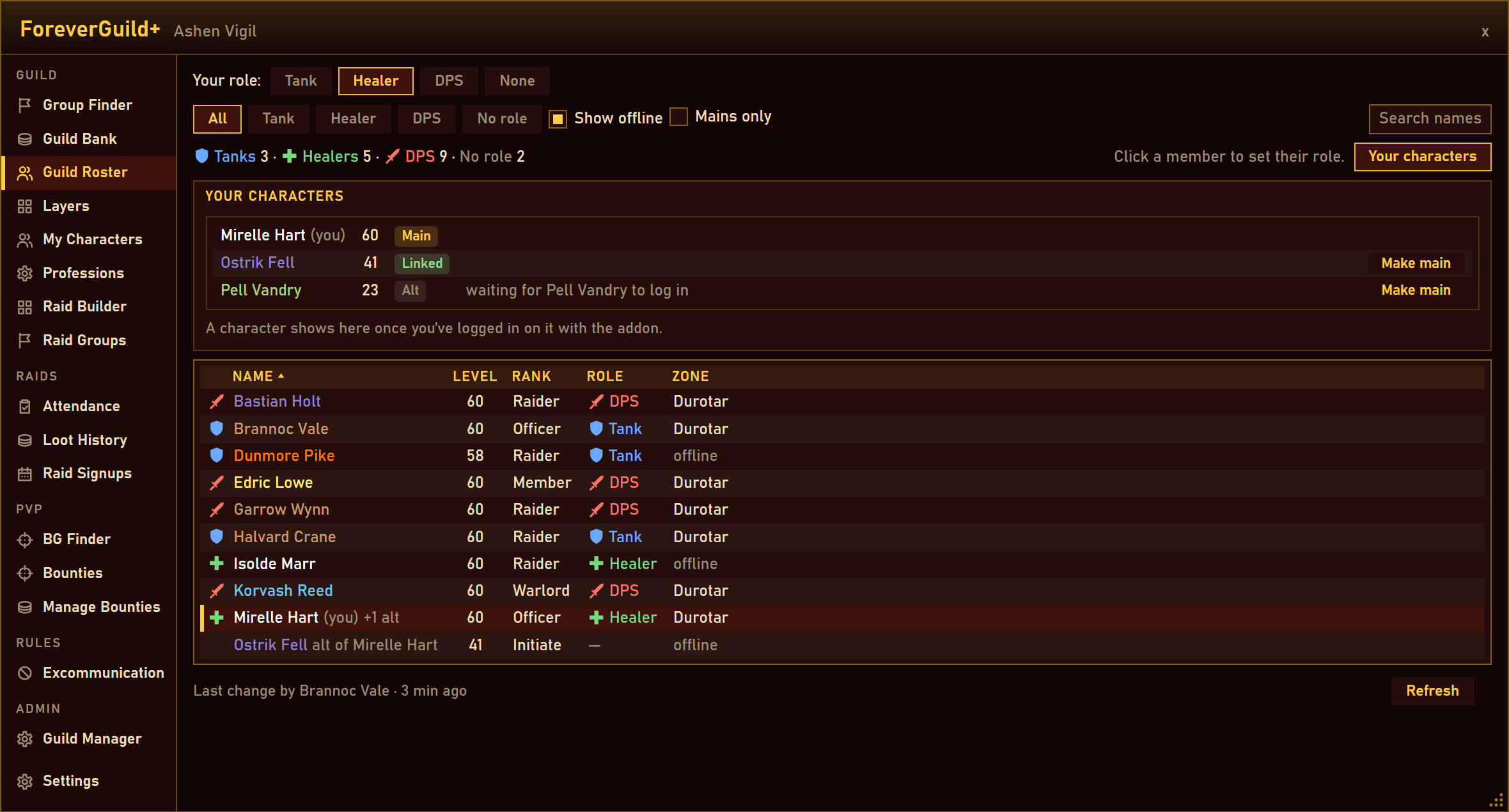
01-guild-roster.png
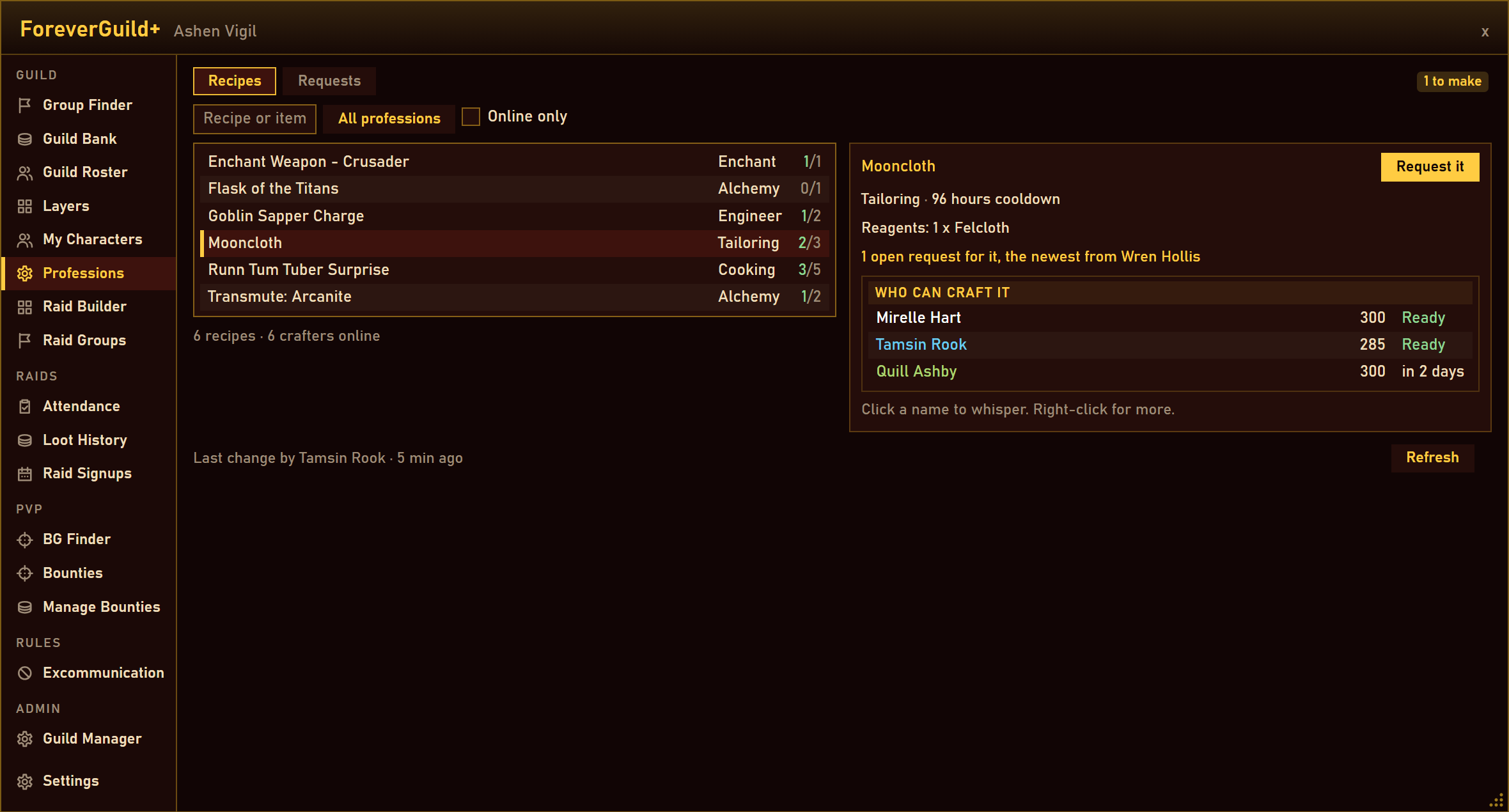
08-professions.png
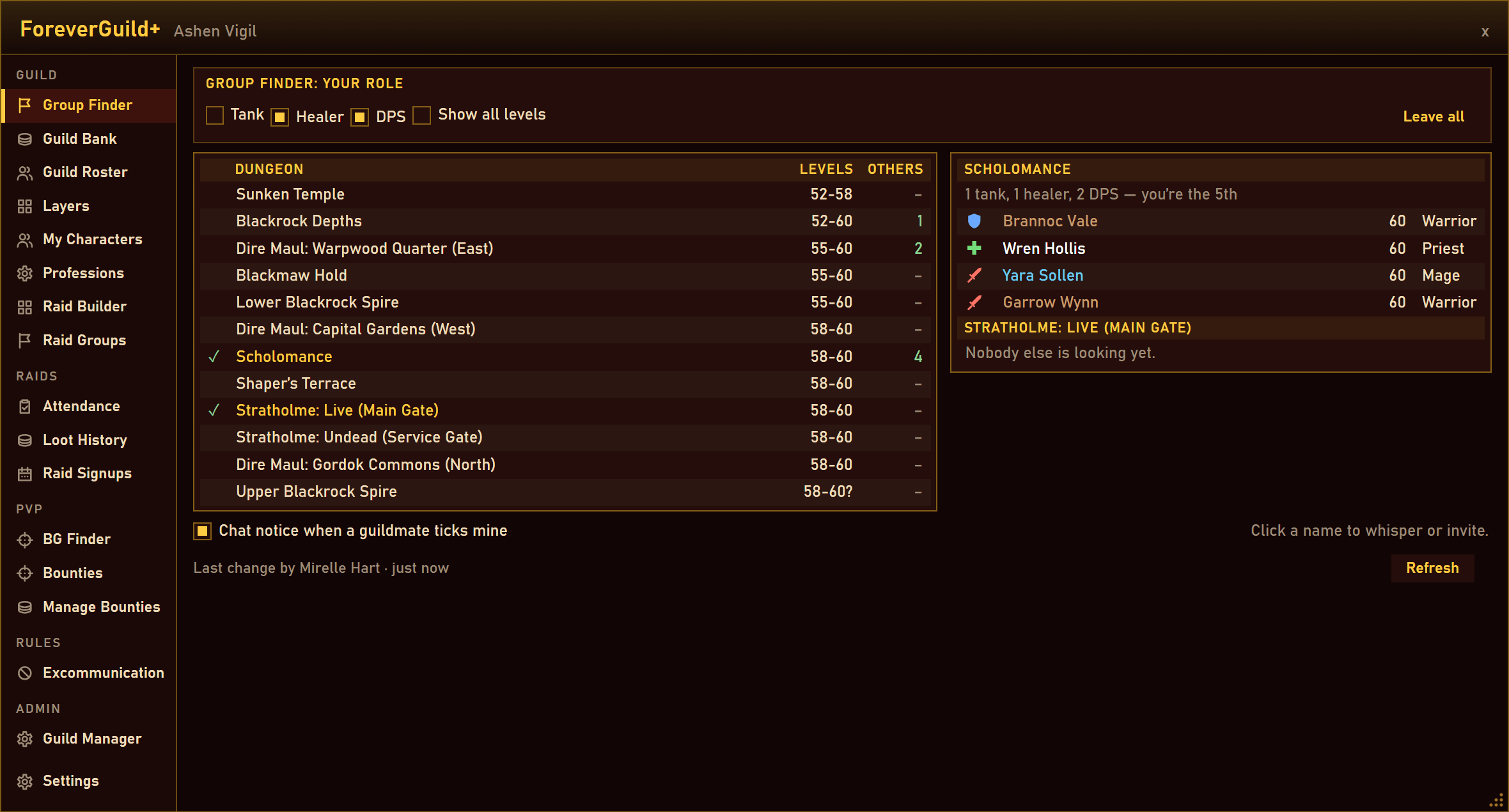
09-group-finder.png
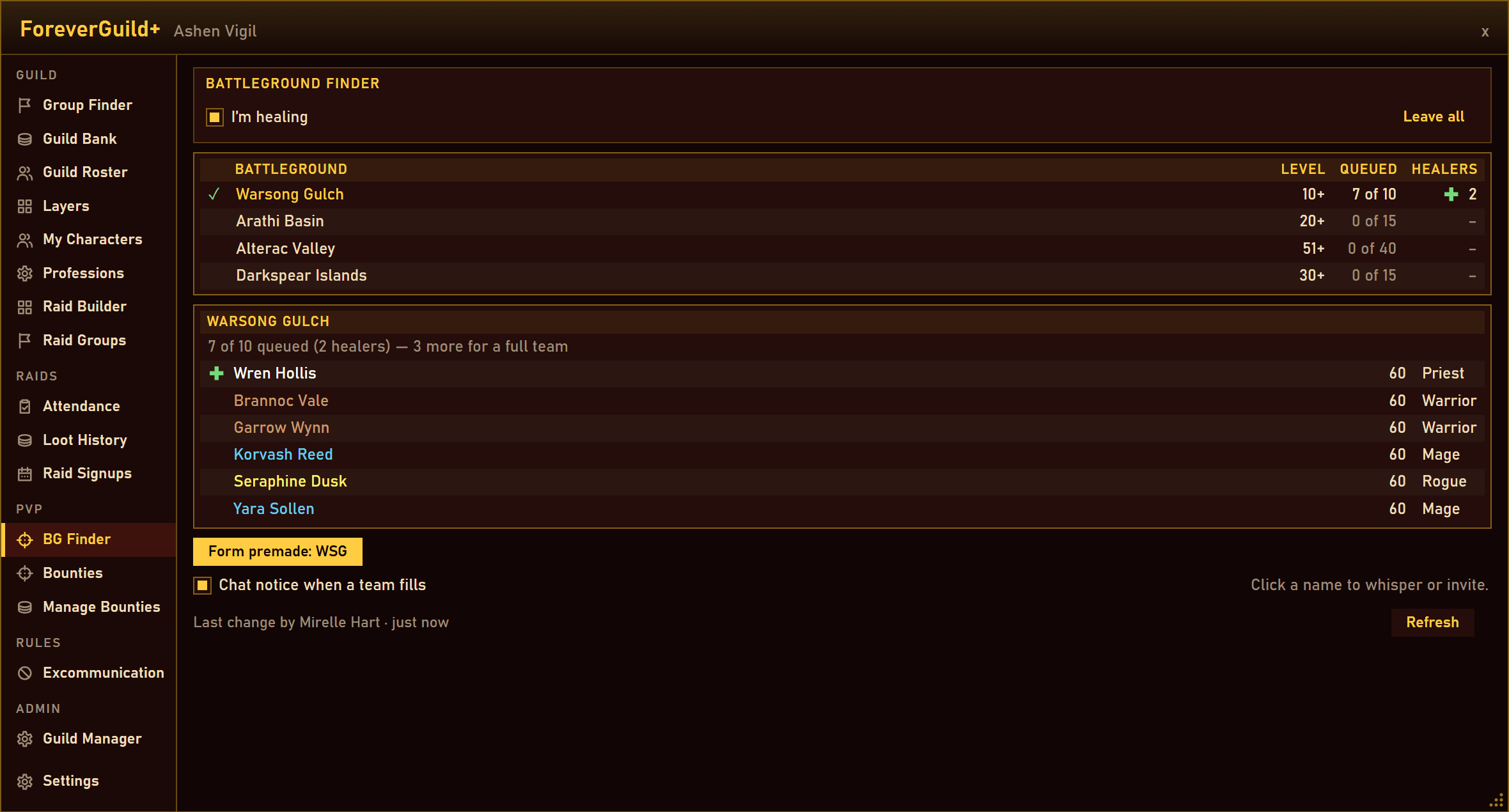
10-bg-finder.png
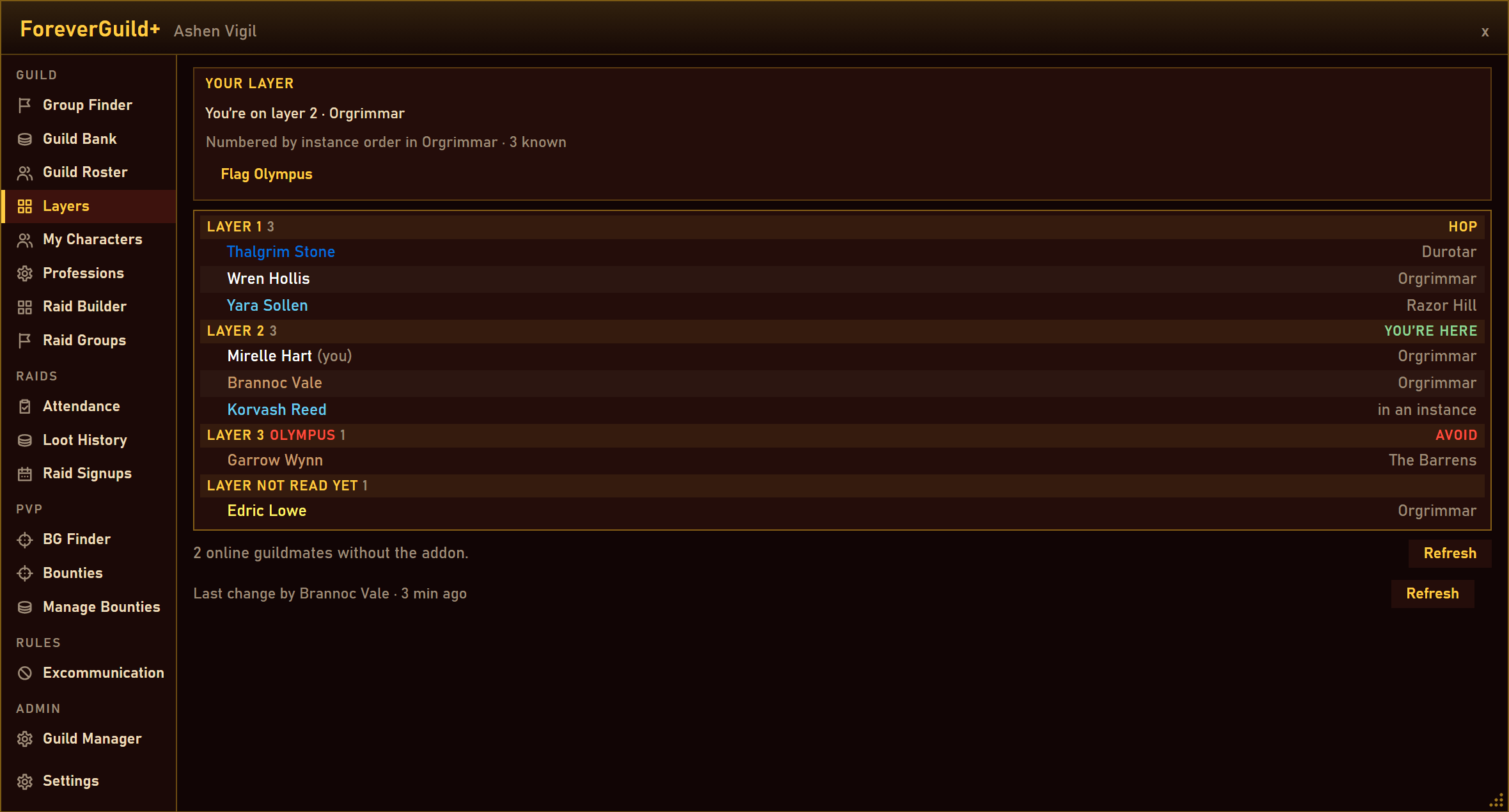
11-layers.png
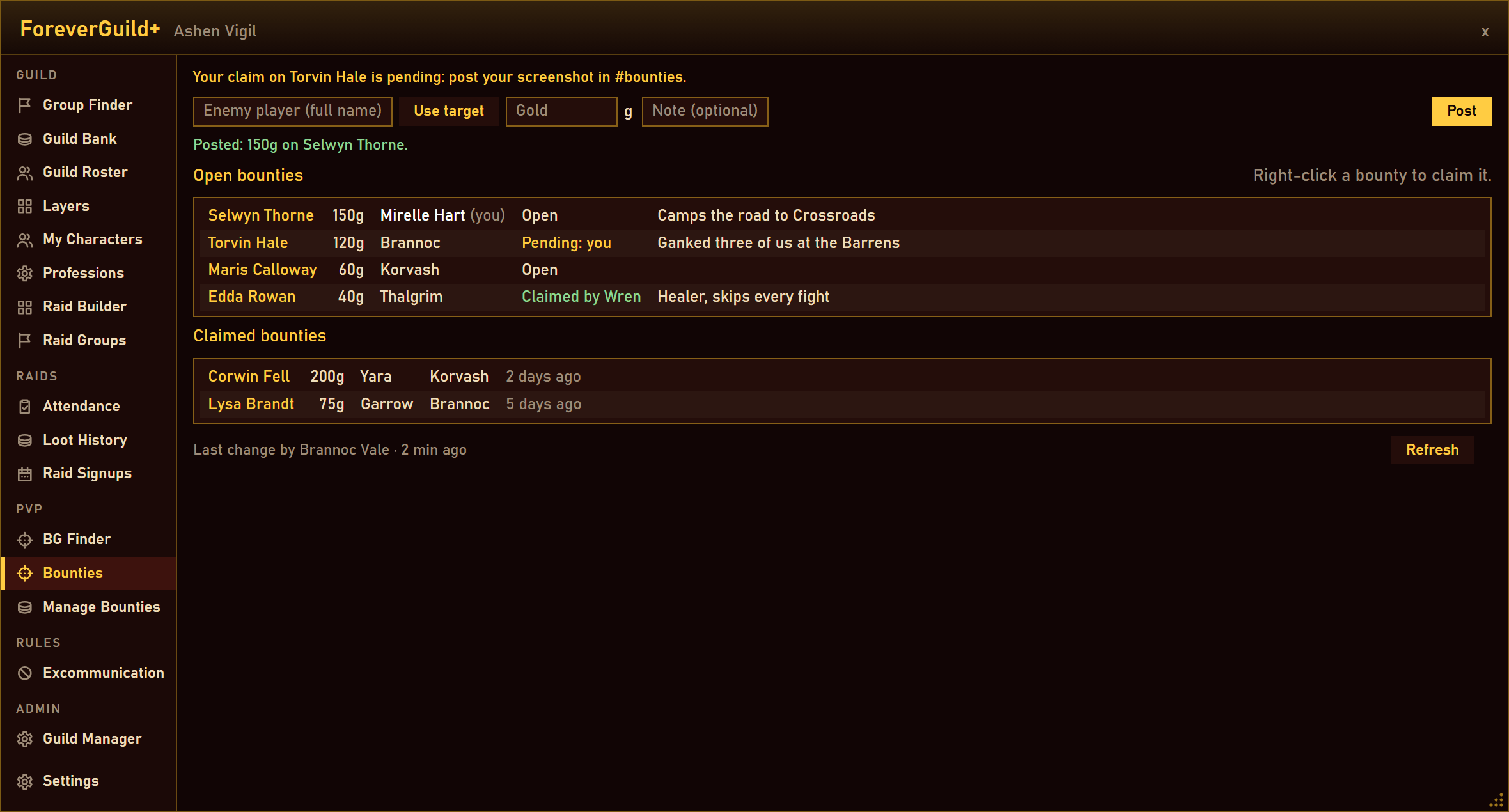
12-bounties.png
Description
ForeverGuild+
Formerly Systematic Guild. Made with forevercommunity.org and the WoWForeverNA Discord.
Guild, raid and loot tools for World of Warcraft: Forever — raid signups with alerts, attendance taken from the raid group, a loot history kept by the master looter, your alts with their professions and attunements, a guild recipe directory with craft requests, the guild bank from anywhere, which layer every guildmate is on, a Group Finder and a Battleground Finder, raid teams on a drag-and-drop board, bounties, the guild's excommunication list and a Call to Arms that pins the map — kept in sync between your guildmates' addons. No external server, no officer notes.
Any guild on Forever can use it. Forever's client won't let addons write to officer notes or the guild information text, so ForeverGuild+ keeps a copy of the guild's data on every member's client and keeps the copies in step over the guild's addon channel. Every change is checked against the guild roster before any client accepts it.
Getting started
- Install it on every account in the guild — through the CurseForge app, or unzip the
ForeverGuildfolder intoInterface\AddOns. No dependencies. It works with one copy, but a change only reaches people who run the addon, and it's their copies that keep yours up to date. Coming from Systematic Guild? ForeverGuild+ is its new name and a fresh start: the whole guild switches together (see Good to know). - The Guild Master opens Guild Manager (
/fg manager) and ticks which ranks may set other members' roles, build raid groups, post bounties, manage bounties, excommunicate, and act as Raid leader (raids, the lineup, attendance and loot). Until then only the Guild Master can do those things. - Everyone sets their own role in Guild Roster (
/fg), and looks through Settings (/fg settings) for how they want alerts and chat lines. - Raid leaders create the raids in Raid Signups (
/fg raids), and everyone signs up there. On raid night the master looter's addon keeps the loot history by itself. That's it.
Requirements
| Client | Interface |
|---|---|
| World of Warcraft: Forever | 16001 |
- Forever only: there is no TOC for Classic Era, TBC Anniversary or Mists of Pandaria Classic, and no Retail version.
- No dependencies, no libraries.
- Systematic Layers is not needed — its layer tracking is built in. If you still run it, version 1.5.0 steps aside for ForeverGuild+ by itself (see Layers).
- The bounty workflow assumes your guild has a Discord channel where kill screenshots get posted (
#bountiesunless the Guild Master renames it in Guild Manager).
What it does
The window
- A sidebar down the left, in five groups, each A to Z: Guild (Group Finder, Guild Bank, Guild Roster, Layers, My Characters, Professions, Raid Builder, Raid Groups), Raids (Attendance, Loot History, Raid Signups), PvP (BG Finder, Bounties, Manage Bounties), Rules (Excommunication) and Admin (Guild Manager) — and Settings on its own at the bottom.
- 900 × 620 the first time; drag the grip in the corner to resize it, down to 780 × 500, and the size is remembered. At the smallest size the sidebar's entries shorten so every tab still fits.
- Near-black crimson panels, cream text and gold headings, with flat buttons, striped lists and a slim scrollbar. No textures are shipped; the fonts are the game's.
Guild Roster
- Every member with a Tank, Healer or DPS icon beside their name. Set your own role in one click.
- Filter by role, show or hide offline members, search by name, and see how many tanks, healers and DPS the guild has.
- Sort by Name, Level, Rank or Zone (click again to reverse; remembered).
- Right-click a member to invite or whisper them; role editors set a member's role from the same menu.
- Alts show beside the name: "alt of Mirelle Hart" on an alt, "+2 alts" on a main. Mains only shows one row per player, online when any of their characters is.
- Each character publishes its own alt link, and a link counts only when both ends agree: the alt names the main, and the main lists the alt. Your characters (
/fg alts) shows this account's links and Make main.
My Characters
- This WoW account's characters in the guild: level, rank and when each was last seen, its professions with their skill and cooldowns ("Mooncloth Ready"), its attunements, and its last loot from the Loot History.
- Attunements for Molten Core, Onyxia's Lair, Blackwing Lair, Naxxramas, Upper Blackrock Spire and Scholomance, and the Shadowforge Key, the Crescent Key and the Key to the City — read from your quests and bags. Content Forever hasn't opened yet stays out of the way unless you tick All attunements. New attunements arrive with addon updates.
- Guild attunements (Raid leaders): who has which attunement, by raid team, so you know who still needs their Onyxia chain before the raid.
Raid Signups (everyone)
- The guild's raids, soonest first, each with where you stand: Confirmed, Bench, Coming, Tentative, Late or Can't. Past raids lists the ones that are over.
- Sign up with Coming, Tentative, Late or Can't, your role, the character you bring and a note. Signing up on an alt replaces what your main said, and back.
- Signed up by role on one side, the Lineup (Confirmed above the Bench) on the other; the team's members who haven't answered are listed as No answer.
- Raid leaders drag players between the columns, set up raids (title, day and time on the realm's clock, length, size, team, note, Repeat weekly), edit, cancel or delete them, announce them in guild chat, confirm everyone coming in one click, and Invite N online — each on the character they bring, or another of theirs that's online.
- Times are the realm's, read from the game's calendar; where yours differs, the tooltip shows your own time too.
Raid alerts and Call to Arms
- Raid alerts for the raids you're going to: 15 minutes before the start (or 30, 10 or 5) and again at the start, on whichever of your characters you're on — a line in chat, a raid warning with its sound, and a popup that says where you stand ("You're confirmed as Healer, bringing Mirelle Hart."). Full, Chat only or Off, in Settings.
- Call to Arms: a small button on screen (drag it anywhere),
/fg cta, or a key binding. Your call goes to guild chat with your zone and coordinates, and every guildmate with the addon gets a raid warning, a sound and a popup. - The map pin. For guildmates who aren't in an instance or a raid, the call drops the game's map pin where you are, on any continent, for 15 minutes, and puts their own pin back afterwards. Settings turns it off.
- Once every 15 minutes per character, and every client drops a second call from the same player within 14 minutes, so nobody can spam the guild.
Attendance (everyone sees it; Raid leaders correct it)
- Recorded by itself on the addon of a Raid leader who is in the raid: a look at the raid group every five minutes from 15 minutes before the start to the end. Several Raid leaders can record the same raid; their records add up.
- Each player gets a mark: Present, Late, Left early, Absent, No answer or Excused (on the Bench). Alts count for their player.
- Finalized by itself after the raid. Raid leaders correct any mark, add a player the records missed, or mark a raid nobody recorded.
- Players: everyone's attendance over 30, 60 or 90 days, for every team or one. Raids: each raid with who recorded it and how much they covered.
Raid Loot History (everyone sees it; Raid leaders edit it)
- Recorded by the master looter's addon, who holds the Raid leader right: every drop at the guild's threshold (Rare unless a Raid leader sets another), with the boss it came from and who got it — Assigned through master loot, Traded inside the instance, or Undistributed when the addon can't tell. Every drop is shown.
- Trades after leaving are not allowed. An item traded once the master looter has left the instance is flagged in the log and stays Undistributed.
- Raids, Players, Items and Log views, a search, 180 days or less, and Records: Rare+ for the threshold.
- Easy to fix afterwards. Raid leaders change who got a drop from a roster picker, mark it Disenchanted, Banked or Rotted, delete it, or Add a missed drop… — each with an optional reason.
- The audit log keeps every change, signed by whoever made it: what it was, what it became, and why. If a master looter or Raid leader leaves the guild, the Guild Master's addon vouches for their raids and entries, and the history says so — nothing disappears.
- Kept 180 days. Export writes the history in the format systematic.gg's loot import reads.
Professions
- Who in the guild can craft what: every profession's recipes, with who knows each one, who is online, the reagents, and the cooldowns (transmutes, Mooncloth, Salt Shaker and the rest) and when they're ready.
- Each character shares its own recipes when its profession window has been opened once. Cooking and First Aid are included; gathering professions show as a skill.
- Craft requests: ask for a recipe (a quantity, whether you bring the mats, a tip and a note). Up to five open each, for seven days. A crafter who has it presses I'll make it, and the requester marks it Done or cancels it. Guildmates who can make it get a line in chat (Settings turns it off).
Group Finder (guild only)
- Tick the dungeons you want to run — the current ones and the ones Forever has announced, filtered by your level and faction — and set your role.
- For each one ticked, the guildmates looking for the same, by role ("1 tank, 1 healer, 2 DPS — you're the 5th"), with their level and class. Click a name to whisper or invite them.
- It replaces posting in chat: nothing is stored, and you drop out of a dungeon once your group is full.
Battleground Finder (under PvP)
- Tick the battlegrounds you're queuing for — Warsong Gulch, Arathi Basin, Alterac Valley and Darkspear Islands — and flag I'm healing.
- Each one shows the guildmates queued for it against its team ("Warsong Gulch: 7 of 10", healers counted).
- Form premade: one click invites everyone queued, healers first, and makes it a raid when it needs one. Anyone can press it — you only need to lead your group, or be on your own. Alterac Valley takes groups of five at most, and the button says so.
- A line in chat when a queue reaches a full team ("Warsong Gulch has 10 — form up!").
Guild Bank
- The guild bank from anywhere. An addon can read the bank only while it's open at the banker, so whoever opens it records what they see and shares it with the guild. Every member can then look at the Guild Bank tab wherever they are.
- The bank tabs along the top, the 98 slots with icons, counts and item tooltips, the gold, and Seen by name, when on each tab — a snapshot is only as true as its last opener.
- Search every tab at once ("Mooncloth: 14 in Tab 2, 6 in Tab 4").
- Every tab the opener can view is shared with the whole guild, including tabs the game limits to some ranks. A tab they can't view keeps the last snapshot. Share the guild bank when I open it is in Settings.
Layers (the Systematic Layers addon, built in)
- Which layer you're on, and which every guildmate is on, read from the creatures around you — no reloading, no guessing.
- Hop: one click asks a guildmate on that layer for an invite, waits until you've moved, and leaves the group. Anyone can turn hop requests off, or invite without being asked.
- Olympus warnings: flag a layer as Olympus, get a warning when you land on one (with Get off this layer), an on-screen badge, and a red ring on the minimap button.
- Chat switches: hide mentions of Olympus, block group invites from Olympus guilds, hide messages in other scripts.
- Works with Systematic Layers. Both speak the same messages, so a guild with some members on each sees one set of layers and can hop between them. With Systematic Layers 1.5.0 installed too, it steps aside and its
/layersand minimap button open this tab.
Raid Groups and Raid Builder
- Raid Groups: the raid teams and who is on each, grouped by role, with counts against each team's size, A to Z. Teams a builder is still working on are hidden from everyone else. Builders right-click a team to invite everyone on it who is online.
- Raid Builder (raid builders): up to nine teams as cards on a board. Drag and drop a player from the roster onto a card, from card to card, or back off. Click a card to name it, size it (1 to 40), show or hide it, or delete it. Nothing is saved until Save; two builders can work at once without overwriting each other.
- Export to website writes the teams as text for systematic.gg.
Bounties and Manage Bounties
- A price on an enemy player's head: bounty posters set the target (Use target fills it), a reward in gold and a note. Right-click a bounty to claim it, then post a screenshot of the kill in the guild's bounty channel on Discord.
- Targeting an enemy with an open bounty reminds you to take the screenshot.
- Bounty managers approve or reject claims, remove any bounty, and clear the claimed history once the rewards are paid. Nobody approves their own claim except the Guild Master.
Excommunication and your blacklist (everyone)
- Excommunication (the guild's): players excommunicated for good, with a reason. Every member can see it; those the Guild Master allows keep it. Their chat is hidden and their group invites are declined on every guildmate's client with the option on — and you can choose to show a listed player's messages anyway, for yourself alone.
- Your blacklist: anyone, for good or for 1, 7 or 30 days. Their chat and invites are hidden for you alone, and it never leaves your computer — nobody else sees it, not even the Guild Master.
Export and Import for forevercommunity.org (new in 1.1.0 — Raid leaders)
- Export (
/fg exportall): tick any of Guild Bank, Roster, Raid Groups, Loot History and Raid Signups, and copy the result into forevercommunity.org. It asks the server for a fresh roster first, and the same data always gives the same text. - Import (
/fg import): paste what forevercommunity.org exports and press Check to see every change it would make, and every one it would refuse with the reason. Nothing is written until Apply. - What comes in: raids planned on the site (importing again updates them, never duplicates), signups made on the site (a player's own signup in game always wins), raid groups, roles, and loot corrections (each signed in the audit log as coming from forevercommunity.org).
- Every imported change is yours and is checked by every guildmate's addon, exactly as if you'd made it in game. A paste meant for another guild is refused.
Settings (everyone, this computer only)
- Every option that belongs to your computer, in one tab under headings: raid alerts and their timing, the Call to Arms button, alerts and map pin, the chat lines for craft requests, the Group Finder and the BG Finder, hiding excommunicated players, the minimap button, Layers (hop requests, invite without asking, the badge, the chat switches) and sharing the guild bank.
- The first time it runs, it takes the Layers choices Systematic Layers had saved.
Guild Manager
- Everyone can read it — "why can't I set my role?" is answered there — but only the Guild Master can change it.
- Which ranks may set other members' roles, build raid groups, post bounties, manage bounties, excommunicate and act as Raid leader; whether members may set their own role; the Discord bounty channel's name. Grant… gives any one member any right, whatever their rank. Linked alts gives an officer's alt the same rights in one click.
- Remove all addon data, for a guild that's done with it: permissions back to the defaults, and everything the guild shares deleted from every member's copy. Your Settings and your blacklist stay on your computer.
Minimap button and notices
- Left-click opens the window, right-click opens Guild Manager, drag moves it round the rim. The tooltip shows your next raid and where you stand, your role, your raid groups and the open bounties.
- Chat tells you about new, moved or cancelled raids, your raid alerts, bounties and claims, a guildmate's Call to Arms, craft requests you can make, full battleground queues, and when a guildmate runs a newer version.
How it works
- Nothing is stored in the guild itself. Every member running the addon keeps a copy of everything it shares — permissions and grants, raid groups, roles, raid events with their signups, lineups and attendance, alt links, the loot history and its audit log, attunements, professions, craft requests, the guild bank snapshot, bounties and the excommunication list — in their own saved variables.
- Some things stay on your computer. Your blacklist, this account's list of its characters, your Settings, and which raid alerts were given.
- Some things are never stored at all. A Call to Arms, the Group Finder and BG Finder queues, and layers are messages to whoever is online, kept nowhere.
- Changes save instantly and reach everyone online at once. When you log in, your copy is compared with everyone online and you're sent whatever you missed; the comparison repeats every quarter of an hour while another addon user is online, and on
/fg refresh. - Every change is checked by every client against its own read of the guild roster: settings only from the Guild Master; a raid event, lineup place, attendance record, loot record or loot edit only from a Raid leader; a signup, alt link, attunement or profession only from that character; a craft request only from its requester; and so on.
- Only the guild channel is used, except that Layers whispers the guildmate you ask for a hop. Messages are paced to the client's addon-message throttle, so nothing is silently dropped.
Who may do what
| Action | Who |
|---|---|
| Set your own role | Everyone, unless the Guild Master turns it off — then role editors only |
| Set someone else's role | The Guild Master, ranks ticked Edit others' roles, and members granted it personally |
| Build raid groups | The Guild Master, ranks ticked Build raid groups, and members granted it personally |
| See raids, signups, the lineup, attendance and the loot history | Every member |
| Sign up for a raid | Every member, for their own characters |
| Set up raid events, place players in the lineup, invite for a raid, correct attendance, edit the loot history and set the loot threshold | Raid leaders: the Guild Master, ranks ticked Raid leader, and members granted it personally |
| Record loot | The raid's master looter, while they hold Raid leader |
| Export to and import from forevercommunity.org | Raid leaders. Each imported change still needs its own right (raid groups need the builder right, others' roles the role editor's) |
| See guild attunements | Raid leaders |
| Ask for a craft, claim one with I'll make it | Every member |
| Share the guild bank | Any member who opens it (Settings turns it off) |
| Use the Group Finder, BG Finder and Layers, form a premade | Every member (to invite, lead your group or be on your own) |
| Claim a bounty | Every member, on anyone's bounty but their own |
| Post bounties | The Guild Master, ranks ticked Post bounties, members granted it personally, and every bounty manager |
| Approve or reject claims, remove any bounty, clear history | The Guild Master, ranks ticked Manage bounties, and members granted it personally — never on their own claim (the Guild Master excepted) |
| Call to Arms | Every member, once every 15 minutes |
| Keep the excommunication list | The Guild Master, ranks ticked Excommunicate, and members granted it personally |
| Keep your own blacklist | Everyone, about anyone but themselves. Nobody else sees it |
Rights belong to the character that holds them: an alt linked to an officer has only its own (the Guild Master can give it the same in one click).
Commands
| Command | Opens / does |
|---|---|
/fg |
Open or close the window |
/fg roster |
Guild Roster |
/fg alts |
Your characters, on the Guild Roster |
/fg characters |
My Characters (also chars) |
/fg prof |
Professions (also professions) |
/fg finder |
Group Finder (also lfg) |
/fg bg |
BG Finder (also battlegrounds) |
/fg bank |
Guild Bank (also guildbank) |
/fg layers |
Layers (also /layers without Systematic Layers installed) |
/fg hop n or name |
Hop to layer n, or to a guildmate's layer |
/fg groups |
Raid Groups (also teams) |
/fg builder |
Raid Builder (raid builders) |
/fg raids |
Raid Signups (also signups) |
/fg attendance |
Attendance (also att) |
/fg loot |
Loot History |
/fg bounties |
Bounties |
/fg claims |
Manage Bounties (bounty managers) |
/fg excom |
Excommunication and your blacklist |
/fg cta note |
Call to Arms |
/fg manager |
Guild Manager |
/fg settings |
Settings (also options) |
/fg export |
The raid groups as text for systematic.gg |
/fg exportall |
Export for forevercommunity.org (Raid leaders) |
/fg import |
Import from forevercommunity.org (Raid leaders) |
/fg invite N |
Invite raid group N's online members (raid builders) |
/fg refresh |
Re-read the roster and ask the guild for fresh data |
/fg comms |
What the addon has sent and heard, and what its copy holds |
/fg minimap |
Show or hide the minimap button |
/fg help |
This list, with the version |
/foreverguild works too. Call to Arms also has a key binding: Key Bindings → AddOns → ForeverGuild+.
Good to know
- Coming from Systematic Guild? Switch together. ForeverGuild+ is a fresh start in a new folder, with its own saved data and its own messages: it and Systematic Guild don't see each other at all. Once everyone has switched, the guild sets things up again: the Guild Master's permissions, roles, raid teams and new raids. Each player's blacklist, Settings and character list start empty. Systematic Guild's last release, 2.0.2, tells players to move and steps aside when ForeverGuild+ is installed, so you can remove its folder at your own pace.
- Not yet tested in game. It has run in a fake client only, so these still need trying on Forever's live servers: drag and drop, the realm time from Forever's calendar, the invite flow, master loot and trades, the tradeskill window, attunement quests, the map pin, the guild bank, and reading layers. If something misbehaves, report it (Support, below).
- The loot history needs master loot. With another loot method, or a master looter without Raid leader, nothing is recorded and the tab says why.
- The bank is a snapshot. It's as the last member to open the bank saw it; each tab says who and when.
- Attendance needs a Raid leader in the raid. With none there, the raid shows "Not recorded", and a Raid leader marks it by hand.
- Approvals don't pay anyone. The addon moves no gold — check the screenshot before paying a bounty.
- Screenshots, because there's no combat log. Forever gives addons no combat log, so a bounty kill is proven with a screenshot.
- Speech bubbles still show. The game draws them itself; no addon can hide them. Chat lines and invites from players you hide are hidden.
- Your blacklist is private. It never leaves your computer, and nobody is told they're on it.
What it stores
What the guild shares: member names, roles and raid groups; raid events with their signups, lineup places and attendance; every character's alt link; the loot history (kept 180 days) with its audit log; each character's attunements and professions; craft requests (seven days); the guild bank snapshot; bounties with their claims and verdicts; the excommunication list; and the Guild Master's settings. It lives in ForeverGuildDB in your saved variables, per guild, and travels only over the guild's addon channel — addons can't make network requests, so nothing leaves the game. The Guild Master can clear all of it with Guild Manager → Remove all addon data.
Also in ForeverGuildDB, and never sent: your blacklist, this account's list of its characters and which is your main, which raid alerts were given, your Settings, and the layers your characters were last seen on.
Latest release — 1.1.0
Export and Import for forevercommunity.org: the guild bank, roster, raid groups, loot history and raid signups out to the site, and raids, site signups, raid groups, roles and loot corrections back in, previewed before anything is written.
First release — 1.0.0
The first release of ForeverGuild+, formerly Systematic Guild: everything it did, under its new name. Raid Signups with raid alerts, Attendance taken from the raid group, a Raid Loot History recorded by the master looter with easy edits and a signed audit log, My Characters with professions, cooldowns and attunements, a guild recipe directory with craft requests, the Guild Bank from anywhere, Layers built in, a Group Finder and a Battleground Finder with Form premade, a drag-and-drop Raid Builder, bounties, the guild's excommunication list, a Call to Arms that pins the map, and a Settings tab for everything that's yours. Forever only. A clean break from Systematic Guild, so the whole guild switches together. The full changelog is in the Changelog tab and ships with the addon.
Support
Bugs, error popups and questions: Malietho Solin — systematic.gg · Discord. If a change didn't reach someone, include the output of /fg comms.
Made by Malietho Solin, with forevercommunity.org and the WoWForeverNA Discord.
ForeverGuild+ Team