Forever Simple Junk
- By
Junk and keep lists, automatic selling and repair at vendors, and Make Room: the cheapest bag slot to free when your bags are full.
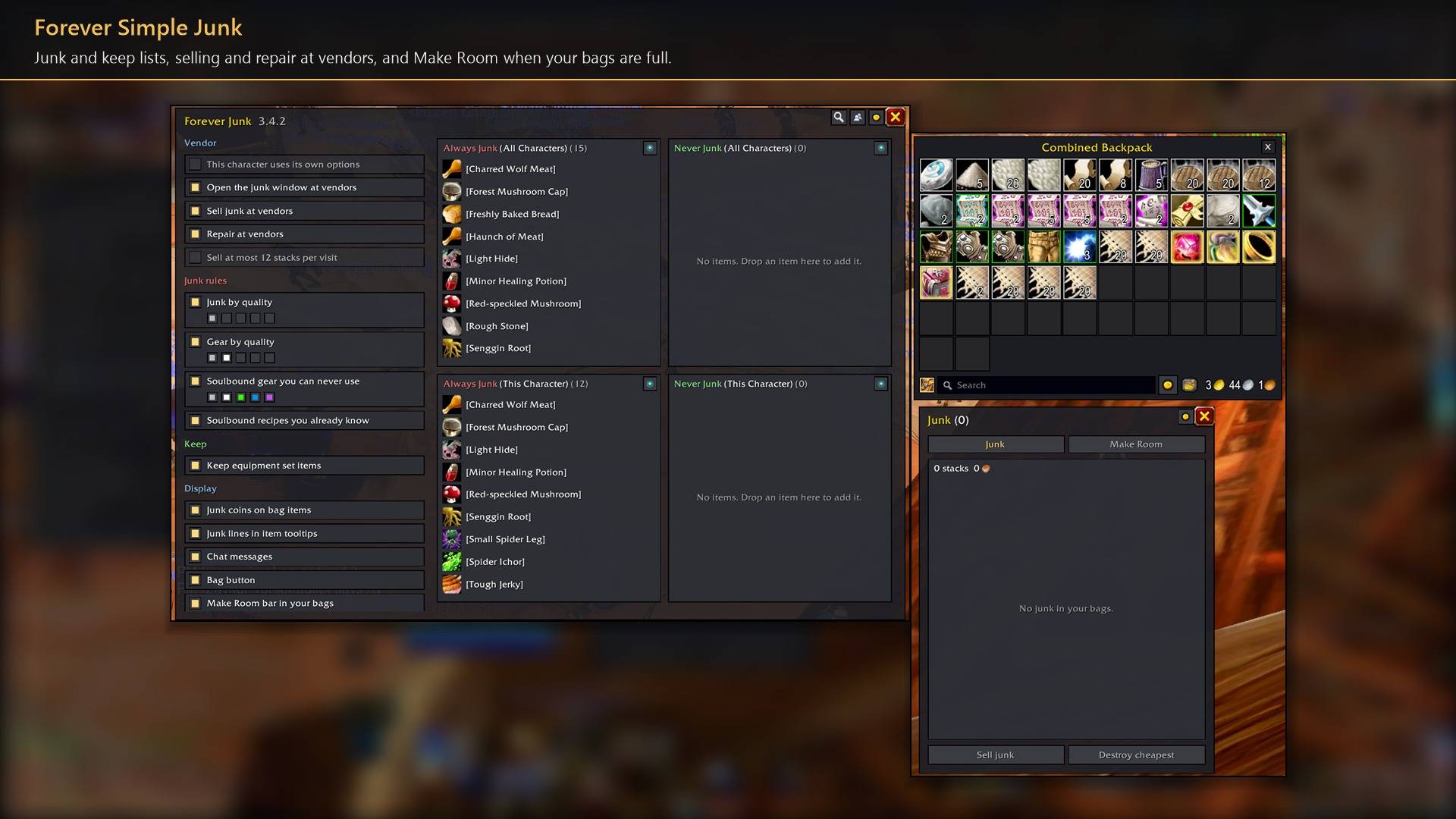
Junk and keep lists, selling and repair at vendors, and Make Room when your bags are full.
Description
Forever Simple Junk sells your junk every time you open a vendor, and when your bags are full it shows the cheapest stack to free. You decide what is junk with simple rules and with lists for one character or all of them. In game it is listed as Forever Junk.
What counts as junk
- Lists. Always Junk and Never Junk, each for all characters and for this character. A character's own list beats the shared one, Never beats Always, and any list beats every rule. Search by name or item ID; import and export a list as item IDs or links.
- Rules. Junk by quality (greys by default), gear by quality, soulbound gear your class can never use, and soulbound recipes you already know. Items in equipment sets (Blizzard's and Forever Loadout's) are kept. Refundable items are never junk.
- Other characters. See every character's lists and copy single items or a whole list.
At the vendor
Selling. Your junk sells when the vendor opens, cheapest first, at most 12 stacks if you like. Each stack is checked again just before it is sold. Selling stops in combat, or while a trade, mail, bank or auction window is open, so nothing goes there by mistake.
Repair. Off by default. Repairs with your own money; when you are short, it repairs once your sales cover it.
Make Room
Every stack in your bags is priced at what it would fetch: the vendor price, or the lowest auction price less the 5% cut. The cheapest comes first. Two part stacks that fit in one slot come first as a free Combine. Quest items, set items, tools and Never Junk items are never offered.
In your bags. A bar under the bag window's search box names the cheapest stack and outlines it in your bags. Delete asks first and names the stack and its value; Skip hides it until you reload; Junk sells it with your junk at the next vendor; Keep marks it Never Junk.

Junk window. Your junk, cheapest first, on one tab and Make Room on the other, with Sell junk and Destroy cheapest. Leave it open and it opens and closes with your bags.
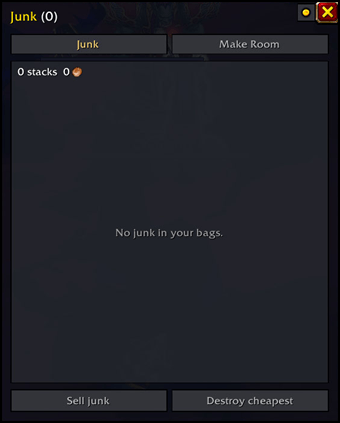
Make Room needs Forever Simple Market for its prices; everything else works without it.
How to use it
- Settings are in Options → AddOns → Forever Junk, or type
/fjunk. - The bag button (beside Blizzard's sort button) and the minimap button: left-click opens the junk window, right-click the lists and options.
- In the junk window, left-click a row to sell it at a vendor, right-click to mark it Never Junk, or drop an item on the list to mark it Always Junk.
Works better with
These addons are optional. Install any of them alongside this one for more:
- Forever Simple Market: Make Room works only with it: when your bags are full, it prices every stack from Market's auction data and frees the cheapest slot first.
- Forever Simple Loadout: Items in your Loadout gear sets are kept and never sold as junk.
- Forever Simple Settings:
/fjunkopens these options in its big, resizable window, even in combat, instead of the game's small Options window.
Feedback
Bugs and ideas: leave a comment on this page with a screenshot or the steps that cause it, and your class. I play one character, so reports from other classes and situations help most.
Forever Simple Junk Team