Forever Macro Creator
- By
A professional macro library for WoW Forever featuring every Classic class, searchable ability macros, consumables, spell icons, and direct insertion into Blizzard’s Macro editor.
s.PNG
w.PNG
Description
Forever Macro Creator
Forever Macro Creator is a searchable macro library designed specifically for World of Warcraft: Forever.
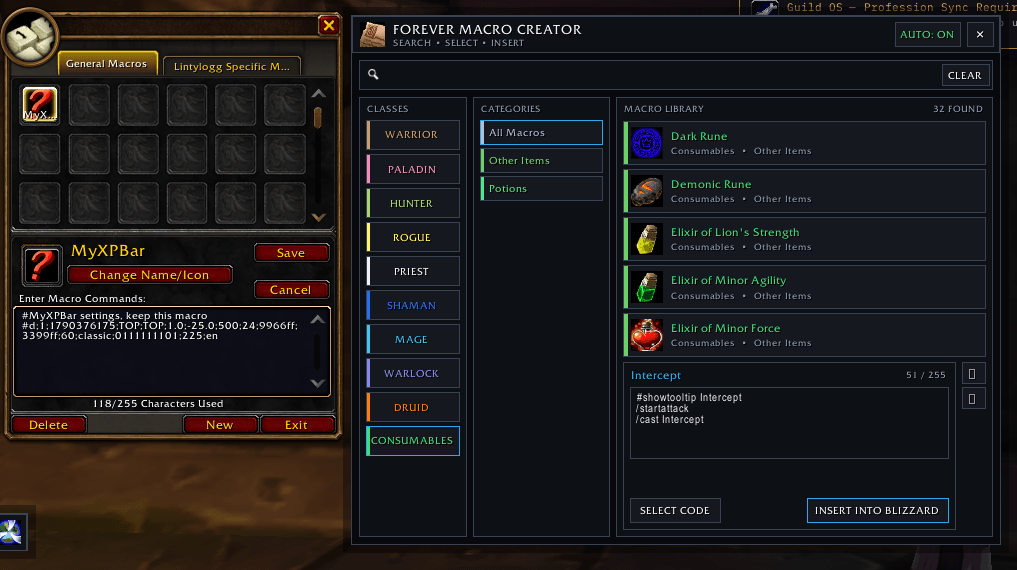
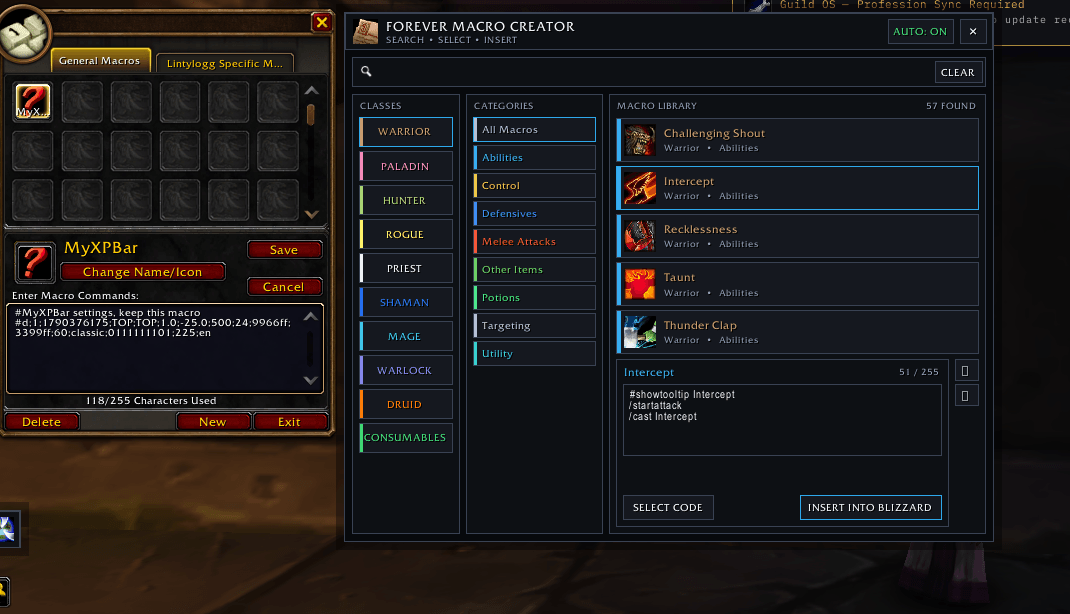
The addon opens as a clean side panel beside Blizzard’s original Macro window. Browse class abilities, utility macros, targeting commands, potions, and consumables—then insert the selected code directly into Blizzard’s Macro editor.
Its dark, professional interface is inspired by addons such as TradeSkillMaster while remaining compact, organized, and easy to understand.
Features
- Automatically opens beside Blizzard’s Macro window
- Dark, professional TSM-inspired interface
- Libraries for all nine original Classic classes
- More than 260 included macro templates
- Automatically discovers abilities learned by your current character
- Global search across every class and category
- Search abilities such as Mocking Blow, Polymorph, Flash Heal, or Counterspell
- Class-colored navigation
- Color-coded macro categories
- Spell and item icons beside every result
- Direct insertion into Blizzard’s selected macro
- Selectable code box for manual copying
- Built-in 255-character macro limit counter
- Automatically moves to the left side if there is not enough screen space
- Addon Compartment and HidingBar support
- No external libraries or dependencies required
Included Classes
- Warrior
- Paladin
- Hunter
- Rogue
- Priest
- Shaman
- Mage
- Warlock
- Druid
Macro Categories
Available categories depend on the selected class and include:
- Melee attacks
- Ranged attacks
- Class abilities
- Defensive abilities
- Healing
- Buffs
- Crowd control
- Utility
- Targeting
- Pet commands
- Druid forms
- Shaman totems
- Potions
- Combat consumables
- Learned abilities
Included Macro Types
The library includes standard and advanced templates such as:
- Basic ability macros
- Start-attack macros
- Mouseover healing
- Mouseover buffs and cleanses
- Focus interrupts
- Focus crowd control
- Stopcasting interrupts
- Pet attack and pet-follow commands
- Targeting and focus commands
- Weapon and shield equipment templates
- Potions, Healthstones, runes, and other consumables
How to Use
- Open Blizzard’s Macro window.
- Forever Macro Creator will automatically appear beside it.
- Select a class.
- Select a color-coded category.
- Choose a macro from the results.
- Review or edit the code inside the preview box.
- Create or select a macro in Blizzard’s window.
- Click INSERT INTO BLIZZARD.
The selected code will be placed directly into Blizzard’s Macro editor.
You can also click SELECT CODE and press Ctrl+C to copy the macro manually.
Search
The search bar checks every class and category regardless of the class currently selected.
For example, typing Mocking Blow will display the Mocking Blow macros even if Mage or another class is currently selected.
Searches can match:
- Ability names
- Macro titles
- Categories
- Descriptions
- Class names
- Commands inside the macro code
Commands
/fmc— Toggle the addon and Blizzard Macro window/fmc show— Open the addon/fmc hide— Close the addon/fmc auto— Enable or disable automatic opening/fmc left— Place the addon on the left/fmc right— Place the addon on the right/fmc auto-side— Automatically choose the best side/fmc scale 0.70-1.30— Change the addon’s scale/fmc reset— Reset the window settings
Important Clipboard Information
World of Warcraft does not allow addons to place text directly into your operating system’s clipboard.
The SELECT CODE button highlights the complete macro so you can press Ctrl+C. The INSERT INTO BLIZZARD button places the code directly into Blizzard’s selected macro and does not require clipboard access.
You must create or select a Blizzard macro before using the insertion button.
Compatibility
Designed for:
- World of Warcraft: Forever
- Interface version 16001
- English game clients
No additional addons or libraries are required.
Installation
- Download and extract the addon.
- Place the
ForeverMacroCreatorfolder inside your WoW Forever AddOns directory. - Confirm the following file exists:
Interface/AddOns/ForeverMacroCreator/ForeverMacroCreator.toc
- Start World of Warcraft.
- Enable Forever Macro Creator from the AddOns menu.
- Open Blizzard’s Macro window.
Support
When reporting an issue, please include:
- The complete Lua error message
- Your WoW Forever game version
- Your character’s class
- What you searched for or clicked
- A screenshot showing the issue
The Forever Macro Creator Team