Flight Clock - Flight Path Times & Landing Countdown
- By
Now syncs flight times with every Flight Clock player! Flight times on the flight map, a landing countdown bar, and built-in Classic times.
Description
Flight Clock - Flight Path Times & Landing Countdown
Found a bug or have an idea? Please bring bug reports and feature requests to our Discord: https://discord.gg/a2x9SjtWxD (#bug-reports or #feature-requests). We read every one and ship fixes fast.
NEW: Flight Clock now syncs flight times with everyone else running Flight Clock. Every flight you take helps other players, and every flight they take helps you. Routes you've never flown show real times, with no setup.
Know how long a flight takes before you pick it, and exactly when you'll land once you're in the air. Flight Clock puts flight times right on the flight master's map and gives you a clean countdown bar, styled like the game's own cast bar and tooltips, while you fly.
New in 1.1: flight times sync with every Flight Clock player
Flight Clock players now help each other. When you fly a route, Flight Clock can quietly share that time with other Flight Clock players in your guild, your group and on your realm, and you get theirs. Routes you've never flown fill in from real flights other players took.
- Lightweight: only routes you've flown yourself are sent, in tiny batches, slowly in the background, well under the game's addon message limits. Never in combat, and nothing ever appears in your chat.
- Trustworthy: a shared time is only used when at least two players agree on it, odd or faked times are thrown out, and your own time always wins.
- Easy to spot: shared times are blue on the flight map, and the tooltip says they were shared.
- Easy to turn off:
/fclock share off, or untick "Share my flight times" / "Use flight times from other players" in/ihub. You can also keep it to guild and group only.
Why players use it
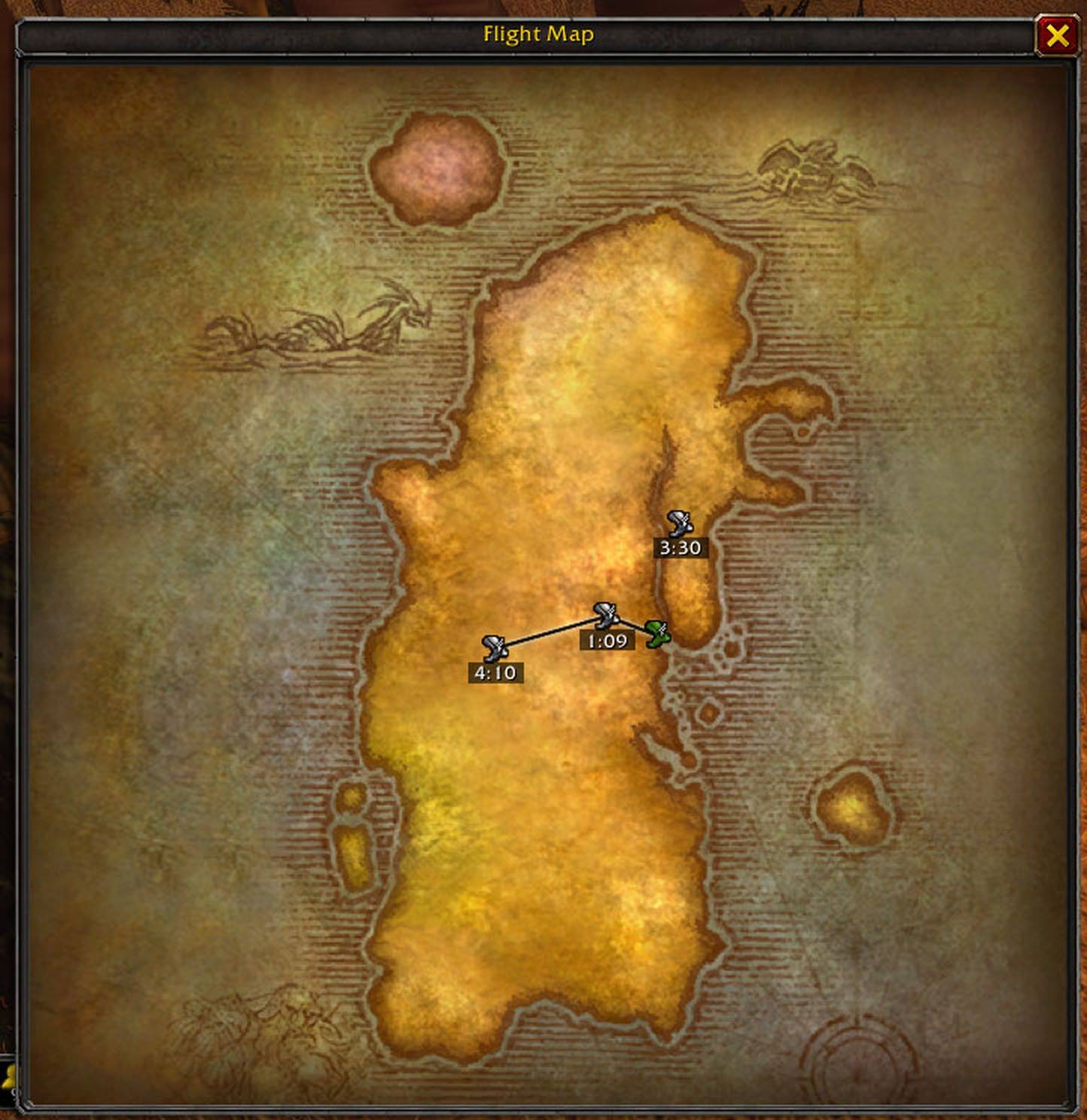
- Hover any place on the flight map and the tooltip shows the flight time and the clock time you'd land.
- A small time label sits under every destination, so you can compare routes at a glance.
- In the air, a countdown bar shows where you're going, where you came from, the time left and the clock time you land.
- Built-in times for the Classic flight paths in Eastern Kingdoms and Kalimdor, for Horde and Alliance, so it works from your very first flight.
- It learns every route you fly, including WoW: Forever's new flight paths, and remembers them for all your characters.
- It shares flight times with other Flight Clock players, so routes you haven't flown yet can still show a real time.
One settings window for all your Ironhide Addons
- Type
/ihub(or/ironhide) to open it. You can also click the Ironhide Addons minimap button, or go to Esc > Options > AddOns > Ironhide Addons. - Every Ironhide addon you have gets its own tab, with plain checkboxes and sliders. No need to memorize commands. Slash commands still work for those who like them.
- Install more Ironhide addons and they show up in the same window. The More Ironhide addons tab lists the ones you have and where to get the rest.
- Found a bug or have an idea? The window has a Discord invite you can click and copy.
30-second start
- Talk to a flight master. Hover a destination to see its flight time and landing time.
- Pick a flight. The countdown bar appears at the top of your screen.
- Type
/ihubto open the Ironhide Addons window and the Flight Clock tab (/fclockis a shortcut): unlock and drag the bar, change its size, or turn the map labels off.
Features
- Flight times on the map: in the tooltip of every place you can fly to, plus a small label under each node. White is the built-in time, green is your own time, blue is shared by other players, "~" is an estimate worked out from the stops on the way. Routes nobody has timed say "Not timed yet".
- Landing clock: both the tooltip and the bar tell you the clock time you'll land (12- or 24-hour, following the game's clock setting).
- Countdown bar: destination, where you came from, time left and landing time, with a gryphon or wind rider icon and the cast bar's fill and spark. On a route that isn't timed yet, it counts up instead, and the time is saved when you land. It hides as soon as you land.
- Learns as you fly: every finished flight is saved for that route and used on all your characters. It uses the average of your recent flights, or your latest time if you prefer. Early landings, glitches and flights that end far too soon aren't saved, so one odd flight can't spoil your times.
- Shared flight times: swaps flight times with other Flight Clock players in your guild, group and realm (one hidden channel, IronhideNet, that never shows in chat). Only times at least two players agree on are used; your own time always wins. Shared times are blue on the map. Sharing, using shared times and realm-wide sharing each have their own switch.
- Frequent Flier aware: WoW: Forever's 20% faster flights perk is taken into account.
- Survives /reload: the countdown keeps going if you reload mid-flight.
- Pretty settings window: in the shared Ironhide Addons window, with a tooltip on every option: show the bar, lock it (unlock to drag), bar size, a sample bar, reset position, map labels, latest or average, a chat note when you land, and "forget learned times" (asks first).
- Light and safe: it only watches the game's flight functions and never replaces them, so it can't break the flight map.
Commands
/ihub: open the Ironhide Addons window (Flight Clock tab)./flightclockor/fclockis a shortcut/fclock test: show a sample countdown/fclock unlock//fclock lock: move the bar, then lock it/fclock reset: put the bar back at the top of the screen/fclock on//fclock off: turn the countdown bar on or off/fclock times: how many routes you've timed, and how many were shared with you/fclock share: sharing status;/fclock share on//fclock share offto turn it on or off/fclock forget shared: forget the times other players shared with you/fclock forget: forget your learned times (asks you to confirm)
FAQ
Where do the built-in times come from? From the open-source (MIT-licensed) flight time tables of InFlight, collected by its players over many years. Thank you to TotalPackage, Deranjata and LudiusMaximus. Flight Clock learns your own times on top of them.
A flight says "Not timed yet". What do I do? Fly it once. Flight Clock times it and shows it from then on, on every character.
What does the "~" mean? That route goes through other flight points, and the time is added up from the parts Flight Clock knows. Fly it once to get the exact time.
I landed early. Will that mess up my times? No. Early landings, and flights that end in less than half the expected time, aren't saved.
Does sharing slow my game down or spam chat? No. Messages are tiny, hidden addon messages sent a few at a time in the background, never in combat, and Flight Clock only asks for routes that changed since you last swapped with someone. Nothing shows in your chat windows. Realm-wide sharing uses one hidden chat channel slot, joined after General and Trade so their numbers don't change.
Can someone send fake times? A shared time has to be a real flight path, a believable length, close to the built-in time when there is one, and at least two players have to agree. The middle value is used, so one bad time can't change it. Your own times are never replaced.
How do I turn sharing off? Type /fclock share off, or open /ihub (or /fclock) and untick the sharing options. "Share realm-wide too" off keeps it to your guild and group.
What is Ironhide Addons? The family of addons Flight Clock belongs to. If you have more than one, they share one settings window and one minimap button. Search "Ironhide Addons" on CurseForge.
Support
Please bring bug reports and feature requests to our Discord: https://discord.gg/a2x9SjtWxD (post in #bug-reports or #feature-requests). We read every one and ship fixes fast. When you report a bug, include the addon version, what you did, and a screenshot if you can.
Built for WoW: Forever (1.60.1). Built-in Classic flight times from InFlight, MIT License, Copyright (c) 2009-2024 TotalPackage, 2022 Deranjata, 2025-2026 LudiusMaximus. The full license text is in FlightClockData.lua. Ironhide Addons is a fan-made addon collection and is not affiliated with or endorsed by Blizzard Entertainment.
Flight Clock - Flight Path Times & Landing Countdown Team