FishPole - One-Click Fishing & Weapon Swap
- By
One button equips your pole, casts and reels in. Weapons come back when you're done, or the moment something attacks you.
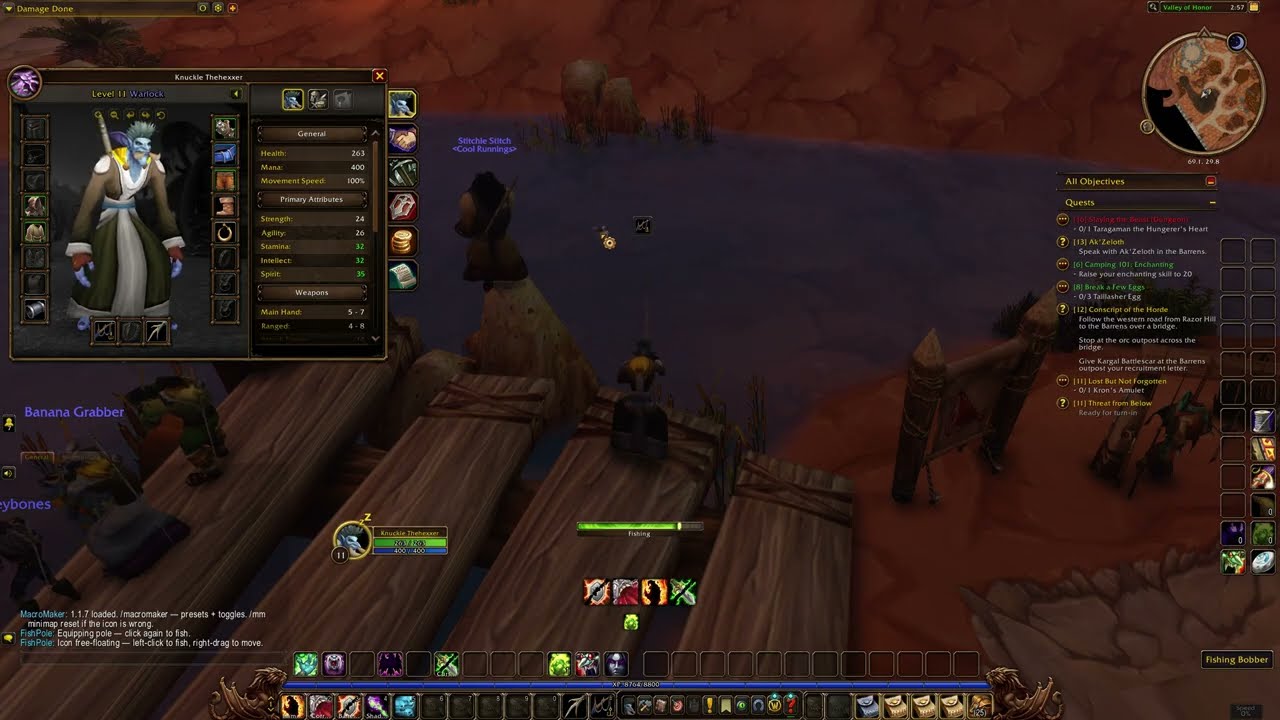
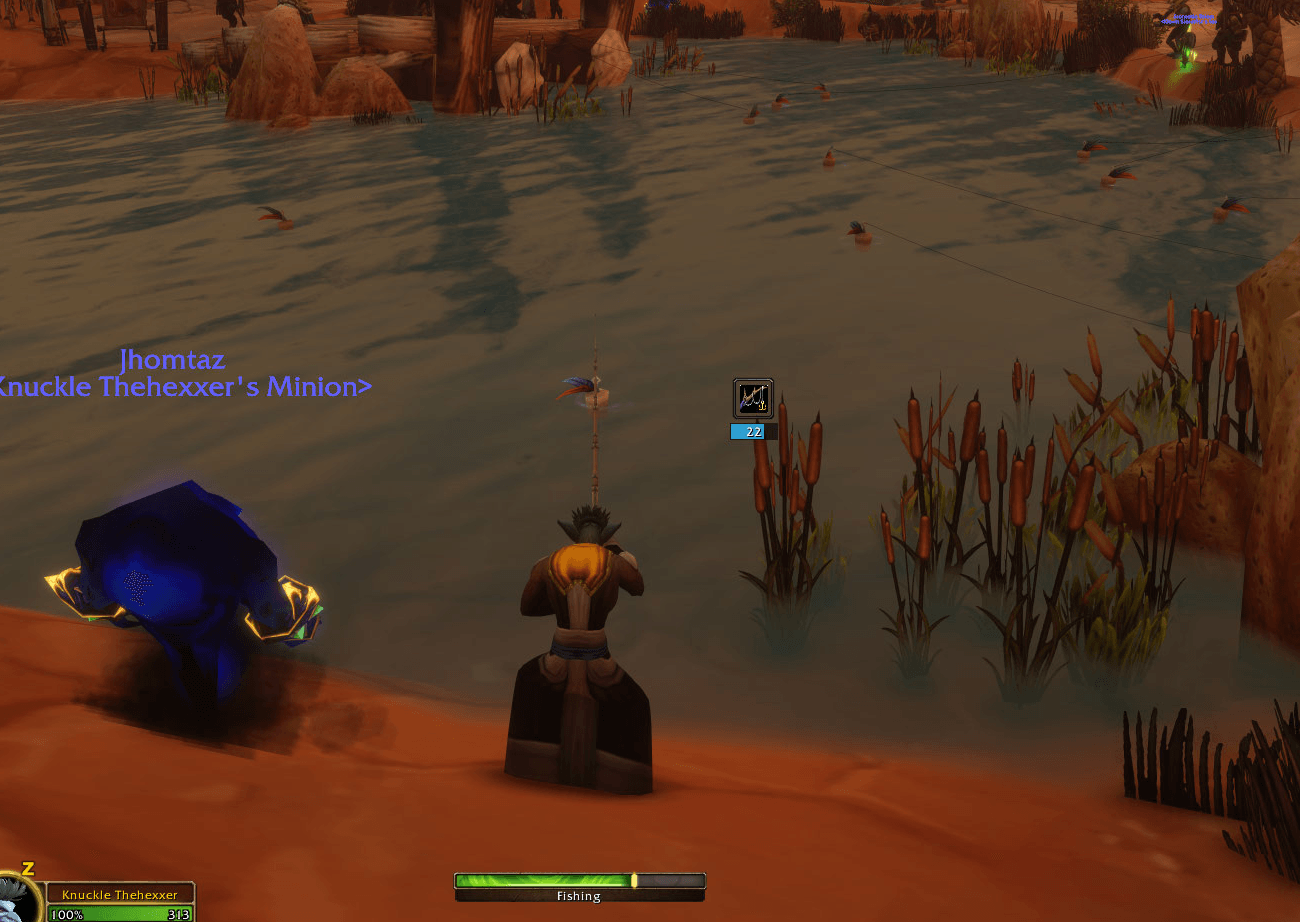
Fishing at the pond, with the FishPole icon parked beside the bobber and the 22-second cast timer showing. The icon tooltip hides while the line is out, by design.
logo-1024.png
Description
Fishing in Forever shouldn't mean hunting for your pole, clicking the bobber, then remembering to put your weapons back on. FishPole makes it a one-button job.
Why players use it
- The same icon equips your pole, casts, and reels in when the bobber splashes.
- Park it right next to your bobber so your mouse barely moves.
- Your weapons come back when you finish, after a delay you choose, or the moment something attacks you.
- A cast timer under the icon, and a louder splash so you don't miss the bite.
30-second start
- Put a fishing pole in your bags.
- Left-click the FishPole minimap icon. Your pole goes on and FishPole remembers your weapons.
- Left-click again to cast. Right-click and drag the icon next to your bobber.
- When the bobber splashes, left-click the icon to reel in. Click again to cast the next line.
- Done? Ctrl-right-click the icon. It goes home and your weapons go back on.
Ctrl-left-click the icon (or type /fishpole) to open settings. There you can turn on the lure, save your fishing gear, and set a fishing key.
Features
- One button: the same icon equips your fishing pole, casts Fishing, and reels in your catch.
- Click to reel in: while your line is out, left-clicking the icon does the same as clicking the bobber. It uses the game's own Interact action.
- Louder splash: your game sound is turned up while your line is out (100% by default), then your own settings go straight back. Works even while the game is in the background.
- Sits by your bobber: right-click and drag the icon anywhere, right next to the bobber.
- Weapons come back: Ctrl-right-click puts the icon back on the minimap and re-equips your main-hand and off-hand right away.
- Auto restore: forget, and your weapons come back on their own after a delay you choose (30 seconds by default). It waits until you're out of combat.
- Any pole works: poles are found by item type, so new poles work without an update.
- Lure with the same click (optional): if your pole has no lure and you carry one, the click puts your best lure on first; the next click casts.
- Cast timer: a small bar under the icon counts down your line, gold for the last 5 seconds.
- Weapons back when attacked: if something attacks you while you fish, your weapons go straight back on. If the game won't swap mid-fight, they go on the moment the fight ends.
- Fishing key (optional): one key does it all: equip, lure, cast, and reel in while the line is out. Set it in settings, or in the game's Key Bindings under AddOns > FishPole.
- Fishing gear (optional): save your fishing hat, boots and gloves. They go on with your pole and come off with your weapons.
- Remembers your gear: your saved weapons survive a
/reload. - Armor never changes in combat.
- Pretty settings window: options live in the shared Ironhide Addons window (gold title, tabs, tooltips), with an entry in the game's AddOns options.
- Quick how-to: a short popup appears the first time you use it.
Commands
/fishpole: open or close settings in the Ironhide Addons window (/fpolealso works)/fishpole idle 30: set the auto-restore delay in seconds (1 to 600)/fishpole volume 75: set the splash volume (1 to 100);/fishpole volume offturns the louder splash off/fishpole reel off/on: turn click-the-icon-to-reel-in off or on/fishpole lure on/off: put on a lure with the same click (off by default)/fishpole timer on/off: the cast timer (on by default;/fishpole timer 30still sets the restore delay)/fishpole attacked on/off: weapons back on when attacked (on by default)/fishpole gear save: save the hat, boots and gloves you're wearing as fishing gear;gear on/off/clear/fishpole key: press a key to use for fishing;/fishpole key Fsets it directly;/fishpole key clearremoves it/fishpole restore: put your weapons back now/fishpole clear: forget the saved weapons/fishpole reset: put the icon back on the minimap/fishpole help: show the how-to popup again/fishpole debug: turn troubleshooting messages on or off/fish: equip your pole from chat (then click the icon to cast)
FAQ
Why can't /fish cast for me?
The game only lets a real click cast a spell. /fish equips your pole; the FishPole icon does the casting.
It says "No fishing pole in bags." Put a fishing pole in your bags, then click the icon again.
My weapons didn't come back.
Ctrl-right-click the icon, or type /fishpole restore. Restoring waits until you're out of combat and done casting.
Clicking the icon doesn't reel in. The bobber has to be in front of your camera, like with the game's Interact key. Face the water and try again; your Interact key also reels in. FishPole turns on the game's interact targeting for you while your line is out and puts your setting back afterwards.
Will it mess up my sound settings?
No. FishPole only ever turns sound up, saves your exact settings first, and puts them back a couple of seconds after your line comes in. That includes after a /reload or disconnect.
I lost the icon.
Type /fishpole reset.
Does it use up my lures? Only if you turn on "Put on a lure with the same click". It only uses lures already in your bags, and only when your pole has none.
Does the fishing key change my key bindings? No. A key set in FishPole only lasts while FishPole is loaded and never changes your saved bindings. Ctrl keys aren't allowed, because Ctrl-click opens settings.
Why did my fishing hat stay on during a fight? The game doesn't let anyone change armor in combat. It comes off the moment the fight ends.
Does it do stats or fishing logs? No. FishPole stays small on purpose.
What is Ironhide Addons? The family of addons FishPole belongs to. If you have more than one, they share one settings window and one minimap gear button. Updates come from CurseForge: search "Ironhide Addons".
Support
Found a bug or have an idea? Join the Ironhide Addons Discord: https://discord.gg/a2x9SjtWxD (post in #bug-reports or #feature-requests).
Built for WoW: Forever (1.60.1). Ironhide Addons is a fan-made addon collection and is not affiliated with or endorsed by Blizzard Entertainment.
FishPole - One-Click Fishing & Weapon Swap Team