FallenBuffCheck
- By
See at a glance who in your group still owes a buff — and call it out with one click.
Ekran görüntüsü 2026-10-06 190104.png
Ekran görüntüsü 2026-10-06 190113.png
Ekran görüntüsü 2026-10-06 190127.png
Description
FallenBuffCheck
Who forgot to buff? FallenBuffCheck tells you — and tells the group.
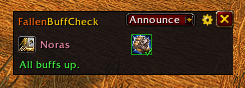
A small, clean window that lists every buff provider in your party or raid, with the buffs they're expected to cast right next to their class icon. Green means everyone has it, red shows how many people are missing it. One click (or one key) posts the missing buffs to chat.
Built for WoW Forever, part of the Fallen addon family by FallenSkullCorp.
Features
- Buff provider overview: class icon, class-colored name and the buffs that player should give
- Missing counts at a glance: red border + number when someone is missing a buff, green check when all are covered
- Hover for names: the tooltip lists exactly who is missing each buff
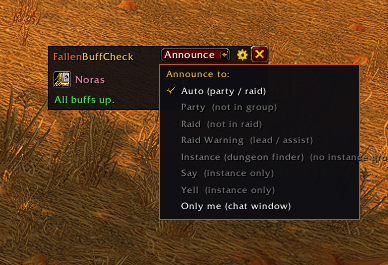
- Announce with one click: choose the channel each time from a menu
- Auto (party / raid), Party, Raid, Raid Warning, Instance, Say, Yell, or Only me
- Channels you can't use right now are greyed out
- Key binding: announce or toggle the window without opening anything
- Auto-show on dungeon / raid entry, with an optional warning sound
- Consumable check inside instances: Well Fed and (optional) Flask
- Minimap button that turns red while buffs are missing
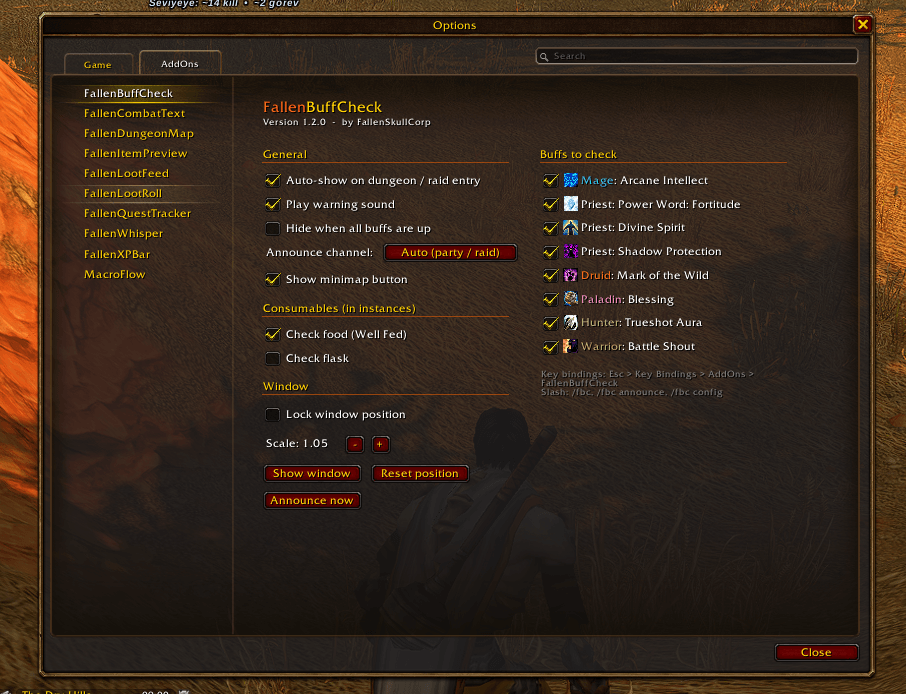
- Settings panel with per-buff on/off switches
- Smart checks
- Paladins: everyone needs a blessing from each paladin in the group
- Talent buffs (Divine Spirit, Trueshot Aura) are only checked once that player has been seen casting them, so no false alarms
- Intellect / Spirit are only checked on mana users
- Dead, offline and out-of-range players are never counted as "missing"
- Combat safe: when the game locks aura data in combat, the window keeps the last known state and updates again after combat
Checked buffs
| Class | Buffs |
|---|---|
| Mage | Arcane Intellect / Arcane Brilliance |
| Priest | Power Word: Fortitude / Prayer of Fortitude, Divine Spirit (talent), Shadow Protection (off by default) |
| Druid | Mark of the Wild / Gift of the Wild |
| Paladin | Any Blessing or Greater Blessing, one from each paladin |
| Hunter | Trueshot Aura (talent) |
| Warrior | Battle Shout (off by default) |
Every buff can be switched on or off in the settings.
How to use
- Join a group. The window opens automatically when you enter a dungeon or raid and something is missing. You can also open it yourself with the minimap button or
/fbc. - Hover a red icon to see who is missing the buff.
- Click Announce, pick a channel, done.
Example chat output:
[FBC] Arcane Intellect (Jaina) missing: Thrall, Anduin
[FBC] Blessing (Uther) missing: Varian, Sylvanas
Minimap button
- Left-click: show / hide window
- Shift + left-click: announce to your default channel
- Right-click: settings
- Drag: move around the minimap
Settings
Open from Esc → Options → AddOns → FallenBuffCheck, from the gear icon on the window, or with /fbc config.
- Auto-show on dungeon / raid entry, warning sound, hide when all buffs are up
- Default announce channel (used by the key binding and minimap Shift+click)
- Minimap button on / off
- Food and flask checks
- Window lock and scale
- Per-buff on / off for every class buff
Key bindings
Esc → Key Bindings → AddOns → FallenBuffCheck
- Announce missing buffs to chat
- Show / hide window
Slash commands
| Command | What it does |
|---|---|
/fbc |
Show / hide window |
/fbc announce |
Announce to the default channel |
/fbc announce party | raid | rw | instance | say | yell | me |
Announce to a specific channel |
/fbc config |
Open settings |
/fbc minimap |
Show / hide minimap button |
/fbc lock |
Lock / unlock window |
/fbc reset |
Reset window and minimap button position |
/fbc shadow | shout | food | flask | auto | sound |
Toggle that check / option |
Notes
- Say and Yell only work inside instances. The game blocks addons from using them outdoors.
- In combat the game may hide aura data from addons. FallenBuffCheck then shows the last known state and refreshes once combat ends. Announcing is paused during that time so the group never gets outdated info.
- Shaman totems are not tracked, because totem effects can't be reliably read as group buffs.
Feedback
Found a bug or missing a buff? Leave a comment or open an issue on the project page. Please include the error text (/console scriptErrors 1 shows Lua errors in-game).
Also from FallenSkullCorp: FallenCombatText, MacroFlow and more of the Fallen addon family.
FallenBuffCheck Team