FallenItemPreview
- By
See every weapon and armor piece in 3D, right under its tooltip. Made for WoW Forever.
Ekran görüntüsü 2026-10-07 190030.png
Ekran görüntüsü 2026-10-07 190041.png
Ekran görüntüsü 2026-10-07 190101.png
Description
FallenItemPreview
See every weapon and armor piece in 3D, right under its tooltip. Made for WoW Forever.
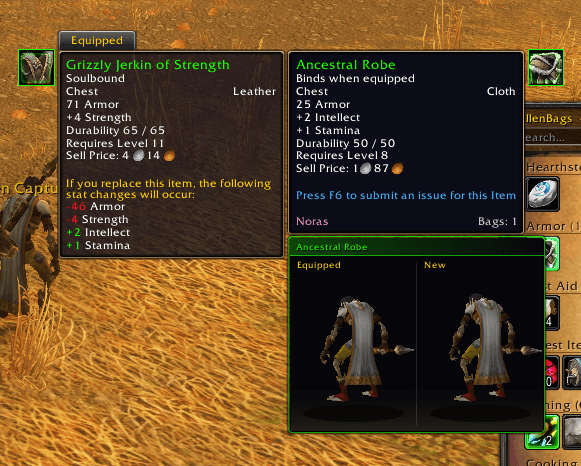
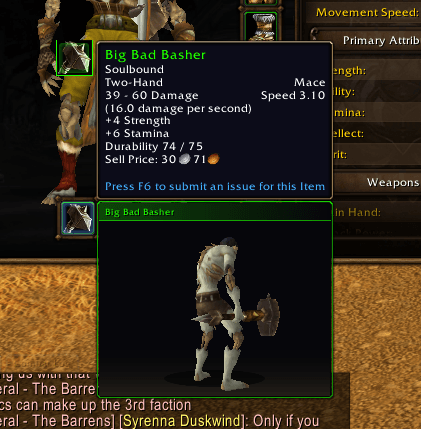
Hover an item in your bags, the Auction House, a loot window or a chat link, and a clean preview box opens under the tooltip with the item rotating in 3D. Every item tooltip also gets its icon next to it, framed in the item's quality color.
Features
3D preview
- Rotating 3D preview under armor and weapon tooltips
- Three view modes
- My character: the item on your own character
- Selected race: the item on any race and gender you choose
- Item only: weapons and shields on their own, armor on a neutral mannequin with the camera focused on that body part
- Compare view: the item you have equipped in that slot is shown next to the new one
- Pin window: Alt+click any item to open it in a movable, resizable window
- Weapons shown drawn in hand
- Quality colored border and a title bar with the item name
- Warning when you can't use the item or your level is too low
- Smooth fade-in, no flicker in the Auction House
- Hold Ctrl to pause rotation
- On chat links: drag to rotate, mouse wheel to zoom
Item icon
- Icon next to every item tooltip, including reagents, consumables and quest items
- Works on comparison tooltips too
- Moves to the other side automatically when there is no room
Settings
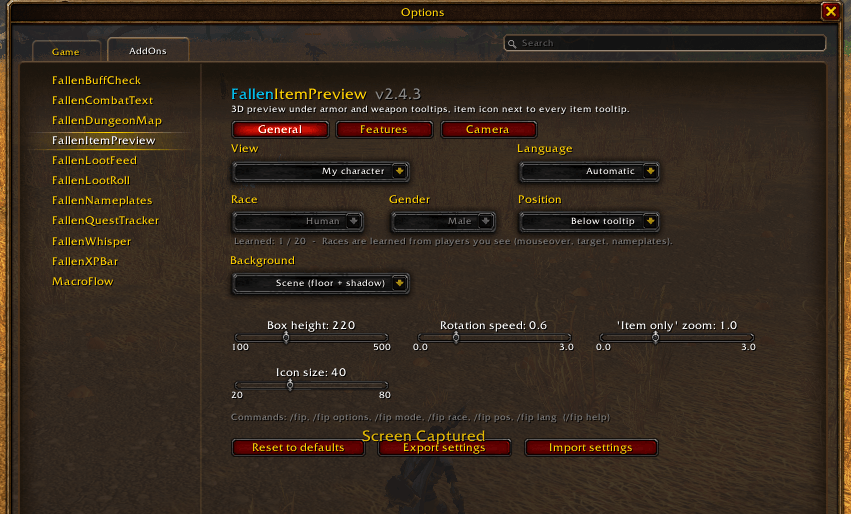
- Position: below, above, left or right of the tooltip
- Sliders for box height, rotation speed, zoom and icon size
- Three background styles: scene, plain dark, semi-transparent
- A description on every option, Reset to defaults, Export / Import settings
- Camera tab with a live preview: pick a slot, adjust X / Y and see the result instantly
- Hide in combat, Shift-only mode, per-character settings
- Minimap button (uses LibDBIcon when another add-on provides it)
- English and Turkish
How race selection works
This client has no built-in way to switch a model's race. FallenItemPreview learns race models from players you see instead: mouseover, target, nameplates and group members. Spend a few minutes in a capital city and most races will be learned. Your progress is shown in the settings and with /fip races. Learned models are saved for your whole account.
Commands
| Command | Description |
|---|---|
/fip |
Turn the preview on or off |
/fip options |
Open settings |
/fip mode player | race | item |
View mode |
/fip race <race> |
Pick a race, e.g. /fip race tauren |
/fip pos below | above | right | left |
Box position |
/fip icon |
Turn the item icon on or off |
/fip pin |
Pin the last previewed item in a window |
/fip compare |
Turn the compare view on or off |
/fip races |
Show learned race models |
/fip help |
All commands |
FAQ
Why is chest armor shown on a mannequin in "Item only" mode? Body armor (chest, legs, gloves, boots and so on) has no 3D model of its own in WoW. It is drawn on a character, so the add-on uses an undressed mannequin and zooms in on that body part.
A race is grayed out with (?) in the menu. That race hasn't been learned yet. Walk near a player of that race and gender.
Something went wrong. If you see a red FallenItemPreview message in chat, please report it with the message text.
Türkçe
Her silah ve zırhı tooltip'in hemen altında 3D gör. WoW Forever için.
Çantada, AH'de, loot penceresinde veya chat linkinde bir itemin üzerine gel; tooltip'in altında item 3D olarak dönerek görünür. Her item tooltip'inin yanında da kalite renkli çerçevesiyle itemin ikonu çıkar.
- Üç görünüm: kendi karakterin, seçtiğin ırk ve cinsiyet, ya da sadece item
- Karşılaştırma: o slotta giydiğin item yenisinin yanında görünür
- Sabitleme: bir iteme Alt+tıklayınca taşınabilir, büyütülebilir pencerede açılır
- Kullanamayacağın veya seviyen yetmeyen itemlerde uyarı
- Chat linklerinde sürükleyerek döndür, tekerlekle zoom
- Canlı önizlemeli kamera ayarları
- Savaşta gizle, sadece Shift ile göster, karaktere özel ayarlar, minimap butonu
- Türkçe ve İngilizce
Ayarlar için /fip ayar, tüm komutlar için /fip help.
FallenItemPreview by FallenSkullCorp
FallenItemPreview Team