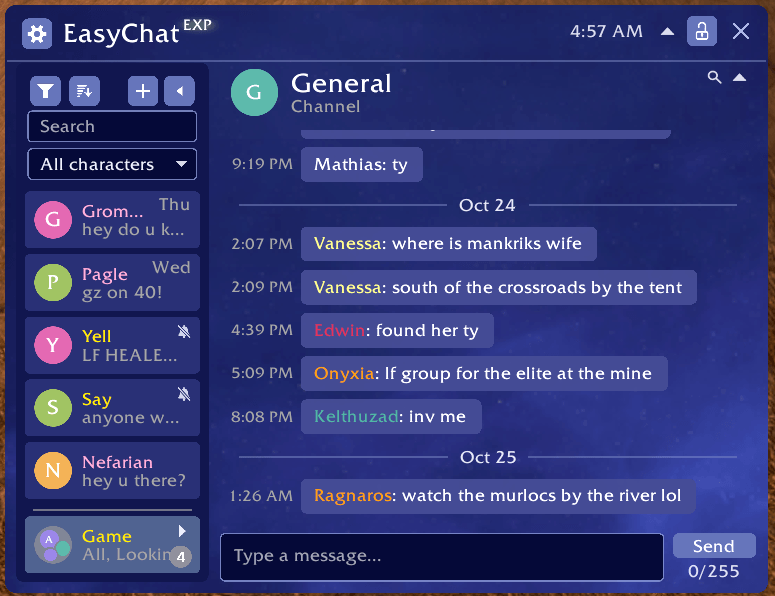
Chat window example. Game channels are gathered in a chat group at the bottom left. The sidebar on the left can be dragged right/left to expand/contract, or be minimized. Almost all of what you see here can be customized in some way.
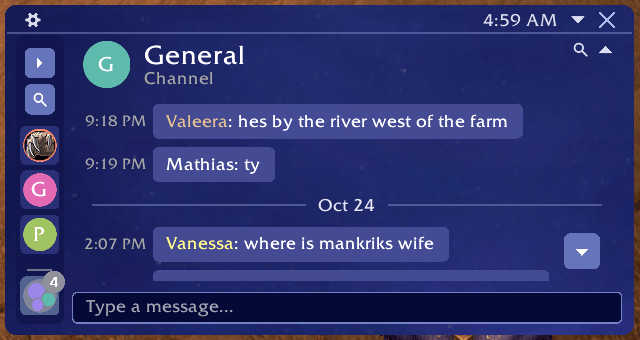
Similar to other example but dragged to be smaller, and conversation side bar minimized. You can still click and search between convos in this mode.
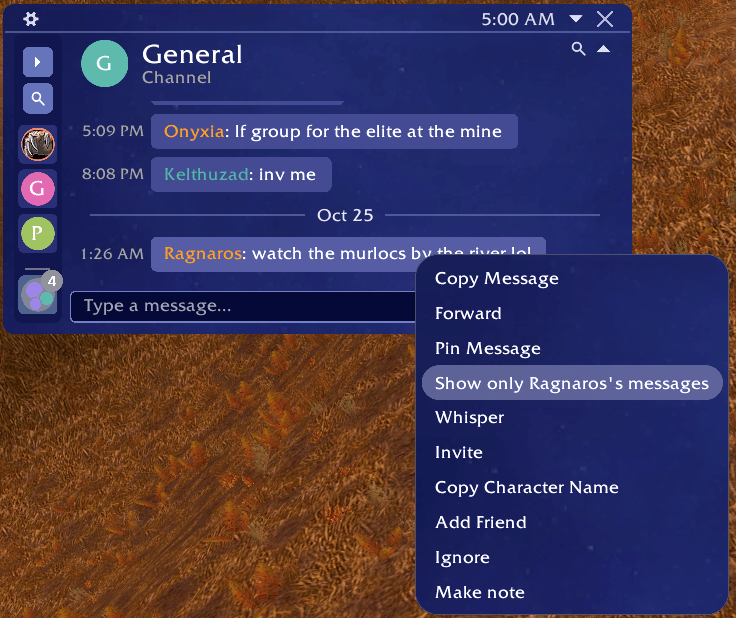
Options menu from right clicking a chat message. Many other general chat settings available in the primary settings window.
Description
EasyFind: Chat Extension


A messenger for WoW's chat. Whispers, Battle.net friends, party, raid, guild, Say and your channels each keep a conversation of their own, with its history, in one window with a list of chats beside it, the way a phone's messenger works.
Requires EasyFind. It is listed as a required dependency, so the CurseForge app installs it alongside.
What it adds
- A conversation for every whisper, Battle.net friend, group and channel, kept between sessions for as long as you choose.
- Message bubbles with times, names in their class colors, and avatars: a letter, a class icon or any icon you pick. A dot shows whether a friend is online, away or busy.
- Reply to a message or forward it; pin a message and jump back to it later.
- A New messages line where your unread messages start, and a button back to the newest when you scroll up.
- Search every chat from the list or from EasyFind's search bar; Ctrl+F filters the open chat, and from:Name shows one person's messages.
- Folders, chats pinned to the top, muted chats, an unread count on the chat button, and messages that name you standing out.
- Unsent drafts kept per chat; away and busy replies, and whispers that never arrived, shown in the chat.
- Web addresses copy on click; item links and EasyFind links work inside the bubbles.
- Optional: use it as the game's chat, with slash commands typed in its window and the Combat Log shown inside it.
- It wears EasyFind's theme (which also means you have plenty of theme options/customizations), with its own text size and font.
Works on retail, WoW Forever, Classic Era, TBC Anniversary and Mists Classic.
How to open it
- Click Chat in EasyFind's extensions menu, or type chat in EasyFind's search bar and pick the Chat row.
- You can also click and drag the chat extension from EasyFind's extension menu anywhere on your screen to become a button, and extra micro menu button, or even a minimap icon for easy access
Some other EasyFind extensions
Each is an addon of its own that plugs into EasyFind; install the ones you want, with more on the way.
- EasyFind: GPS Navigation Extension: step-by-step directions to anywhere EasyFind finds, through flights, boats, portals and the walk, with an arrow at your character and the route on the map.
- EasyFind: Questie Extension: Questie's quests in EasyFind's search, with your progress, their objectives on hover and directions to the next step. Classic Era, TBC Anniversary, Mists Classic and WoW Forever.
- EasyFind: Auctionator Extension: your Auctionator shopping lists in EasyFind's search: add items from any result, open a list as a checklist, run its search at the auction house. Retail and WoW Forever.
Feedback
Bug reports and ideas are always welcome.
- Discord: https://discord.gg/3pdfmD493B
- GitHub issues: https://github.com/fallenguards/EasyFind_Chat/issues
Links
EasyFind: Chat Extension Team
Owner