DieOuweUI
- By
Modular UI for WoW Forever: draggable blocks, themes with hand-made ornaments and a gallery to share your look. Plus group frames, alts and storage, world map, toolbox, PvP, profession helper, flight and AFK screens, macro builder.
1.png
2.png
3.png
Description
DieOuweUI
A modular, self-made interface for WoW Forever. Build your own style. Every part of your screen is a block: move it, resize it, decorate it, save it, share it. Pick a theme with hand-made ornaments, place extra ornaments yourself, and share your complete look with one text. Others load it in one click, in your colours or in their own.
🎨 **Gallery: https://www.dieouwe.nl/dieouweui/galerij/** Download looks and layouts of other players, or upload your own variant with a screenshot.
💬 **Discord: https://slayeralliance.com/discord** · 🛡️ **Guild: https://www.slayeralliance.com** · 🌐 **Manual: https://www.dieouwe.nl/dieouweui/** · ⛏️ **Node map: https://www.dieouwe.nl/nodehound/** Found something odd? See *Reporting bugs* below.
Quick start
| Key | What it does |
|---|---|
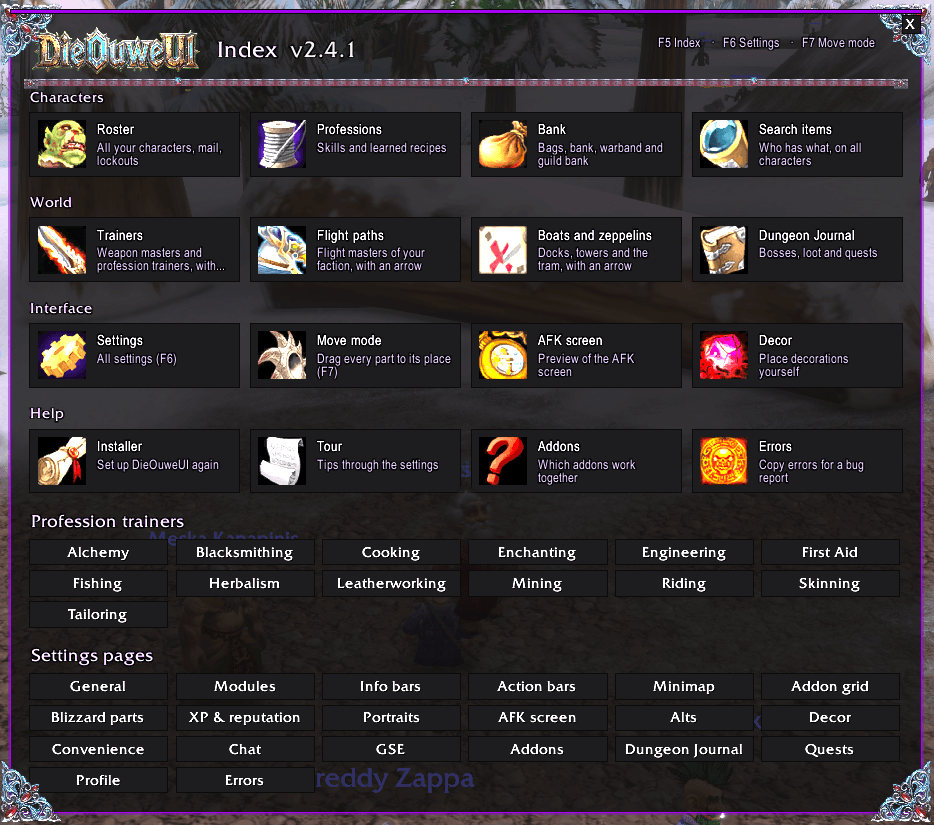
| F5 | Index: one window with everything in DieOuweUI |
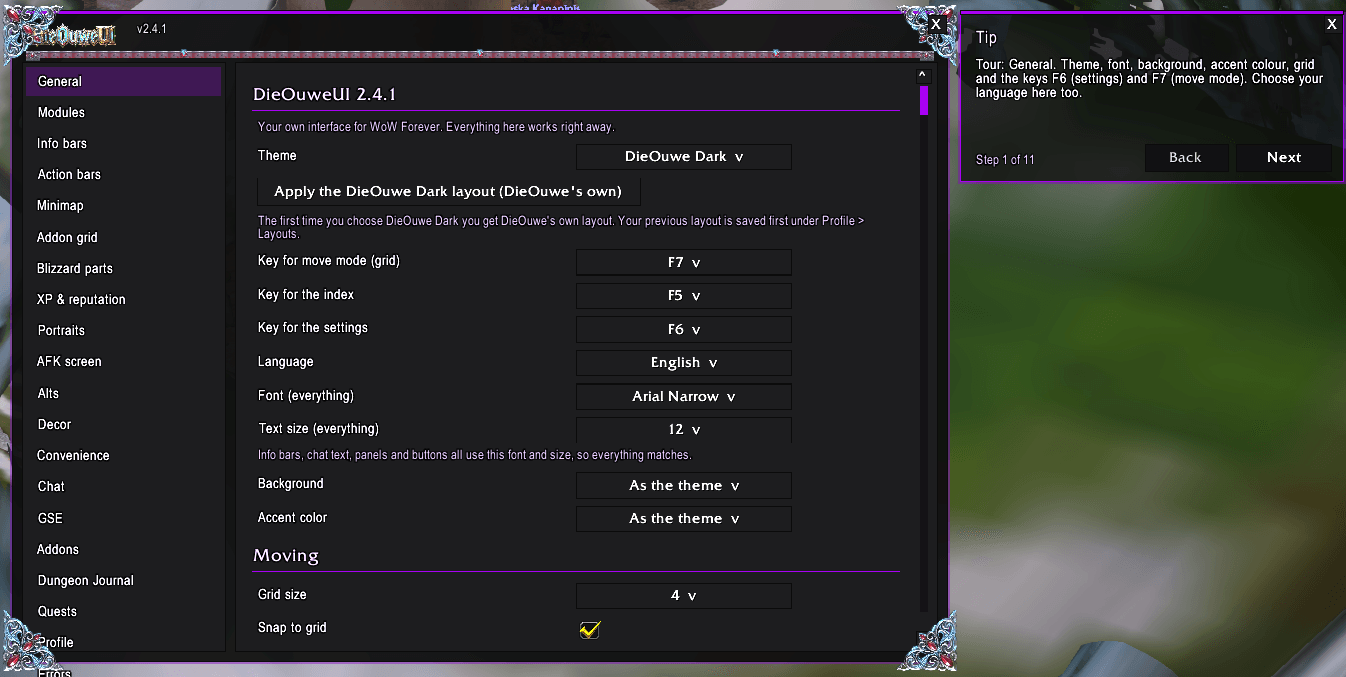
| F6 | Settings |
| F7 | Move mode: drag every block to its place on the grid |
| Esc | Game menu with an Index button, and Esc closes DieOuweUI windows |
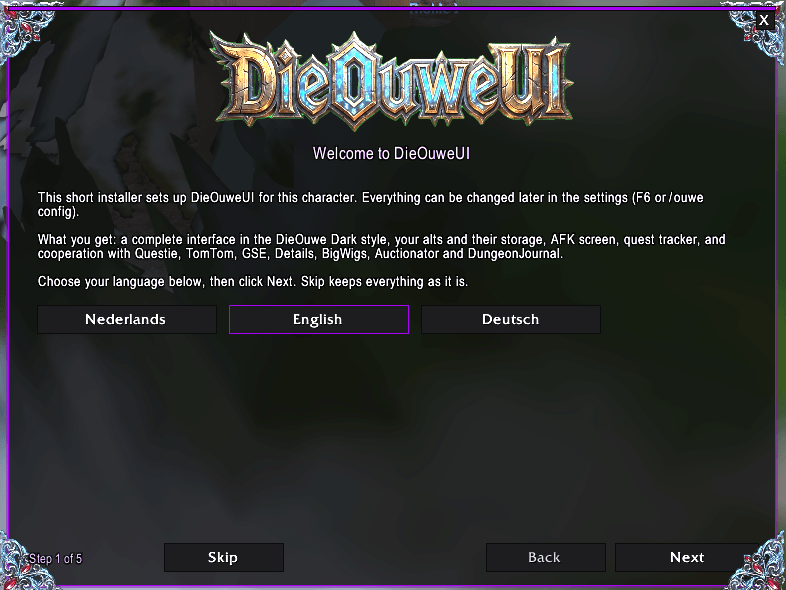
On each character an installer opens once, after the logo. It sets up the theme and layout, checks your addons, sets the keys and lets you choose a language. An optional tour through the settings follows. Type /ouwe for all commands.
Needed: Questie, TomTom and NodeHound
Questie and TomTom are essential. DieOuweUI starts without them, but then the quest tracker, the trainer and travel finder, and the arrows do not work. DieOuweUI warns you at login when one is missing.
Works together with these optional addons: GSE, Details!, BigWigs, NodeHound (DieOuwe's addon for ore, herbs, chests and fishing pools on your map), Capping (battleground timers under the minimap, in your theme), Auctionator and DungeonJournal.
🧩 Modular interface: build your own style
- Blocks on a grid (F7). Action bars, info bars, minimap, chat, quest tracker, buffs, portraits, the addon grid and more are blocks you drag into place. They snap to the grid and to each other. Blizzard's player frame, focus frame, group finder eye, buffs, micro menu and more are blocks too, each with its own size and visibility. Left-click a block for its options, right-click for its default spot.
- Every screen. Positions are kept relative to the screen edges, so normal, wide, ultrawide and 4:3 screens all work. DieOuweUI windows shrink to fit, with a Window size setting (70-150%) and - 100% + in every window for its own size (60-200%).
- Themes with hand-made ornaments:
- DieOuwe Dark (default): black, deep purple, baroque corners, rune seams and two dragon heads in their own colours.
- Dark Iron: black iron with only a touch of blood red.
- Forged Iron: black iron from the fire, blood red with glowing orange and flame yellow.
- Slayer Neon: neon purple with neon pink and neon light blue.
- Class color.
- Every theme colours the ornaments in its own colour. Font, text size, background and accent colour can be set for the whole UI.
- Decor: place ornaments yourself. Dragon heads, gems, corners, rune chains, iron and gothic bars: add them, drag them, resize, mirror, set transparency and layer. They are part of your layout and follow the colour of your theme.
- Save, load and share:
- Complete look: one text with everything to get the same screen as the maker: theme, colours, ornament colour, font, plus all blocks, the grid and your Decor ornaments. Load it with Load with its theme.
- Layout only: the same positions and ornaments, but in the colours of your own theme.
- Saved layouts are kept for your whole account; loading one first saves yours, so you can always go back.
- Gallery link and a Screenshot for the gallery button in the settings.
- Styled windows. A thin frame in the theme's style around bags, bank, Blizzard windows (also the PvP scoreboard and battlefield map), chat windows and windows of other addons. Blizzard's windows themselves are not changed. Dark buttons in the game menu, and the micro menu and bags bar in your theme.
- Quest tracker in your style for Questie: banner, a maximum number of quests, scrolling, nearby quests first, and objectives in the font and text colour of your theme.
- Portraits with ornamental rings, an addon grid that collects minimap buttons, chat panels with Details! on the right, XP and reputation bars.
🛡️ Group frames and Frame Assist
- Own party and raid frames (5, 25 and 40 players), fully adjustable with sliders: size and spacing per layout, class icon or 2D/3D portrait, names, text sizes, bar colours and heights. In a raid your own group gets a border and a ◆.
- Frame Assist: a light HealBot-style window. Put spells on Shift/Ctrl/Alt + click for the group frames, or let Import from spellbook fill them. Buff watch shows who misses your buff.
- Test mode with fake players:
/ouwe grouptest 5 | 25 | 40.
⚔️ Social and PvP
- Online notices: a small notice when a friend, Battle.net friend or guild member comes online, with class colour, level, zone and rank. Click to whisper. Its own block in the grid.
- PvP status (
/ouwe pvp): honor level, honorable kills (total, today, yesterday), and per battleground: played, won, killing blows, honorable kills, deaths and honor, plus your last matches and Blizzard's PvP statistics. - Capping timers under the minimap in your theme; the PvP scoreboard and battlefield map in the theme frame.
👥 Your characters
- Roster of all your alts: level, gold, mail, lockouts, professions, time played and a gold book (today, week, month).
- Actions per character: mail to collect or about to expire, full rested XP, repair, full bags, a profession cooldown that is ready, a raid resetting soon with bosses left, new spells at your class trainer, gold below your own limit, and your own tasks.
- Storage and search: bags, bank, warband bank and guild bank of every character, a bank viewer you can open anywhere, and
/ouwe findto see who has what. - Professions: skill and learned recipes per character, and "who can make this?".
- Mail to alt: a sidebar at the mailbox sends cloth, leather, herbs, ore, gems and more to the right alt, or to a friend or guild member. DieOuweUI prepares each mail; you press Send.
- Travel counter: how far each character walked, rode, swam and flew, and how often it took the boat, zeppelin or tram.
- Remove a character completely when you deleted or renamed it.
🛡️ Recruiting for your guild
- Right-click a player: Invite to guild (a secure button: your click sends the invite, as Blizzard requires).
- Adverts for a channel of your choice, ready in your chat box (you press Enter), or as a macro on your action bar. A wait time keeps it from turning into spam.
- Players without a guild in your zone (/who), with Invite and Whisper per player.
- Someone whispers inv or guild: a notice with an Invite button.
- Nothing is sent or invited automatically.
⚒️ Profession helper (semi-automatic)
- Alt + item in your bag: hold Alt over an item and it lights up when your character can disenchant, prospect, mill or pick the lock. Click to do it. Yields are remembered.
- Fishing button: appears in the middle of your screen as soon as you hold a fishing pole. One click to cast; scroll on it for volume (Shift + scroll: sound effects, to hear the bobber); move it with F7.
- Loot sparkles: golden sparkles with the gathering icon on herbs, ore veins and corpses with loot as you walk to them, and the quest item sparkle always on.
- Profession cooldowns across all alts in the roster.
- Trainer finder: every profession trainer, nearest first, with a TomTom arrow or a map pin.
🗺️ Travel
- Trainers and travel: weapon masters (with the weapons each one teaches), profession trainers, flight masters, boats, zeppelins and the tram. Left-click for a TomTom arrow, right-click for a world map pin.
- Automatic TomTom arrow to your selected or nearest quest (also without Questie).
- Flight screen: on a flight path the interface fades out and shows your destination, a countdown and your stats one by one. Esc closes it, Enter lets you chat, and whispers and guild messages appear on it.
- AFK screen with your 3D character, clock, alts and more.
🗺️ World map
- Flight masters on the world map and minimap: known ones in your theme colour, undiscovered ones in grey.
- Boats, zeppelins and tram with their destination, also on the continent map.
- Graveyards: DieOuweUI remembers every spot where you appear as a spirit, for all your characters (
/ouwe map gysaves one by hand). - Zone and level range under the mouse, coloured to your level, with the zone's fishing skill.
- A map button at the top right of the world map with a menu to turn each part on or off. Click an icon for a TomTom arrow.
- Fade the map while moving, and move and size the map yourself with Alt.
🧰 Toolbox
- Small tools on their own bar (Shift + drag or F7) or as boxes in the info bars.
- Stopwatch and count-down timer (1 to 30 minutes), with a separate timer bar that shows progress and time.
- Counter and farm counter: drag an item onto it, set a goal, and hear a sound when you reach it.
- Raid markers and optional world markers, ready check and pull timer (5-20 seconds).
- Ready check window in DieOuweUI style: a large emblem above it (dwarf for Alliance, orc for Horde), a countdown bar, and movable with F7.
- Pull timer shield: a shield behind the countdown numbers that beats every second and fades out in the last 3 seconds; size and place adjustable.
🧭 Travel: departure board and route planner
- Departure board (
/ouwe board): boats, zeppelins and the tram with departure time, travel time, arrival and status, learned by NodeHound. - Route planner (
/ouwe route): the fastest way from A to B with your known flight paths, boats, zeppelins, tram, Hearthstone and class spells, a line on the world map and a TomTom arrow step by step. Share the route with a whisper.
🏆 Milestones
- A festive notice with hand-made artwork at the big moments: level up, level 40 (riding), level 60, epic and legendary loot, profession ranks, Exalted, your first gold and your first boss kill.
- Every moment on or off, artwork size, time on screen and sound; move it with F7. Test them all with
/ouwe milestone.
⌨️ Macro builder
- Drag and drop: drag spells, pet actions (Attack, Follow, Stay) and items into boxes to make a rotation (
/castsequence), a buffs-on-yourself macro, a macro with modifier keys, or two sets with a switch key that also works in combat. - Class templates: one click fills a ready rotation, mouse-over heal or buff macro for your class; only spells you know.
- Ticks for /startattack, /petattack and your trinkets.
- Saved as a normal macro for your action bars, separate from GSE.
/ouwe assistchecks Blizzard's rotation helper and puts it on your cursor.
✨ Quality of life (off until you turn it on)
Faster loot, auto repair, sell grey items, auto quest accept and turn-in (hold Shift to do it yourself), collect all mail, LFM and map-pin links from the quest tracker.
⛏️ Companion addon: NodeHound
NodeHound is DieOuwe's own addon for ore veins, herbs, chests and fishing pools on your world map and minimap, now on CurseForge too. With DieOuweUI it takes your theme colours, gets a tile in the Index (F5) and its minimap button goes into the addon grid. Community map: https://www.dieouwe.nl/nodehound/
Languages: English, Nederlands, Deutsch, Română, Magyar.
🔜 Coming soon
- Theme builder: make your own theme with your own colours and ornaments, and share it in the gallery. DieOuweUI will expand even more!
- Unit frames and auras in DieOuweUI style.
- More profession and auction house helpers.
Good to know
- Do not use DieOuweUI together with another complete UI (ElvUI, ForeverUI, Bartender and the like).
- Nothing can be moved in combat.
- F5, F6 and F7 are only used when you have not put anything else on those keys. F5 takes over Blizzard's default target party member 4.
- Messages, mail and guild invites are never sent automatically. DieOuweUI fills them in; you press Enter, Send or Invite.
- Works on WoW Forever's new zones and the Skyborne race.
- New images need a full restart of WoW, not only
/reload.
Reporting bugs
- Type
/ouwe errorsand copy the text (Ctrl+A, Ctrl+C). - Post it in the comments here, with a screenshot if it is about the looks.
- Also useful:
/ouwe screen(screen size),/ouwe windows(window style) and/ouwe framecheck(Blizzard parts in the grid). - Or ask on Discord: https://slayeralliance.com/discord
Manual (EN / NL / DE / RO, also as PDF): https://www.dieouwe.nl/dieouweui/
DieOuweUI is DieOuwe's own code. No code from other UIs was copied. The decorations and logo are DieOuwe's own designs. All rights reserved.
DieOuweUI Team