Completao!!: Forever
- By
Quest chain trees for WoW Forever: dungeons, raids and more coming. See each quest's requirements, where it starts and what you've done, with map markers and TomTom waypoints.
Completao!!
Every quest, in order. Completao!! lays out the quests of WoW Forever as chain trees: what each quest needs before you can take it, where it starts, what it asks of you, and which ones you have already done. Pick a section on the left, read the tree on the right, click a quest for everything about it -- and let the addon walk you to the person who hands it out.
Dungeons, raids, battlegrounds, zones, class and profession quests, races and world events are in, with more on the way. Currently in beta.
Features
Quest chain trees
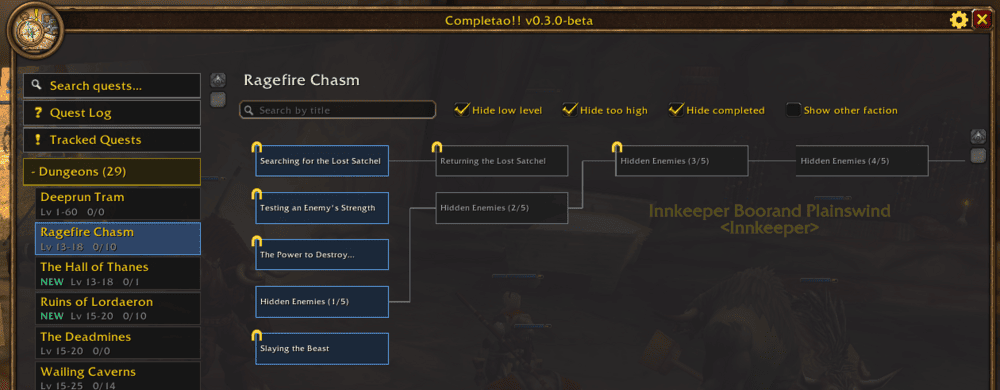
Each entry -- a dungeon, a raid -- draws its quests left to right, by prerequisite, so a long chain reads like a story instead of a list. Quests are colored by state: completed, in progress, available and locked, and the lines between them turn green as you move down a chain. Only the quests of your own faction are shown. Drag the background to pan the tree and use the mouse wheel to zoom in or out to see more at once (Shift + wheel to go sideways, Ctrl + wheel vertically); your zoom is remembered.
A side panel that grows with the addon
Sections are collapsible: open Dungeons, Raids (Molten Core, Blackwing
Lair, Naxxramas, Ahn'Qiraj, Zul'Gurub…), Battlegrounds, Zones, Class
Quests, Professions, Races, Events (Lunar Festival, Darkmoon Faire,
the Ahn'Qiraj war effort, Scourge Invasion…) or Miscellaneous and pick an
entry, listed alphabetically. Each one shows its level range, your progress
(done/total), and a NEW tag on what Forever adds on top of Classic. Apart
from dungeons and raids, sections only list what you can actually do -- entries
with nothing for your faction and race are hidden. More sections slot into the
same panel as they are added.
Only what applies to you
Quests of another class, race or faction stay out of your way. If you want to see them, look at that class or race in particular -- each has its own entry -- or tick Show other faction to browse the opposite faction's zones.
Search every quest at once
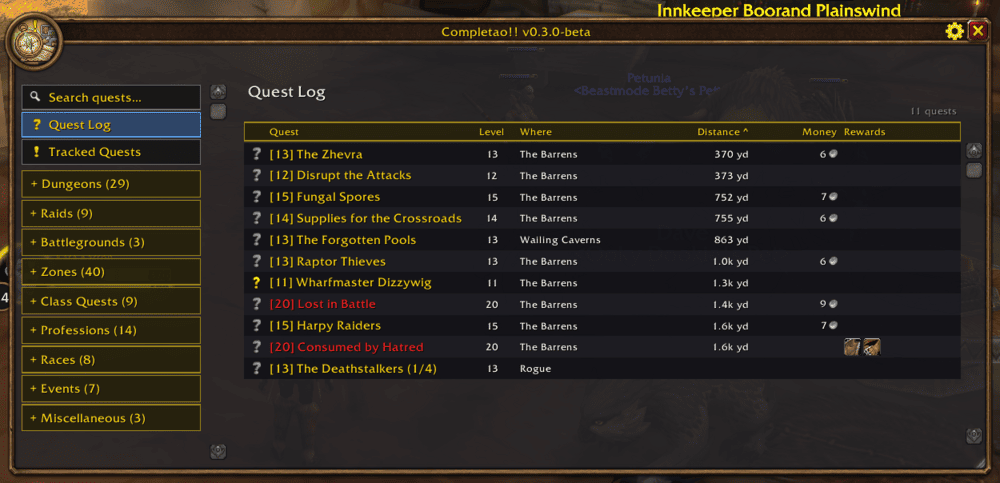
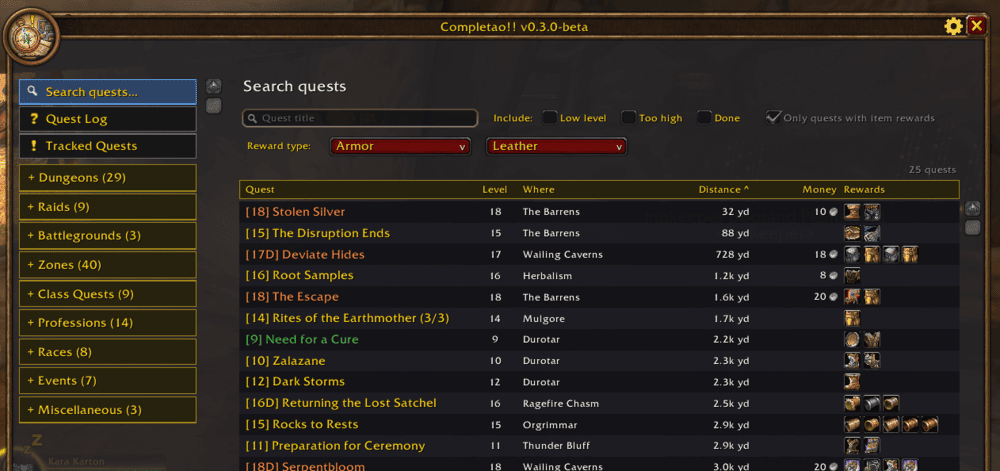
Search quests…, at the top of the side panel, looks through every
dungeon, raid, zone and class at the same time. Search by title, choose whether
to include low-level, too-high and completed quests, or look for a reward type
-- say, Weapon > Wands -- or keep only quests that give an item. Results come
as a table with level, location, money and the reward icons (hover for the
item tooltip), sortable by title, level or money; click one to jump to its
tree with the quest selected. Every row starts with the quest's [level]
(D for dungeon quests, + for elite ones), and the Distance column shows
how far each quest's next step is from you -- sort by it and the table re-sorts
as you move.
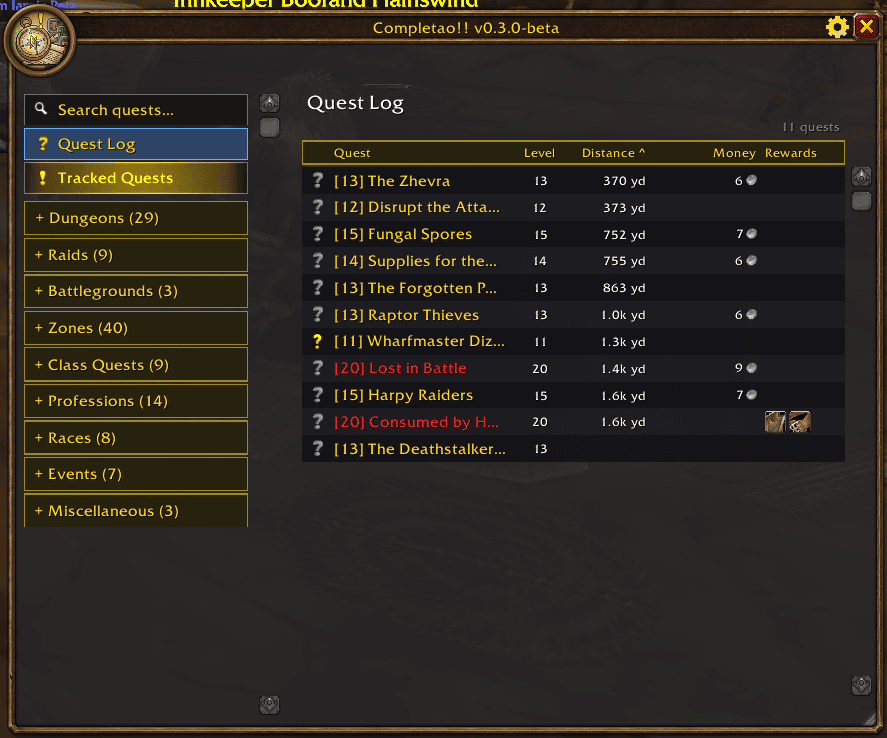
Your quest log, and the quests you track
Quest Log shows the quests you carry in the same table, with a status icon (ready to hand in / in progress) next to each, colored by difficulty for your level.
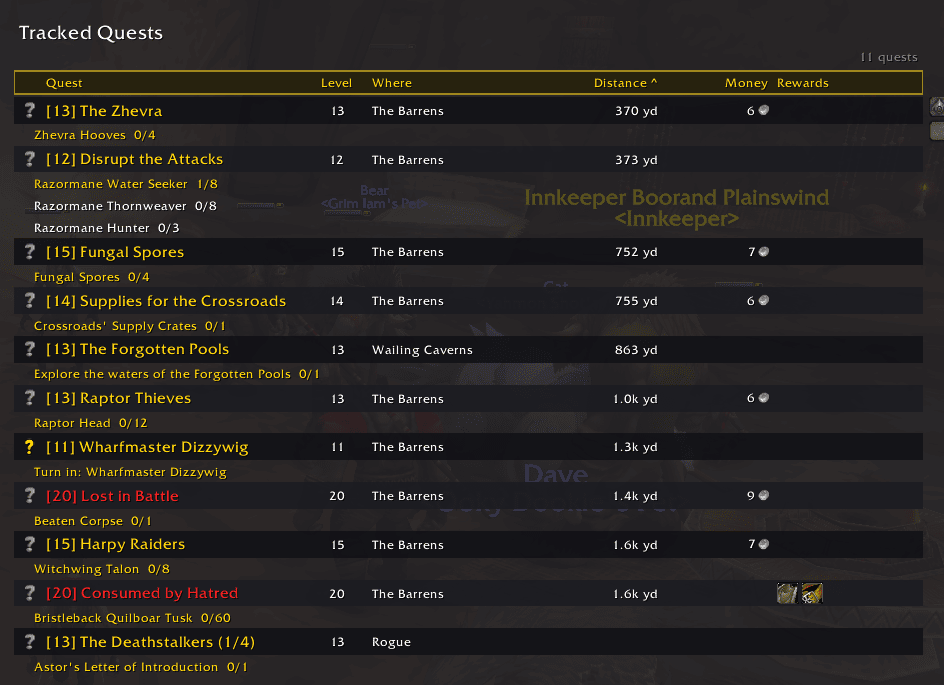
Tracked Quests narrows it to the ones in your objective tracker and lists, under each quest, its objectives with live progress: finished ones checked, the next one in gold, and only the turn-in once the quest is ready. Click an objective to set your waypoint on it.
Filters that keep the tree readable
Above the tree, a search box finds a quest by title and three checkboxes trim the noise: hide low level (grey) quests, hide too high (quests you can't take yet, or red for your level) and hide completed quests -- every quest you've done, even the finished steps of a chain you're still on. By level, chains are shown or hidden as a whole, so they are never cut in half: a chain is hidden as "too high" when everything it starts with is above your level (if you can start it, all its steps stay, even the higher ones), and as "low level" only when every quest in it is grey. A chain you have already started, and anything in your quest log, is never hidden by level. What stays visible is drawn translucent: quests too high for you more, low level ones just a little, so they are still easy to read. "Low level" is the grey title you know from your quest log. Your choices are remembered, per character or for all of them.
Which ones are done inside
Quests that take place inside a dungeon or raid wear a small doorway icon on the top-left corner of their box, with a note in the tooltip and the quest panel -- so you can tell them from the ones you do outside on the way there.
Which ones are ready to hand in
A quest in your log with every objective done keeps its yellow box and gets a green check on the top-right corner, so you know at a glance what is only waiting for the turn-in.
Follow a chain
In a crowded tree it is hard to follow a chain by eye. Click a quest and its whole chain -- everything to do before and after it -- lights up in green, while every other quest and connection fades back. Close the panel to return to the full tree.
Everything about a quest, one click away
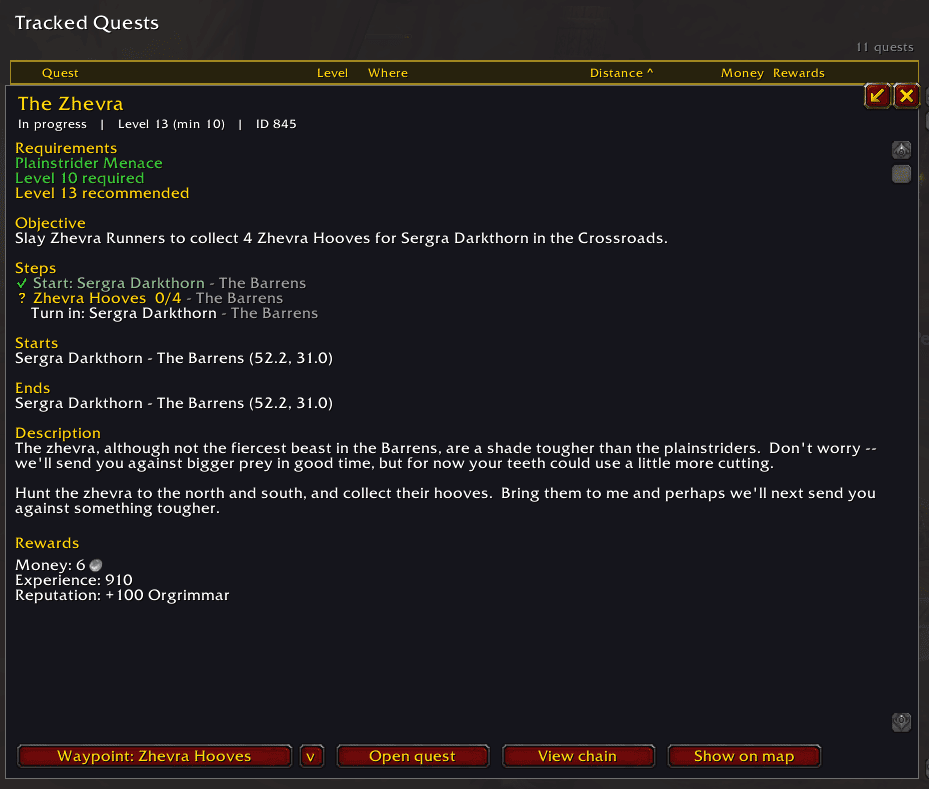
Click any quest in the tree to open its panel -- or click one in Search, Quest Log or Tracked Quests and its details open right below the table:
- Requirements -- prerequisite quests and level, in green when you meet them and red when you don't.
- Objective -- what to do.
- Who starts it and who ends it, with the zone and coordinates.
- Description -- the story behind it; for the quests in your log, straight from the game in your language.
- Rewards -- the items you can choose and the ones you always get, with the game's own item tooltip (Shift-click to link one in chat), plus money, experience and reputation.
- A maximize / restore button (Blizzard's own) to read the text over the whole tree.
- View chain, for quests that belong to a chain: jumps to its tree with the quest selected.
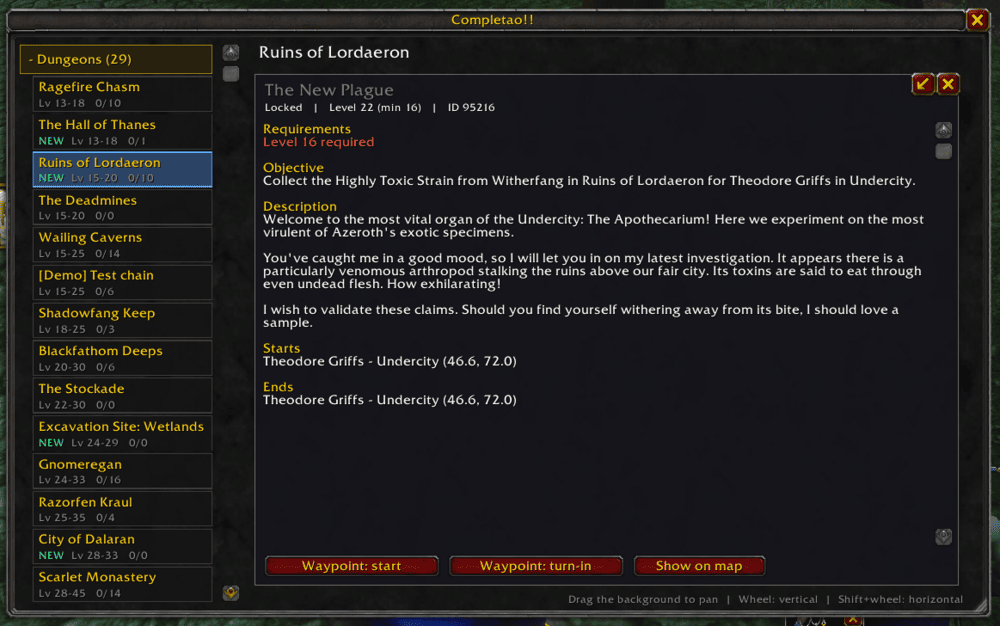
Find it, go there
- Steps, under the objective: requirement, start, each objective with the zone where it is done, and turn-in. On a quest you carry, every objective shows its live progress and the next step is highlighted.
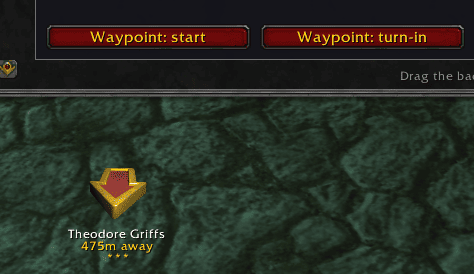
- Waypoint is a split button that already points at the next step: the quest giver (or the quest you still need first), the first objective you haven't finished, or the turn-in when you're done. The arrow lists every step to pick another. It uses TomTom, or the game's own waypoint if you don't use it.
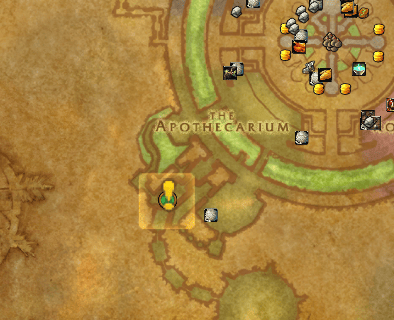
- Show on map opens the world map on that step and drops a bouncing gold ! marker on the exact spot, easy to see even on a busy map.
- A step inside an instance? Show entrance takes you to the door of the dungeon instead.
- Already have the quest? Open quest opens your quest log right on it.
Made to stay out of your way
- Move and resize the window; its position, size, open section and selected dungeon are remembered per character (or shared, if you prefer).
- A minimap button opens it (drag it wherever you like), and the addon has its own icon in the AddOns list and on the window's portrait, next to its version.
- A Preferences window behind the gear next to the close button, with the basics: opacity while moving, the minimap button, the startup chat messages, opening Completao!! together with your quest log, always opening on the Quest Log (otherwise it remembers where you left it: the log, the search or a tree), and resets for the window position, zoom and filters. More options will come. Tick Character specific preferences to keep them for one character, or untick it to share them -- filters, zoom and window included -- with all your characters.
- Fades while you move, like the world map: the window goes half transparent
while you walk or run, so it never hides what is ahead, and comes back when you
stop or when the cursor is over it.
/completao fade <10-100>changes how much (100 = no fade). - Click-through: let the mouse pass through the window in combat and/or while you move (separate settings), with its own opacity in combat.
- Sync with Blizzard Quest Log: the window opens and closes with the game's quest log, and selecting a quest there opens it -- and its chain -- here.
- Completion is always read live from the game, so it is never out of date.
Commands: /completao (or /cpl) opens the window, /completao prefs the
preferences, /completao minimap shows or hides the minimap button,
/completao fade <10-100> sets the opacity while you move. You can also bind
keys to open the window and the preferences, in their own Completao!! section
of Options -> Keybindings.
Where the data comes from
Quest data is generated, not typed in by hand: the Classic quests come from Questie's database; the ones Forever adds, and the rewards of every quest, are compiled from public quest databases. That has a consequence you should know about:
- Every Classic dungeon, raid, battlegrounds, zone, class and profession has its quests, as do the world events, and so do the ~700 quests Forever adds: in their zones and classes, and in the new Zephras Isle, Camping and Crafting entries.
- Of Forever's new dungeons, The Hall of Thanes and Ruins of Lordaeron have theirs so far; the other new dungeons and the new raids appear as their quests are published, and coverage grows with each update.
- Quest text shipped with the addon is English only; quest titles follow your client's language, and so does the description of the quests in your log.
- Some quests start inside an instance and have no known starting point yet -- for those the addon shows the entrance instead.
This is a beta: expect gaps, and please report them.
Supported game versions
- Classic "Forever" (beta)
License and credits
Completao!! is free software under the GNU General Public License v3. Copyright (C) 2026 LechuckThePirate.
- The Classic quest data derives from Questie's database -- thanks to its team and contributors.
- The names, text and locations of the quests Forever adds, and the rewards of every quest, are compiled from public quest databases.
- The quests and every game asset belong to Blizzard Entertainment. World of Warcraft is a trademark of Blizzard Entertainment, Inc.; Completao!! is not affiliated with or endorsed by Blizzard, Questie or TomTom.
Localization
English and Spanish interface (esES / esMX clients get Spanish). Missing a
translation for your locale? Open an issue or a PR on GitHub.
Feedback & Issues
Found a bug, a wrong chain, a missing quest, or have an idea? Open an issue on GitHub.
The Completao!!: Forever Team