Aggreao!!
- By
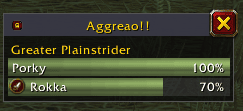
Small movable window with your target's aggro list: who has it and how close the others are, with class colors and tank/healer/dps icons. Warns you with a sound when you're about to pull. Retail, TBC, Classic Era and Forever.
Aggreao!!
Know who has the aggro before the mob does. Aggreao!! is a small, movable window that lists the aggro of your current target: who is holding it and how close everybody else is to taking it, in order, with the one on top being the one the mob is hitting. Every row has the player's class color and, where the game knows it, a tank, healer or damage icon. And if you are about to pull, it warns you with a sound.
Works on Retail, TBC Anniversary, Classic Era and WoW Forever. Currently in beta.
Features
The aggro list
Target a mob and the window lists the players (and pets) with threat on it, highest first. Each row has a bar in the player's class color that fills up as they get closer to pulling the mob -- a full bar means they take the aggro -- and the percentage next to it. If you are further down the list than the rows shown, your own row replaces the last one, so you always see where you stand. Under the title bar, the mob's name; out of combat, the window says so instead of showing made-up numbers.
Roles at a glance
A tank, healer or damage icon next to each name, taken from the roles assigned in your group or from your own specialization. Where the game doesn't tell (older clients), it is only guessed for classes that can't do anything else -- mage, rogue, hunter, warlock -- and left empty otherwise.
Warning when you are about to pull
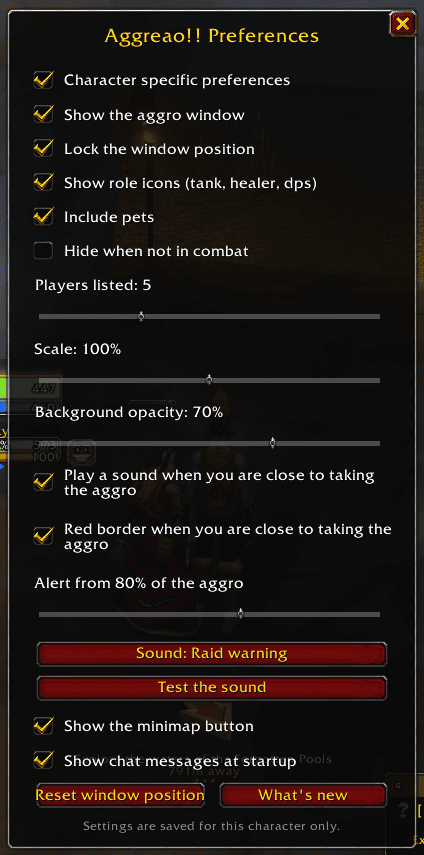
Turn on the sound and Aggreao!! plays it once when your threat reaches a percentage of what it takes to pull the mob (80 % by default; choose from 50 to 100 %), and the window border turns red. Pick the sound from a short list and try it from the preferences. It sounds once per approach -- it re-arms when you drop back, get the aggro or change target -- and it stays quiet if you are a tank, since you want that aggro.
A window that stays out of the way
- Title bar with a padlock to lock its position and a button to close it.
- Click-through in combat: the mouse goes to the game behind it.
- Hide when not in combat, if you only want it while fighting.
- Choose how many players to list, the scale and the background opacity.
- Hunters and warlocks: pets can be listed too (or left out).
Preferences
Open them with the minimap button, a right-click on the window or /aggreao.
Everything can be saved per character or shared by your whole account.
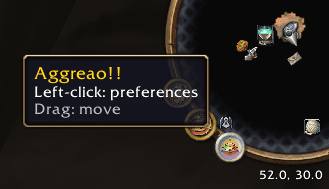
The minimap button opens the preferences with a click and can be dragged around the minimap (or hidden from the preferences).
Commands
| Command | What it does |
|---|---|
/aggreao or /agg |
Open the preferences |
/agg toggle |
Show or hide the window |
/agg lock / /agg unlock |
Lock or unlock its position |
/agg reset |
Put the window back at its default place |
/agg minimap |
Show or hide the minimap button |
/agg changelog |
What's new |
/agg version |
The addon's version |
A word about the data
What each client tells addons about threat is not the same everywhere. Where the game provides it, the list shows everybody's threat. Where it doesn't (or hides it from addons), Aggreao!! still shows who the mob is attacking, but not how close the others are -- and the pull warning can't work. If you find a client where something looks wrong, please say so.
Languages
English and Spanish (esES / esMX).
Feedback
This is a beta: you may run into bugs. Please report them (and ideas!) on GitHub.
The Aggreao!! Team