Class Marks Forever
- By
Class, spec and role icons above nameplates, with highlighted healers. Built for WoW: Forever.
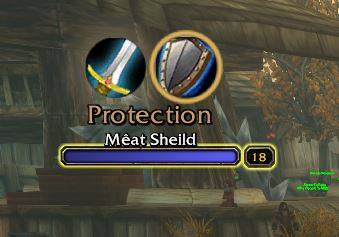
ClassMarks_Tank.JPG
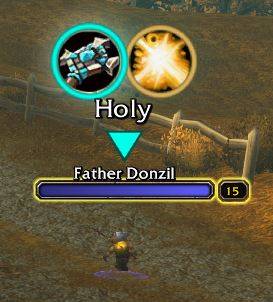
ClassMarks_Healer.JPG
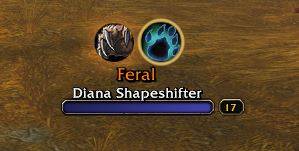
ClassMarks_Dps.JPG
Description
ClassMarks
Know who you're looking at. ClassMarks puts each player's class, spec and role above their nameplate, so you can read a crowd, a battleground or a duel at a glance. Healers stand out with a glow and a bobbing arrow.
Built for World of Warcraft: Forever.
What it shows
- Class: the round class icon, with an optional glow in the class colour.
- Spec: the player's main talent tree (Frost, Restoration, Protection...), as an icon, as text under the icons, or both.
- Role: tank, healer or DPS.
- Healers: enemy healers get a pulsing red glow and a red arrow ("kill this one"). Friendly healers get a softer green glow and a green arrow ("keep this one alive"). Both colours can be changed.
Your target's icons can be shown larger, and everyone else can be dimmed while you have a target.
How spec and role are worked out
- Your party and raid: the role they picked in the group is used straight away.
- Everyone else: ClassMarks quietly inspects players near you (within about 28 yards), one at a time, and reads their talents. The tree with the most points decides the spec, and the spec decides the role. A Feral Druid counts as a tank while in Bear Form.
- Memory: each player is inspected once. Results are remembered for a week, so people you've seen before show up instantly, and are re-checked after 15 minutes in case they've respecced.
- Low levels: a call needs at least 5 points in one tree with a clear lead, so very low-level players may show their class only.
- In combat: only your target is inspected. Everyone else waits until the fight is over.
- Your own inspects: if you inspect someone yourself, ClassMarks backs off for a few seconds so it doesn't get in the way.
Options
Open them from Options → AddOns → ClassMarks, the addon compartment button, or /classmarks. A live preview shows your changes as you make them.
- Icons: size, height above the name, target size, dimming, role icon, class glow.
- Spec: icon / text / both / off; text size, class colour, short names (Resto, BM, Affli...), all capitals. Long names shrink or shorten on their own to fit.
- Who & Where: enemy players, friendly players, your group, NPCs; hide while resting; only in PvP; always / only in combat / only out of combat.
- Healers: enemy and friendly healer highlights, their colours, and the arrow.
Commands
| Command | Does |
|---|---|
/classmarks |
Open the options |
/classmarks on / off |
Turn ClassMarks on or off |
/classmarks all / target |
Everyone around you, or your target only |
/classmarks role |
Show what ClassMarks read for your target (points per tree, spec, role) |
/classmarks npc |
Toggle NPCs |
/classmarks size 16-64 |
Icon size |
/classmarks offset -20-60 |
Height above the name |
/classmarks reset |
Back to defaults |
/classmark works too.
Good to know
- Icons only appear where nameplates do. Enemy nameplates are on by default. Friendly players need friendly nameplates switched on (Shift+V by default).
- Spec names are in English for now.
- If your settings reset every time you log in (an issue on some Forever beta builds), set them in
ClassMarks\Settings.luaand restart the game. On a client where saving works, that file is ignored. - If the game ever says "Interface action failed because of an AddOn" and ClassMarks was responsible, it prints what was blocked in chat. Please include that line in a bug report.
Class Marks Forever Team