Cap20
- By
The definitive trial & F2P companion for WoW Midnight — built for the level-20 cap, not against it.
Cap20_4.png
Cap20_3.png
Cap20_5.png
Description
Cap20
The definitive trial & F2P companion for WoW Midnight — built for the level-20 cap, not against it.




Overview
Cap20 is a purpose-built addon for trial, veteran-trial, and restricted (level-20 cap) accounts in World of Warcraft Midnight (12.0). It does not try to replace your UI — it gives you the tools Blizzard leaves out: gold-cap tracking, XP-lock warnings, trial restriction guides, BiS gearing help, and safe communication workarounds.
Every feature is opt-in via the settings panel, event-driven, and safe to run on subscribed accounts too (trial-specific modules simply stay quiet).
- Trial-first — detects account limits via
GameLimitedMode_IsActive()and adapts automatically. - Dashboard at a glance — one panel for gold, XP, bags, professions, Chromie Time, and Traveler's Log.
- Level-20 BiS suite — browser, gear planner, socket quest walkthrough, and gem guide in one package.
- Native settings — clean options built on Blizzard's Settings API (
Esc → Options → AddOns → Cap20). - Localization-ready — English master locale with override stubs for community translations.
- Performance-conscious — single event dispatcher, cached lookups, debounced warnings, Lua 5.1–safe.
Installation
Via an addon manager (recommended)
- CurseForge — search for Cap20 and install (when published).
Manual
- Download the latest release from the Releases page.
- Extract the
Cap20folder intoWorld of Warcraft\_retail_\Interface\AddOns. - Restart the game (or
/reloadif already in-game).
On first login you'll see a short welcome message pointing you at /cap20 and /cap20 tips.
Getting Started
| Command | Description |
|---|---|
/cap20 or /c20 |
Open the status dashboard |
/cap20 guide |
Open the Trial Account Guide window |
/cap20 tips |
Print the trial guide to chat |
/cap20 status |
Print a full account summary |
/cap20 gold |
Print gold vs. account cap |
/cap20 bis |
Open the level-20 BiS browser |
/cap20 build |
Open the gear planner |
/cap20 sockets |
Socket quest walkthrough + waypoints |
/cap20 gems |
Gem/enchant guide for your spec |
/cap20 emotes |
Toggle the emote quick-panel |
/cap20 talent |
Refresh the talent tree filter |
Minimap button: left-click → status panel · right-click → emote panel · drag to reposition · pulses amber when action is needed.
Configuration
Open the panel with /cap20 or Esc → Options → AddOns → Cap20.
Landing page
Quick-launch buttons for the status dashboard, trial guide, emote panel, BiS browser, and gear planner — plus links to every settings subcategory.
Settings groups
| Group | What lives here |
|---|---|
| Gold Monitor | Enable cap warnings, threshold %, alert sound |
| XP Safety | Persistent banner when XP is unlocked at level 20 |
| Interface | Blizzard subscription popup suppressor, emote panel toggle |
| Nameplates | Green 20 badge on other capped players |
| Talents | Hide unavailable talent nodes for cleaner trees at 20 |
| Extras | Traveler's Log unlock, bag monitor, quest XP warnings, smart error hints |
| Minimap | Show/hide the Cap20 minimap button |
Most toggles apply live; reopen the talent panel after changing the talent filter.
Features
Status dashboard
Your trial-account command centre.
- Account badge — Starter Trial, Veteran Trial, Restricted, or Subscribed.
- Chromie Time — active or not at a glance.
- XP Lock — locked / unlocked / N/A with Behsten/Slahtz reminder.
- Gold bar — current gold vs. cap with percentage and colour shift near the limit.
- Bags — free/total slots with low-space bar.
- Profession cap — highest skill vs. trial profession limit (75).
- Traveler's Log — unlock status for Monthly Activities.
- Quick waypoints — pin XP Locker, Chromie, Lorewalker Cho, or clear your waypoint.
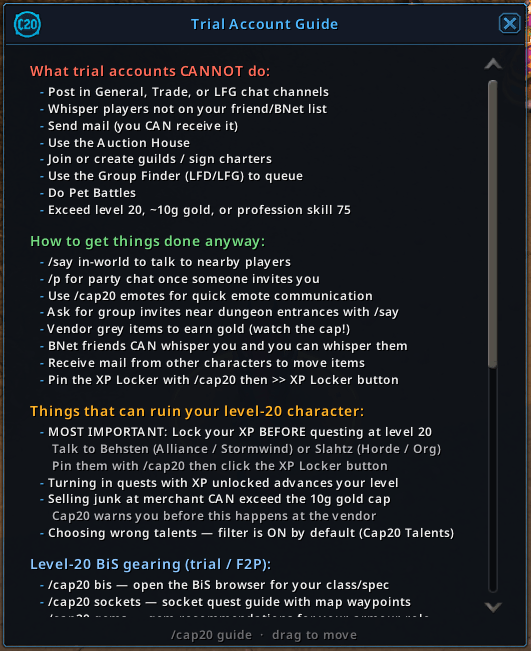
Trial Account Guide
Everything a new trial player needs in one scrollable window (or /cap20 tips in chat):
- What trial accounts cannot do (channels, AH, guilds, LFG, pet battles, caps).
- Workarounds —
/say, party chat, emotes, mail, BNet whispers. - Dangers — XP unlock at 20, gold overflow at vendors, talent mistakes.
- Gearing — BiS browser, sockets, gems, manual TBC groups.
- What Cap20 does for you — slash commands and panel overview.
Gold & economy
- Live gold vs. cap from
GetRestrictedAccountData()(never hardcoded). - Threshold warnings in UIErrorsFrame with optional alarm sound.
- Vendor check — warns if selling all grey items would overflow the cap.
- Gold section auto-hides on subscribed accounts with no cap.
XP & quest safety
- Banner when you are level 20 with XP enabled.
- Quest reward warning before you accept XP-granting rewards.
- Quest accepted reminder when a logged quest will grant XP while unlocked.
Level-20 BiS suite
Research-backed gearing for trial/F2P characters.
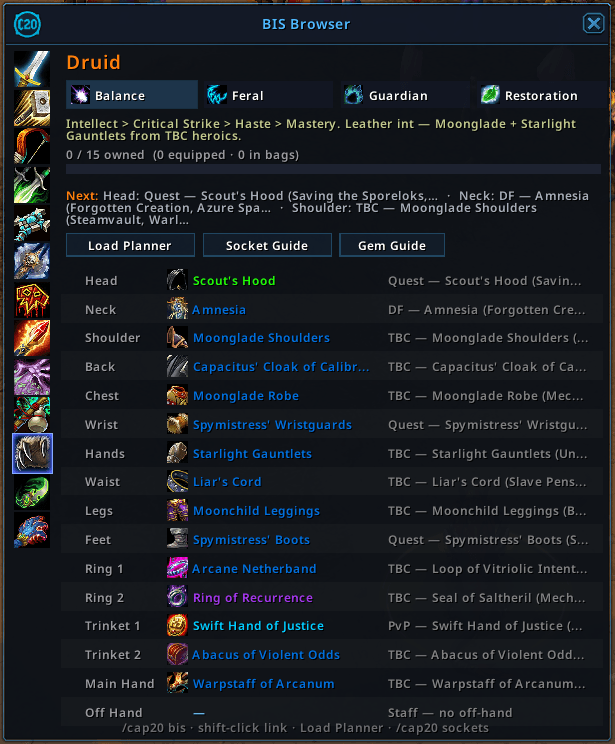
- BiS Browser — pick any class/spec; exact item links where known, stat-priority guidance otherwise; progress bar; equipped/bag checks; "next farms" hints.
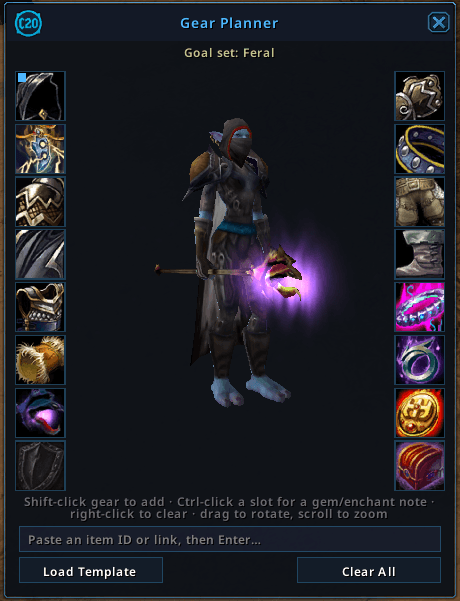
- Gear Planner — build your own goal set, 3D character preview, load curated templates, per-slot gem/enchant notes.
- Socket Quest Guide — Saving the Sporeloks, Shadow Lab chain, Soul Devices, DF neck sockets with map pin buttons.
- Gem Guide — role-based gem and enchant recommendations (plate/mail/leather/cloth presets).
BiS data lives in BiS/Data_<Class>.lua — community contributions welcome.
Communication & social
- Emote quick-panel — Wave, Thanks, Point, Beckon, Follow, Wait, Yes/No, Help, Attack, Cheer, Bow via
DoEmote()(never blocked on trial). - Smart error hints — when Blizzard shows "Free Trial accounts cannot perform that action", Cap20 explains what to do instead.
Quality of life
- Traveler's Log unlock — access Monthly Activities on trial accounts.
- Bag monitor — warns when free slots drop below your threshold.
- Nameplate markers — small green
20on fellow capped players. - Talent filter — hides greyed-out uninvested nodes you cannot pick.
- Popup suppressor — closes Blizzard trial subscription nag frames.
- Minimap button — quick access with amber pulse when XP or gold needs attention.
Localization
Cap20 ships with a full English (enUS) string table in Locales/enUS.lua. To translate:
- Copy keys into
Locales/<locale>.lua(stubs provided for deDE, frFR, esES, koKR, ruRU, zhCN). - Guard with
if GetLocale() ~= "xxXX" then return end. - Override
NS.Localekeys andNS.LocaleDatasections as needed.
Missing keys fall back to the key name in-game so gaps are easy to spot.
Contributing
Contributions, BiS data fixes, translations, bug reports, and ideas are welcome! Open an issue or a pull request.
When filing a bug, include your client version, account type (trial/subscribed), and steps to reproduce after a /reload.
BiS data: edit the relevant BiS/Data_<Class>.lua file — the engine validates armor types on load and warns about bad slot keys.
Support
Appreciate the work that goes into Cap20? Consider showing your support:
- PayPal — paypal.me/KkthnxTV
- Patreon — patreon.com/Kkthnx
- Battle.net / Balance —
Kkthnx#1105orJRussell20@gmail.com - In-game gold — Kkthnx on Area 52 (US)
License
Released under the MIT License. See LICENSE for details.
<sub>Developed and maintained by Josh "Kkthnx" Russell. Built for trial players who punch above their cap.</sub>
Cap20 Team


Owner