BiS>Healing
- By
Click-cast healing frames for any healer on WoW Forever. Drag a spell onto a mouse, click a name.
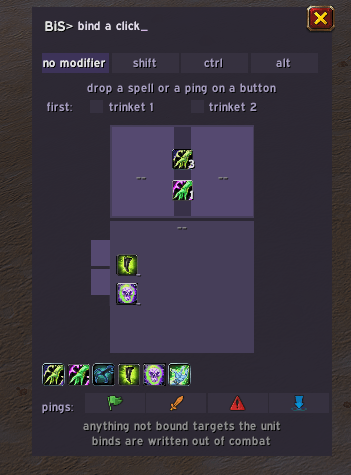
Drag a spell onto a mouse button, for no modifier, shift, ctrl or alt. Pings and trinkets too.
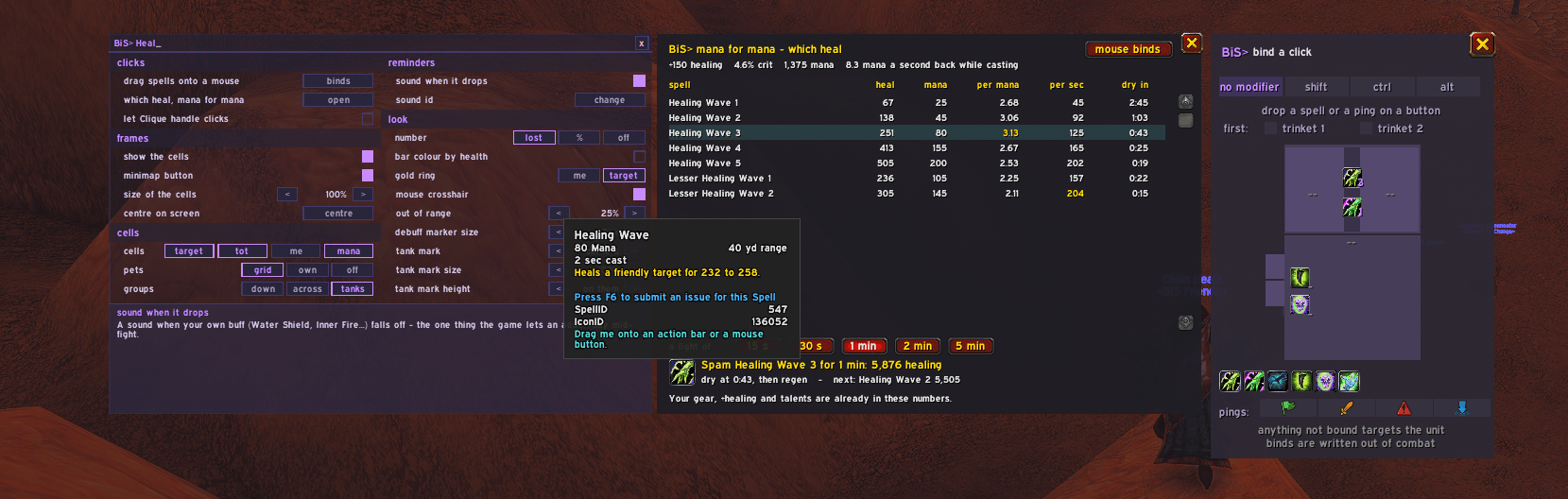
Every rank of your heals, by healing per mana and per second, and how long until you run dry.
Description
BiS Healing
Click-cast healing frames for any healer on WoW Forever.
Forty names on the screen and one of them is about to die. You do not want a spellbook. You want your mouse on their name and a heal on the button. Drag a spell onto a picture of a mouse. Click a name. That's the addon.
Your mouse, or Clique — your choice
Use ours: left-click the minimap button or type /bish mouse. You get a drawn mouse: drop a spell on the button you want to press. Left, right, middle, two thumb buttons, wheel up and wheel down, each with no modifier, Shift, Ctrl or Alt: 28 places.
- Your heals, ready to drag. A row of your trained healing spells sits in the window, each at your highest rank — drag one onto a button.
- Ranks are kept. Drop Rank 4 and you get Rank 4, not the biggest one you know — the same bar for a third of the mana. Click the little number on a slot to step through your ranks.
- Nature's Swiftness first, in one press. Drop Nature's Swiftness onto a button that already holds a heal: that button pops it, then casts the heal on whoever you clicked. The slot shows half of each icon. On cooldown you simply get the normal heal; drop the heal again to take it off. Inner Focus (priest) and Divine Favor (paladin) work the same way.
- Trinkets first, in one press. Each tab (no modifier, Shift, Ctrl, Alt) has two ticks: trinket 1 and trinket 2. Tick them and every button on that tab uses those trinkets, then the heal. Or drag a trinket you wear onto one heal's button. It stacks with Nature's Swiftness. A trinket with nothing to use, or on cooldown, is skipped.
- Macros, too. Drag a macro from your macro window (Esc > Macros) onto any button, heal side or hostile side. Write
[@mouseover]in the macro to aim it at the cell you click. - Anything not bound targets the unit. Leave a button empty and clicking a name selects them, like Blizzard's own frames.
- Right-click a slot to clear it.
Already use Clique? Keep it. Tick "let Clique handle clicks" (or /bish clique) and BiS Healing steps aside entirely. Untick it and your own binds are back.
A second mouse, for enemies
At the top of the mouse window sits a switch: heal | hostile. The hostile side is tinted red. Drop damage spells on it — Lightning Bolt, Smite, Wrath, Hex — and a click on an enemy casts those instead of your heals: a mob in your target cell, or an enemy in PvP mode. A friend still gets your heal, on the same button.
- The wheel too. An enemy under the cursor gets the hostile spell, anyone else the heal.
- Your damage spells, ready to drag. Along the bottom of the hostile side sit your trained damage and control spells (Lightning Bolt, Smite, Wrath, Hammer of Justice…) at their top rank. Drag one straight on, no spellbook needed.
- The game picks the side at the click, from its own answer to "is that an enemy", so it works in every fight.
Mana for mana: which heal to spam
Should you spam your biggest Healing Wave, or a smaller rank that costs half? Press open on "which heal, mana for mana" in the options (or /bish efficiency). A window opens beside them with every rank of every heal you know, read from your spells as they are right now — your gear, +healing and talents are already in the game's numbers:
- heal, mana, per mana, per second for each rank, with your crit included. The best per mana and the fastest are lit.
- dry in: how long you can spam that rank from a full mana bar, counting the mana you get back while casting.
- Pick a fight length — 15 s, 30 s, 1 min, 2 min or 5 min — and it tells you the rank that heals the most in that time: full speed until you run dry, then what your regen pays for. A short burst wants a fast heal, a long fight a cheap one, and it shows you where that switch is for your character.
- Drag the answer. The recommended rank's icon sits beside it — drag it onto an action bar or one of your mouse buttons. mouse binds opens the mouse right beside it.
- Group heals and heal-then-HoT spells (Prayer of Healing, Holy Nova, Regrowth, Tranquility) show with a
*and aren't ranked yet - they heal more than one number can say.
Pings, on any button you like
The game's ping wheel is good and slow — you hold a key, move the mouse, pick. In a fight you want one press.
Open /bish mouse and there are four chips along the bottom: Assist, Attack, Warning, On My Way, wearing the game's own icons. Click one, then click any mouse button — including the wheel — and it lives there.
The cell you click is who it pings. Alt-click your own cell to ping Assist on yourself; put Attack on a button and click the target cell with a mob in it. Same gesture as healing, no radial menu, no mouse travel.
Every healer keeps their own binds
This client forgets addon settings at every restart, so BiS Healing keeps your binds and settings in a macro called BiSHealing in each character's own macro tab. Your druid and your priest never share, and everything comes back at login. Please don't rename it. (/bish keep shows what's in it.)
The cockpit look
Every cell is drawn like one screen on an aircraft's instrument panel, with one colour rule: green is fine, amber is a caution, red is a warning, cyan is information, magenta is what you've selected.
- A dark screen with a thin steel border.
- The name big on top, in white, behind a small lamp in their class colour.
- Health as a gauge tape along the bottom, in a dark track with quarter marks — green, then amber, then red as they get hurt.
- What they still need in amber digits on the right, just above the tape.
- Heals on their way in cyan, a shield in white, overheal in orange — all riding the tape.
- Your target in magenta; DEAD in red, OFFLINE in amber.
Prefer the plain grid? look: classic in the options (or /bish look classic) puts every cell back, at once. New installs start in classic.
The radar look
The third look turns the grid into a quiet radar: you in the middle, your group around you, tanks always on top. Only what needs a click lights up — in a fight everything else goes invisible, so your eyes go straight to the one thing to do.
- Who needs a heal: each person is a pip that appears green, amber, then red as they get hurt, and is gone when they're fine. Click to heal; your other binds still work on it. Pets are small paws beside their owner.
- Dispels: a diamond in the cure's colour on whoever carries something you can remove.
- Interrupts: a red triangle on someone's target the moment it casts — click it to kick.
- LOS / RANGE: when a heal fails, the word appears under that person, so you know to move.
- Your mana tools on the left: your shield, Mana Tide, a mana potion, Mana Spring as the last resort, a drink and food — each lights only when it would keep you off empty, and goes dark while it cools.
- The fuel gauge across the top: the boss's health racing your mana. When the boss is well ahead of you, a warning band says slow down.
- The right rail: a catch-all (Grounding Totem, Psychic Scream) when your interrupt is cooling; after a fight, the best person to res — healers first; and for shamans CALL, BRING and RECALL: call your totems before the pull, bring them along in the fight, and after it bring them or recall them for mana back, whichever is cheaper.
- Ships: the colours change with your group's size, from a fighter for a party to a capital ship for a raid.
- The engineer's view: a button in the corner swaps the radar for the same buttons on a plain grid — party, dispels, interrupts, pets, tools — for anyone who'd rather not have the radar.
- Resize by dragging the bottom-right corner (right-click it for 100%). Drag the radar itself to move it. Both out of a fight.
- The black box along the bottom is still being built: its keypad doesn't do anything yet.
Turn it on with look: radar in the options, or /bish look radar.
The cells
One per person, and the groups can run down or across. Options: groups: down / across / tanks.
- The first name on the top line — "Kumlust", not "Kumlust Surname".
- A number on the bottom line: what they still need. It counts heals already on their way, so two healers stop filling the same gap. Shortened (
3.2K), and blank at full health. Prefer a percentage? Or nothing? Your choice. - Heals on their way, and the overheal. Incoming heals fill the missing health (cyan in the cockpit look, green in classic) and stop at the cell's edge. The part of a heal that would land on nobody shows as a bold band over the end of their health (orange in the cockpit look, magenta in classic), with a white tick where it starts — that is how much damage they can take before your heal stops being wasted. Mid-cast, cancel and re-cast until there is no magenta left - then every point of it lands.
- Coloured by health: green, amber below 70%, red below 35% — always in the cockpit look; in classic, class colour or by health, your pick.
- Cure boxes, down the left edge. One small box per cure you know: Cure Poison and Cure Disease for a shaman, Dispel Magic and Cure Disease for a priest, Remove Curse and Cure Poison for a druid, Cleanse for a paladin. Click the box to cure that person, mid-fight too. When they pick up something that box can remove, the game draws its icon in the box and the box pulses teal, with the stack count in the corner. On Forever a cure takes one stack off, so the number is how many clicks are left. Each box lights only for its own kind, so the one lit is the one to click. Your mouse buttons stay free for heals.
/bish cures offputs back a single marker instead. - Your heals over time, with a countdown: Renew for priests, Rejuvenation and Regrowth for druids, and Riptide for shamans — only your own casts, every rank. Each is found by name in your own spellbook, so it appears the day you train it and never before.
- Marker size, 6 to 20 pixels.
- Dimmed when they're out of range of your longest-reaching heal — every heal you have bound, plus your class's own — including during a fight, which is when you need it. The game keeps "can you reach them" secret in combat, so it is handed back to the game to pick the brightness from; the addon never learns who is reachable. You and your target are never dimmed. How far it dims is yours:
out of rangein the options, 20% to 90% (30% on a fresh install). - Click a corpse to res it. Out of combat, every click on a dead player's cell (any button, any modifier, even one with nothing bound) casts your res: Ancestral Spirit, Resurrection, Redemption, and for druids Revive, Forever's out-of-combat res. Rebirth is never cast for you; its long cooldown stays yours for a battle res. The moment they're up, or a fight starts, the cell is your binds again.
/bish res offturns it off. - No double res. When another BiS healer starts a res, the corpse's cell says who:
rez: Chain, until it lands or fails. Your own res casts are told to them the same way. Inside an instance fight the game hides these messages, and the cell just says DEAD. - Role icons, and the raid's Main Tank counts as a tank.
- A pyramid (
/bish pyramid): tanks on top, then damage, healers at the bottom. Melee sit above casters inside each band, and the bottom rows go half-width so a 40-man still reads as a pyramid. - Size: 60% to 160%. Put it anywhere — drag the header above the cells.
Who is who: the crosshairs
Thick corner brackets with a tick in from each side, outlined so they read on any class colour.
- Gold on you — or, with
/bish ring target(gold ring: me / target in the options), on whoever you have targeted (magenta in the cockpit look, red in classic): their raid cell, the target cell and the tot cell when they are the same person. - White on whoever your mouse is on — hover a party or raid member's character in the world and their cell lights up, so you can see who that is on your frames.
- Target and mouse on the same person: the corners stay red and the four ticks turn white.
All of it keeps working inside dungeons and raids, where the game will not tell an addon who anyone is: the question is handed to the game and the game draws the mark. The mouse crosshair starts off on a new install: "mouse crosshair" in the options, or /bish hover on.
Cells you can add
Each is a block of its own with a small BiS> bar: drag it anywhere, or shift-click the bar to send it round the grid. Two blocks never share a side. In the options window they are one row of switches — cells: target · tot · mana.
- target — a cell for whoever you have targeted, taking your mouse binds like any other.
- tot — and one beside it for their target. Useful for watching a tank's target.
- mana — one short row per healer in the group, name and percent, you included.
The game keeps another player's mana secret from addons, even out of combat. This addon never learns the number — it asks the game for the percentage and hands it straight to the screen.
PvP mode: see what your team is hitting
Switch on PvP mode in the options, or type /bish pvp on — or /bish pvp bg to have it only in battlegrounds and arenas.
Beside each player's cell sits a small one with whoever they are targeting. Your groups keep the shape you picked: down (columns of 5), across or tanks.
- Click it and your binds cast on that target, so you can hit what your team is hitting — your hostile binds on an enemy, your heals on a friend.
- Red for an enemy, green for a friend, with the target's health on the bar. Hover it for the full name.
- The focus gets a gold edge. When two or more of your team are on the same enemy, and more than on any other, that enemy's cells are edged in gold.
- Your interrupt, ready to press. Each target cell carries your class's interrupt icon — Earth Shock, Kick, Pummel, Counterspell, Hammer of Justice, Silence, Bash, Spell Lock or Scatter Shot. It sits dim, and lights up the moment that target starts casting or channelling — with a gold glow, a bounce, or both (your pick: "cast alert" in the options). Click the icon and it casts your interrupt, at its cheapest rank, at that target — no bind needed. After you use it, a cooldown sweep runs over the icon until it's ready again. It only appears on enemies; a teammate targeting a friend keeps a plain cell. The game keeps the spell itself hidden from addons; this only tells you a cast is happening.
Off by default for everyone. /bish pvp off turns it off.
A buff to watch on the whole group
/bish watch Lightning Shield names a spell you have trained, and between pulls the header tells you when it is not up on anyone. /bish watch off stops it. Nothing is watched until you ask, and it never nags about a spell you do not have.
It works in a dungeon, which is the point. The buff is asked for by spell id rather than by reading a unit's whole list of auras — and by id is the one aura question this client still answers inside an instance, where listing auras is refused outright even between pulls.
And it never reports a guess as a fact. If the game is hiding a buff, that is "we cannot tell", not "it is not up". A hidden buff and a missing one look identical from here, and the difference matters when the addon is about to tell your raid something.
BiS> now — the button for the moment you are in
A small block you can drag anywhere. Switch it on with /bish now.
It starts with one button: help. It is faint while you are well, warms to amber as your health drops, and goes solid red low down, with its outline following — and the colour is chosen by the game, from health this addon is never allowed to read. Click it to ping for help at yourself. On your corpse it keeps a dimmer, slower glow, so somebody looking to res you can find you.
More buttons arrive as you need them. Each earns its place the first time its moment happens, and the order learns: what keeps coming up drifts to the front, and help stays first.
Your shield, live in a fight. A shaman gets a Water Shield button (a priest Inner Fire, and so on: whatever /bish buff watches). Full charges: the plain icon. Two left: it washes yellow. One: orange. Gone: the icon pulses red. Click it to put the shield back, mid-fight too. Your own buffs are secret to addons in a fight, so the addon never looks — the game draws the icon and picks the colour.
The next res, already aimed. After a wipe, BiS> now carries your res with a name on it: the best person to get up next. Healers first, then priest, paladin, shaman, druid, mage, warlock, hunter, warrior, rogue. It skips anyone another healer is already ressing, anyone with a res on the way, and anyone who released. Click, and it moves on to the next. It is only there out of combat, while someone is down.
Weapon oil. With a mana or wizard oil in your bags, an Oil button appears wearing its icon. One click puts your best oil on your main hand. It is lit while the weapon has none and dims once it does. Hover it for what the oil gives, read from the game itself, and how long it has left.
Buff buttons, for the group's buffs. Type /bish buffs and BiS> now gets a button for each group buff you have trained: Power Word: Fortitude, Divine Spirit and Shadow Protection for a priest, Mark of the Wild and Thorns for a druid, Arcane Intellect for a mage. Your spellbook decides which, never your class, so a button turns up the day you train the spell.
- Only when it is needed. A button shows out of combat, while someone in reach is missing that buff or has under 5 minutes of it left. Everyone covered: it goes.
- One click, the right person. Missing it before running low, then tanks, then healers. Hover it to see who it is aimed at. Anyone AFK still gets the buff, but last.
- The rank they can take, so a low-level player doesn't get "Target is too low level".
- Only in reach. The game casts a buff on you when the person it was aimed at is out of range, and says nothing. So a button only aims at someone the game says you can reach, and looks again as people move.
- Thorns on tanks, Intellect and Spirit on mana users. Shadow Protection is off until you want it (
/bish buffs shadow on); any of them can be switched off the same way. - Never a guess. If the game is hiding someone's buffs, they count as "we cannot tell", not "missing". No button for a buff that might already be up.
Off by default. Paladins are left out on purpose: Pally Power does blessings.
The header talks to you
Out of combat, the buff you keep forgetting. no Water Shield, right there — one per healing class to start with, and only if you have actually trained it. /bish buff <name> watches something else. With BiS> now switched on, its shield button shows this instead, live, so the header stays quiet about it.
And a sound when it drops. Your own buffs are secret to addons during a fight, so nothing can look — but the game will still make a noise for you. Switch it off in the options, or open the sound id drawer to put a different one in, with a hear button to try it.
In a fight, the five second rule. Spend mana and a bar drains across the header over the five seconds until your regeneration comes back: regen 100% between casts, regen 62% while they're ticking. The numbers come from your own character sheet.
Honest about what it can't see: this client hides your own regeneration once a fight starts, so the header shows the last figure it was given, and says
regen ?if it has never had one.
Quiet by default
Nothing is written to your chat frame during normal play.
One exception, and it is there so you are never left guessing: on some PCs the game will not let an addon place the small aura markers on a cell. BiS Healing then leaves the markers out, draws every cell as normal, and says so once. /bish auras tells you why.
Settings
Left-click the minimap button for your mouse binds, right-click it for the options window — two columns, everything in it. Right-click again to close it. Hover the button and it says which click is which.
Or find it in the game's options: Esc > Options > AddOns > BiS>. Every BiS addon you have is listed there with what it has on. BiS> Healing has a full-page dashboard of its own: every section down the left — frames, binds & clicks, look, layout, target & pets, BiS> now, buff buttons, buff reminder, the channel — and the one you pick, big and readable on the right, with a big "mouse binds" button.
A new install starts quiet: only the main job is on — the cells, your binds, cure boxes, your heals over time, click-a-dead-friend res and the gold ring. The mouse crosshair, the LOS flash, the buff-drop sound and the buff reminder start off, each one a switch away in the options. Already using it? Everything you had stays as it was.
Or type:
| command | does |
|---|---|
/bish |
the options window |
/bish mouse |
the mouse binds, heal and hostile side, and the ping chips |
/bish efficiency |
mana for mana: every rank of your heals, and which one to spam |
/bish clique |
let Clique handle the clicks, or take them back |
/bish trinkets shift both |
trinkets first on a modifier tab — 1, 2, both, off |
/bish now |
the BiS> now block |
/bish buffs |
the buff buttons in BiS> now — on, off, or one buff: fort, spirit, shadow, mark, thorns, int with on or off |
/bish cures · /bish res |
the cure boxes, and click-a-corpse-to-res: on or off |
/bish watch <spell> |
a buff to watch on the group — off stops it |
/bish target · /bish tot · /bish mana |
the cells you can add |
/bish pets grid · own · off |
where pets go |
/bish pvp on · bg · off |
PvP mode: each player's target beside them, always or only in battlegrounds and arenas |
/bish buff Water Shield |
a buff on yourself: the shield button in BiS> now, or the header when that is off |
/bish buffsound |
the sound when it drops — an id, off, on, default, test |
/bish across · /bish grid · /bish pyramid |
groups across, down, or by role |
/bish missing · /bish percent · /bish number off |
the number on the cells |
/bish colour · /bish hots · /bish markers 14 · /bish scale 90 |
how it looks |
/bish ring me · /bish ring target |
the crosshair on you, or red on your target |
/bish hover on · off |
the white crosshair on whoever your mouse is on |
/bish dim 40 |
how far out-of-range cells dim, 20 to 90 |
/bish center · /bish hide · /bish show |
where it is |
/bish scan · /bish range · /bish regen · /bish overheal |
what this client will tell me right now |
/bish byid · /bish ping · /bish curve · /bish control · /bish hits |
the same, in detail — for bug reports |
/bish keep |
what's saved in your BiSHealing macro |
/bish cpu |
which addons make your game hitch, and whether it is us |
Why it works the way it does
Forever will not let an addon read another player's health. Or their auras, their mana, whether you can reach them. Inside a dungeon, not even between pulls. So BiS Healing never asks. It hands each number to the game, and the game draws it.
The bar, the missing number, the dimming, the dispel marker, the magenta overheal, all drawn by the game from numbers this addon never sees. That is why it keeps working in every fight. And why it will not rank people by damage taken. It cannot see it.
When it cannot tell, it says so. It does not guess.
It is also built to sit still. A cell is redrawn when the game says that person changed, not ten times a second for nothing. A quiet raid second used to cost 8,300 questions to the game. Now about 1,400.
TBC
This is the Forever edition. In a TBC client it loads one line saying so and does nothing else — on purpose, so it can never touch an older BiS Healing's saved settings.
BiS>Healing Team