BiS>Tools
- By
Death recap, rivals, pals and battleground marks for WoW Forever: see what killed you, who heals them, and who's back. Type /bist.
Screenshot 2026-10-12 213258.png
Screenshot 2026-10-12 211149.png
Screenshot 2026-10-12 215917.png
Description
BiS Tools
What killed you, who to watch for, who heals them, and what to farm. For WoW Forever.
You're dead, and you never saw it coming. BiS Tools opens the game's own record of the hits that killed you: who landed the last one, who helped, with what, and how fast. Click a player on that screen and they're your rival. The next time they walk into view, you'll know.
Death recap
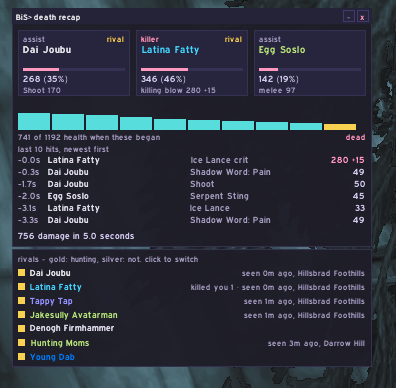
When you die, a small window opens with the last ten hits.
- The killer in the middle, the two biggest helpers either side. Their damage, their share, their main spell, the killing blow and how far past zero it went.
- Your health falling across those seconds, gold where a hit was a crit.
- The hits, newest first, crits and blocks marked, and a total: "306 damage in 6.0 seconds".
- Players in their class colour. Mobs are grouped by who they really are. Forever gives a mob a new nickname on every hit; the recap knows it was one Molten Elemental, not three.
- It closes when you're back in your body.
/bist recapopens your last death again.
Rivals
Click a player on your recap, or right-click an enemy player and pick BiS: add rival. They're gold now: hunted.
- They walk into view, you hear it. A warning in the middle of your screen, a sound, and where you are. Once a minute at most.
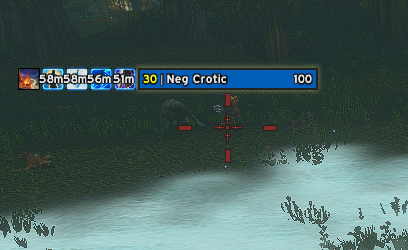
- A crosshair on their body, pinned under their nameplate, pulsing. Eight shapes to pick from, or none. It needs enemy nameplates on; the options have a button for that.
- One button targets them, even across the map. It sits in the BiS> tools box and takes a key if you want one.
- Enemies only. A friend can't be a rival, and a "Terry Lin" on your list never marks a "Terry Daviss": whole names and player IDs are checked.
- In a battleground, the right-click menu can't carry the line, so a red + in the tools box adds your target. A rival you add there is for that match only. Kill you ten times and they're kept for good.
Pals
Right-click a friendly player and pick BiS: add pal. A small green heart sits over them, out of combat, so you find your people in a crowd. /bist pal on your target does the same in a battleground.
A whole surname
Forever lets a guild share a surname. /bist surname Foreverpvp puts a small gold crown over everyone wearing it: enemies any time, friends out of combat. One call-out a minute for the whole surname, not one per player. The same again turns it off.
Battlegrounds: their healers, and their killer
Forever hides the scoreboard's numbers from addons mid-match. It still sorts by them. BiS Tools reads the order, and their top three healers wear white crossed sabers, their top killer red ones, glowing on the body.
- One click targets one of them, the nearest first, from a saber button in the tools box. A BiS> mark button under the scoreboard reads it on demand.
- It remembers. A healer from last match is marked the moment they show up in the next one.
- It never touches your scoreboard while you're reading it, and stays quiet the first 90 seconds, while everyone is still at zero.
- Five looks (X, saber, arrow, diamond, corners), with size and height in the options.
Guild rivals
Right-click a player and pick BiS: add guild rival, and every guildmate running BiS Tools learns them. A guild rival wears an amber crosshair, so you know the call came from someone else. When anyone sees one, the guild's lists say where, and who saw them. No sound.
Guildmates in passing
Out in the world on your own, a guildmate gets a small teal guild crest under their nameplate. Nothing else: no sound, no text. Join a party, a raid or a battleground and it's gone.
A thank-you for buffs
A stranger buffs you on the road and you're mid-pull, or just didn't notice. Switch on /bist social on and BiS Tools does it for you: a random friendly emote at them, a thank or a hug or a bow. Two to five minutes between emotes, never the same person twice in ten, never in a fight, and your group left alone. It's off until you turn it on.
Farm
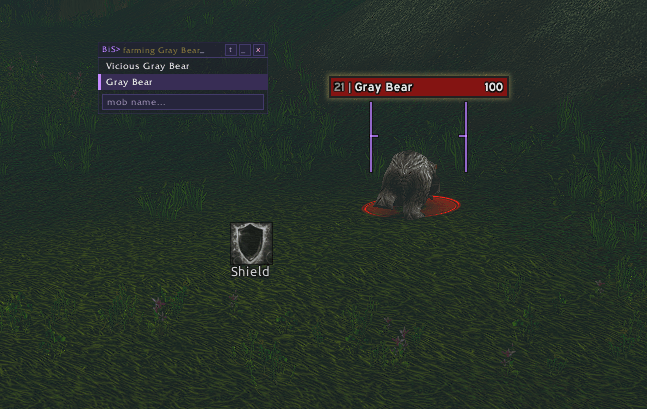
Type a mob's name, kill one, or right-click it and pick BiS: track in farm.
- The skull, on a fresh copy. One key press targets a live one nobody else has tagged and marks it.
- A purple crosshair on every live copy in view, so you can see the next one coming.
- Spawn timers. Where you killed it, and when it's back. On the minimap, on the world map, and as a big arrow pointing at the next one up.
- RestedXP's targets. If you run RestedXP, the mobs your guide step wants show in the farm window and wear the purple crosshair too.
The BiS> tools box
The farm's skull, the rival target button, and in battlegrounds the red + and the saber button sit together in one small box. Each shows only when it has something to do. With BiS Healing's "BiS> now" on screen, the box docks beside it.
Settings
Left-click the minimap button for the tools, right-click for the options. Hover any setting and the strip at the bottom of the window says what it does. Or type:
| command | does |
|---|---|
/bist |
the list of tools |
/bist recap |
your last death |
/bist rival · /bist rivals |
add your target as a rival · list them |
/bist pal · /bist pals |
add your target as a pal · list them |
/bist surname <word> |
crown everyone with that surname (again: off) |
/bist recap forget <name> |
drop a rival |
/bist recap key F6 |
a key that targets a gold rival - off to drop it |
/bist recap style scope |
the crosshair: rails, L, aim, box, scope, drop, chevron, tee, none |
/bist bg mark · why · clear |
battlegrounds: read the board now · what it saw · forget everyone |
/bist social on · off · group · why |
the thank-you emote for buffs |
/bist farm |
the farm window |
/bist farm key F5 |
the skull key |
/bist on <tool> · /bist off <tool> |
switch a tool on or off |
Why it works the way it does
Forever closed the combat log to addons. So this one never asks for it. The death recap is the game's own record, the one Blizzard keeps for its recap screen, read to the last number in a dungeon, mid-fight, before a line of the window was written.
The battleground marks work the same way. The numbers are hidden. The order isn't. So it reads the order.
The rest watches nameplates. When one appears, a name is read and compared. With nobody to watch for, a city full of players costs nothing.
When the game won't say, it says so. It does not guess.
BiS>Tools Team