
BigNoteBox
- By

BigNoteBox is a modern and feature rich in-game notepad addon letting you create, organize, & access notes without leaving WoW. Track quests, boss strategies, crafting, other info. It keeps your notes handy & shows them when needed by place or situation!
File Details
BigNoteBox v1.7.0
- R
- May 9, 2026
- 20.71 MB
- 87
- 12.0.7+3
- Retail
File Name
BigNoteBox_v1.7.0.zip
Supported Versions
- 12.0.7
- 12.0.5
- 12.0.1
- 12.0.0
Changes in v1.7.0
Major Feature: Task system!
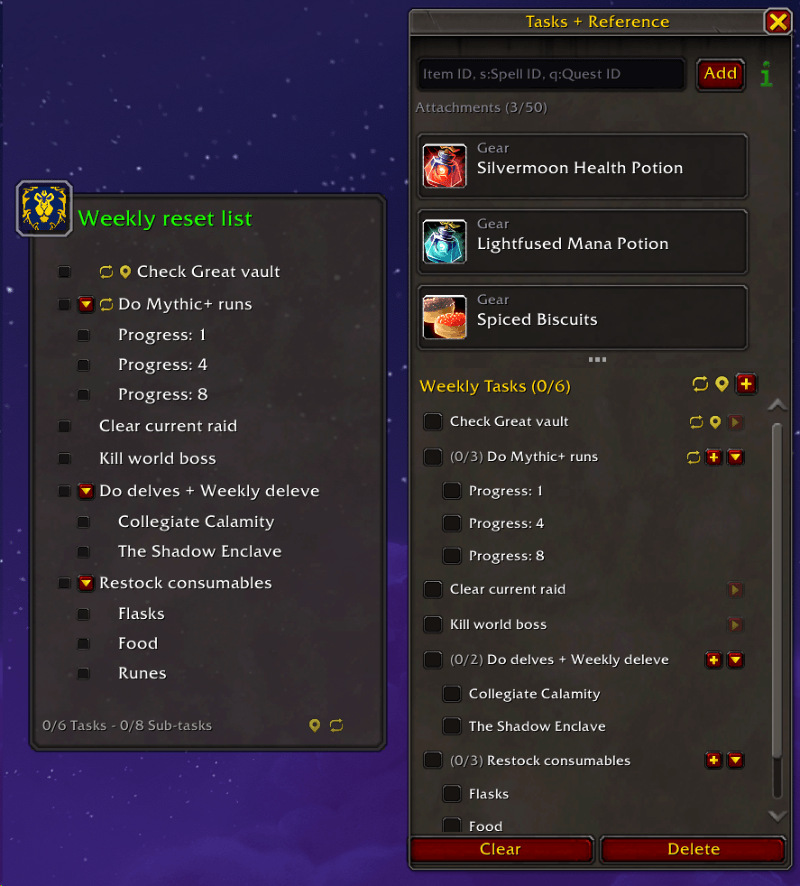
- New: Task system! Add tasks and sub-tasks to any note
- New: Tasks can have daily or weekly auto-reset (set in the task edit window)
- New: Tasks can be bound to a situation (zone, instance, player) (set in the task edit window)
- New: Sub-tasks can collapse and expand
- New: Task panel in the Reference Box with header, footer, and splitter
- New: Sticky notes can show task view instead of note body (toggle with the task button in the sticky header)
- New: Task view in sticky notes with live checkbox toggling
- New: Task filter button in the note list
- New: Task icon shown in note list rows for notes with tasks
- New: Tasks added as a share tier in the share system
- New: Global reset and situation icons in sticky note task footer
- New: Task list spacing setting: Compact, Normal, Spacious (Config > Features > Tasks)
- New: Stone background texture added to sticky note appearance (Sticky Settings > Appearance)
- New: You can now change the opacity of all windows in skin mode (Config > Appearance > Skins > Window opacity)
- Change: Background opacity in sticky notes can now be set to 0 (Sticky Settings > Appearance)
- Change: Sticky note task footer shows Tasks and Sub-tasks counts separately
- Change: Task toggle buttons match the Reference Box style
- Change: The triggered alarm window now follows the skin
- Change: Alarms now default to "Wait for combat to end" instead of "Fire immediately". Can be changed per alarm in the advance tab
- Fixed: The icon for the trash stat in Config > General was not showing
- Fixed: Tag bar in main window included the "Add tag..." input field in the counter. Now ignores it and shows correct hidden tag count
- Fixed: Separation line in the alarms window reduced to 1px and hidden when no alarm is set