
BigNoteBox
- By
BigNoteBox is a modern and feature rich in-game notepad addon letting you create, organize, & access notes without leaving WoW. Track quests, boss strategies, crafting, other info. It keeps your notes handy & shows them when needed by place or situation!
File Details
BigNoteBox v1.5.1
- R
- Apr 17, 2026
- 19.74 MB
- 53
- 12.0.5+2
- Retail
File Name
BigNoteBox_v1.5.1.zip
Supported Versions
- 12.0.5
- 12.0.1
- 12.0.0
Changes in v1.5.1
- Added: You can now migrate notes from the addons Notepad, Notes and TinyPad too
- Added: There are 8 more skins to choose from Midnight, Ember, Arcane, Fel, Titan, Frost, Emerald and Light
- Removed: Left over code from when I was working on a classic version
Changes in v1.5.0
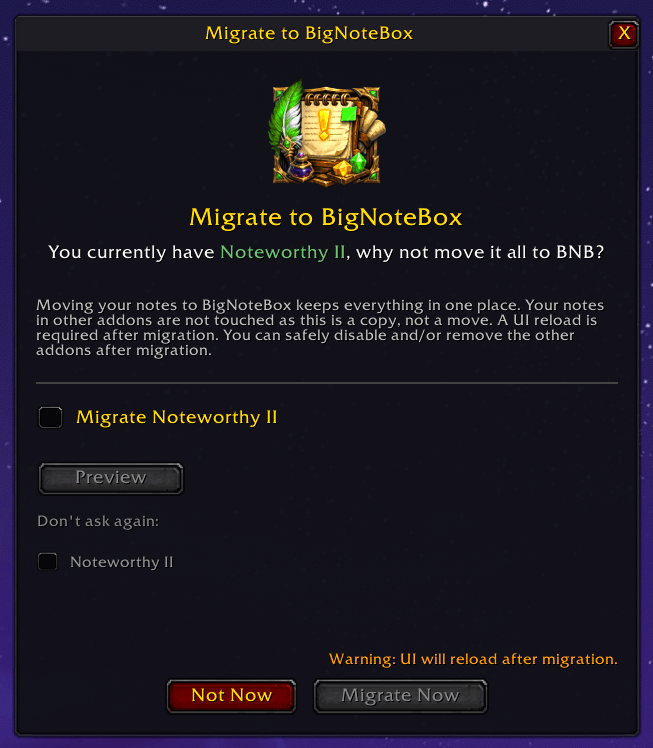
- Major feature: Migration from NoteworthyII, TakeANote and YetAnotherNotepad. If you have any of the three you will get a popup window when you start the game that asks if you want to migrate your notes from them to BNB. This will not remove the notes for the three other addons, only make copies of the notes in BNB. There is also a preview window so you can see what is migrated to BNB
- Added: New section in "Config → Advanced" for migrating from the three addons above. This section will only show if any of the three addons are installed and active
- Added: You can now show/hide the sidebar using the sidebar button in the topbar to the right of the config cog
- Added: The time of day icon that shows in the note window with no note selected now has an icon for dawn and dusk
- Fixed: Importing a shared note wouldn't show refbox content if there was any
- Fixed: Ctrl+C popup didn't work as intended, fixed it and added a nice AutoCast animation to make it pop more
- Fixed: Disabling the sidebar in "Config → Features → Character Sidebar" will now set the filter to "All notes", before it would keep the current selected sidebar item
Changes in v1.4.5
- Fixed: There was a bug after adding skinning that would not let the sticky note config window open
Changes in v1.4.5
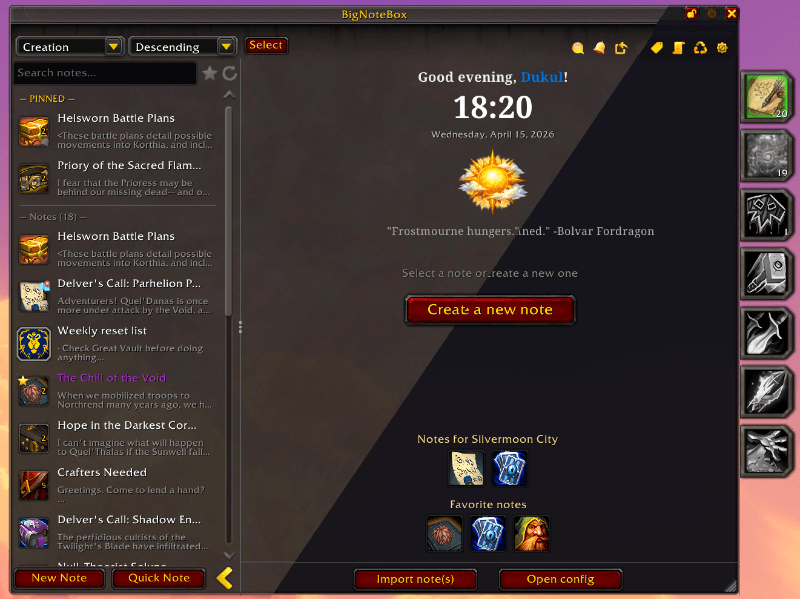
- New Feature: You can now change BNB into a skinned mode that will let you choose between three darkness types (going to be adding a lot more variants soon with different colors)
- New feature: New share window. Right click or click share button for a note and you can share that note with other players in game or through places like Dicords etc. You can choose between what from the note you want to send ex. Only title and body, title, body and refbox and more. You can import notes from the same window
- Added: All windows (except main config for the time being) have a skinned version
- Added: Added LibDeflate
- Added: 10 new sounds to use with alarms
- Fixed: Focus mode window won't open if no note is selected anymore
Changes in v1.4.2
- Added: Welcome screen for when no notes are shown! This will also show your favorited notes and notes for the location you are currently in if any are set
- Added: You can now import notes from the welcome screen. So if anyone sends you a note as JSON you can add notes from there
- Change: Creating a new note will now show a popup where you can write the title, choose icon, change title color, font type and font size. If you want to create a note quickly use "Quick Note"
- Change: The "Set alarm" window will now show as "Edit alarm" if the note has an alarm active or an overdue one
- Change: The alarm indicator on the icons in note list will now be desaturated if the note has an alarm that has fired, and show the alarm icon normally if an alarm has yet to fire
- Change: You can now deselect notes in the note list by clicking the selected note a second time. Double click will still open the settings for the note
- Fixed: Right click menu will now show alarm items correctly
- Fixed: The addon will now look for notes that have no title and delete them on reload/relog
- Fixed: Hitting the shortcut to open/close the main window will not correcly close all windows currently open
- Fixed: Forgot to update the new placement of the flags in main config General tab
- Fixed: Wrong icon used in top bar for "Send note to BigChatBox multiline input", and if BCB isn't installed it will show that instead
Changes in v1.4.1
- Added: Text explaining what "Idle delay" and "Forced interval" does in Config → Editor → Undo / Redo
- Added: You can new click "View" on a note in the Trash to see it before you restore or delete
- Added: Ten new sounds to use with your alarms
- Change: Creating a note and not setting a title will now give a discard popup
- Fixed: Forgot to change the location of the icons in the WYSIWYG toolbar
- Fixed: Changing the animations for an alarm didn't update the preview icon
- Fixed: When using "Create new alarm" it wouldn't reset the Set Alarm window. All old options where there, including reminder text. Will now reset all of it
- Fixed: Creating a note and changing options for it before adding the title will no long dismiss the note
- Fixed: Clicking "Select" in the Alarms window did nothing. Changed how this work
- Fixed: Clicking ESC with the Alarms window open would fail to close the alarm window first
- Fixed: Clicking ESC with the trash note preview window would fail to close the preview window first
- Update: LibSharedMedia-3.0
Changes in v1.4.0
Major feature: Alarm System
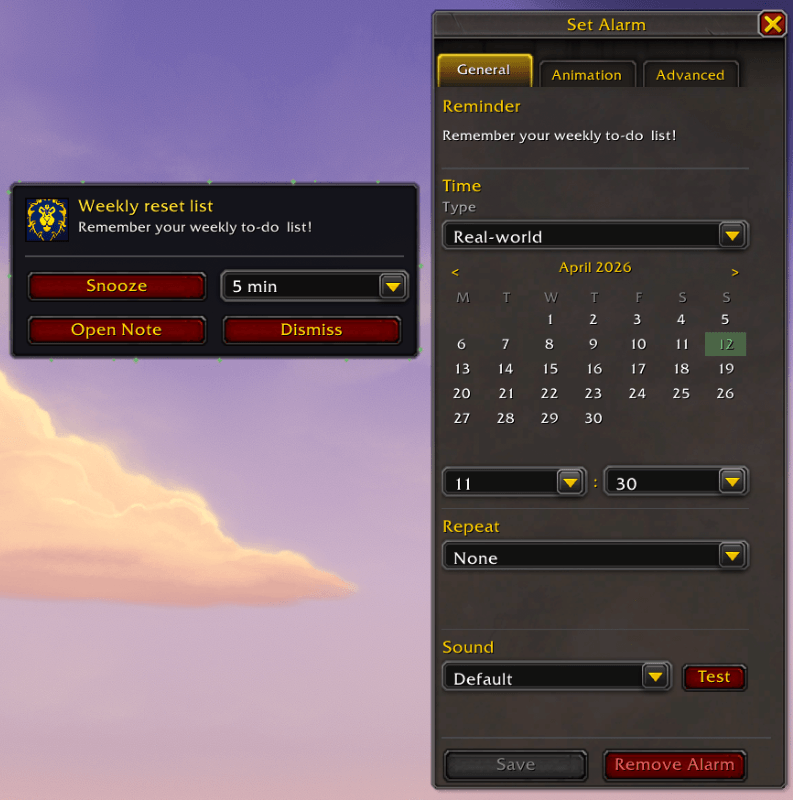
Your notes can now have alarms set so that they show up the date and time you want. This feature is highly configurable to fit your needs. You can set an alarm from right click menu in main window, or from the new alarm button on a sitcky note. There is also a new "Alarms" window that shows you all alarms you have set
New Set Alarm window
- General tab: Short reminder label, date/time picker (real-world calendar or daily in-game server time), repeat options (none / WoW weekly reset / specific weekdays / every N days), sound (default or silent)
- Animation tab: Glow type (Pixel / AutoCast / Border / Proc), glow mode (continuous / pulse / once), color picker, per-type parameter sliders with live value display, continuous live preview at the bottom
- Advanced tab: On Fire behaviour (alarm popup / open sticky note / minimized sticky with animation), snooze (enable/disable, interval 1–60 min, repeat limit), combat handling (fire immediately or queue until out of combat, with post-combat delivery options)
Alarm fires
- Plays a sound, unless silent (more sounds are coming)
- Starts glow animation on the note's icon in the note list and any open sticky
- Three "On Fire" modes:
- Alarm popup
- Dedicated popup window with Dismiss, Snooze, and Open Note buttons
- Open sticky note
- Opens the note as a sticky: closing the sticky or clicking the alarm button dismisses the alarm
- Minimized sticky with animation: shows the note as a minimized icon with glow; left-clicking it or right-clicking → Dismiss Alarm
- Alarm Overview window (bell icon in top bar)
- Lists all notes with alarms, sorted by next fire time
- Shows active, snoozed, and fired alarms
- Per-alarm context menu: Open Alarm, Open Note, Open as Sticky, Delete Alarm
- Fired alarms are desaturated with a Reset button
Alarm data model
- Stored per-note
- Supports recurrence (weekly reset, specific weekdays, every N days)
- Snooze state persists across sessions
- Fired state persists until manually reset or alarm is deleted
- Missed alarms (fired while offline) detected on login and shown in the overview
Other
- Added: Added LibCustomGlow-1.0 to give alarm system animations
- Change: Updated button graphics, and cleaned up the \Assets\ folder
- Change: Added a button press state so you see when you press them
- Change: Icons in note list now have a default border, looks kinda bare without. You can of course still change the border if you want
- Fixed: The focus button in the title bar would hide when the multi select button was clicked