BankShot
- By
See your bank from anywhere: one click from your bags shows a snapshot of everything you’ve stored.
Description
BankShot
See what's in your bank from anywhere.
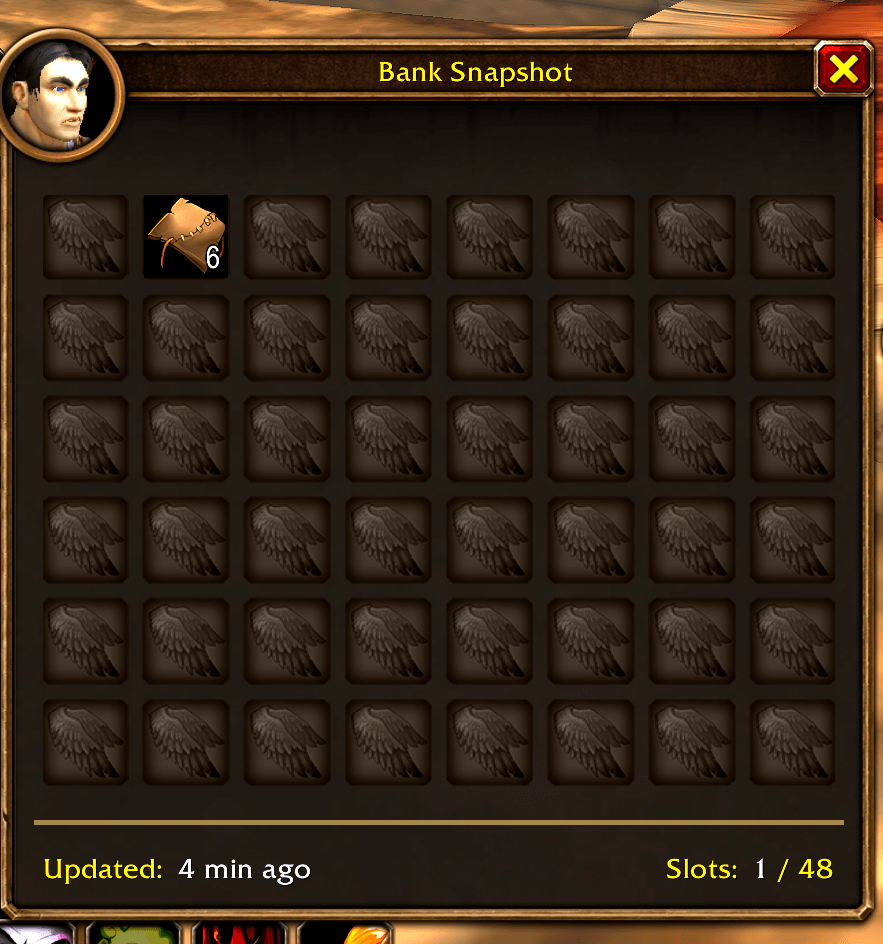
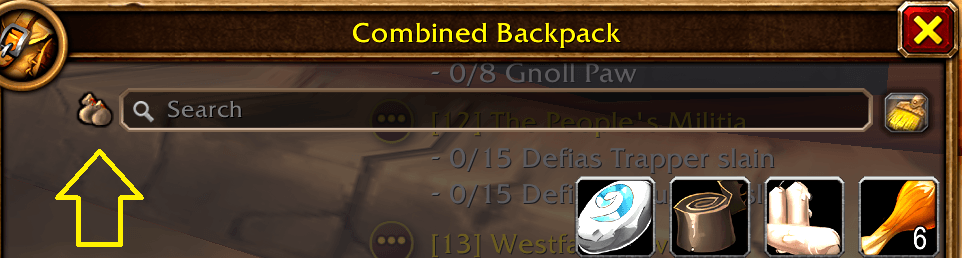
BankShot adds a small banker icon next to the search bar on your bags. Click it to open a snapshot of your bank, laid out just like the real one, so you can check what you have stored while you're questing, in a dungeon, or standing at the auction house.
Features
- One-click preview. A small icon beside the bag search bar opens the snapshot.
- Looks like the real bank. It uses the same frame, portrait, stone background and item slots as the game's bank window.
- Updates automatically. The snapshot refreshes every time you visit a banker and whenever items change while the bank is open.
- Includes bank bags. Each bank bag shows in its own section below the main 48 slots.
- Works with bag search. Typing in your bag search bar also highlights matching items in the snapshot.
- Full tooltips. Hover any item for its tooltip. Shift-click links it in chat, and Ctrl-click previews it in the dressing room.
- Per character. Each of your characters keeps its own snapshot.
- Shows when it was taken. The footer shows when the snapshot was last updated and how many slots are used.
Usage
- Open your bank once to take the first snapshot.
- Click the banker icon next to the bag search bar, or type
/bankshot. - Press Escape or click the X to close it.
Made for World of Warcraft: Forever.
BankShot Team