BagItemLock
- By
Alt+Right-click to lock bag items. Locked items can never be sold to a vendor or deleted by accident.
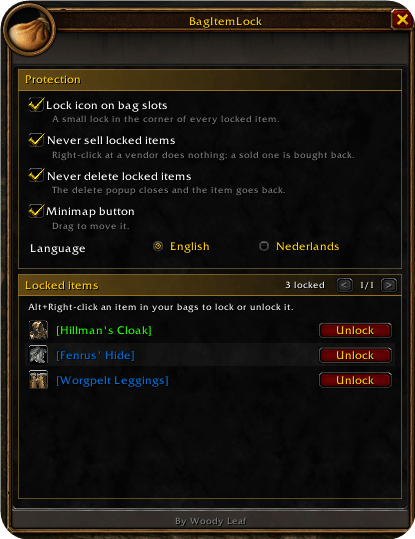
Screenshot 2026-11-09 08-33-07.png

Screenshot 2026-11-09 08-33-42.png
Description
BagItemLock protects the items you care about from one wrong click. Lock an item with Alt+Right-click and it can't be vendored, auto-sold or deleted until you unlock it again.
No more selling your hearthstone, your best trinket or that rare drop to a vendor because you clicked too fast.
How it works
- Open your bags.
- Alt+Right-click an item to lock it.
- A gold padlock and a gold edge show up on its bag slot. That item is now safe.
Alt+Right-click it again to unlock it. A short tutorial walks you through it the first time you log in. Want to see it again? Click Show tutorial in the panel or type /bil tutorial.
Never sold
- At a vendor, right-clicking a locked item does nothing.
- If something still sells it, such as an auto-sell or junk addon or dragging the item onto the vendor window, BagItemLock buys it back right away.
Never deleted
Try to delete a locked item and the delete popup closes. The item goes back to your bag.
Easy to spot
- A crisp gold padlock in the top right corner of every locked slot, readable on any item icon.
- A gold edge around the slot.
- The tooltip says the item is locked and how to unlock it.
All your locked items in one place
Type /bil, click the minimap button or pick BagItemLock in the addon compartment to open the panel. It lists every locked item with an Unlock button and holds the settings.
Commands
| Command | What it does |
|---|---|
/bil or /bagitemlock |
Opens the panel |
/bil [item link] |
Locks or unlocks that item |
/bil tutorial |
Shows the tutorial again |
Settings
- Lock icon on bag slots
- Never sell locked items
- Never delete locked items
- Minimap button
- EllesmereUI look (turning it off takes a
/reload) - Language: English or Nederlands
Good to know
- Locks are saved per character and per item, so they follow the item to any bag or slot.
- Works with Blizzard's bags and with EllesmereUIBags. With EllesmereUI installed the panel and the tutorial wear its theme and your accent color.
- Lightweight, no libraries needed.
- Made for WoW Forever.
Found a bug or have an idea? Leave a comment on this page.
BagItemLock Team