Auto Trash | Sell & Destroy Junk | Junk Seller
- By
Mark items as junk, and they're sold at every vendor or deleted cheapest first, one key press per stack.
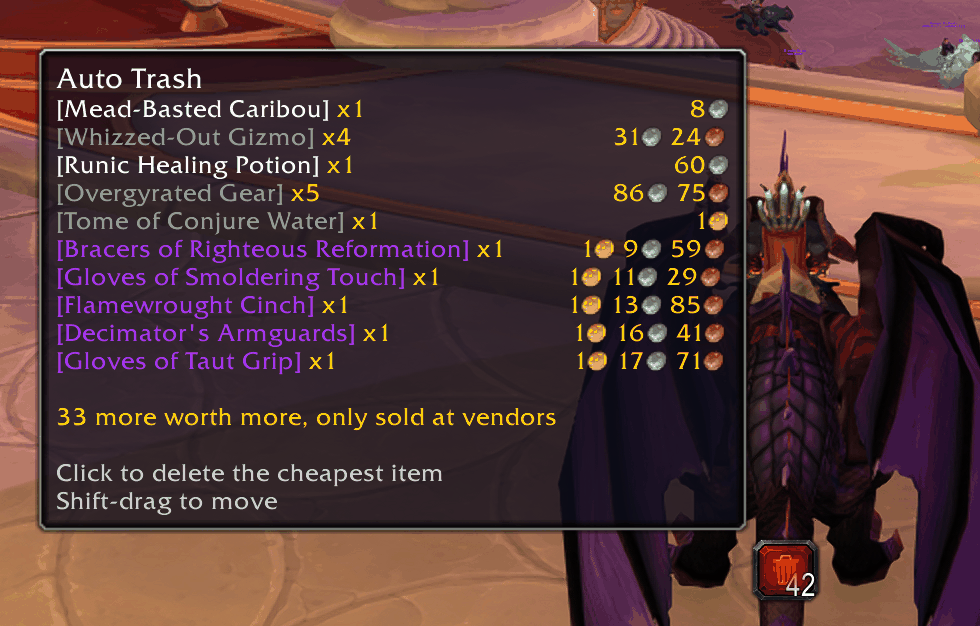
One button deletes the cheapest trash first — the tooltip shows what’s next and what it’s worth.
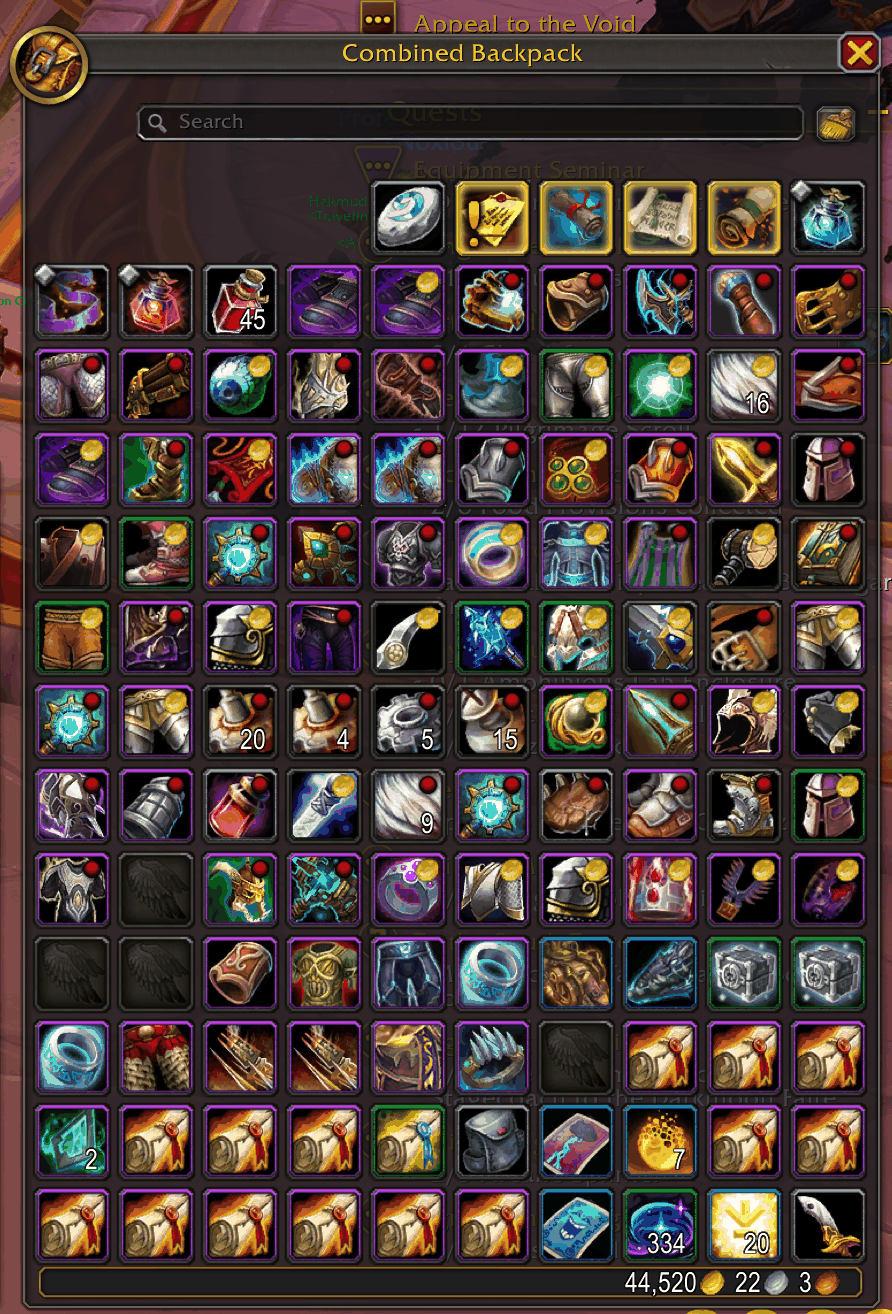
Red dot: gets deleted. Gold coin: worth more than your defined limit, only sold at the vendor.
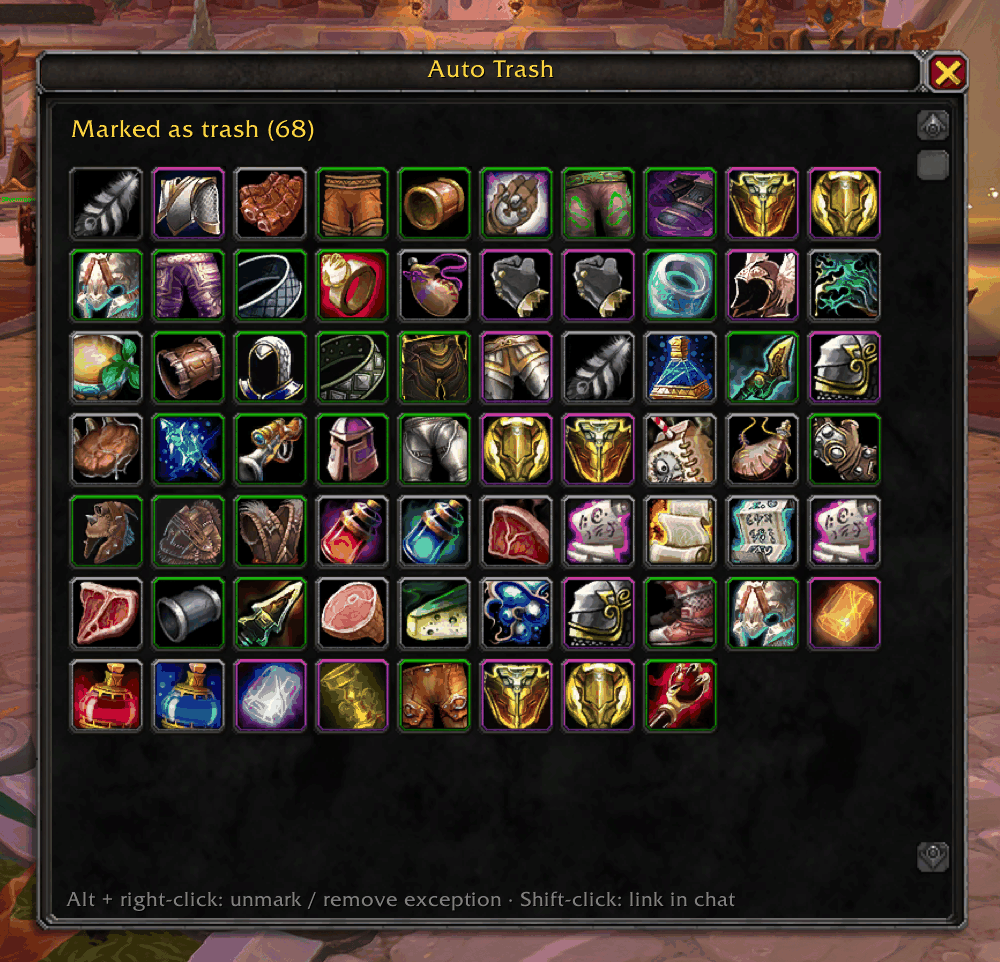
Everything you marked at a glance — Alt + right-click an item to unmark it.
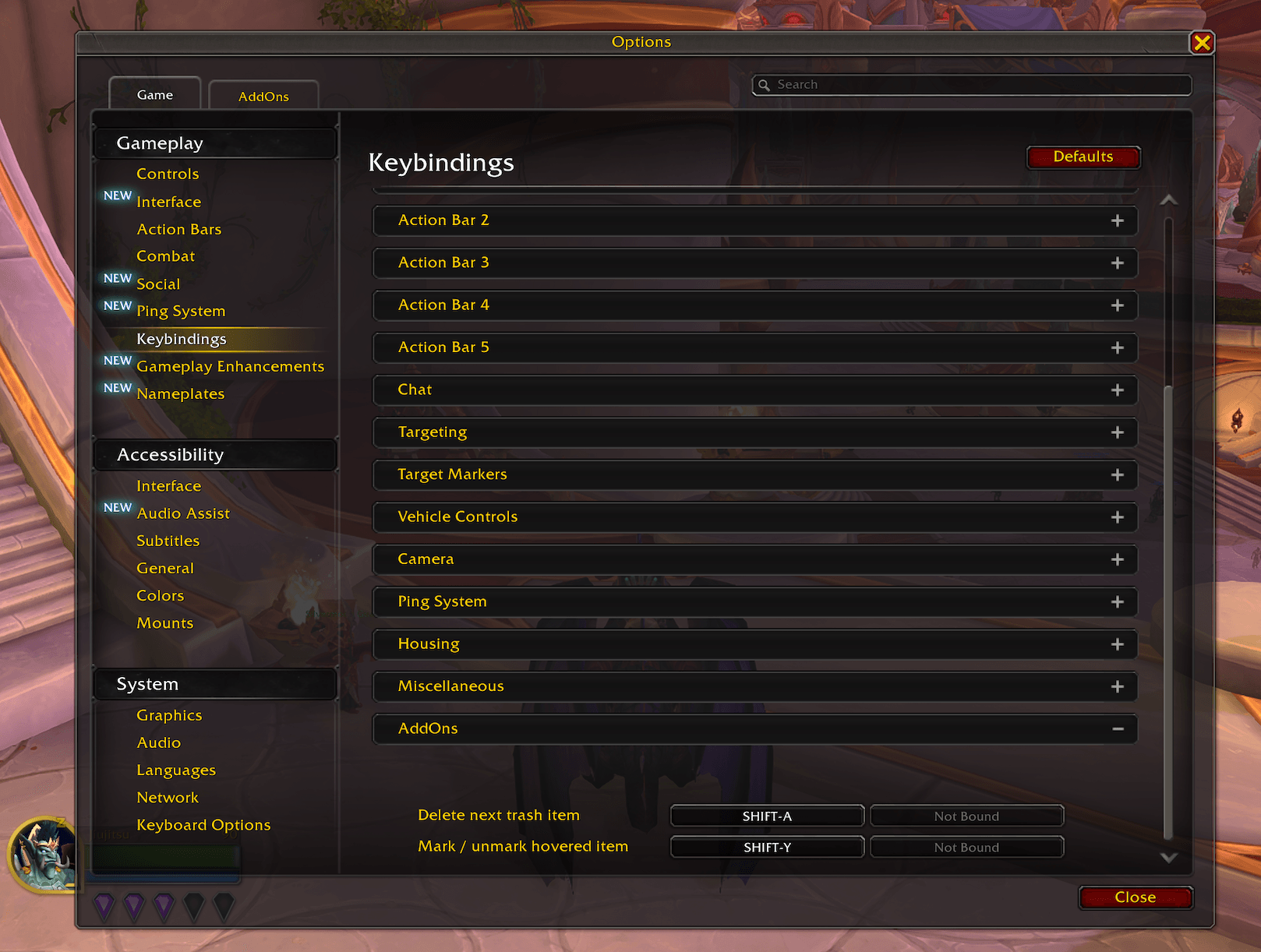
Two optional keybinds — assign them under Options → Keybindings → AddOns.
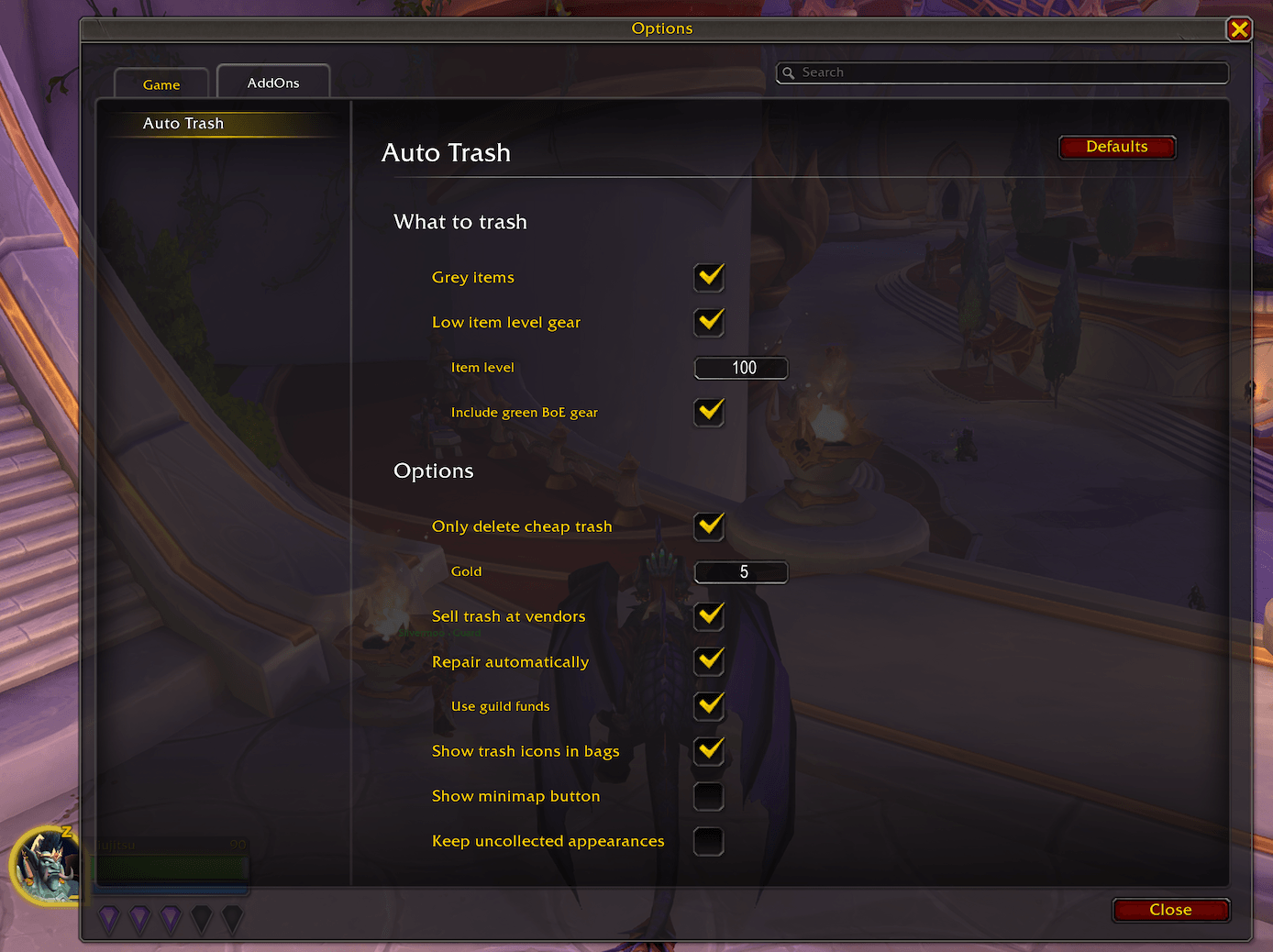
Rules (incl. green BoE gear), gold limit, selling, repairing, bag icons, minimap button, and transmog protection in the game’s options.
Description
Farming old dungeons and raids for mounts, pets and transmog fills your bags with junk fast. Auto Trash sells and destroys that junk for you.
Mark an item as junk once, and Auto Trash takes care of it from then on: it's sold at every vendor automatically. When your bags fill up in the middle of a run, you decide how much goes: need three free slots? Press three times, and the three cheapest stacks are gone. Everything else stays in your bags and turns into gold at the next vendor, so a 40 gold epic never ends up deleted by accident.
Available in: English, German, Spanish, French, Italian, Portuguese (Brazil), and Russian.
Features
Mark what's junk
- Alt + right-click an item in your bags to mark it as junk (Alt can be changed to Ctrl in the settings, e.g. if it clashes with ElvUI)
- Optional keybind to mark the item under your mouse, anywhere a tooltip shows (chat links, loot window, vendor)
- Marked items are saved for your whole account
Rules instead of marking every item
- Grey items are junk
- Low item level gear: soulbound gear below an item level is junk (default 100)
- Include green BoE gear (optional): green gear that binds when equipped also counts below your item level
- Never touched by the item level rule: warbound items, blue and purple items that are not bound yet, shirts, tabards, cosmetic items, legendaries, heirlooms and items in equipment sets
- Exceptions: Alt + right-click an item a rule catches, and it's never sold or deleted
- All rules start disabled, so nothing new is thrown away until you turn a rule on
Deleting while farming
- A trash can button shows up when there's something to delete, with a counter
- You decide how much goes: each click (or keybind press) deletes exactly one stack, the cheapest first. Need three free slots? Press three times.
- Everything you don't delete stays in your bags and is sold for gold at the next vendor
- Only delete cheap trash (optional): junk worth less than your gold limit (default 5 gold per stack) is deleted, everything worth more stays in your bags and is sold at the next vendor
- Bags almost full? The trash can button pulses and a short message appears when only a few bag slots are free (default 5), so you can clear space before loot gets lost. It only warns, it never deletes on its own.
- Nothing is deleted while you hold an item on your cursor
One stack per press is also how Blizzard wants addons to delete items, so it works reliably, without workarounds that could break with the next patch.
At the vendor
- Auto-sell all junk with a sell price
- Auto-repair (optional), with guild funds if your guild allows it, falling back to your own gold
See what happens
- Bag icons: a red dot on junk that gets deleted, a gold coin on junk that's only sold
- Tooltips tell you why an item is junk (marked, grey, item level) or why it's kept (exception, uncollected appearance)
- List window (
/trash list): all marked items and exceptions as icons with rarity borders, sorted by name; Alt + right-click to unmark - Log (
/trash log) of recently sold and deleted items
Transmog protection
- Optional: items whose appearance you haven't collected yet are never sold or deleted until you learn it
- On by default, easy to turn off if you don't care about transmog
Keybinds
Two optional keybinds, unbound by default. Assign them under Options → Keybindings → AddOns:
- Delete next trash item: deletes the cheapest stack, just like clicking the trash can button
- Mark / unmark hovered item: works on any item tooltip, e.g. chat links, the loot window or a vendor
Works with your bag addon
Bag icons and Alt + right-click marking work in Blizzard's bags, Baganator and Bagnon. In Baganator, Auto Trash shows up as an icon corner you can move in Baganator's settings.
Settings
- Minimap button: left-click opens the settings, right-click the list window; also in Blizzard's AddOns menu next to the minimap
- Everything under Options → AddOns → Auto Trash
How to use
- Alt + right-click items in your bags to mark them as junk, or turn on a rule under Options → AddOns → Auto Trash
- Visit a vendor: junk is sold automatically
- Bags full during a run? Click the trash can button (or bind a key) to delete the cheapest junk
/trash listshows everything you marked,/trashlists all commands
Commands
/trash list– open the list window/trash log– recently sold and deleted items/trash options– open the settings/trash minimap– show or hide the minimap button/trash add,/trash remove,/trash keep+ item link – mark, unmark, or make an exception/trash reset– move the delete button back to the screen center
Feedback
Found a bug or have a suggestion? Visit:
Auto Trash | Sell & Destroy Junk | Junk Seller Team