Auctionator PriceCheck Forever
- By
Search Auctionator’s last-scan prices and price history for any item by name, anywhere, with no need to visit the auction house.
screenshot.png
Screenshot_2.png
Description
Auctionator - PriceCheck Forever
A pocket price lookup for WoW Forever, built on top of Auctionator. Check what any item was worth at your last auction house scan, by name, from anywhere: no need to own the item, no need to stand at the auction house, and it works in combat.
Features
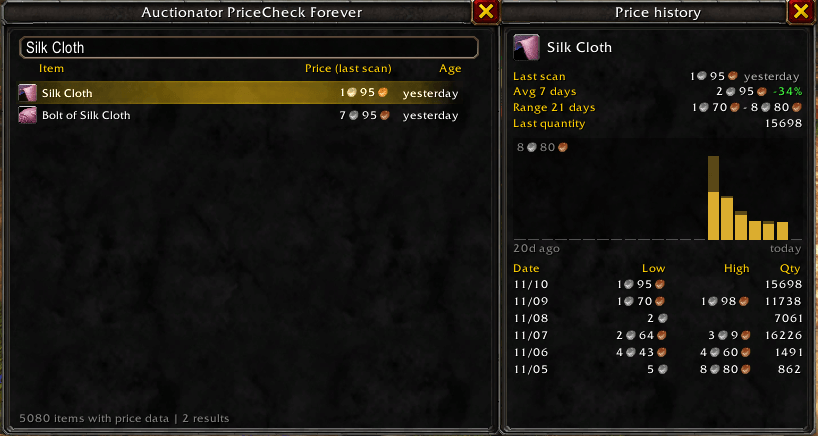
- Search by name: type part of an item name and get matching items with their last-scan price and how old that price is. You can also enter an item ID or shift-click any item (bags, chat links, loot) into the search box.
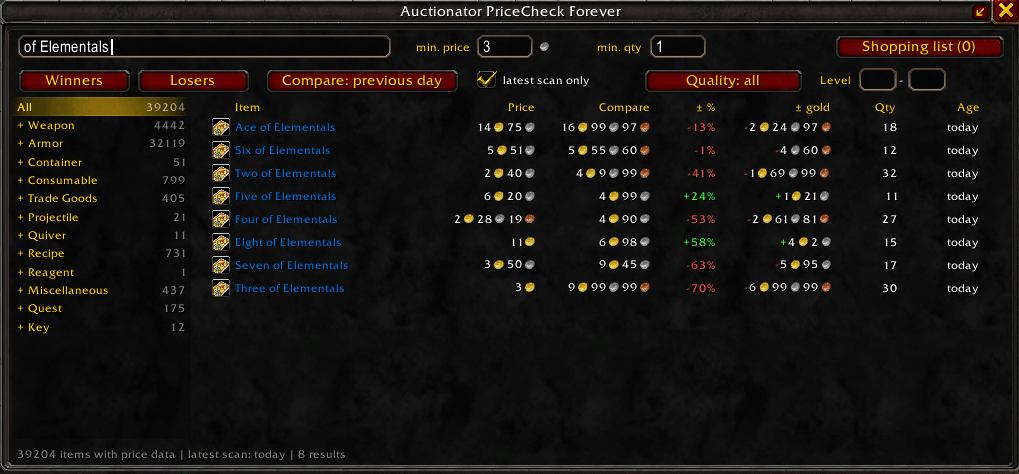
- Winners & losers: after a new scan, click Winners or Losers to see only the items that rose or fell, biggest change first, compared with the 7-day average (or the previous scan day). Sort any column, and use the noise filters (min. price, min. quantity, latest scan only) to hide single cheap listings.
- Browse like the auction house: category tree with subcategories, minimum quality and required level filters, combined with search and every sort.
- Shopping list: right-click a result (or use + List in the price history) to put an item on your shopping list. The price known at that moment is noted and never changes, so at the auction house you see at a glance whether today's offers still match it: noted vs. current price, difference in %, wanted quantity and totals. Item tooltips (e.g. auction house offers) show the noted price too, and clicking a list entry while the auction house is open searches for it.
- Compact mode for smaller screens: the button next to the close X shrinks the window to search, winners / losers and the columns price, change and age. Click it again for the full window.
- Hover lookup: hover any item (bags, bank, loot, vendor, chat link tooltip …) and press Ctrl+D to jump straight to its price and history.
- Price history: click a result to open the history panel:
- last scan price
- 7-day average of the daily lows, with how far the current price is above or below it (green = higher than usual, red = lower)
- price range over the stored days and the last seen quantity on the auction house
- a daily bar chart; hover a bar for date, low, high and quantity
- a scrollable list of every scanned day
- Tooltips: hover any result for the regular item tooltip, including Auctionator's own price lines.
- Shift-click a result to link it in chat, Ctrl-click to preview it in the dressing room.
- Minimap button with a right-click menu to set your keys, and a window that remembers its position.
- English and German.
Requirements
Auctionator is required. PriceCheck shows the data Auctionator already stores from your own scans: if an item was never on the auction house while you scanned, there is no price for it. Auctionator keeps 21 days of history by default (configurable in its options).
Commands
| Command | Action |
|---|---|
/pc or /pricecheck |
Open / close the window |
/pc <name> |
Open the window and search for <name> |
/pc icon |
Toggle the minimap button |
/pc list |
Open / close the shopping list |
/pc compact |
Switch between compact and full window |
| Right-click a result | Add it to the shopping list |
| Ctrl+D while hovering an item | Look up that item |
| Right-click the minimap button | Menu: set key bindings, hide the button |
Key bindings: right-click the minimap button, click a binding and press the key you want (or use Key Bindings → AddOns → Auctionator PriceCheck Forever). Ctrl+D is set on first login if the key is still free.
Note
Shortly after login, PriceCheck builds a name index of all items in Auctionator's database in the background. Names the client hasn't cached yet are fetched from the server in small batches, so on the first login the status line may show "loading X names…" for a minute or two. Items from new scans are added the next time you open the window.
Credits
Unofficial plugin for Auctionator by plusmouse and Borjamacare; not affiliated with or endorsed by its authors. Auctionator is required and does all the scanning.
Bundled libraries: LibStub, CallbackHandler-1.0, LibDataBroker-1.1, LibDBIcon-1.0, each under its own license.
Changelog
0.10.0
- New: compact mode for smaller screens (button next to the close X, or
/pc compact). Hides the category tree, the filters and the compare / change in gold / quantity columns; the choice is saved.
0.9.0
- New: shopping list. Right-click a result or use "+ List" in the price history; the price at that moment is noted and stays fixed.
- The list shows noted vs. current price, the difference, wanted quantity and totals, and can open together with the auction house.
- Item tooltips show the noted price of listed items; clicking a list entry at the auction house searches for it.
0.8.0
- New: category tree on the left, like the auction house (with subcategories and item counts).
- New: minimum quality and required level filters.
- Winners now only lists items that rose, Losers only items that fell.
- Fix: looking up an item ID that exists in several variants could throw a Lua error.
0.7.0
- New: winners / losers. Browse the whole market sorted by price change since the previous scans, compared with the 7-day average or the previous scan day.
- New columns: comparison price, change in % and gold, quantity; click a header to sort.
- Noise filters: min. price, min. quantity, latest scan only (saved).
- Price change colors are now the same everywhere: green = up, red = down.
0.6.1
- Menu shows key bindings in full (e.g. "STRG-D") instead of abbreviated.
0.6.0
- New: right-click menu on the minimap button. Set the key bindings by clicking them and pressing a key, right-click to clear, or hide the button.
0.5.0
- New: hover an item and press Ctrl+D (configurable key binding) to look it up and open its price history.
0.4.2
Initial release.
Auctionator PriceCheck Forever Team