AddonHub
- By
Minimap popup that lists addons without their own icon and jumps to their options, plus backup & restore of addon settings, keybinds, macros, chat and Edit Mode layouts for a new character or WoW install.
Description
AddonHub
A minimap button for WoW Forever that lists every loaded addon without its own minimap icon and gives you one-click access to its options or slash commands. It also backs up and restores your addon settings, keybinds, macros, chat and Edit Mode layouts for a new character or a new WoW install.
Popup
- Lists addons without a minimap icon.
- Left-click opens the addon's options or runs its main slash command, shift-click puts the command into the chat box, right-click hides an entry.
- Tooltips show an addon's options, slash commands and any detected minimap icon.
- Detects slash commands, Blizzard / legacy option panels, AceConfig tables and LibDBIcon buttons automatically.
- Dependent addons (modules such as
Foo_Options) are merged into their parent.
Backup & Restore
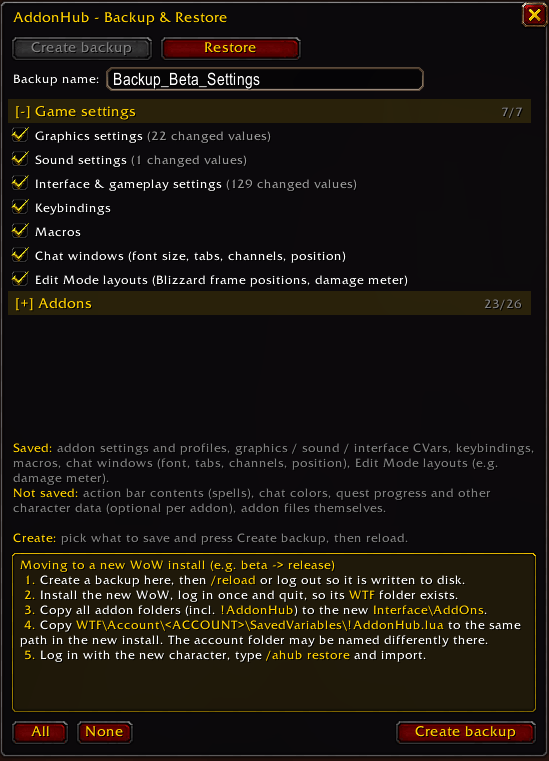
Save your setup once, restore it on a fresh character or when moving to a new install (e.g. beta -> release). Open it with /ahub backup or the Backup / Restore button in the popup. On a fresh character a prompt offers the import automatically.
Saved: addon settings and profiles, graphics / sound / interface CVars, keybindings, macros, chat windows (font, tabs, channels, position) and Edit Mode layouts (e.g. the damage meter). Ace addons (Bartender4, Quartz, ForeverFrames, …) get the profile added as "Profile (Character)" and activated, nothing is overwritten.
Not saved: action bar contents (spells), chat colors, quest progress and other character data (optional per addon), the addon files themselves.
Addon settings are detected automatically. Addons found this way are marked "(auto-detected)" in the list, so double-check them. Addons without detectable settings are listed in a collapsed section.
Moving to a new install
- Create a backup, then
/reloador log out so it is written to disk. - Install the new WoW, log in once and quit, so its WTF folder exists.
- Copy all addon folders (including
!AddonHub) to the newInterface\AddOnsfolder. - Copy
WTF\Account\YOUR_ACCOUNT_NAME\SavedVariables\!AddonHub.luato the same path in the new install (the account folder may be named differently there). - Log in with the new character, type
/ahub restoreand import.
Commands
/ahub popup, /ahub backup, /ahub restore, /ahub icon, /ahub reset, /ahub debug
Optional
tools\Generate.ps1 regenerates Generated.lua from your .toc files and CVars for a more precise addon list (maintainers / power users). It is not needed for normal use.
Changelog
0.2.2
- Version bump only, no functional changes.
0.2.1
- Backup & Restore now finds addon settings automatically (by variable name: DB / Saved / Config …). No PowerShell script needed anymore.
- Auto-detected addons are marked "(auto-detected)" in the list so you can double-check them.
- Addons without detectable settings are listed in a separate, collapsed section.
- Backup window: separator line and automatic height, text is no longer cut off.
0.2.0
New: Backup & Restore
- Save your setup and restore it on a fresh character or a new WoW install. Open it with
/ahub backupor the Backup / Restore button in the popup. - Backs up addon settings and profiles, graphics / sound / interface CVars, keybindings, macros, chat windows and Edit Mode layouts.
- Ace addon profiles are never overwritten: the imported profile is added as "Profile (Character)" and activated.
- Fresh characters get a prompt to import a backup;
/ahub restoreopens it any time. - Collapsible Game settings / Addons sections, size per addon, per-character data is opt-in.
- Built-in guide for moving to a new install.
Other
- New slash commands:
/ahub backup,/ahub restore. tools/Generate.ps1creates the addon and CVar lists the client does not expose.
0.1.0
Initial release.
AddonHub Team