Assistant Button Visualizer
- By
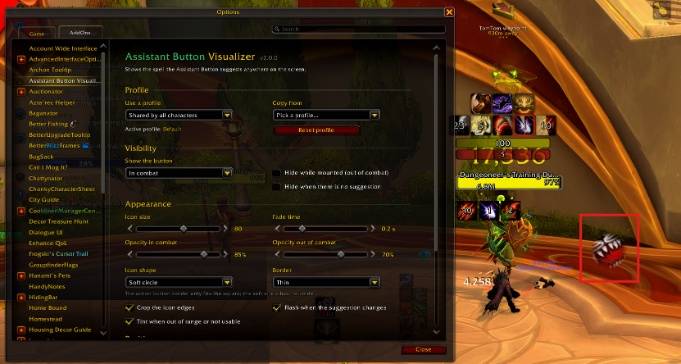
Provides a real-time visual interface for the Assistant Button rotation logic, replicating the optimal action bar slot in a movable frame.
screenshot-2026-10-03-142421-edited.jpg
Description
Assistant Button Visualizer
Shows the spell Blizzard's Assistant Button (Single-Button Assistant) suggests, anywhere on your screen: next to your character, under your target, in the middle of the screen… wherever your eyes already are.
Works on Retail (Midnight).
How it works
The addon reads the suggestion straight from the game's assisted combat system and shows it as a free icon. Nothing is placed on your action bars.
Upgrading from 1.x? Older versions kept the Assistant Button spell in an action slot (88 by default). 2.0 removes it from that slot once, on your first login, if it is still there.
Features
- Place it anywhere: move it from the game's Edit Mode, with
/abv moveor with the Move button in the options. Lock it to let clicks go through. - Icon shape: square, rounded, circle or a soft circle that fades out at the edge.
- Range and usability tint: red out of range, blue without enough power, grey when it can't be used, just like the default action buttons.
- Visibility: always, in combat, with a hostile target or in instances. You can also hide it while mounted or when there is no suggestion.
- Look: size, opacity in and out of combat, fade time, thin or action button border, cropped icon edges, a flash when the suggestion changes.
- Profiles: shared by all characters, per character or per specialization, with copy and reset.
- Addon language: game language, English or Spanish, switchable in the options.
Options
Type /abv, or go to Game Menu → Options → AddOns → Assistant Button Visualizer, or use the minimap addons menu.
Commands
| Command | Description |
|---|---|
/abv |
Open the options |
/abv move |
Move the button (right click or Escape to finish) |
/abv reset |
Center the button |
/abv help |
List the commands |
Assistant Button Visualizer Team