RolePing
- By
Radial wheel for roleplay: emotes, voice emotes, chat languages, commands and macros, one key away under your cursor.
Description
RolePing
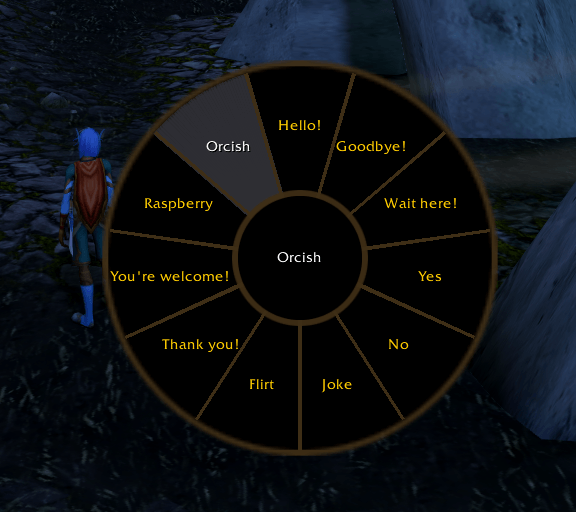
Your roleplay toolkit, one key away. Hold a key, flick the mouse toward a sector, release, and your character bows, cheers, says a line or switches to Thalassian. No digging through chat commands or menus in the middle of a scene.
How it works
- Hold the wheel key (Ctrl-E by default). The wheel opens right under your cursor.
- Point the mouse toward a sector. Only the direction matters, not the distance.
- Release the key to perform it. Release over the center to cancel.
Prefer clicking? Tap the key instead: the wheel stays open and you pick a sector with the mouse.
What you can put on the wheel
| Sector | What it does |
|---|---|
| Emote | 45 text and animation emotes: /bow, /dance, /kneel, /salute, /mountspecial... |
| Voice emote | Spoken emotes: /hello, /thank, /cheer, /charge, /flee... |
| Custom emote | Your own /e text. %t becomes your target's name: "bows deeply before %t." |
| Command | Any line, as if typed in the chat: /s For the Alliance!, /mountspecial... |
| Macro | Runs one of your own macros, with its icon. |
| Language | Sets a language, or opens the language picker. |
From 4 to 12 sectors, laid out clockwise from the top. Each one can have its own label and icon.
Chat languages, done right
- Language picker: the wheel turns into a second wheel with every language your character speaks, the current one checked. Pick one and you're speaking it.
- Language memory: the game resets your chat language to the default one on login, on
/reloadand after some loading screens. RolePing remembers your last language per character and restores it for you. - totalRP3 friendly: when totalRP3 is installed, RolePing switches languages through it, so both addons always agree.
Options
Open them with /rp or from Options → AddOns → RolePing.
- Wheel key: press any key or an extra mouse button. RolePing asks before binding it and warns you if the key is already used by another action, so you won't lose your strafe key by accident.
- Look: wheel size, show or hide icons and labels.
- Behavior: aim emotes at your target or not, and remember the chat language.
- Sectors: choose the type and action, set an optional label and icon, reorder, add or remove.
- Addon language: English or Spanish (follows your game language by default).
Commands
| Command | Description |
|---|---|
/rp |
Open the options |
/rp open |
Open the wheel under the cursor |
/rp reset |
Restore the default wheel |
/rp help |
List the commands |
Good to know
- Works in and out of combat.
- Settings and the wheel are shared by your whole account; the last chat language is saved per character.
Supported versions
- Retail (Midnight)
- WoW: Forever
Feedback
Found a bug or have an idea for a new sector type? Leave a comment or open an issue. Feedback from the roleplay community is very welcome!
The RolePing Team