AfkDelight
- By
A beautiful, configurable screen while you are /afk. Supports World of Warcraft: Midnight and World of Warcraft: Forever.
...
Description

AfkDelight
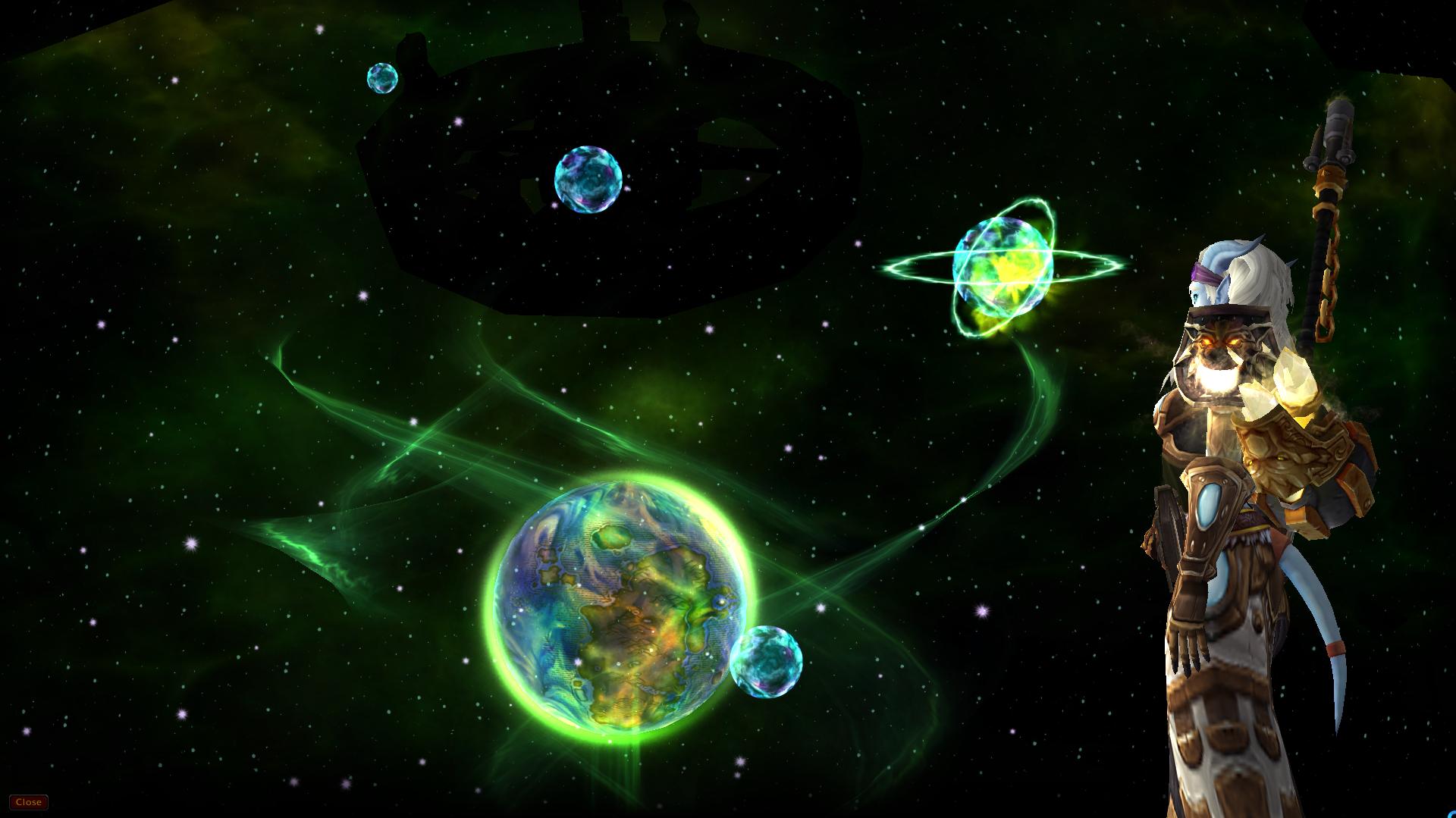
A beautiful screen while you are /afk: your character in the spotlight in front of a galaxy, plus everything you
want to know at a glance. Rewritten from scratch for World of Warcraft: Midnight (Retail 12.x) and
World of Warcraft: Forever.
Originally by Frost-Xavius, first released in 2016, when it passed 1,200 downloads on Curse.
Compatibility
| Game | Client version | TOC interface |
|---|---|---|
| World of Warcraft: Midnight (Retail) | 12.1.5 (and the 12.1.7 PTR) | 120105, 120107 |
| World of Warcraft: Forever | 1.60.1 (beta/test) | 16001 |
Features
- The classic look: galaxy (the Legion star map), your character with transmog, smooth fades and edge shading.
- Azeroth and her moons: Azeroth (oceans, continents and the Maelstrom), the pale White Lady and the crescent of the Blue Child hang over a twinkling starfield and slowly drift across the sky. They are painted with the game's own sky textures, so they look like part of WoW. This is the default on WoW Forever (where the galaxy model doesn't exist) and a choice on Retail.
- Creature flybys: every minute or two a classic creature crosses the sky, over Azeroth or the galaxy: Onyxia, your faction's flight master gryphon or wind rider, a white hippogryph, a green dragon of the Emerald Dream or a faerie dragon. Each one shows up before any repeats.
- More backgrounds: Animated starfield (twinkling stars and shooting stars), Game world (fades out your interface and slowly spins the camera around you, ElvUI-style), or Solid black.
- Lively character: waves when the screen appears, then stands, dances, talks or plays random emotes. You can set its facing, size and a slow turntable spin.
- Character card: name (class colored, with surname on WoW Forever), title, level, race, specialization, class icon, guild and rank, item level and zone.
- Leveling info: level progress and rested XP, including how much rest you gained while away and a warning when you are not in a rested area. This is handy when leveling to 60 on WoW Forever.
- AFK timer and clock: "Away for 12:34", plus the time and date. The clock follows your game clock settings (local or realm time, 12 or 24 hour).
- Your AFK message:
/afk Getting coffeeshows "Getting coffee" on the screen. - Missed messages, in tabs: Whispers (character and Battle.net), Guild (guild and officer) and Group (party, raid and instance) each get their own tab with a message count. Tabs with unread messages light up gold, and the screen opens on the first tab with something new. Messages read top to bottom, oldest first, starting right under the tabs. Senders are class colored and Game Masters are marked. Scroll with the mouse wheel (Shift for the oldest/newest), Page Up/Page Down, the arrow keys or Home/End, and switch tabs with Tab (Shift-Tab goes back). Each tab keeps the latest 200 messages.
- Taskbar flash when someone whispers you while you're away.
- Welcome-back summary in chat: how long you were away, how many whispers, guild and group messages you missed, money changes and rested XP gained.
- Stays up while you read: only Escape or the Close button (bottom left) closes the screen. Clicks and other keys don't, so you can read your missed messages in peace. Print Screen still takes a screenshot.
- Never miss anything important: the screen closes by itself for ready checks, dungeon, battleground and pet battle queue pops, role checks and polls, group invites, summons, resurrections, duels, trades and logout countdowns. It closes instantly when you enter combat.
- Smart timing: optional delay before showing. It waits while you're crafting or casting, in combat, in a pet battle or watching a cinematic, and can be turned off inside instances.
- Options panel in Game Menu > Options > AddOns > AfkDelight, plus a minimap AddOn compartment entry: left-click opens the options, right-click shows a preview.
Commands
| Command | What it does |
|---|---|
/afkd or /afkdelight |
Open the options |
/afkd test |
Preview the AFK screen (Escape or Close closes it); the first flyby comes after a few seconds |
/afkd on, /afkd off, /afkd toggle |
Enable or disable the AFK screen |
/afkd reset |
Restore all settings to their defaults |
/afkd status |
Show version, game version and whether your AFK status is readable right now |
Good to know
- Dungeons, raids, Mythic+ and PvP matches: Midnight's addon restrictions (also active on WoW Forever) hide your AFK status from addons there, so the screen can't appear in that content. It comes back automatically as soon as the game allows it again. Chat that arrives while restricted is skipped.
- WoW Forever and the galaxy: the galaxy is a Legion-era model that WoW Forever doesn't have, so Forever shows Azeroth and her moons instead. If you pick the galaxy anyway, AfkDelight tells you once and shows Azeroth.
- Flybys only use creatures whose model has a flying animation in your client. A creature that can't fly (or whose model never loads) is quietly left out, and the others keep coming. You can turn flybys off in the options.
- Game world background: this only lowers the interface's opacity (it never hides protected frames), so it is
safe even if combat starts. The camera stops spinning when the screen closes, and a spin that was interrupted by a
/reloadis stopped on login.
Installation
The easiest way is the CurseForge app. To install by hand:
- Exit World of Warcraft (or be ready to
/reload). - Download AfkDelight from CurseForge and copy the
AfkDelightfolder from the zip into the game's AddOns folder:- Retail:
World of Warcraft\_retail_\Interface\AddOns\ - WoW Forever: the client folder name may change at launch, so let the launcher show it. In the Battle.net
app, select World of Warcraft: Forever, click the gear next to Play, choose Show in Explorer (Finder on
Mac), then open
Interface\AddOns\inside that folder.
- Retail:
- Make sure the folder is
Interface\AddOns\AfkDelight\AfkDelight.toc(not nested twice). - Start the game and enable AfkDelight in the AddOn list on the character select screen.
AfkDelight Team

Owner