AchiTrack - the Achievement Tracker
Track any achievement across all your characters — search by name or ID, monitor progress, and view cross-character stats in a sleek tooltip.
AchiTrack_SC2.jpeg
Description
AchiTrack — General Achievement Tracker
Track any achievement across all your characters. Search, monitor, compare — all in one sleek tooltip.
New in V 1.4.0
- Faction filter toggle — sub-tooltip now shows your own faction only by default
- Show-all toggle — optionally include characters with no progress yet
- Minimap button toggle — now available as a slash command and a click binding
- New minimap icon click bindings — Alt+Left-click, Shift+Left-click, Shift+Right-click for quick toggles
/atrack help— full command reference, in German or English depending on your client language- Drag & drop reordering for your tracked achievements list
- Dynamic window height — the search window resizes to fit your tracked list
- Max tracked achievements adjusted to 20
What is AchiTrack?
AchiTrack is a lightweight achievement tracking addon for MoP Classic (5.5.3). It lets you search for any achievement by name or ID, add it to your personal tracking list, and monitor progress across all your characters — directly from a DataBroker bar or minimap button.
Features
- Track up to 20 achievements account-wide, shared across all your characters
- Live search by name (with debounce) or direct ID lookup via
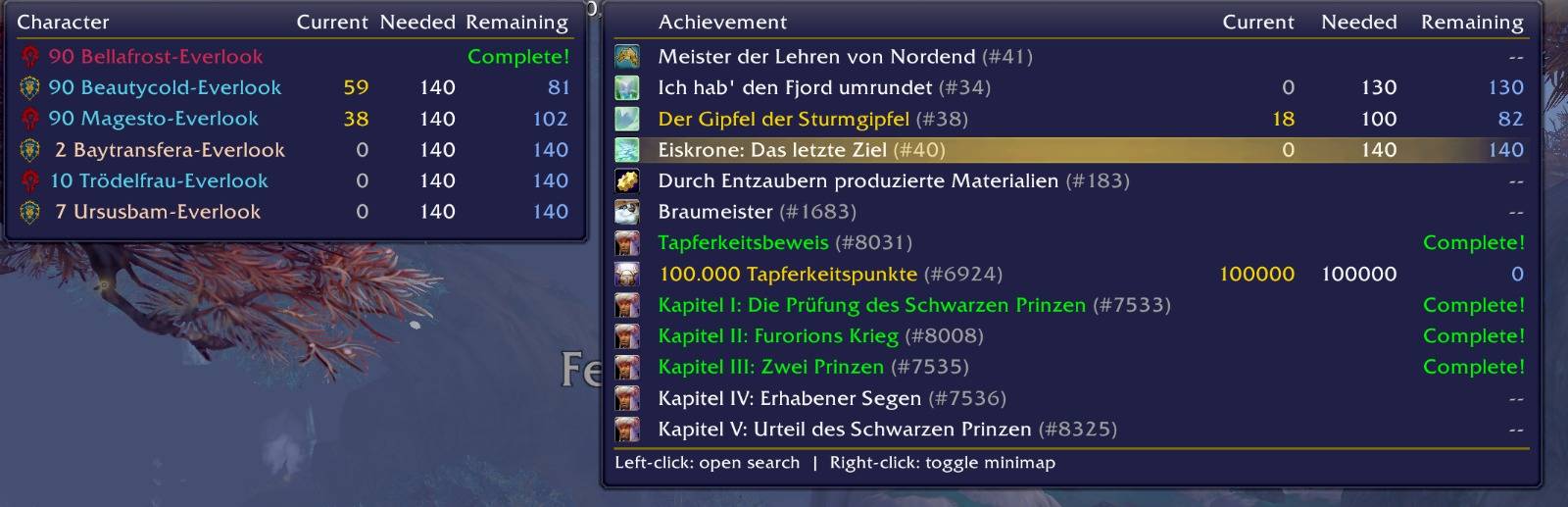
#1234 - Smart tooltip showing achievement icon, faction, current progress, goal and remaining — color-coded by status
- Cross-character sub-tooltip — hover any achievement to see the progress of all your other characters, including faction icon, level and class color
- Faction filter — sub-tooltip shows your own faction only by default, toggleable
- Show-all toggle — optionally include characters with no progress
- Drag & drop reordering for your tracked achievements list
- Status colors: not started · in progress · complete
- Remaining column in blue for quick overview
- Search GUI with scrollable results and tracked achievement list, dynamic window height, open via left-click or
/atrack - Minimap button with dedicated click bindings for all toggles
- Position memory — the search window remembers where you left it
- Escape key support — closes search focus or the window, as expected
How to use
- Hover the DataBroker icon or minimap button to open the tooltip
- Left-click to open the search window
- Search for any achievement by name or enter
#IDdirectly - Click a result to add it to your tracking list (max. 20)
- Log in on any character to update their snapshot — visible to all your other chars
Slash commands
| Command | Description |
|---|---|
/atrack |
Open / close the search window |
/atrack minimap [on|off] |
Show / hide the minimap button |
/atrack faction [on|off] |
Own faction only in sub-tooltip (default: on) |
/atrack all [on|off] |
Show characters without progress (default: off) |
/atrack help |
Command reference (German or English, based on client locale) |
Minimap icon clicks
| Click | Action |
|---|---|
| Left-click | Open / close the search window |
| Right-click | Open / close the search window |
| Alt + Left-click | Toggle minimap button |
| Shift + Left-click | Toggle show-all (characters without progress) |
| Shift + Right-click | Toggle faction filter |
AchiTrack - the Achievement Tracker Team