Hunger, thirst and rest: slow them down, switch them off, or make them harder.
One slider per bar, 0x to 5x, changed live from Mod Menu. 1x is the normal game, 0x means that bar never drains. Made for Dragonwilds 1.0 and kept up to date (0.1.1, October 2026).
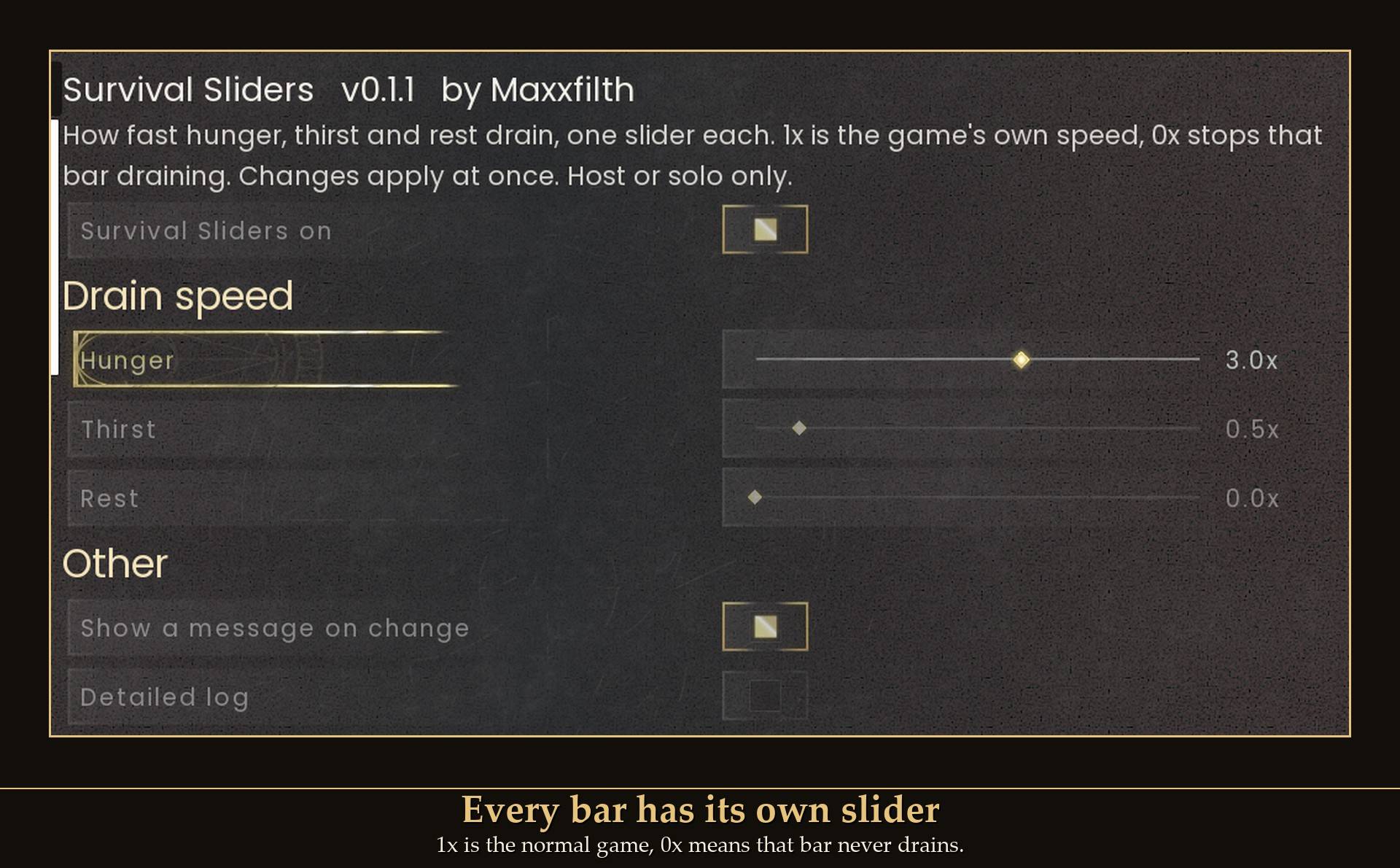
Sometimes I want to build for an hour without stopping to eat, and sometimes I want the survival side to actually bite. So every bar gets its own slider, and you can change them while you play. Want food to matter but not water? Set thirst low and leave hunger alone. Going back to normal is one click, no restart.
What it does
- Hunger (0x to 5x): how fast the food bar drains.
- Thirst (0x to 5x): how fast the water bar drains.
- Rest (0x to 5x): how fast the rest bar drains, the one with the arm icon that you refill by sleeping (the game files call it endurance).
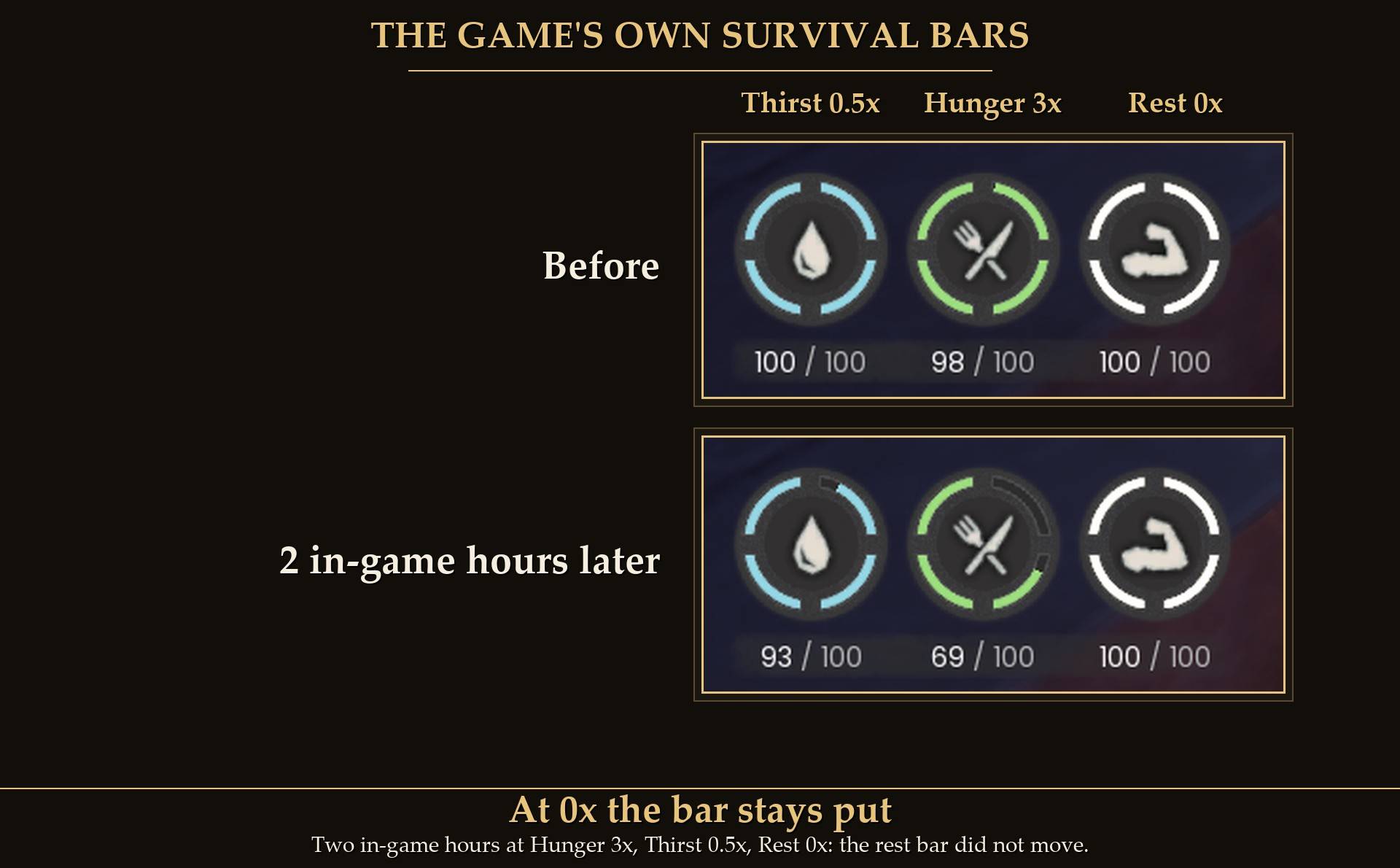
0.5x is half as fast, 2x is twice as fast. At 0x the bar stays where it is: it does not drain, but it does not fill up either, so you still eat, drink and sleep to top it off.
A few ways to set it
- Build without food breaks: Hunger 0x and Thirst 0x. Eat and drink once to fill up, and the bars stay there.
- Gentler survival: everything at 0.5x. You still eat, drink and sleep, half as often.
- Only food matters: Thirst 0x, Hunger and Rest left at 1x.
- Harder survival: everything at 2x or more, up to 5x.
How it works
The game already has a drain speed for each bar on your character, and its own effects for changing it. This mod applies those same effects, set to your slider value. It multiplies the game's drain instead of replacing it, so the game's own slowdowns still work on top. For example, standing near your bed halved rest drain at 1x in my test.
Measured in game, points drained per in-game hour:
- 1x: thirst 5.51, hunger 4.15, rest 0.75.
- 2x: thirst 10.85, hunger 8.19, rest 1.48.
- 0x: exactly 0 on all three over two in-game hours.
- Thirst 0.5x, hunger 3x, rest 0x: thirst 2.74, hunger 12.38, rest 0. Each slider only touches its own bar.
Settings
All live in Mod Menu (Esc > MODS > Survival Sliders), or in config.txt in the mod folder (restart the game after editing it).
- Survival Sliders on (default on): off puts every bar back to normal drain.
- Hunger, Thirst, Rest (default 1x, 0x to 5x, steps of 0.1).
- Show a message on change (default on): a short note on screen after you close Mod Menu, showing what is set.
- Detailed log (default off): extra lines in UE4SS.log for troubleshooting.
Install
- Install UE4SS for RSDragonwilds (free, from the UE4SS for RSDragonwilds page on Nexus Mods).
- Drop the
SurvivalSliders folder into RSDragonwilds/Binaries/Win64/ue4ss/Mods/
- For the in-game sliders, also install Mod Menu and open Esc > MODS > Survival Sliders. Without it, every setting is in
config.txt inside the mod folder.
On Game Pass: use the BE version of UE4SS with the SCO signature, the normal build does not load there. Game Pass also installs the game under Binaries/WinGDK/ instead of Binaries/Win64/, so the SurvivalSliders folder goes in RSDragonwilds/Binaries/WinGDK/ue4ss/Mods/. If you install with Vortex, check that is where it ended up.
To uninstall, delete the SurvivalSliders folder. Nothing is saved to your character, so everything goes back to normal.
Dedicated servers
- Install it on the server. Survival Sliders works on a dedicated server when it is installed on the server. The server needs UE4SS running on it.
- No menu on a server. Set the values in
config.txt in the SurvivalSliders folder on the server. Changes are picked up in about 10 seconds, no restart.
- One setting for everyone. It then applies to every player on the server, about a minute after they join. A copy on a player's own PC does nothing on a server.
- Solo and hosting from inside the game work as before, with the Mod Menu sliders as usual.
- Tested on the Windows dedicated server.
Good to know
- Changes apply at once. Close Mod Menu and a short note shows what is set (with everything at 1x it says "Everything at the game's normal values"). You can turn that note off.
- Survives dying. Dying clears these effects in this game; the mod notices and puts yours back when you respawn.
- Not the mod: after a death the game itself lowers your max hunger and thirst to 75.
- Nothing permanent. Your character save holds no trace of the mod. Set the sliders back to 1x, turn it off in Mod Menu, or remove it, and the bars drain normally again.
- Co-op: in a world hosted from inside the game it only works for the host. Guests can have it installed; it does nothing on their side. On a dedicated server it goes on the server, see Dedicated servers above.
- Not sure it is running? UE4SS.log shows lines starting with
[SurvivalSliders].
Tested on RuneScape: Dragonwilds 1.0 with UE4SS 3.0.1: every bar measured over in-game hours at 1x, 2x, 0x and a mixed setting, every slider read back exactly in game, going back to 1x returned exactly to normal, and dying and respawning put the settings back with no doubling up. 0.1.1 was loaded again on October 4, 2026, next to Movement Sliders: both answered Mod Menu and the log showed no errors. Not tested yet: player-hosted co-op, controller, Game Pass.