Coby's Crest Exchange
- By
Exchange upgrade crests at Vaskarn in Silvermoon. Choose how many to convert for gear upgrades, plan a trade up or down across crest tiers, and check caps, costs and unopened packs. Buy and open packs with one button you press for each step.
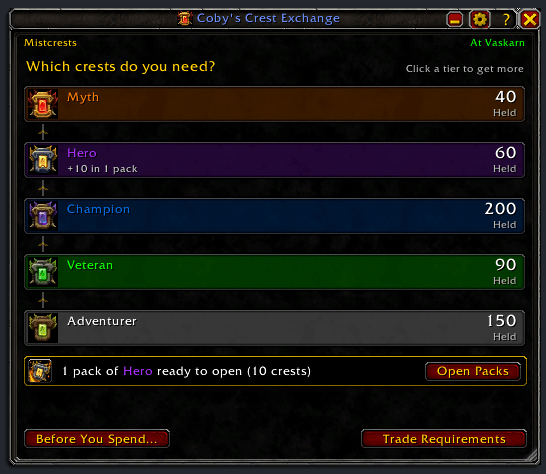
01-CobysCrestExchange-crest-ladder.png
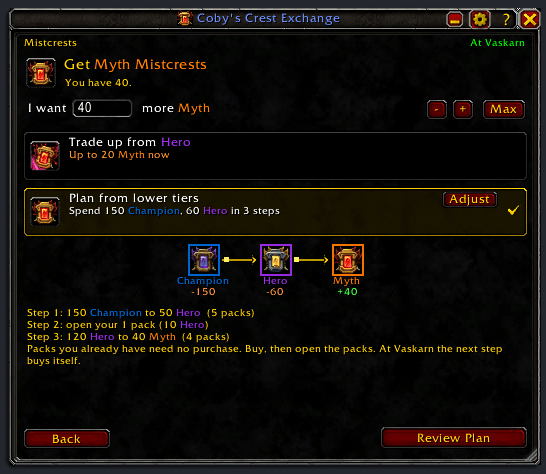
02-CobysCrestExchange-choose-crests.png
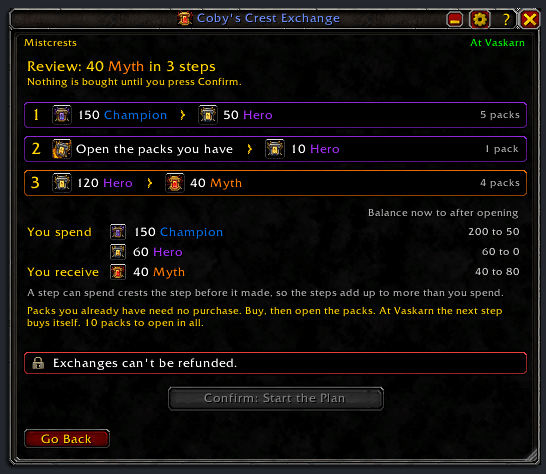
03-CobysCrestExchange-review-plan.png
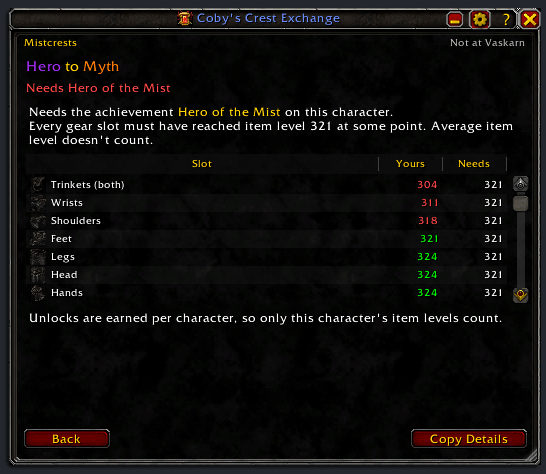
04-CobysCrestExchange-requirements.png
Description
Coby's Crest Exchange
A better crest exchange at Vaskarn in Silvermoon (WoW Midnight 12.1.5). Choose how many crests you want, see what each way of getting them costs, and let one button run the buying and opening.
Features
- Every way of getting your crests, priced for the amount you choose.
- Plans across your lower tiers, with the crest packs already in your bags counted, Warbound reward packs of Mistcrests included.
- Packs you already hold open from the first page, wherever you are, and the same press opens the first one. A plan that starts by opening them can be started anywhere.
- Few presses: a tier you pick starts at one pack with the best route chosen, and while Vaskarn's window stays open each step of a plan buys itself.
- No crest caps to plan around: the crests have no cap for the rest of the season, so nothing is held back for one.
- Your balance per tier, on a bar in the tier's color, and the crests in your unopened packs.
- A reserve per tier that Max and every exchange leave alone.
- Locked trades explained, down to the gear slot.
- The window docks beside Vaskarn's list, exactly as tall as it and at its size, even when another addon resizes his window.
- Your Interact key can run the whole exchange.
- A chat line when a newer version is out, which you can turn off in the settings.
Quick start
- Talk to Vaskarn and click the tier you want more of. It starts at one pack.
- Change the amount if you want more (type it, or use + and Max); a route is picked for you.
- Press Review, check the cost, then Confirm.
- Press Open Next Pack: it opens each pack, with Vaskarn's window open or closed. While his window stays open, a plan's next step buys itself; if you walked away, talk to him and keep going.
Stop, combat, or closing Vaskarn's window pauses the buying; nothing more is bought until you confirm again, or press Buy Step for a plan stopped between steps.
Install
CurseForge: https://www.curseforge.com/wow/addons/cobys-crest-exchange
Manual: Drop the CobysCrestExchange folder into your Interface/AddOns/. No dependencies.
Slash commands
/ce                   Open or close the exchange window (also /ce show)
/ce settings          Open or close the settings window (also /ce config, /ce options)
/ce guide             Open or close the feature guide (also /ce tutorial)
/ce changelog         Open or close the changelog: what changed in each version (also /ce whatsnew, /ce news, /ce change)
/ce addons            Every addon by Cobanyte, with CurseForge links and pictures (also /ce other, /ce more)
/ce debug             Open or close the debug log window
/ce reset windows     Put every window back to its default place and size
/ce dump              Show a report of what the addon sees, selected for Ctrl+C (for bug reports)
/ce version           Print the addon version
/ce help              Show this help
/crestex and /crestexchange work the same as /ce. The addon is also in the AddOns menu by the minimap: click for the exchange window, right-click for settings.
License
Copyright (C) 2026 Cobanyte. Released under the GNU General Public License, version 2 (see LICENSE).
Issues / feedback
Found a bug? Copy /ce dump, then run /ce debug and press Copy Last 250, and send both with a line about what you were doing. The log holds the addon version, your WoW build and your settings.
- Email: hackythings@gmail.com
- BugSack errors: whisper them to Figment-Illidan in game.
- CurseForge: comment on the project page for questions and feedback.
- GitHub: open an issue for bugs you can reproduce.
Coby's Crest Exchange Team