Recollect
- By
A World of Warcraft addon that tells you what every item in your bags, bank and warband bank is for.
6b6287dc28efe82b60ccc6c11f45ba57.png
b3e0ec6ab08e399a867266e59675e172.png
120a0b1f3db57efc4aef8555381a3751.png
Description
Recollect

Recollect shows what each item in your bags, bank and warband bank is for, and whether you still need it.
How to use it
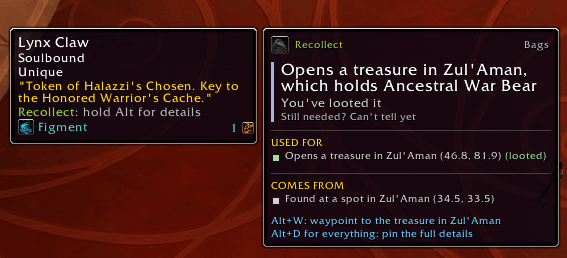
- Hover an item in your bags or bank and hold Alt: the audit panel beside the tooltip shows the verdict, what the item is used for, and why.
- Alt+D while the panel shows opens the item's full details.
- Alt+W while the panel names a vendor, treasure or NPC sets a waypoint to it.
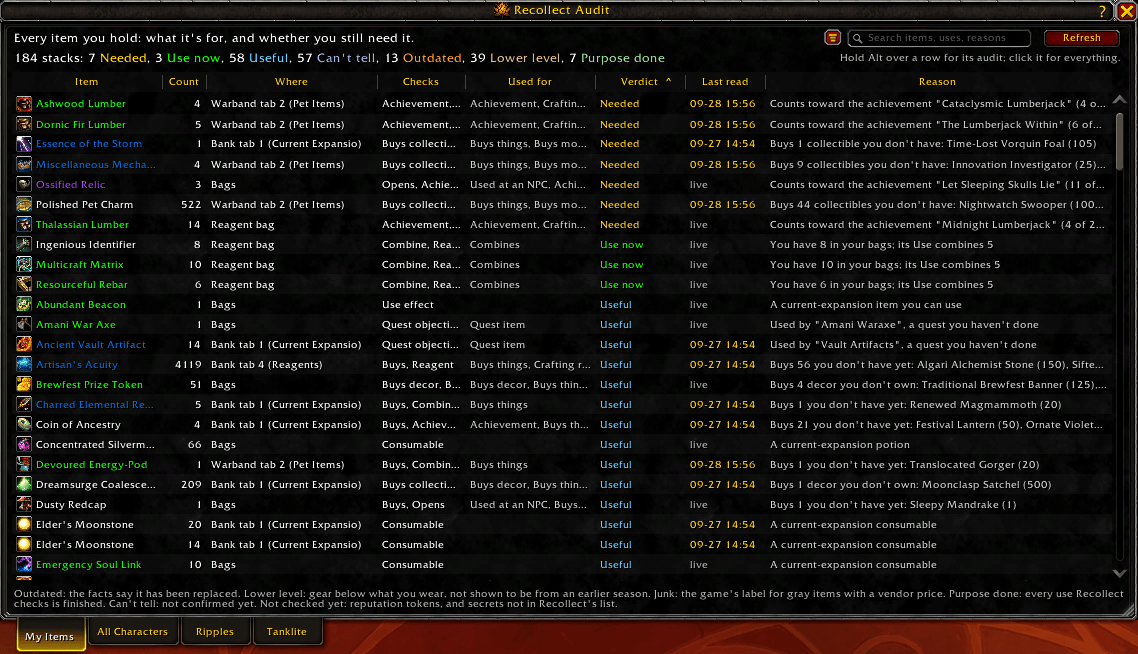
/recor the minimap button opens the Recollect Audit, every stack you hold with its verdict. Right-click the button for settings./rec guideopens the feature guide (it opens by itself on your first login).
Verdicts
- Needed: something unfinished still uses it.
- Use now: learn it, open it, or start its quest.
- Useful: it still has a use for you, such as something it buys that you don't have.
- Can't tell: Recollect can't confirm yet, and says why (and what to do, where it can).
- Junk: a gray item with a vendor price, the game's own junk label.
- Outdated: it has been replaced (older gear, an older expansion's potions, flasks, food, weapon oils and sharpening stones, an old-season reagent and the like).
- Lower level: gear below what you wear, not shown to be from an older season.
- Purpose done: every use Recollect checks is finished.
Recollect never decides for you. Its suggestions, such as "most likely safe to sell or delete, but that's your call", always come with their reason.
The audit panel
A short summary beside the tooltip: the verdict and its reason, the few uses that matter most with where you stand on each, where the item comes from, a Tip when one applies, and the keys you can press. On an item you don't hold (a chat link, loot, a vendor's goods) it shows how many you have instead of a verdict.
The item details window
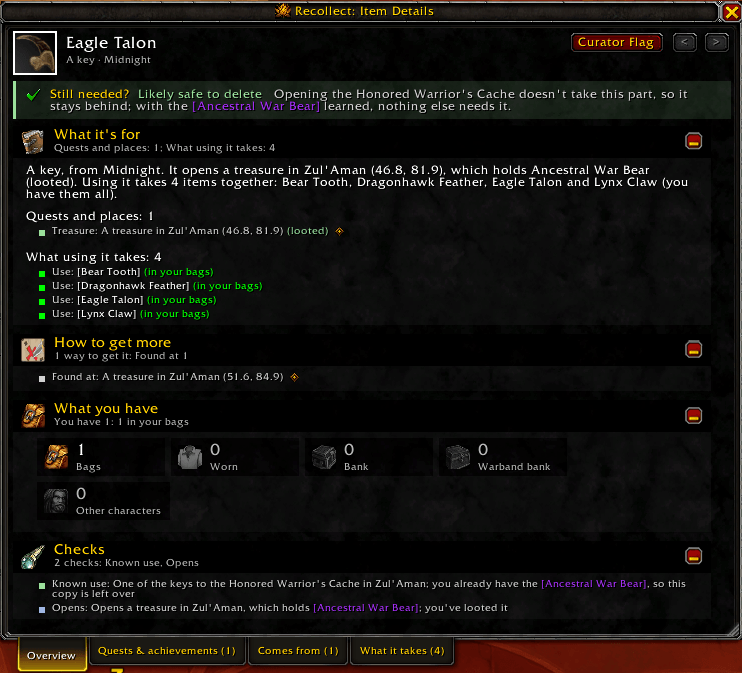
Everything Recollect knows about one item, so you don't need a website. Open it with Alt+D, or click a row in the Recollect Audit. A setting can make the key a click instead (Alt+click, for example), which works on any item, even in combat.
- Still needed?: Recollect's suggestion (Keep it, Sell it, Likely safe to delete, Probably done, Replaced, Lower level or Can't tell yet) with a short reason; hover for the rest.
- What it's for: what the item is, its Use line, and tiles counting each kind of use still open.
- Achievements: what it counts toward, with progress bars.
- How to get more: each way to get it (sold by, drops from, rewards) and what buying it requires first.
- What you have: your counts by place and on your other characters; hover a tile for exactly where.
- Checks: every check Recollect ran and what it found.
Tabs along the bottom list everything in sortable, searchable tables. Names work as they do in chat (hover, Shift-click, Ctrl-click), Alt-click opens that item here, and right-click gives a menu: link it, preview it, set a waypoint, or copy its Wowhead link. An achievement row's icon opens the game's achievement window at it.
The Recollect Audit
/rec lists every stack you hold with its verdict and reason, counted by verdict at the top. Search it, or filter by verdict, place, use or why Recollect can't tell. Tabs choose whose items you see: this character, all characters, or one of your others as they were at their last login. Click a row for its details.
Waypoints
Waypoints go to TomTom when it's installed, else to the game's map pin; a setting can always use the game's pin. The waypoint key isn't bound in combat.
Settings
/rec settings, a right-click on the minimap button, or Options > AddOns.
- Tooltips: when the audit panel shows (Alt, Shift, Ctrl or always), the waypoint and details keys, and where waypoints go.
- Recollect Audit: whether the list includes your bank, warband bank and other characters, and the minimap button.
- Curator: curator mode (below).
Curator mode
Optional and off by default: turn it on under /rec settings, Curator, or with the Want to be a curator? button in the item details window. While it's on, Recollect notes where the game disagrees with its database or shows something it lacks: a vendor's prices, a drop, a quest reward, where an NPC stands. It also notes items its database knows nothing about, wherever you meet them, bags and banks included, so the author can find out what they're for.
It records only game IDs and positions, with your character's class, race, level, faction, professions, zone, War Mode, Chromie Time and instance difficulty and, where it matters, quest progress. It never records names, chat, gold, currencies, how many of anything you have, or anything else you carry. Curators who opted in before bags and banks were included see a one-time chat line first.
- Curator Flag on the details window reports a problem with an item, with your own words if you like. On an item Recollect knows nothing about it reads Request info.
/rec feedbacksends a note to the author. Recollect's own errors are sent too. Only the author reads these.- The author collects findings through the "Recollect Curators" community (
/rec curator joinprints the invite). Members can see each other's character names and zones. Collections travel as hidden whispers, on any realm; they never show in your chat and take no chat channel slot. - Once enough curators have confirmed that a place matches the database, Recollect stops sending matches for it; differences are always sent. Findings the author has already ruled out aren't recorded.
- Findings not collected yet survive updates. Turning curator mode off offers to delete them.
/rec curator opens the curator dashboard:
- Overview: whether it's recording, what waits to be sent against the 1 MB limit, what the author has saved and when they last collected, anything you need to fix (such as a character outside the community), and, folded away, the connection to the author with a connection test.
- Findings: everything waiting, in a table you can sort, search and filter.
- History: each collection the author made: when, what it held and how it went (the last 100).
Commands
/recor/recollect: the Recollect Audit/rec settings,/rec guide,/rec changelog,/rec debug/rec curator: the curator dashboard;status,join,cancel,diag(what your game sees, for a bug report),transport Name-Realmorping(a five-minute connection test with that player)/rec feedback(or/rec bug): write feedback for the author/rec version,/rec help
The Addon Compartment also opens the Recollect Audit; right-click it for settings.
License
Copyright (C) 2026 Cobanyte. Released under the GNU General Public License, version 2 (see LICENSE).
Where the data comes from
Recollect reads your collections, quests, achievements, bags and bank live from the game. What links an item to its uses ships as IDs only (names are read live in your language), from:
- the game's own answers, gathered with Recollect's development tools;
- AllTheThings (MIT license, Copyright (c) 2026 AllTheThings WoW Addon), from which Recollect builds its own curated list of vendor costs, positions, quest items and item sources; its license notice is in
Source/Data/Relations.lua; - what curators found in game, once the author has checked it;
- short notes the author wrote in Recollect's own words for items nothing in the game explains. None of them changes a verdict.
The Recollect Team