Coby's Currency Searcher
- By
Add a search bar to the Currency tab. Find currencies by name, expansion or description, even in collapsed headers. Save favorites, filter owned, capped, weekly or transferable currencies, and open the transfer menu for warband transfers.
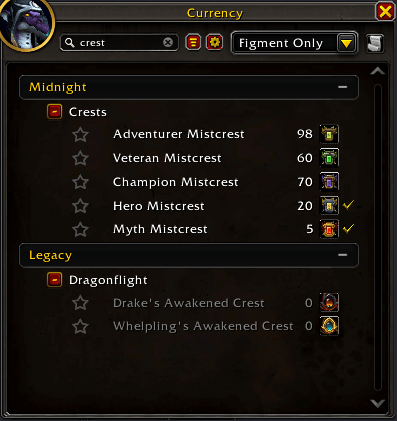
01-CobysCurrencySearcher-find-it.png
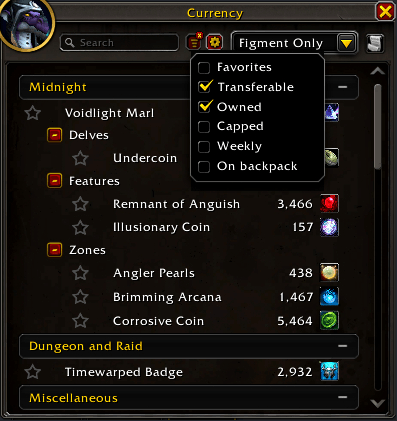
02-CobysCurrencySearcher-filters.png
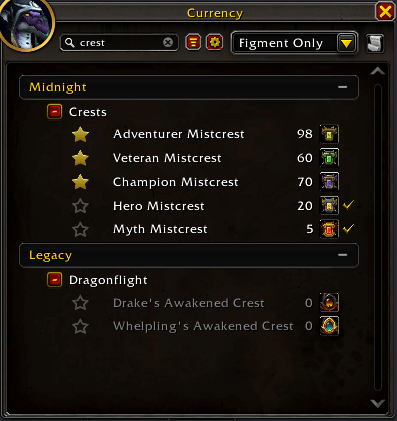
03-CobysCurrencySearcher-stars.png
04-CobysCurrencySearcher-flat.png
05-CobysCurrencySearcher-favorites-settings.png
Description
Coby's Currency Searcher
A search box for the Currency tab of the character window in WoW Midnight (12.1).
If you've ever opened the Currency tab to check one number, scrolled past six expansions of headers, opened the wrong one, and closed the window without finding it, type a few letters and the list shrinks to what you're looking for.
Blizzard's tab has no search, and collapsed headers hide their currencies completely. This addon shows only the matching rows, in Blizzard's order and row style, with no empty gaps. Blizzard's own list stays untouched underneath, which keeps warband transfers working.
How it works
- Open the Currency tab. A search box, a funnel and a settings gear sit beside Blizzard's filter dropdown.
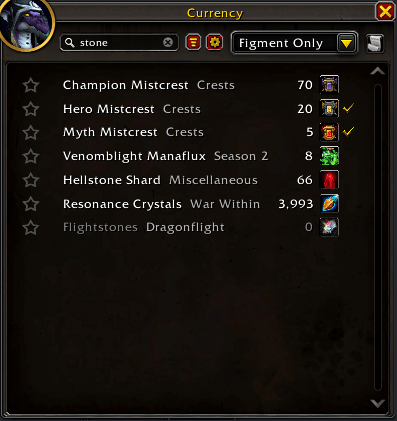
- Type. Only the matching currencies show, under their headers, with no gaps. (The Flat list setting drops the headers and puts each currency's group after its name.)
- Collapsed headers are searched too. Your headers are never changed.
- Type a header's name ("Midnight", "Dungeon and Raid") to see everything under it. Filters you have on still apply.
- Filter. The funnel offers Favorites, Transferable, Owned, Capped (at their maximum or an earning limit, weekly included), Weekly (has a weekly limit) and On backpack, with or without search text. Filters combine: Owned plus Transferable shows the transferable currencies this character holds. A red x on the funnel means a filter is on; click it to clear.
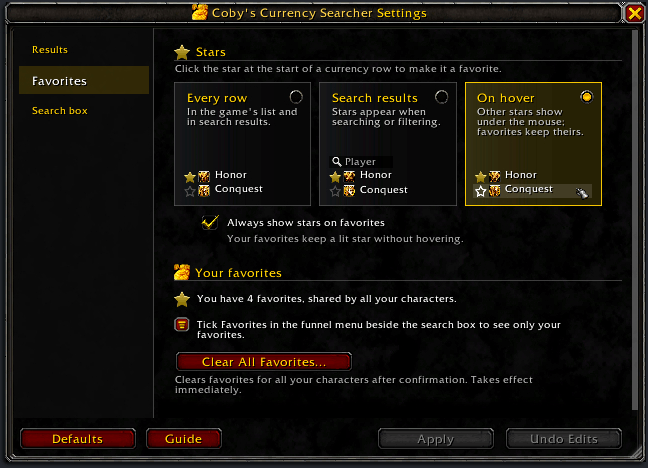
- Star favorites. Click the star at the start of any row, in Blizzard's list or in results. Stars are shared by all your characters and never reorder anything. Tick Favorites in the funnel to see only starred currencies. A setting shows stars on search results only, or only under the mouse.
- Clearing. Escape, the clear button or closing the window clears the text (a setting keeps it). Filters stay on until you clear them.
Also handled:
- Nested sub-headers inside collapsed headers are found, and same-named sub-headers under different parents are kept apart.
- Collapsing a header in the results hides rows in the results only; your real headers are untouched.
- Clicking a result opens its options in place: Unused, Show on Backpack and Transfer. Transfer opens the transfer menu for that currency beside the window and your search comes back. If it can't (the currency can't be transferred now, or sits too far down the list; chat says where), the game's list stays up so you can finish there, and your search and filters are cleared.
- Row actions. Tooltips, Shift-click to link and the backpack's modified click work as on Blizzard's rows.
- Account data still loading? The results fill in as soon as it arrives.
- Logged in during combat? The search box appears when combat ends.
Guide and what's new
/ccs guide opens a short feature guide; it also opens the first time you log in with the addon. After an update, What's new lists what changed; /ccs changelog opens it any time.
Install
CurseForge: https://www.curseforge.com/wow/addons/currency-searcher
Manual: Drop the CobysCurrencySearcher folder into your Interface/AddOns/. No dependencies.
Slash commands
/ccs <text>         Open the Currency tab and search for <text>
/ccs settings       Open or close the settings window (also /ccs config, /ccs options, /ccs show)
/ccs guide          Open or close the feature guide (also /ccs tutorial)
/ccs changelog      Open or close the changelog: what changed in each version (also /ccs whatsnew, /ccs news, /ccs change)
/ccs addons         Every addon by Cobanyte, with CurseForge links and pictures (also /ccs other, /ccs more)
/ccs debug          Open or close the debug log window
/ccs reset windows  Put every window back to its default place and size
/ccs version        Print the addon version
/ccs help           Show this help
/cobyscurrencysearcher works the same. /ccs on its own opens the settings. The command words above are never searched; to find a currency named like one, use the search box.
/ccs <text>:
- Searches at once when the Currency tab is showing, or the window was last left on it.
- Otherwise a small window asks you to click Go to Currency (only your own click can change that tab without blocking transfers later), and the search runs when the tab opens.
- That click is usually needed once. It comes back after you leave the window on another tab (your Character key does) and after a login or
/reload. - To skip it, bind a key to the Currency tab in the game's Keybindings and open the window with that.
- If the command needs Go to Currency during combat, the prompt appears when combat ends.
Settings
Open with /ccs settings, the gear beside the funnel, the addon list on the minimap, or Options > AddOns. Changes wait for Apply; Undo Edits or closing the window throws them away. Defaults fills in the defaults for you to Apply. Drag the bottom-right corner to resize.
- Results: Grouped (default) or Flat list; search names only (default), or descriptions too.
- Updates: a chat line when someone in your guild or group has a newer version (on by default; "Tell me when a newer version is out" turns it off).
- Favorites: where stars show (every row, search results only, or on hover, with favorites kept lit), and Clear All Favorites (asks first; Undo Edits and Defaults don't bring them back).
- Search box: the cursor in the box when the tab opens, remember your search while the window is closed, remember filters between logins, and the search delay (default 0.2 s).
Troubleshooting
A currency I know I have does not show up.
- A red x on the funnel means a filter is on (Transferable hides everything that can't move between your characters). Click the x to clear it.
- Blizzard's filter dropdown (Character or Transferable) still applies on top of the search.
- Unused currencies are searched too. If it still doesn't appear, this character hasn't discovered it yet.
- Try "Also search descriptions" (
/ccs settings, Results page) if you only remember what the currency is for.
I ticked Favorites and the list is empty.
- If nothing is starred, turn off Favorites, search for a currency, then hover over its row and click the star. Otherwise, check your search text and the other filters.
There is no search box on the Currency tab.
- If you logged in during combat, the box appears once combat ends.
- Run
/ccs debug. If the log says "TokenFrame is missing or changed shape" (TokenFrame is the Currency tab), another addon or a WoW patch changed the tab. The log is what I need to fix it (see below).
I clicked Transfer and got a message to scroll down.
- The currency's group is taller than the window. Scroll down and click it; from there it is the game's own list, and your search and filters don't come back by themselves.
In combat, Transfer only brings the game's list back.
- Opening the transfer menu for you only works out of combat. In combat, Transfer clears your search text and filters; click the currency in the game's list yourself.
A transfer was blocked after I marked a currency Unused from a search.
- Marking a currency Unused makes the addon refresh Blizzard's list once, and a transfer started from that refreshed list can be blocked. Reopen the character window, or transfer from a search result.
/ccs <text> says the search box is unavailable, or the tab could not be opened.
- You logged in during combat (the box appears when combat ends), another addon replaced the tab, or the character window is turned off where you are. Open the window yourself and use the box.
License
GPL-2.0. See LICENSE.
Issues / feedback
Found a bug? Run /ccs debug, press Copy Last 250 and send the text with a line about what you were doing. The log holds the addon version, your WoW build and your settings.
- Email: hackythings@gmail.com
- BugSack errors: whisper them to Figment-Illidan in game.
- CurseForge: comment on the project page for questions and feedback.
- GitHub: open an issue for bugs you can reproduce.
Coby's Currency Searcher Team