Coby's Coinrot
- By
Buy and open Satchels of Corrosive Coins at Er'inye the fast way: one button buys as many as your souls and bags allow, no popups, then opens them one press at a time. Set a satchel count or a coin goal and see what you'll end up with.
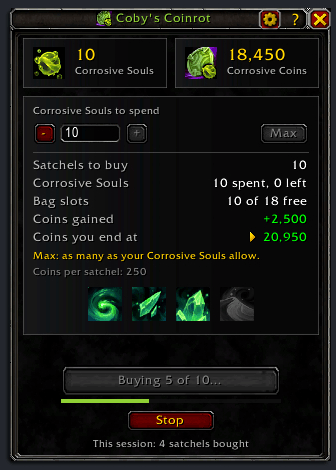
02-CobysCoinrot-buying.png
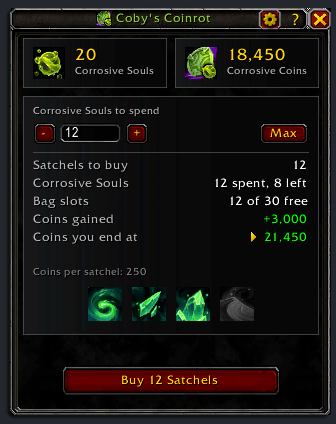
01-CobysCoinrot-plan.png
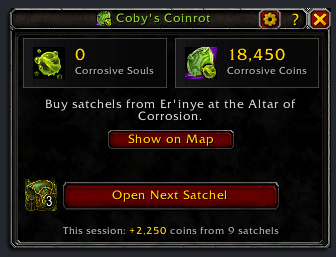
03-CobysCoinrot-opening.png
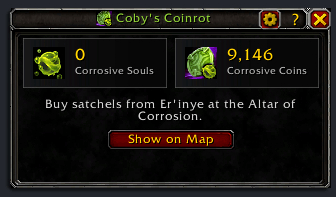
04-CobysCoinrot-away.png
Description
Coby's Coinrot
Buy Satchels of Corrosive Coins with your Corrosive Souls and open them, all from one button you press again and again (WoW Midnight 12.1.5). No confirmation for every satchel, no hunting for satchels in your bags: talk to Er'inye at the Altar of Corrosion in the Vaults of Atal'Utek and keep pressing the same button, or your Interact key.
Features
- One button, two jobs: Buy N Satchels first, then Open Next Satchel once per press, with her window open or not. The button shows only when it has something to do.
- No popup for each satchel: one press buys them all, one at a time, each checked in your bags before the next. A full bag, her window closing, combat or Stop ends it cleanly, and nothing is ever bought twice by mistake.
- Choose how many: one box for the Corrosive Souls to spend (one soul a satchel), with -, + and Max. Under it, the plan: the satchels, the souls spent and left, the bag slots, the coins you gain and the coins you end at. Remembered for each character.
- Exact coins: the panel reads your Corrosive Spirit ranks at the Altar of Corrosion and shows the four rank icons as the Altar does, the ones you have lit. It checks the figure against what your satchels really gave.
- Safe opening: satchels are opened by name, never from a bag slot (a right-click in your bags with a vendor's window open sells them), so her window can stay open while you open them.
- Your Interact key: while the button has something to do, your Interact key presses it, and the line under the button names the key.
- Away from her: the panel stays small, with your Corrosive Souls and Corrosive Coins, and Show on Map pins her on your map (with TomTom installed, its arrow points to her too once you're on her continent).
- This session: the coins from the satchels you opened (or the satchels bought, before the first opening), at the bottom of the panel.
- A chat line when a newer version is out, which you can turn off in the settings.
Quick start
- Talk to Er'inye. The Coinrot panel opens beside her window, as tall as hers.
- Keep Max (every soul your bags have room for) or type the number of souls to spend.
- Press Buy N Satchels. It buys them one at a time.
- Press Open Next Satchel once per satchel; the satchel's icon beside the button counts the satchels left. Your Interact key presses the button too.
On Max, every Corrosive Soul your bags have room for is spent: type a smaller number, or keep the ones you need for something else in your bank.
Coins per satchel
100 coins, plus 25% of that for Corrosive Spirit rank I, 50% for II, 75% for III and 100% for IV, added together: ranks I to III give 250, all four 350. The panel reads your ranks itself, so the plan is exact from the start. If what a satchel really gives ever differs from your ranks, the panel uses what you received and says both. While your ranks can't be read and no satchel has been opened yet, it shows the range, 100 to 350.
Install
CurseForge: https://www.curseforge.com/wow/addons/cobys-coinrot
Manual: drop the CobysCoinrot folder into your Interface/AddOns/. No dependencies.
Slash commands
/coinrot                Show or hide the panel (also /coinrot show)
/coinrot settings       Open or close the settings window (also config, options)
/coinrot guide          Open or close the feature guide (also tutorial)
/coinrot changelog      Open or close the changelog: what changed in each version (also whatsnew, news, change)
/coinrot addons         Every addon by Cobanyte, with CurseForge links and pictures (also other, more)
/coinrot debug          Open or close the debug log window
/coinrot reset windows  Put every window back to its default place and size
/coinrot version        Print the addon version
/coinrot help           Show this help
/cr works the same as /coinrot. The addon is also in the AddOns menu by the minimap: click to show or hide the panel, right-click for settings.
Settings
/coinrot settings, the gear on the panel, or right-click the minimap addon menu entry. Changes wait for Apply.
- Vendor: whether the panel opens by itself when you visit Er'inye, whether your Interact key presses the button, and the newer-version chat line.
- Window: where the panel docks (right of her window, left, whichever side fits, or where you last dragged it), and Reset Panel Position.
Good to know
- The panel closed when I left Er'inye. A panel that opened by itself closes with her window. Bring it back with
/coinrotto open the rest of your satchels anywhere. - The button isn't there. It hides when there is nothing to buy or open; the line above it says why.
- My Interact key didn't press it. It never does in combat, or when your Interact key is bound with Shift, Ctrl, Alt or Cmd: click the button then.
- The Corrosive Collector endeavor moved less than my coins. The game counts each satchel you open as one gain, however many coins it holds. Nothing an addon can change.
License
Copyright (C) 2026 Cobanyte. Released under the GNU General Public License, version 2 (see LICENSE).
Issues / feedback
Found a bug? Run /coinrot debug, press Copy Last 250 and send the text with a line about what you were doing. The log holds the addon version, your WoW build and your settings.
- Email: hackythings@gmail.com
- BugSack errors: whisper them to Figment-Illidan in game.
- CurseForge: comment on the project page for questions and feedback.
- GitHub: open an issue for bugs you can reproduce.
Coby's Coinrot Team