Twinbar
- By
A second hotbar in the bottom row of your inventory. Tap Left Alt to swap. Client-side only.
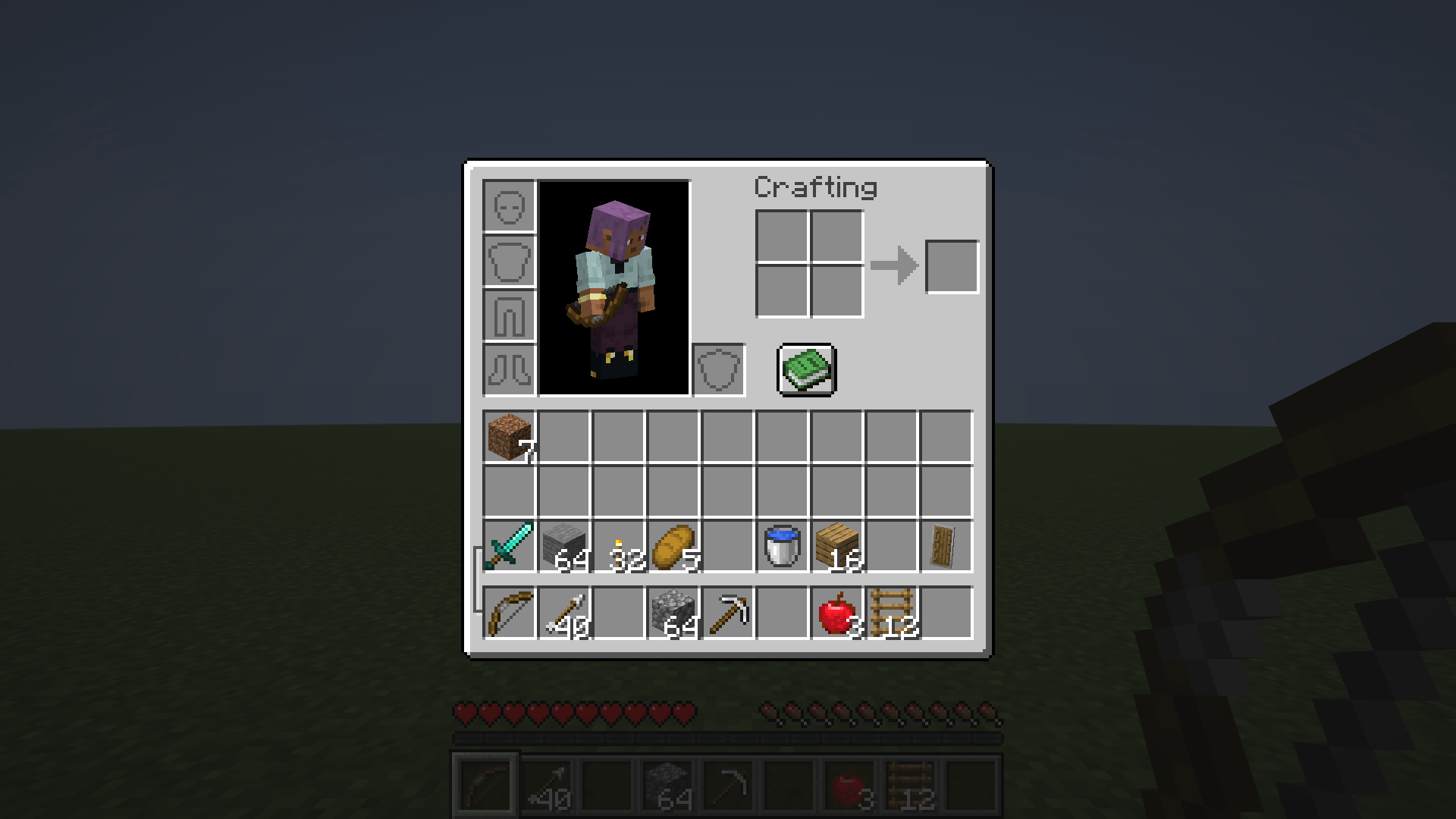
The bottom row of your inventory is your second hotbar. The small bracket on the left edge links it to your hotbar.
Description
A second hotbar, one key away. The bottom row of your inventory becomes your second hotbar. Tap Left Alt and it swaps places with your hotbar: sword, food and blocks out, bow, arrows and tools in. Your inventory shows both rows, the screen only the one you are using.
Twinbar only runs on your client. The server needs nothing installed, so it works on vanilla and modded servers alike.
Features
- Swap with one tap. Left Alt swaps your hotbar and your second hotbar, slot by slot. It works while playing, in your inventory, in chests and other menus that show your inventory, and in Creative mode.
- Always clear which rows swap. A small bracket on the left edge of your inventory, chests and most other menus links your second hotbar and your hotbar. Click it to swap, hover over it to see the key.
- No accidental swaps. The swap happens when you release Alt, and only if Alt was not part of a shortcut. Alt+Tab, Alt+F4 and other Alt shortcuts leave your hotbar alone.
- Combat friendly. Moving, jumping, sneaking, sprinting, attacking and using items while Alt is held still count as a tap, so a quick swap in the middle of a fight works.
- Rebindable. Change the key in the game's controls under "Twinbar", even to a mouse button.
- Nothing to lose. Your second hotbar is a normal inventory row. Remove the mod and your items are still there.
- English and German.
Controls
| Input | What it does |
|---|---|
| Tap Left Alt | Swaps your hotbar and your second hotbar. |
| Click the bracket | The same, in your inventory, in chests and the other menus with the bracket. |
At villagers and beacons your inventory sits in the middle of the window, so there is no bracket there. Left Alt still works.
Good to know
- The second hotbar is the bottom row of your inventory, so your inventory has 9 fewer storage slots. Picked up items only start new stacks there once all your other slots are full, but they do top up stacks already in it. Inventory sorting mods treat it like any other row.
- Twinbar swaps with the same inventory clicks the game sends when you press the number keys in your inventory. Anti-cheat plugins such as Grim or Vulcan may flag nine clicks without an open inventory and set you back or kick you. On servers with such plugins, ask the server owner first.
Installation
- Minecraft 1.21 to 26.3. Pick the file for your Minecraft version.
- Fabric Loader 0.20.1 or newer for 26.x. On 1.21.x an older loader is fine too, from 0.15.11 on 1.21.1 to 0.17.3 on 1.21.11.
- Fabric API
- Java 21 for Minecraft 1.21.x, Java 25 for 26.x
Twinbar is client-side only. Install it in your own game. The server does not need it.
Twinbar Team