Tool Slots
- By
Four dedicated slots for your pickaxe, shovel, axe, and shears, with auto switch when breaking blocks.
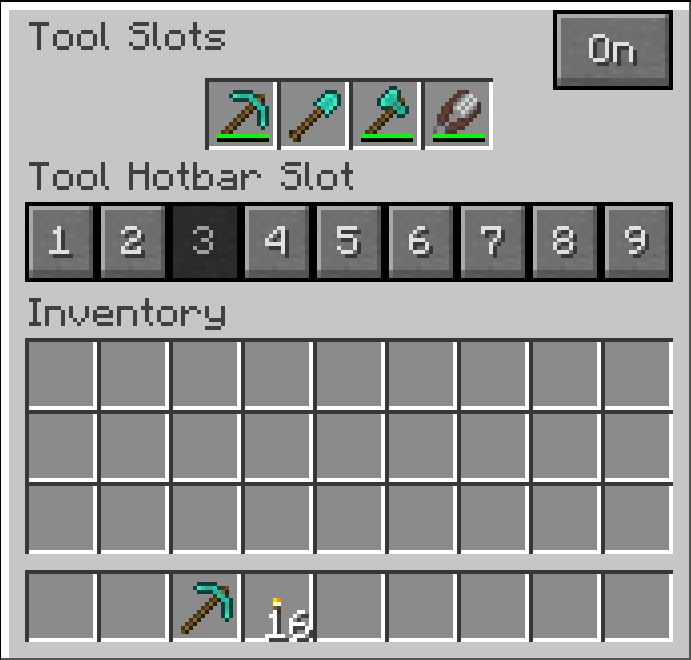
Where you place your tools.png
Description
Tool Slots
AI usage disclaimer: This mod was developed with AI-agent assistance using this agent workflow. The project owner reviewed the work during development.
Adds four dedicated slots for a pickaxe, shovel, axe, and shears. You assign one position in your hotbar as your tool position, and breaking a block while holding it automatically switches in whichever of the four suits the block.
This is similar to auto switch mods, with one difference: it never searches your inventory and never guesses which tool you meant. It only ever uses the item you put in the slot yourself. Put a pickaxe in the Pickaxe Slot and that pickaxe is what you get on stone. Your silk touch pick stays your silk touch pick, and nothing is swapped for something the mod thought was better.
- Four Tool Slots. Pickaxe, shovel, axe, and shears, opened from a button beside your inventory. Any item can go in any slot; a slot is a category, not a restriction.
- One tool position, yours to pick, marked so you can see it. Choose the mark too: an outline, corner ticks, a line underneath, or none.
- Leave that position empty and the last tool you used returns to it whenever you close a screen.
- An On/Off switch, per player, in the screen or with
/toolslots toggle. - Your tools survive death by default.
Configuration
Optional, in config/toolslots.cfg, and most players never need it. Server owners can force a block
into a category or stop the mod reacting to it at all:
S:categoryOverrides <
    mymod:strange_ore=PICKAXE
    minecraft:glass=NONE
 >
The marker style and the On/Off control are client-side, so your choice is yours alone on a server.
Installing
Required on both the client and the server.
Also install Inventory Button Bar. It is what puts the button beside your inventory, and it lets several mods share that spot instead of drawing on top of each other. Tool Slots will not start without it.
Tool Slots Team