Inventory Button Bar
- By
A shared strip on the inventory screen where mods can each add a button without landing on top of each other.
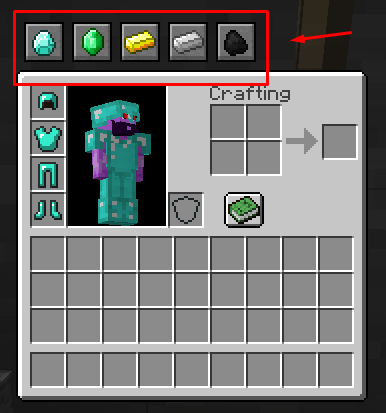
Where buttons appear by default.png
Description
This mod adds a shared strip on the inventory screen where other mods can put their buttons. It exists so that a mod author does not have to decide where players reach their mod's menu, and so that two mods making that decision do not end up in the same place. Registering a button is one API call.
On its own it does nothing. It adds no buttons of its own. With no mods using it, your inventory screen looks exactly as it did before you installed it.
AI usage disclaimer: This mod was developed with AI-agent assistance using this agent workflow. The project owner reviewed the work during development.
What it does
- Lines the buttons up along one edge of the inventory panel, evenly spaced, moving with the panel when the panel moves.
- You choose the edge. Top or right, separately for the survival and creative screens, or off entirely on either one.
- Wraps onto more lines when one line fills up, and stops cleanly when the screen runs out rather than drawing off the edge.
- You choose the order, and you can hide any button you do not want.
- One bad mod does not break your inventory. If a button misbehaves, the bar logs it and carries on.
Config
Everything lives in config/inventorybuttonbar.cfg. There is no settings screen, so edit the file and restart.
The important ones:
survivalPlacementandcreativePlacement-TOP,RIGHT, orHIDDEN. Survival starts on top, creative starts on the right.order- button ids you want first, in the order you list them.hidden- button ids you want left out.
Both order and hidden need button ids. Run /ibb ids in game and it prints the list.
Why two settings instead of one: the two screens are different sizes with different things already drawn on them, so the edge that is free on one is often taken on the other.
A note if you use JEI
The item list sits in the strip to the right of the panel. On the creative screen the bar starts on the right by default, so the two overlap.
If that bothers you, set creativePlacement=TOP. That puts the bar above the creative tabs instead, and it needs a reasonably tall window to fit. On a short window the creative bar will not appear at all, which is the trade and the reason the right edge is the default.
The survival screen defaults to the top and does not have this problem.
Installing
Required on both the client and the server.
For mod authors
Registering a button is two types and one call. See the integration guide.
Read it before you integrate. The most likely mistake has a crash for a symptom rather than a missing button, and the guide is written around avoiding exactly that.
Source
github.com/mahghuuuls/inventory-button-bar. MIT licensed.
Inventory Button Bar Team