Temperature Bands
- By
Modifies world generation to place biomes into repeating temperature bands. Compatible with most worldgen mods. Now with humidity based on proximity to river and/or ocean too!
Description
🌡️ About
Don't like how cold and hot or wet and dry biomes are kinda randomly placed? This mod changes world generation to place biomes into repeating temperature bands, or "climate zones" if you prefer. Automatically compatible with most worldgen mods (see Compatibility section for details). 2.0 adds an advanced humidity algorithm to make wetter biomes appear closer to rivers and/or oceans, or a simpler/faster humidity bands option that are perpendicular to the temperature bands.
There is a new Discord for CosmicDan's Minecraft Mods! Here you can be notified of mod updates or new mod releases, share config presets, get support from CosmicDan and other users/players, or just chat about Minecraft and mods in general. Permanent invite link: discord.gg/pRMVJsz39D
📜 Changelogs (Update history)
2.2.0
- NEW: Added "band limit" settings. Can be used to make a certain temperature band extend forever, providing a "soft world border" of sorts (which could compliment real world borders). Thanks to himlico for the initial suggestion.
- OPTIMIZED: Better default config for advanced humidity, now it's faster *and* much more accurate, the previous defaults were quite bad actually (apologies). Specifically, "humidityResolution" and "climateSamplerResolution" were adjusted and their comments were also updated.
- NOTE: It is highly recommended to delete your default mod config if updating, or at least update these two changed values - "humidityResolution" and "climateSamplerResolution" - to the new defaults. If regenerating a world, remember to set 'copyConfigOnRecreateWorld' to false to use the current mod config (instead of previous world config).
- IMPROVED: The "noiseFactor" setting now supports a percentage value, with the new default being 0.05, which is 5% of the current bandSize (and almost identical to the original default). New percentage values scale better when bandSize is changed. Thanks to Anluckie for suggestion.
- IMPROVED: Preliminary support for "Custom Biome Parameters" (not yet released) under advanced humidity, or other mods that might change river/ocean biome parameters.
- FIX: Potential integer overflow for World Preview benchmark numbers, now the cache values shouldn't go into negative anymore.
- FIX: Crash fix for new worlds on dedicated server (along with general improvements to world creation/loading process, esp. for multithreaded environments). Thanks to snowtyler for reporting.
- IMPROVED: Added default values to config comments for numbered entries (was only required for 1.20.1 and below). Thanks to Anluckie for suggestion.
2.1.0
- OPTIMIZED: [Relevant to 1.20.1+ only] Major climate sampler [advanced humidity] speed increase, measured at over 200% (!!!) faster on average. We now skip Temperature and Humidity noise generation completely (because Rivers/Oceans don't care about those parameters) along with an early-abort to skip extra sampling once we've already determined that a River/Ocean definitely doesn't exist at a given point. Doesn't apply to 1.19.2 version since it doesn't support advanced humidity.
- OPTIMIZED: [Relevant to 1.20.1+ only] Removed all climate prefetching features/config since it doesn't actually provide any benefit at all after the above optimization.
- FIX: [Relevant to 1.20.1+ only] Fix crash with BCLib and BetterX mods, and any other mods with similar bad ports - these mods are calling "createAccess" on world load instead of "validateAndCreateAccess" which is technically wrong for 1.20.1 and above. Fix wasn't necessary for 1.19.2 version.
2.0.x
- NEW: Humidity settings that modify biome placement even more. The default (for 1.20.1 and later only, see FAQ for why) is the "advanced" algorithm that calculates humidity based on proximity to rivers and/or oceans. The other "simple" option generates bands that are perpendicular to temperature bands. Existing worlds will keep their vanilla humidity, see the "Upgrading" section on mod description page for more info.
- OPTIMIZED: The core system was completely rewritten to replace the temperature/humidity density functions and check for success/failure instead of dynamically modifying them and assuming they worked. More robust, more reliable, more gooder. Most of the below changes are made possible thanks to this rewrite.
- NEW: Ability to blacklist/whitelist dimensions. The default config will exclude The Nether and The End. This new default will only apply to NEW worlds, see the "Upgrading" section on mod description page for more info.
- NEW: Benchmark option if World Preview is installed. See config for usage, results are written to log/console.
- IMPROVED: When recreating a world, the Temperature Bands config will now properly copy from the old world by default. This function can be disabled to make world recreation use the current mod defaults, see the "Upgrading" section on mod description page for more info.
- IMPROVED: Better compatibility with worldgen mods. Tested with Larion, Tectonic and Lithosphere - they *really* work now, and it should work with every worldgen mod (assuming they still use Density Functions that are named "temperature" and "humidity").
- IMPROVED: Solved compatibility with C2ME, and probably other performance mods.
- IMPROVED: More config options, better comments and reworked defaults.
- VERSION: Latest branch moved to 26.1.2, dropping 1.21.5 (was previous latest) and 1.18.2 versions (too much backport work and no longer popular anyway)
- [2.0.2] FIX: Solved crash caused by trying to process "fake" levels (from e.g. Supplementaries mod and/or Moonlight Lib)
- [2.0.2] FIX: Properly handle dimension data for runtime-generated dimensions that re-use the overworld noise router
- [2.0.3] FIX: Improved support for naughty mods that replace the Overworld BiomeSource with one that doesn't inherit from the original MultiNoise type (e.g. Blueprint library)
- [2.0.3] FIX: Skip World Preview benchmarks for in-game preview screen (eliminates log spam)
- [2.0.4] FIX: Further improve compatibility with mods that change vanilla BiomeSource (especially when C2ME is installed)
- [2.0.4] FIX: Crash fix for dedicated servers
1.0.0
- Initial release
⭐ Highlights
- Modifies worldgen to place biomes into repeating temperature bands from coldest through to hottest, back to coldest, and so on;
- NEW: Additionally modifies biome placement to put high humidity biomes closer to rivers and/or oceans (default, configurable, only for 1.20.1+) or in bands that run perpendicular to temperature bands (default for 1.19.2);
- NEW: Dimension blacklist/whitelist. By default, The Nether and The End are blacklisted;
- Compatible with most worldgen mods (see Compatibility section for details);
- Each world will remember its own settings, mod config will only apply to new worlds;
- Configurable band size, choice of vertical bands, many more config options;
- By default the world spawn (near origin; i.e. block X,Z coordinates 0,0) will act like a "northern hemisphere temperate zone start", meaning cold is North and hot is South (NOTE: Only guaranteed on vanilla worldgen, some mods e.g. Larion and Tectonic are much more random with origin - see Tips section to solve this with another mod);
- Ability to benchmark chunk generation if World Preview is installed.
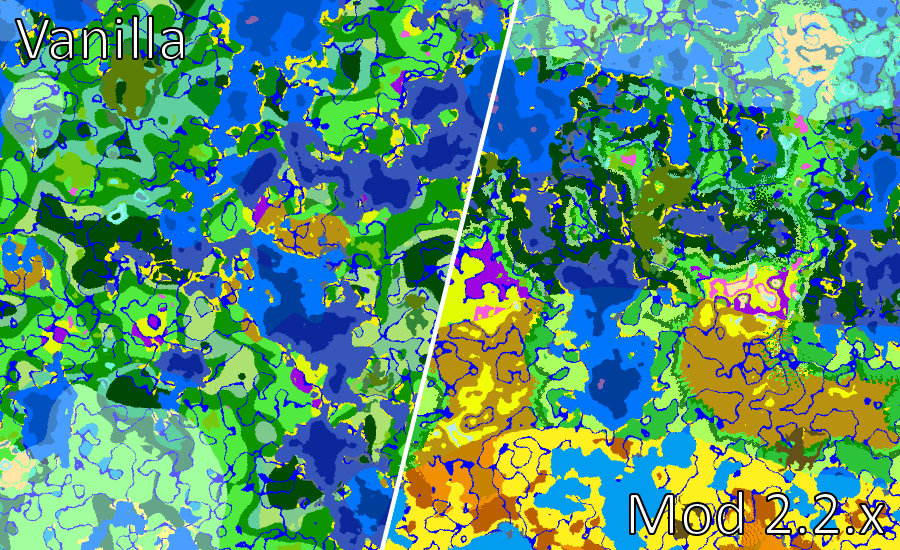
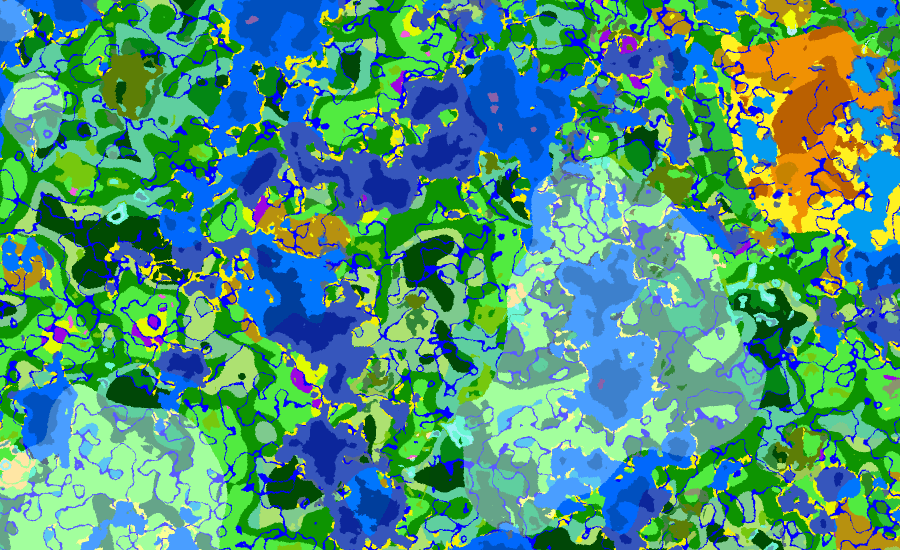
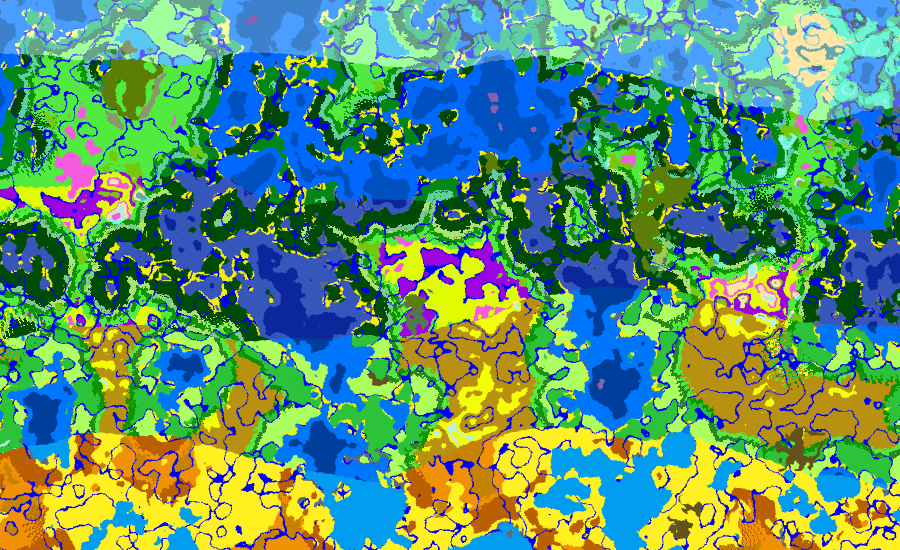
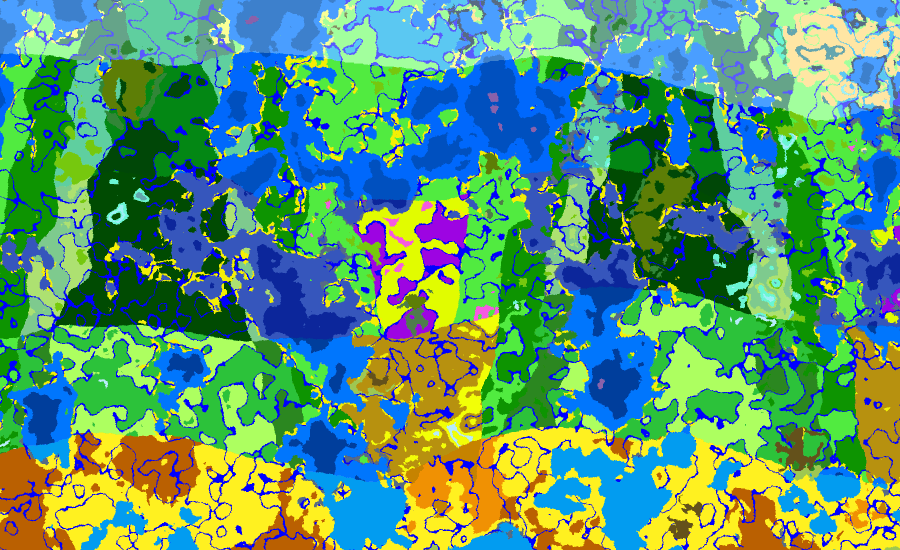
Example pictures of a 1.21.1 world before and after mod (with default mod config):
(Screenshots taken with World Preview mod, highly recommended if you want to test any config changes. 1.20(.1) is here on CF, port for NeoForge 1.21.1 can be found on Modrinth)
🏷️ Usage & Config
After installing the mod, simply start Minecraft to let the config generate. Jump into a NEW world if you're happy with the default config, as detailed below. By default each band is about 2048 blocks wide on average, and the player will start "above the equator" with cold biomes North and warm biomes South, but this can all be changed in config.
The config is very extensive with lengthy comments that detail all features and worthwhile considerations. It's highly recommended to read it all once.
Rather than showing the config files here in CurseForge which is difficult to format, you can view the default configs on GitHub:
💡 Tips
- World Preview mod allows you to preview settings before making the world. Highly recommended if you want to tune configs. (Note: A port for NeoForge 1.21.1 can be found on Modrinth)
- World Preview Temperature Addon adds a "heatmap" view to World Preview, providing some focused detail to changed configs.
- Biome Spawn Point might be desired if using some worldgen mods like Tectonic or Larion, which have their own idea about initial world spawn (rather than origin).
⤴️ Upgrading
New versions of the mod may add new features, these new features will be configurable but WILL NOT apply to existing worlds (to avoid world generation issues). Easiest way to "upgrade" is to simply set the config "copyConfigOnRecreateWorld" to false, (re)start Minecraft, and Recreate your old world. In some cases, however, you may want to retroactively apply the new changes to the old world. Here's the easiest way to do that (be sure to read this whole section before starting):
- Upgrade to the new version of Temperature Bands;
- Start Minecraft, generate a new world, then Save and Quit (no need to quit the whole game);
- Browse to your instance Save folder. If you don't know how to do this, I can't help sorry - do a web search;
- Each folder here are your worlds. Inside, there will be a 'temperaturebands.prop' file - this is a plain text file with the Temperature Bands config for that world;
- You can "simply" open these files with Notepad (or whatever) and compare the prop file contents from the newly-generated world with your old world, and copy-and-paste the appropriate new lines over.
You can of course backup your existing world if you want to be careful. Now, sometimes you don't need to copy the lines EXACTLY, you might want to change them. You may have already noticed that each line in this prop file already corresponds to a setting in the usual (default world) config, so it's important not to change anything in the prop unless you're absolutely sure. Here I will detail new config options and any tips regarding them:
2.0.0
Added config entries "configDimBlacklist" and "configDimBlacklistAsWhitelist". You can read about these in the Usage & Config section above, but they should be mostly self-explanatory. A couple important notes regarding these, though:
- The "configDimBlacklist" lists blacklisted dimensions, with each dimension entry separated by commas. Do NOT remove the '\' characters, these are necessary. I.e. the default of "configDimBlacklist=minecraft\:the_nether,minecraft\:the_end" is correct.
- If you do end up moving the blacklist over to your old world, you may need to delete those dimensions or chunks so they regenerate correctly. You can delete the whole dimensions by deleting the "DIM1" and "DIM-1" folders inside your save folder (make sure you've saved and quit your world first).
- The "configDimBlacklistAsWhitelist" option is not strictly necessary to copy if you want to keep it as a blacklist, since the default is already false.
- You can verify the blacklist worked by looking at the log after loading into a world - you'll see something like "Using dimension blacklist: minecraft:the_nether,minecraft:the_end" (or whitelist instead of blacklist if you set configDimBlacklistAsWhitelist to true).
✔️ Compatibility and Known Issues
The mod should be compatible with most world generator mods, since in modern Minecraft they are often based on datapacks which still use vanilla-style noise functions. This includes the following (personally tested, confirmed working in 2.1.0+):
- Tectonic and/or Terralith;
- Larion World Generation;
- Lithosphere; (NOTE: Lithosphere is notoriously slow and expensive, you may want to disable advanced humidity if using it)
...everything should work with most worldgen mods, as long as they still use DensityFunctions that are named "temperature" and "humidity". Do note that the default mod config might not be ideal for some mods, though - read the config comments for details. Most notable is vanillaNoiseOverride.
The following are examples of worldgen mods that are NOT compatible, because they completely replace Minecraft generation with their own system (i.e. they don't use the vanilla NoiseRouter and/or vanilla DensityFunctions):
- TerraFirmaCraft;
No support will be added for these incompatible mods. Please report any and all other issues not mentioned so I can improve the mod 😁
Other mods
- C2ME is supported, at least with my testing on the latest versions of the mods (0.4.x+ for NeoForge and Fabric). HOWEVER, abandoned and outdated forks of C2ME (such as the 0.2.x versions for Forge 1.20.1) cannot be supported with advanced humidity - you will likely experience extremely slow worldgen speed. Either remove C2ME, or disable advanced humidity to restore normal operation.
- World Preview is supported and should respect 'copyConfigOnRecreateWorld'. HOWEVER, if copyConfigOnRecreateWorld is true, and you are recreating a world that was originally generated with an older version of Temperature Bands, the preview is only accurate if you enter the World Preview settings screen ONCE. Upon opening World Preview settings a second time, then closing out, the new preview will generate and use the current mod defaults for any values that are missing from the older world that is being created. This is only an issue with World Preview, and only happens if you enter the settings screen twice. This is an annoying problem to solve and I can't be bothered fixing to be honest lol; if you want accurate world preview then just cancel world recreation and go into recreate again - world preview will remember the settings you already changed from the first time.
🛎️ Support
Hopefully, the mod is simple enough to use, but you are encouraged to:
- Report any bugs you find;
- Report any incompatibilities with other mods;
- Request any features you want to see
...so I can keep improving the mod 😊 be sure to mention your loader (e.g. Forge, Fabric) and Minecraft version too!
⁉️ FAQ / Troubleshooting
Q. Can I use this in my modpack?
A. Of course! As long as you consider reporting any mod compatibility issues, and feature/config requests too 😁
Q. Does this mod slow down world generation?
A. Yes and No. If you've turned off advanced humidity, the performance impact is negligible. If you are using advanced humidity, it is a little slower, but in modern Minecraft this initial noise-generation and biome placement is highly multi-threaded and is very rarely the bottleneck in actual gameplay. The final phases of chunk generation - decoration and carving - generally remain the bottleneck since the final part still runs on the main (server) thread. In World Preview, on my 3900X, I'm still able to achieve over 15000 chunks per second. Still, if you want it to be faster, see the next question.
Q. Can I make World Preview faster?
A. Yes, assuming you're keeping advanced humidity enabled, which is the main reason for slowing it down. In the World Preview settings menu (wrench icon on Preview tab), go to the "Resolution" tab and change the bottom bar, "samples per chunk", to the maximum value (farthest right). The preview will be a bit more pixelated, but it will significantly improve the speed.
Q. The "Climate Sampler is warming up" screen (or world load on server) takes to long, how to speed up?
A. Update to version 2.1.0. Climate sampler warmup and prefetching is no longer a thing due to major optimizations in 2.1.0.
Q. Is X worldgen mod compatible?
A. If it only adds new biomes, yes. If it actually changes worldgen and is not listed above in Compatibility, probably - try it out! Would appreciate reporting your results 😊 remember you can use World Preview mod to make testing quicker, though that's only for 1.20.x at time of writing (there is also an unofficial port for NeoForge 1.21.1 on Modrinth). You should see log messages when temperature/humidity function replacement succeeds or fails for a given dimension.
Q. Can you make the border between bands more organic rather than with the lines they currently are?
A. Not really, no. Doing so would require a separate mod/datapack that actually changes biome parameters to fit into those transition zones (and/or adds new biomes that go between them). This *might* be something I am working on, though 😉 Note regarding Oceans, there is no such biome as "Warm Deep Ocean" but Warm Oceans can still get as deep as the non-Warm deep variants.
Q. There's too much Dark Forest! How to fix?
A. I've noticed this. Try increasing "humidityMiddleWeight" a little. I might be able to "fix" this properly with a separate mod that adjusts biome parameters (see the Q just above this one).
Q. Why is advanced humidity only available on 1.20.1 and later?
A. Minecraft 1.20.1 added significant performance improvements to biome decoration which make it possible, namely the generation of Strongholds and other large structures through multithreading. In 1.19.2 and below, this structure generation is still single threaded. The process in both versions requires locating biomes since structures have preferred biomes, and this in turn requires climate sampling. But with advanced humidity, climate sampling itself also requires locating biomes. This results in several levels or "nested" climate sampling processes, and because 1.19.2 still uses single threads for generating these structures it becomes practically impossible to finish with the chunk generation seeming stuck.
There is no mod that I know of that "backports" multi-threaded structure generation to older versions, not even C2ME, so I've prevented it from being used in these older versions. It is also beyond the scope of Temperature Bands to solve this - I looked into it and it requires significant changes to the MC codebase which may introduce more problems. The only solution I can give is to update your modpack to 1.20.1 or later.
Q. It's still too slow, or my PC freezes!
A. First, make sure you've updated to 2.1.0 since it has major performance improvements (not necessary for 1.19.2 version). Apart from that, advanced humidity might be a little expensive if you don't have a decent CPU or you have a lot of players on a server. Try adding C2ME and Fast Noise mods. If these don't help, consider setting 'humidityRiverInfluence' to 0.0 for a significant speed improvement, but with a sacrifice in advanced humidity coolness. Last resort is to disable advanced humidity entirely and just use the simple bands algorithm.
Q. Can you add a port for Minecraft version X?
A. I will only support popular modding versions since it's a lot of work to maintain so many versions. If I've missed a version, please let me know in the comments (along with some examples of major content mods or modpacks that exist for this version). Otherwise, another modder has made a similar mod (though it's closed source/proprietary) called 'Natural Temperature' which has some other versions supported, you can try there.
Q. I have another question...
A. ...ask away in the comments :)
🕹️ CosmicDan's Mods
Sleeping Overhaul 2
Replaces skip-to-day on sleep with a time lapse, and more!
Simple Day Length Extender
A simple, highly-compatible mod to extend the length of day and/or night.
Temperature Bands
Modifies world generation to place biomes into repeating temperature bands. Compatible with most worldgen mods.
Temperature Bands Team


Owner