SwiftMap
- By
SwiftMap is a Minecraft minimap / world map mod built around two goals: fast rendering and low resource usage.
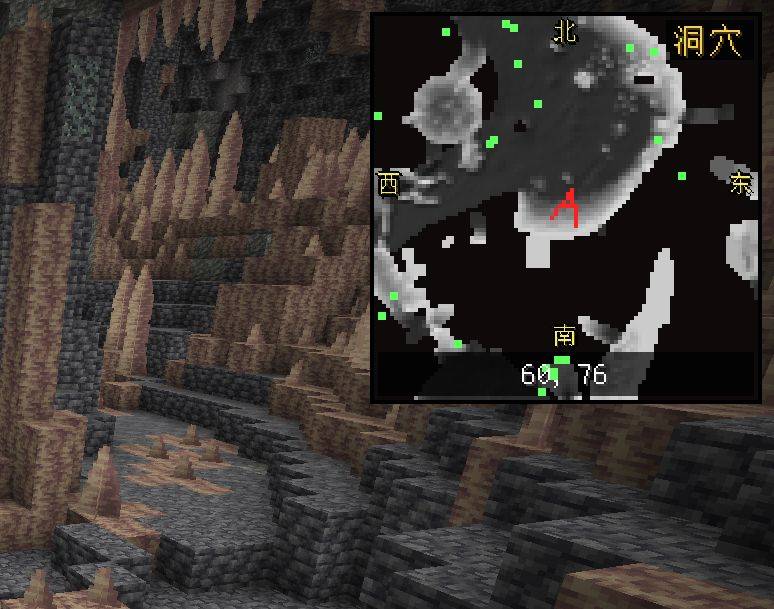
===========
SwiftMap - User Guide (English)
Version 1.0.5
================================================================================
1. What Is This
--------------------------------------------------------------------------------
SwiftMap is a Minecraft minimap / world map mod built around two goals:
fast rendering and low resource usage.
Its core design is a self-drawn tile map at "1 block = 1 pixel". Terrain
colours of loaded chunks are baked into tile files on disk. Displaying the map
only reads those tiles and never samples the world, so frame time is essentially
unaffected.
It also provides chunk operations (save / paste), waypoints, temporary
highlights and structure markers.
2. Supported Versions
--------------------------------------------------------------------------------
This package contains four independent builds. Pick the jar that matches your
game and loader:
Game version Loader Jar file
--------------- --------- -------------------------------------------------
Minecraft 1.21.1 NeoForge swiftmap-1.0.5-mc1.21.1-neoforge.jar
Minecraft 26.3 NeoForge swiftmap-1.0.5-mc26.3-neoforge.jar
Minecraft 26.3 Fabric SwiftMap-1.0.5-mc26.3-fabric.jar
Minecraft 26.3 Fabric SwiftMap-1.0.5-bubbleworld-mc26.3-fabric.jar
Note: install only ONE SwiftMap build per game version.
The Bubble World build is a specialised branch of 26.3-Fabric. When the
Bubble World (bubbleworld) mod is detected, it automatically disables the
minimap and the world map, keeping only waypoints. Bubble World already
draws a large amount of world structure information on the HUD; two map
overlays would both block the view and duplicate work. Waypoints are
something it does not provide, so those are kept.
3. Installation
--------------------------------------------------------------------------------
1. Make sure the matching loader (NeoForge or Fabric) is installed.
2. Drop the corresponding jar into .minecraft/mods/.
3. Start the game.
Requirements:
- 26.3 builds require Java 25
- 1.21.1 build requires Java 21
- 26.3-Fabric additionally requires Fabric API
On first launch, config/swiftmap-settings.json is created with defaults.
4. Features
--------------------------------------------------------------------------------
[Minimap]
- Always-on minimap in a screen corner; configurable position, size
(64-256), zoom and orientation
- Follows player rotation by default; can be locked north-up
- Shows current coordinates at the bottom
- Cardinal direction markers (N/E/S/W)
- Shows nearby players, friendly mobs and hostile mobs
- Cave mode: captures and displays underground layers separately
- Edge-smooth sampling: no hard pixel mosaic, blocks blend into each other
- Terrain shading: hills and cliffs gain a sense of relief
(see "Terrain Shading" below)
- Void as sky: in skyblock/void worlds, empty columns in the overworld are
drawn as a light sky blue instead of black
- Live terrain updates: placing or breaking blocks updates the minimap
automatically, without moving or reloading the world
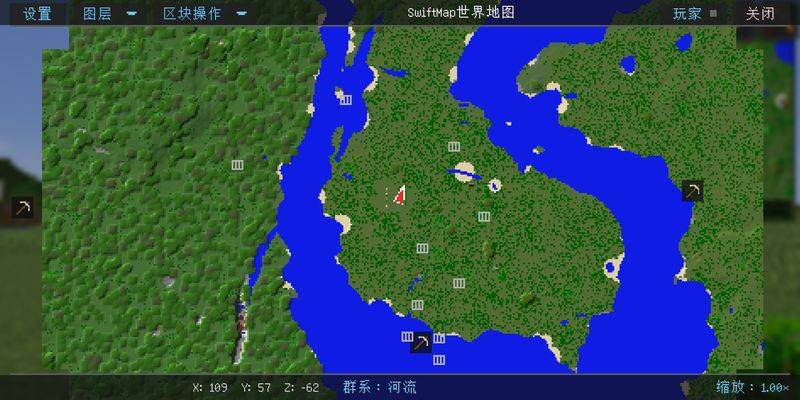
[World Map]
- Press M to open (rebindable in settings)
- Zoomable and draggable
- Optional chunk grid overlay
- Optional biome boundary overlay
- Marks discovered structures (villages, strongholds, mineshafts, etc.)
- Shows coordinates of spawners, end portals and other special blocks
[Waypoints]
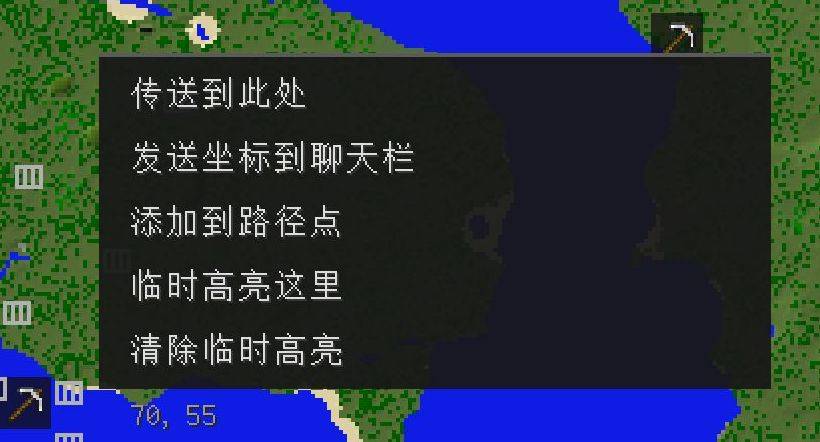
- Right-click on the world map to add a waypoint
- Press U to open the waypoint manager
- New waypoints pre-fill the player's current position
- Name, description, icon and colour are configurable
- Can be highlighted, which draws a direction marker in the world view
- Every waypoint and highlight shows its distance to the player
[Temporary Highlights]
- Mark a coordinate quickly without creating a waypoint
- Command: /swiftmap highlight <x> <y> <z>
- Clear all with one action
[Chunk Operations]
- Select chunks on the map (up to 7x7 = 49 chunks)
- Save as .smclip under <game dir>/swiftmap/clips/
- Paste elsewhere with three alignment modes: original coords / custom Y /
snap to surface
- Optional inclusion of air blocks, biomes, entities and block entities
- Feathered edges: gradient transition at paste borders to avoid hard seams
* Permissions:
- Saving: any player
- Pasting: creative/spectator, or GAMEMASTER permission
(survival cannot paste, to prevent accidental overwrites)
* Safety limits:
- No cross-save paste (rejected when dataVersion differs)
- No cross-dimension paste
[Localisation]
- 10 languages: Simplified Chinese, Traditional Chinese, English, Japanese,
Korean, German, French, Spanish, Brazilian Portuguese, Russian
- All text lives in language files; nothing is hardcoded
5. Settings
--------------------------------------------------------------------------------
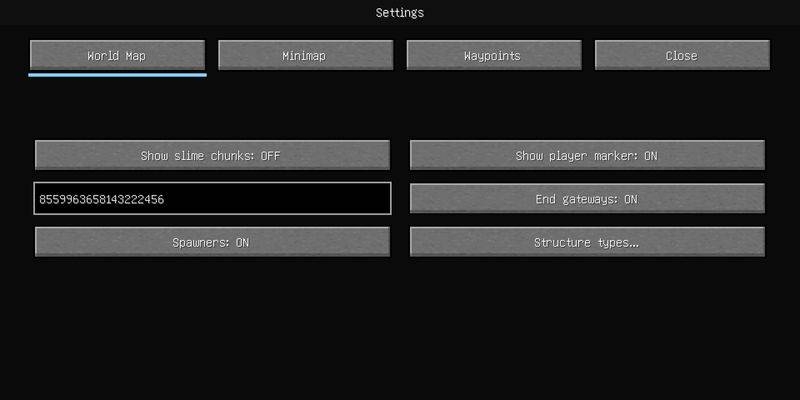
Press K to open settings. The minimap page exposes:
Enable minimap Master switch
Position Any of the four corners
Size 64 / 96 / 128 / 192 / 256
Zoom 0.5x - 4x (pixels per block)
Orientation Follow player / North up
Show coordinates Coordinates at the bottom
Show directions Cardinal markers on the edges
Show players/mobs Toggles for each entity category
Cave mode Separate capture and display of underground layers
Void as sky Overworld only; draws empty columns as sky blue
Terrain shading 0% - 200%, strength of the relief effect
[Terrain Shading]
The map is a straight top-down view, so flat colour blocks convey no height.
With shading enabled, brightness varies with the height gradient: imagine
light coming from the north-west, so slopes facing the light get brighter and
slopes facing away get darker. Hills and cliffs then read as three-dimensional.
Default is 50%. Raise to 100% or 150% if it feels too subtle; lower to 25%
if it feels overdone.
Important: shading is baked into the tile data during capture, so **changing
the strength only affects newly captured areas**. Existing areas must have
their *.smr tile files deleted to be recomputed (paths listed in section 7).
6. Key Bindings
--------------------------------------------------------------------------------
M Open / close the world map (rebindable)
K Open SwiftMap settings
U Open / close the waypoint manager
Drag Pan the map
Scroll Zoom the map
Right-click Context menu on the world map (add waypoint / highlight)
7. Data Locations
--------------------------------------------------------------------------------
<game dir>/swiftmap/clips/ Chunk operation saves (global)
<save>/swiftmap/dimensions/<dim>/lod0/ Surface map tiles
<save>/swiftmap/dimensions/<dim>/lod0/caves/ Cave layer tiles
<save>/swiftmap/waypoints.jsonl Waypoints
<save>/swiftmap/structures.jsonl Structure records
config/swiftmap-settings.json Global settings
Tiles are organised into "containers", one container covering 512x512 blocks
(32x32 chunks). Deleting the *.smr files under lod0 makes that area recapture;
waypoints and structure records are unaffected. This is also how you make a
terrain shading strength change take effect.
8. Performance Characteristics
--------------------------------------------------------------------------------
- Map display only reads tiles; the world is never sampled, so frame time
is constant
- Shading is baked into tiles at capture time, costing nothing at display
- Capture runs on a dedicated background thread with a hard per-tick budget
(8 chunks by default) and never competes with rendering
- Open tile file handles are LRU-cached, up to 32
- The minimap only recomposes when it must: player movement, rotation,
settings changes, or tile updates. Standing still costs nothing
- Data is deflate-compressed with fixed-size slots inside containers for
random access
9. Known Behaviour
--------------------------------------------------------------------------------
[Swamp grass appears in blocks]
Swamp grass colour in vanilla is a hard two-way switch driven by noise
(dark green / light green, period about 44 blocks), not a smooth gradient.
The map reproduces this faithfully at 1 block = 1 pixel, so you will see
blocky dark/light green regions. This is vanilla behaviour, not a bug, and
all three platforms present it the same way.
[Fresly captured areas may look slightly off]
When a chunk first loads, neighbouring chunks may not be available yet, so
biome tinting of grass and leaves can be slightly off. The chunk is
recaptured automatically once neighbours load.
[Terrain shading needs a recapture]
See "Settings - Terrain Shading".
10. Troubleshooting
--------------------------------------------------------------------------------
1. The map is blank
- Make sure you have walked around that area; only visited areas are recorded
- Check whether a lod0 directory exists under <save>/swiftmap/dimensions/
2. Map colours look grey or unloaded
- Usually just-captured terrain; wait a moment or walk a few blocks to
trigger a recapture
3. The minimap does not follow block changes
- Fixed in 1.0.4. If it still happens, verify the jar is version 1.0.5
4. Save corruption risk
- The mod only reads and writes its own directory; vanilla save data is
never modified
- However, chunk paste really does change world blocks. Back up your save
before pasting
5. Crashes
- Check logs/latest.log and crash-reports/
- Include the full log when reporting an issue
11. Licence
--------------------------------------------------------------------------------
See the LICENSE file in this package.
================================================================================
================================================================================
SwiftMap 迅捷地图 · 模组使用说明(中文)
版本 1.0.5
================================================================================
一、这是什么
--------------------------------------------------------------------------------
SwiftMap 是一个 Minecraft 小地图 / 世界地图模组,主打「渲染快、资源占用低」。
核心设计是「1 方块 = 1 像素」的自绘瓦片地图:把已加载区块的地表颜色烘焙成
瓦片文件存到磁盘,之后显示地图只需读瓦片,不再采样世界,因此对帧率几乎无影响。
同时提供区块操作(保存 / 粘贴)、路径点、临时高亮、结构标注等功能。
二、支持的版本
--------------------------------------------------------------------------------
本包内含四个独立构建,请按你的游戏环境选择对应的 jar:
游戏版本 加载器 成品 jar
--------------- --------- -------------------------------------------------
Minecraft 1.21.1 NeoForge swiftmap-1.0.5-mc1.21.1-neoforge.jar
Minecraft 26.3 NeoForge swiftmap-1.0.5-mc26.3-neoforge.jar
Minecraft 26.3 Fabric SwiftMap-1.0.5-mc26.3-fabric.jar
Minecraft 26.3 Fabric SwiftMap-1.0.5-bubbleworld-mc26.3-fabric.jar
注意:同一游戏版本只能装一个 SwiftMap。
泡世界版是 26.3-Fabric 的特化分支:检测到泡世界(bubbleworld)模组时
自动关闭小地图与世界地图,只保留路径点。这是因为泡世界自己已在 HUD 上
绘制大量世界结构信息,两套地图叠在一起既挡视线又做重复的事;
而路径点是它没有的能力,保留下来才互补。
三、安装
--------------------------------------------------------------------------------
1. 确认已装好对应版本的加载器(NeoForge 或 Fabric)。
2. 把对应的 jar 放进 .minecraft/mods/ 目录。
3. 启动游戏。
依赖:
- 26.3 版本需要 Java 25
- 1.21.1 版本需要 Java 21
- 26.3-Fabric 另需 Fabric API
首次启动会在 config/swiftmap-settings.json 生成默认设置。
四、主要功能
--------------------------------------------------------------------------------
【小地图】
- 屏幕角落的常驻小地图,可配置位置、尺寸(64~256)、缩放、朝向
- 默认跟随玩家朝向,也可锁定正北向上
- 底部显示当前坐标
- 方位标记(东南西北)
- 显示范围内的其他玩家、友好生物、敌对生物
- 洞穴模式:单独采集洞穴层数据,可查看地下结构
- 边缘平滑采样:不是硬边马赛克,方块之间有过渡
- 地形明暗:山坡有立体感(见下方「地形明暗」说明)
- 虚空显示为天空:空岛/虚空世界里,主世界无方块处画成淡天蓝
- 实时跟随地形:放置/破坏方块后小地图会自动更新,不需要移动或重进世界
【世界地图】
- 按 M 键打开(可在设置里改键)
- 可缩放、可拖动浏览
- 显示区块网格(可开关)
- 显示群系边界(可开关)
- 标注已发现的结构(村庄、要塞、矿洞等)
- 显示刷怪笼、末地传送门等特殊方块的坐标
【路径点】
- 在世界地图上右键添加路径点
- 按 U 打开路径点管理界面
- 新建路径点时坐标自动填入玩家当前位置
- 支持命名、简介、图标、颜色
- 可设为高亮,游戏中会在视野里显示方位标记
- 每个路径点和高亮标记旁会显示到玩家的距离
【临时高亮】
- 快速标记某个坐标,不需要建路径点
- 支持命令:/swiftmap highlight <x> <y> <z>
- 可一键清除全部
【区块操作】
- 在地图上框选区块(最多 7×7 = 49 个区块)
- 保存为 .smclip 文件,存在 <游戏目录>/swiftmap/clips/
- 可粘贴到其他位置,支持三种对齐方式:原始坐标 / 自定义 Y / 对齐地表
- 粘贴可选是否包含:空气方块、群系、实体、方块实体数据
- 羽化过渡:粘贴边缘做渐变过渡,避免生硬接缝
* 权限规则:
- 存档:有玩家即可
- 粘贴:需要创造/旁观模式,或拥有 GAMEMASTER 权限
(生存模式不能粘贴,防止误覆盖建筑)
* 安全限制:
- 不允许跨存档粘贴(dataVersion 不同会拒绝)
- 不允许跨维度粘贴
【多语言】
- 支持 10 种语言:简体中文、繁体中文、英语、日语、韩语、
德语、法语、西班牙语、葡萄牙语(巴西)、俄语
- 语言文件全部独立,无硬编码文本
五、设置项详解
--------------------------------------------------------------------------------
按 K 打开设置,小地图页有以下可调项:
开关小地图 总开关
显示位置 四个角任选
尺寸 64 / 96 / 128 / 192 / 256
缩放 0.5× ~ 4×(1 格对应多少像素)
朝向 跟随玩家 / 正北向上
显示坐标 底部是否显示当前坐标
显示方位 边缘是否显示东南西北
显示玩家/生物 各类实体的显隐
洞穴模式 单独采集与显示地下层
虚空显示为天空 仅主世界生效,把无方块处画成淡天蓝
地形明暗 0% ~ 200%,控制山坡立体感强弱
【地形明暗】
地图是正俯视,纯色块看不出高低。开启明暗后,按高度梯度给地表加亮度变化:
假想光从西北方斜射,朝光的坡面变亮、背光的坡面变暗,于是山丘和悬崖有立体感。
默认 50%。觉得不明显可以拉到 100% 或 150%;觉得太夸张可以降到 25%。
重要:明暗是在采集时烘焙进瓦片数据的,所以**改强度只影响之后新采集的区域**。
已有区域需要删除对应的 *.smr 瓦片文件才会重新计算
(路径见「数据存放位置」一节)。
六、按键
--------------------------------------------------------------------------------
M 打开 / 关闭世界地图(可在设置里修改)
K 打开 SwiftMap 设置界面
U 打开 / 关闭路径点管理
鼠标拖拽 在地图上平移
滚轮 缩放地图
右键 在世界地图上呼出菜单(加路径点 / 加高亮)
七、数据存放位置
--------------------------------------------------------------------------------
<游戏目录>/swiftmap/clips/ 区块操作存档(全局,不分存档)
<存档>/swiftmap/dimensions/<维度名>/lod0/ 地表地图瓦片
<存档>/swiftmap/dimensions/<维度名>/lod0/caves/ 洞穴层地图瓦片
<存档>/swiftmap/waypoints.jsonl 路径点
<存档>/swiftmap/structures.jsonl 结构记录
config/swiftmap-settings.json 全局设置
瓦片按「容器」组织,一个容器 512×512 格(32×32 区块)。
删除 lod0 下的 *.smr 即可让该区域重新采集,不影响路径点和结构记录。
这也是让「地形明暗」强度改动生效的方法。
八、性能特性
--------------------------------------------------------------------------------
- 地图显示只读瓦片,不采样世界,帧时间恒定
- 明暗在采集时烘焙进瓦片,显示时零额外开销
- 采集在独立后台线程,每 tick 有硬预算(默认 8 个区块),不抢占渲染
- 瓦片按 LRU 缓存打开的文件句柄,上限 32 个
- 小地图只在「该重画」时才重画:玩家移动/转向/设置变化/瓦片更新,
站着不动时完全不重算
- 数据用 deflate 压缩,容器内定长槽位,随机读取
九、已知行为说明
--------------------------------------------------------------------------------
【沼泽草色的成块差异】
沼泽群系的草色在原版就是「按噪声二选一」的硬切换(深绿 / 浅绿,周期约 44 格),
不是连续渐变。地图按 1 方块 = 1 像素如实呈现,因此会看到成块的深绿/浅绿区域。
这是原版特性,不是 bug,三个平台均按原版行为呈现。
【刚采集的区域可能颜色偏】
区块刚加载时周围邻区可能还没到位,地表颜色(草/叶色的群系着色)会略有偏差。
该区块会在邻区加载完成后自动重采修正。
【地形明暗需要重采才生效】
见「设置项详解 · 地形明暗」。
十、问题排查
--------------------------------------------------------------------------------
1. 地图一片空白
- 确认曾在该区域走动过(地图只记录走过的区域)
- 检查 <存档>/swiftmap/dimensions/ 下是否有 lod0 目录
2. 地图颜色发灰 / 像没加载
- 多为该区域刚采集完,稍等或走动几格触发重采
3. 小地图不跟随方块变化
- 1.0.4 已修复该问题。若仍有问题,确认 jar 版本为 1.0.5
4. 存档损坏风险
- 模组只读写自己目录下的文件,不修改原版存档数据
- 但区块操作会真实改变世界方块,粘贴前建议先备份存档
5. 崩溃
- 查看 logs/latest.log 与 crash-reports/
- 提交问题时请附上完整日志
十一、版权
--------------------------------------------------------------------------------
详见包内 LICENSE 文件。
================================================================================
SwiftMap Team