bubble world hs
- By
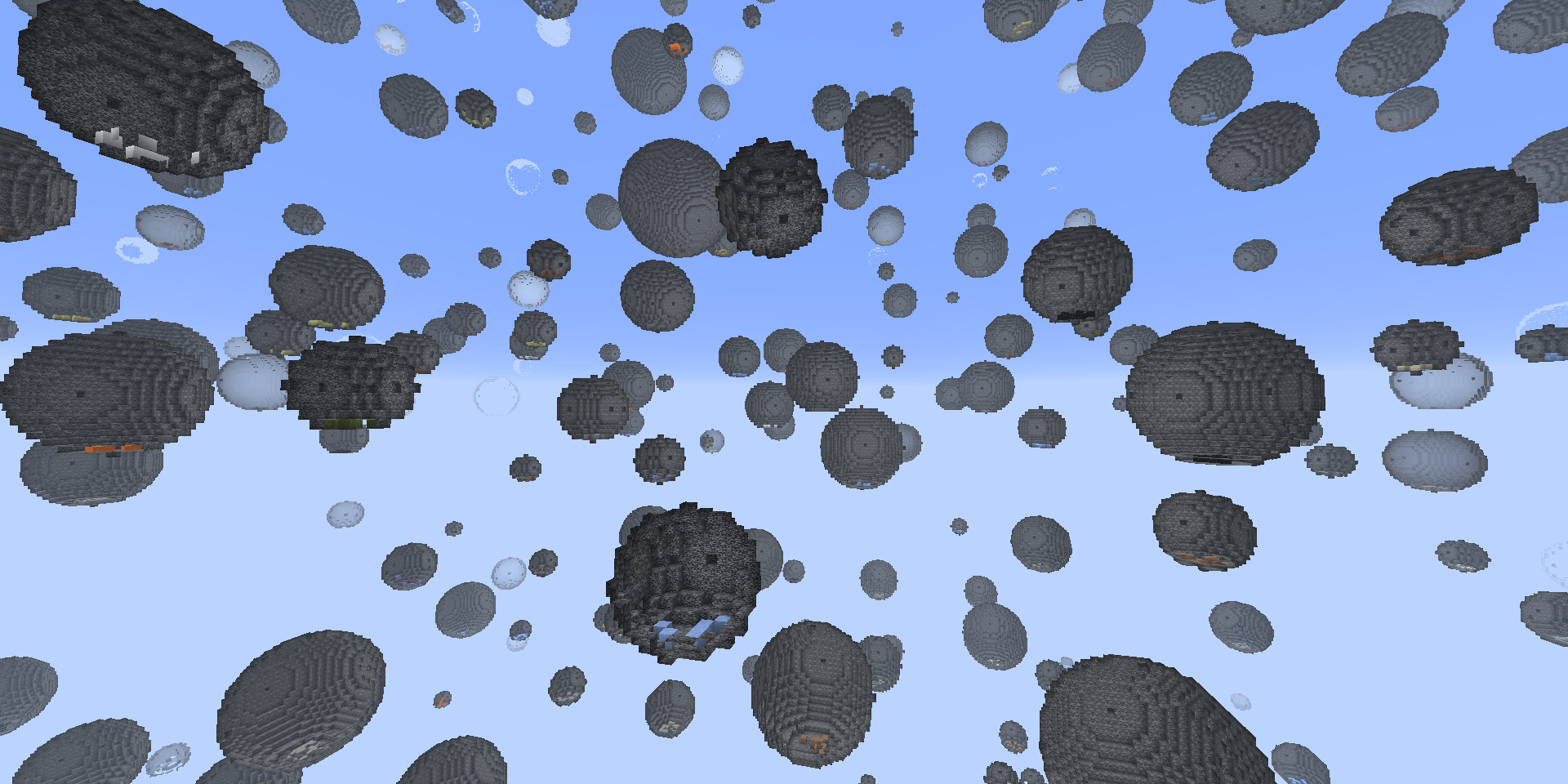
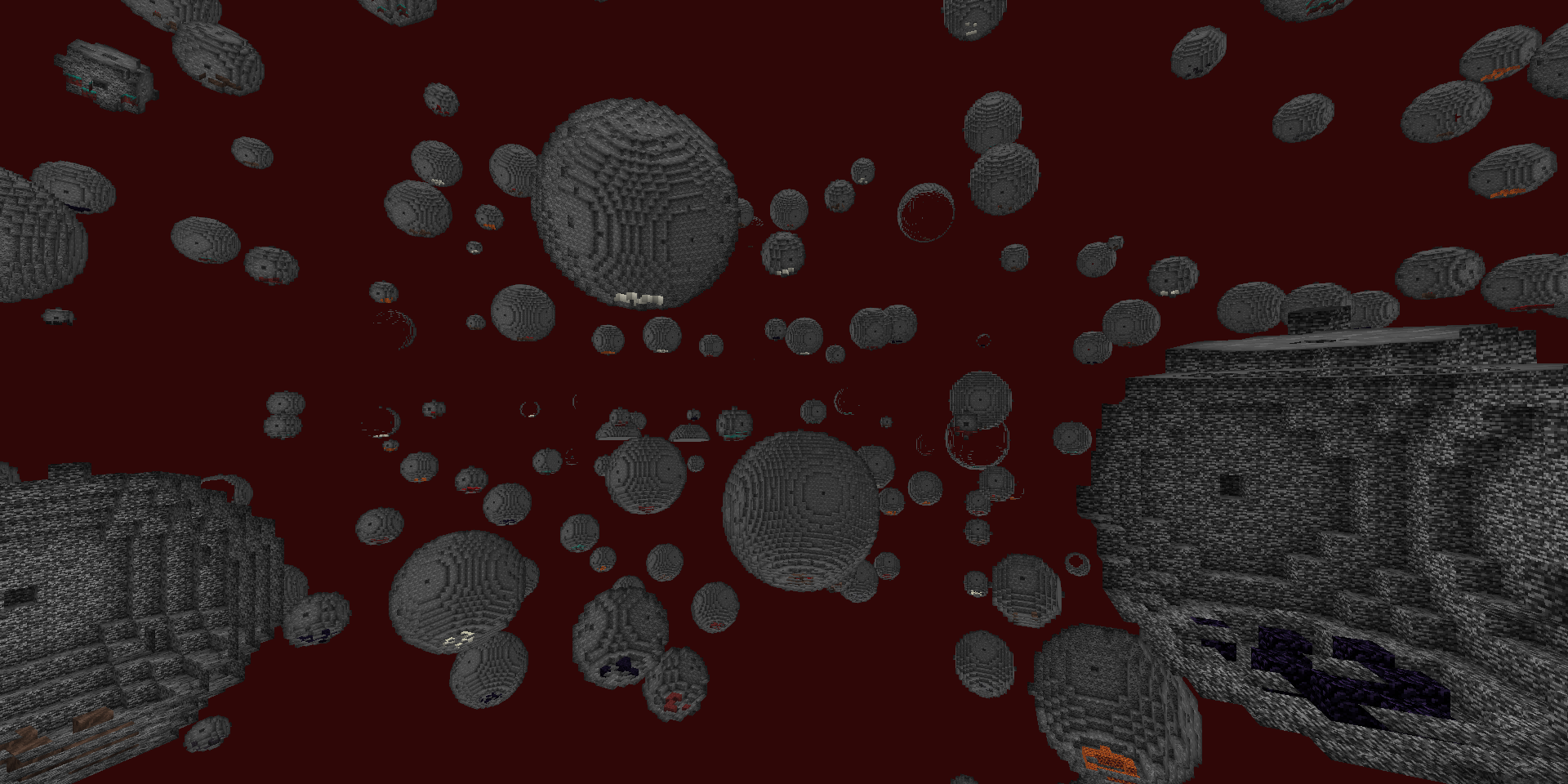
This is a world filled with bedrock. You can only survive in bubbles, and air blocks are limited. Move the bedrock to expand your home.泡世界,基岩填满世界空间有限,不过幸好你能抱起基岩。
2026-10-22_19.24.15.png
2026-10-22_19.25.48.png
Description
In one sentence: the whole world is filled with bedrock, and luckily there are still bubbles
where you can survive. Pick up bedrock to enlarge your bubble, explore far away, and take space
and resources out of every bubble you find.
Three builds, one ruleset: every rule below is identical on Fabric 26.3, NeoForge 26.3 and
NeoForge 1.21.1. Wherever an older text said "Fabric", read "all three builds"; only the loader
and the game version differ.
=== 0. How to enter this world ===
- World type: you must choose "Bubble World" when creating the world. With any other world
type the mod as a whole does nothing.
- Loader requirements: the Fabric build needs Fabric Loader 26.3 + Fabric API; the NeoForge
builds need the matching NeoForge version.
- Languages: Chinese and English. Every language other than Chinese falls back to English.
- Master switch: the code decides by asking "is this world's generator the Bubble World
generator?", not by world name. Use /bubble gate to check for yourself.
=== 1. What the world looks like ===
- All air is replaced by bedrock, and spherical air bubbles are scattered through it. Those
bubbles are the only places you can stay.
- Bubble radius is 3~20 blocks; smaller is more common, and radii above 10 are reduced by a
further 70%.
- The layout is a three-dimensional grid: 50 blocks horizontally with ±13 jitter, 40 blocks
vertically with ±7 jitter, so nothing lines up neatly.
- Y 50~80 is a denser band where bubble density doubles; digging down to that layer is busier.
- Bubbles can generate at any height from y=-64 to y=320 (with a radius of margin left at the
top and the bottom).
- There are no caves: natural caves (including lush caves) never generate, so "mining" means
the few ores at the bottom of a bubble.
- Structures are whitelisted; only a handful can generate (see section 6).
=== 2. Spawn: where you start ===
You spawn inside a bubble of radius 8 with its centre at y=70:
- a 3×3 patch of dirt at the bottom;
- one bamboo stalk in the exact centre (your first source of sticks; 4 bamboo also craft
1 bamboo slab);
- one torch planted north of the bamboo -- the bubble is completely dark.
The spawn point is fixed and deterministic, derived from the world seed and the bubble-field
algorithm: restarting the server or moving to another machine gives the same coordinates, with
no drift.
When you are sent back there (only in these cases):
Just spawned (first time in this world) : sent back to the spawn bubble
Respawn without a bed (no bed / anchor) : sent back to the spawn bubble
Every later login : not sent; you stay where you logged out
Death respawn with a bed / respawn anchor : not sent; you return to your own bed
Stuck above the bedrock ceiling (rescue) : sent back to the spawn bubble (no bubbles up
there and bedrock cannot be dug, so it is a dead end)
This rule was revised twice:
(1) The earliest text said "every login sends you back to spawn". Players reported it as a
bug ("every time I log back in the game forces me back to the spawn point"), so it became
the first two rows of the table above;
(2) That fix created a new problem: when creating a new world the player was placed on top of
the bedrock layer instead of inside the spawn cave. The root cause was that the "already
placed" flag lived in an in-memory map that survived across saves in single player without
a restart. After fixing that, the last row (rescue) was added so that saves already stuck
on the ceiling could be recovered.
On your first join you carry one Bubble World Guide in your inventory (4 pages covering picking
up bedrock, enlarging the bubble, and finding bubbles with the question mark). The body text is
a translatable component: Chinese clients see Chinese, every other language sees English.
=== 3. Core gameplay: picking up bedrock ===
What you hold decides how much bedrock you can carry.
Held item Bedrock carried Selection shape
Empty hand / anything else 0 (cannot carry) —
Stick, sugar cane 1 1×1×1
Wooden pickaxe 2 1×2×1 (always vertical, 2 blocks)
Stone / copper pickaxe 4 2×2×1
Iron / golden pickaxe 6 3×2×1
Diamond pickaxe 12 3×2×2
Blaze rod 16 2×2×4
Netherite pickaxe 27 always 3×3×3
- Controls: sneak + right-click to pick up, walk elsewhere and right-click to put down. The
selection box is only drawn while sneaking.
- While carrying, the landing spot is previewed, so you can simply not place it if it looks wrong.
- The HUD shows "carrying bedrock x / y" and reminds you that right-click places and
sneak + right-click interacts normally.
- The netherite pickaxe is always a 3×3×3 cube and does not change shape with the count -- the
"one swing gives you a cube" feel.
- The wooden pickaxe is always a vertical 2-block column (two blocks stacked), independent of
which face you clicked. Other tiers fill inward along the face you clicked; the wooden tier
is a hard-coded vertical column.
- Carving starts from the face you clicked, and if fewer than 27 blocks are available you carry
whatever is there.
[ Bedrock is never lost ]
- Death: bedrock you are carrying drops where you are; it never vanishes;
- Placement never overwrites existing bedrock (a real bug that was fixed);
- Placement never force-loads chunks (this one really did hang the server once, fixed later);
- When you cannot carry bedrock, the vanilla "place block" action is never blocked.
=== 4. What is inside a bubble ===
Every bubble (except the spawn bubble) has a 50% chance to generate one type of block on the
bottom of its sphere, in a stack of 4~9:
stone, dirt, sand, obsidian, iron ore, diamond ore, coal ore, copper ore, lapis ore, gold ore,
water, lava, moss block, snow block, ice, packed ice, blue ice, grass block, amethyst cluster
(budding amethyst)
- Budding amethyst is the exception: always 4 blocks, laid out in a row with a two-block gap
along a random horizontal direction.
- A grass-block bubble also spawns two kinds of overworld animals (two at random out of cow,
pig, sheep, chicken, rabbit, horse).
- About 15% of bubbles are small dungeons: a cobblestone floor with one spawner in the exact
centre (zombie, skeleton, spider, cave spider, silverfish). This fills the slot of the vanilla
dungeon.
=== 5. Finding bubbles: type a question mark in chat ===
Send a single ? in chat and the mod looks for the nearest bubble you have not visited yet.
- Once found it is highlighted for 20 minutes -- you can see where it is even through bedrock
(there is dedicated rendering for it);
- If you send ? again during the highlight, it tells you which one is still highlighted and how
long is left;
- Bubbles you have already visited go on a list and are never offered again; the message says
"you already know this path";
- It does not guess outside loaded chunks: with nothing loaded it refuses to invent coordinates
and only says "walk further into somewhere you have not been";
- If the target is in another dimension it tells you to switch dimension and ask again;
- After the highlight expires, sending ? offers two clickable options:
[highlight the previous bubble again] / [search a new nearest bubble from here].
- Related commands: /bubble hint, /bubble hint new, /bubble hint prev.
=== 6. Structures and special blocks: whitelist ===
Allowed to generate:
Ocean monument / witch hut / pillager outpost / stronghold (including the end portal room)
Kept, placed at the vanilla terrain height.
Trial chambers
Allowed, but "de-architected": only spawners and reward chests remain, everything else
(including air) becomes bedrock, and a radius-8 air bubble is carved around the kept blocks.
Spawners / end portal
After generation a radius of 5 blocks of bedrock is force-carved (only bedrock is removed;
not a single structure block is touched).
Witch hut
The bounding box is expanded by 5 blocks and that whole volume is carved out of bedrock.
Not allowed to generate: villages, abandoned mineshafts, woodland mansions, desert temples,
jungle temples, trail ruins, shipwrecks, ocean ruins, igloos, ruined portals, ancient cities ...
all forbidden.
=== 7. Mob spawning and wandering traders ===
- Spawning inside bubbles is restored to the vanilla rate. Vanilla picks points uniformly over
the whole height range, but in a bubble world 97.6% of those points land inside bedrock, so
spawning was diluted to almost nothing. It now picks points only within the vertical range
covered by air bubbles. The Nether and the End are unaffected.
- Wandering traders: vanilla finds a landing spot from the surface heightmap, and in a bubble
world the top is a bedrock ceiling, so a trader could effectively never spawn. It now looks
for a landing spot inside air bubbles, is allowed to stand on bedrock, additionally requires
the spot to be within 50 blocks of you, and spawns at double the probability.
- The moment a trader appears, its coordinates are announced: a gold line appears in chat
(bottom left): "A wandering trader appeared, he is here at (X, Y, Z)!"
- The trader also gets a 5-minute glowing highlight -- visible even through bedrock, and it
follows him automatically (no need to re-mark him while he wanders). It fades after 5 minutes
on its own, nothing to clean up by hand.
=== 8. Pistons cannot move bedrock ===
Destroying bedrock with pistons is forbidden outright; all three layers are closed:
(1) Pistons cannot push bedrock;
(2) Bedrock does not take part in the structure resolver;
(3) Retracting (pulling) also no longer deletes the bedrock in front -- this was a real hole
found later and then fixed.
=== 9. Fishing ===
- Sugar cane was added to the fishing "junk" loot table with exactly the same weight as the
vanilla stick (both 5).
- Sugar cane is on the same tier as a stick and carries 1 bedrock -- one more route to a
"transport tool" while you are inside a bubble.
=== 10. The Nether is a bubble world too ===
- The Nether uses the same bedrock + air-bubble generation; the rules are identical;
- Two structures are kept: bastion remnants + nether fortresses;
- Portals dig through bedrock: build the obsidian frame and light it as usual, no extra
tunnelling needed;
- The "experimental settings" warning no longer appears (vanilla is made to treat our Nether
generator as stable; existing saves get fixed too).
=== 11. Rotten Flesh Block ===
id : bubbleworld:rotten_flesh_block
Form : a standard block (placeable, breakable, drops itself) plus an edible item with the
same id
Craft : 9 rotten flesh -> 1 Rotten Flesh Block (fill a 3×3 crafting grid)
Smelt : in a furnace -> netherrack
Eating : works in every dimension (Overworld / Nether / End); healing speed matches the golden
apple (regeneration 100 ticks, amplifier 1); after a 2-minute delay you get 2 minutes
of nausea and your health is set to 1 (never fatal)
Side : eating it in any dimension clears Loss of Control (Loss of Control only happens in the
End, so in the Overworld this is a harmless no-op); "it always has a side effect,
wherever you eat it" is exactly what separates it from the cooked block
- Player ruling of 2026-10-17: "eating the rotten flesh block in any dimension gives both the
healing and the penalty. In the End you use the cooked block to clear Loss of Control. The
ordinary block has its side effect wherever you eat it." An earlier version ("only works in
the End, outside the End it only clears Loss of Control") is void; that dimension gate has
been deleted from the code.
- The penalty uses setHealth(1.0F) instead of dealing damage -- damage can genuinely kill the
player (for example at half a heart).
- The countdown is written into the player save, otherwise "eat it and restart the server"
would wash the penalty away; eating two blocks keeps the later deadline.
=== 12. Cooked Rotten Flesh Block and crafting ===
[ Cooked Rotten Flesh Block (the antidote) ]
id : bubbleworld:cooked_rotten_flesh_block
Obtain : only by cooking a Rotten Flesh Block on a campfire
Furnace : cannot make it. A furnace produces netherrack, not the cooked block
Effect : its only effect is clearing Loss of Control; no saturation, no potion effect, no
penalty
Texture : the rotten flesh block texture darkened overall (same image ×0.68)
"The furnace cannot do it" is guaranteed by the recipe type itself: a campfire uses
campfire_cooking, a furnace uses smelting, two different recipes. One self-test assertion
checks exactly this (it makes the recipe manager perform a real match).
[ Carrier orientation wheel (hold Alt + mouse wheel) ]
The shape is decided automatically by the number carried (always the most compact
factorisation); the wheel only chooses the orientation -- that is, which world axis (X / Y / Z)
each of the three dimensions maps to.
Count Shape Wheel entries
1 1×1×1 no wheel (rotation is meaningless)
2 (wooden pickaxe) 1×1×2 3
4 (stone / copper) 1×2×2 3
6 (iron / golden) 1×2×3 6
12 (diamond pickaxe) 2×2×3 3
16 (blaze rod) 2×2×4 3
27 (netherite pickaxe) 3×3×3 no wheel
- The default is "auto (dig inward from the face you clicked)", exactly the feel from before the
wheel existed;
- Hold Alt or Ctrl + scroll the mouse wheel to pop up the orientation list; the wheel only
selects (one notch pops it once, and it stays for 2 seconds after you let go; without a
modifier the wheel changes hotbar slots as usual);
- Cubic counts (1, 8, 27) are still shown, just marked "only one orientation";
- Prime numbers carry a little less: carrying 23 can only form a thin 23-block strip, so it
drops automatically to 20 (2×2×5) and the remaining 3 blocks stay in the wall -- no bedrock is
lost. Likewise 5->4, 7->6, 11->9, 13->12, 17->16, 19->18.
[ Crafting and processing added by this mod ]
Output Materials Method
Rotten Flesh Block 9 rotten flesh crafting table, 3×3 filled
Netherrack Rotten Flesh Block furnace
Cooked block Rotten Flesh Block campfire (a furnace cannot)
Bamboo slab 4 bamboo shapeless
Bamboo plank 4 bamboo slabs shapeless (reverse, yields 2)
Extinguished Torch 1 stick + 1 bamboo plank shapeless (yields 1)
Vanilla torches (2) 1 Extinguished Torch + 1 torch shapeless (yields 2)
- The bamboo slab recipe also exists in vanilla (3 planks -> 6 slabs); both coexist and each
does its own job. This one starts from raw bamboo, skipping the "bamboo -> bamboo block ->
planks" steps.
- The two together form a "bamboo <-> bamboo slab <-> bamboo plank" conversion chain:
4 bamboo -> 1 slab; 4 slabs (= 16 bamboo) -> 2 planks. Note it is more material-hungry than
the vanilla "9 bamboo -> 2 planks"; it is a shortcut recipe that saves steps.
- Torch recycling: 1 Extinguished Torch + 1 vanilla torch -> 2 vanilla torches (shapeless).
It yields 2, not 1.
- The Extinguished Torch (bubbleworld:extinguished_torch) is a plain item with a stack size of
64, and it is not a fuel; exactly one recipe produces it and exactly one consumes it.
=== 13. Above the ceiling: instant death ===
In a bubble world y=319 is the solid bedrock ceiling, and above the ceiling there is not a single
bubble: no gameplay, no resources, and if you fall you land on the ceiling. So the gentle
"send them back to spawn" treatment is not used here:
Trigger : an Overworld player above the maximum block height (feet at y > 319, i.e. standing
on top of the bedrock ceiling)
Result : immediate death
Message : chat line "You do not belong here."
Frequency : checked every tick -- you die the moment you stand up there, no delay
Not fired : vanilla worlds (world type is not Bubble World), spectators, players already dead
Note the difference from the "spawn bubble rescue": on join / respawn, if the player in that
save was already stuck on the ceiling, they are first sent back to the spawn bubble (a rescue
for a historical bug -- otherwise everything under their feet is bedrock, they cannot even pick
up bedrock, and dying on join would drop their whole inventory at y=320 where it cannot be
retrieved). Dying only applies when you really cross the line during play.
=== 14. Loss of Control ===
Something far out in the End is affecting you.
Trigger Effect
Walk 1000 blocks out in the End Loss of Control immediately, with no warning
Stay in the End for 10 minutes 10 seconds before the deadline you get a red warning; eating
a Rotten Flesh Block during the warning cancels this one
What Loss of Control looks like:
- movement speed ×20;
- view / mouse sensitivity ×20;
- a full-screen translucent red overlay;
- the effect is simply called "Loss of Control" (no particles, no icon; the red screen is the
feedback).
How to clear it: eat a Rotten Flesh Block or a Cooked Rotten Flesh Block.
Chat messages (all of them tell you what to do):
- On entering the End (yellow): here you may lose control of your own body; try eating a Cooked
Rotten Flesh Block.
- 10 seconds before losing control (red): you are about to lose control! plus (gold) you could
try eating a Cooked Rotten Flesh Block.
- When Loss of Control is actually applied (gold): you could try eating a Rotten Flesh Block.
(The walk-1000-blocks route has no warning, so this line is your only hint.)
=== 15. The End settings ===
The End has been rebuilt on purpose:
- all air within a horizontal radius of 1000 blocks becomes bedrock (at every height);
- a radius-20 air bubble is left around the altar, and the altar is not damaged;
- a 3-block-high, 1-block-wide tunnel is dug from the obsidian landing platform to the altar,
passing through the obsidian pillars;
- a 2-block-wide ring tunnel on top of the pillars connects all 10 pillars -- you can reach
every crystal;
- no bedrock is placed within a radius of 4 blocks around a crystal, so each crystal has room;
- the ender dragon can pass through bedrock: that is vanilla behaviour (noPhysics), not
something we changed; it also does not suffocate in bedrock (vanilla already makes it immune
to source-less damage);
- the ender dragon takes off, circles and lands normally again: its flight nodes are computed
from the terrain heightmap, and filling the world with bedrock pushed that heightmap up to
256, which lifted the nodes to the top of the world, so no path could be built and the dragon
froze on the altar. That lookup is now corrected back to the terrain surface at runtime, and
the dragon's cycle works again (land -> perch on the altar -> take off -> circle).
=== 16. Creative inventory ===
In creative mode there is a tab called "Bubble World" that holds this mod's items:
Rotten Flesh Block · Cooked Rotten Flesh Block · Bubble World Guide
(Since 1.0.23 the Extinguished Torch is in this tab as well.)
=== 17. Commands ===
/bubble info show the centre, radius, distance from spawn and bottom contents of the
bubble you are in (or the nearest one)
/bubble tp teleport to the bubble centre
/bubble hint find a bubble
/bubble hint new search a new nearest bubble
/bubble hint prev highlight the previous bubble again
/bubble book give you another Bubble World Guide
/bubble stats count the block composition of nearby chunks (Overworld only)
/bubble gate check whether the mod is active in this dimension
/bubble lang language self-test (13 items)
/bubble worldtype world-type self-test (1 item)
/bubble selftest built-in self-test (191 items as originally measured; 259 / 254 in
1.0.23)
=== 18. Languages ===
- Two files are provided: zh_cn (Chinese) and en_us (the English fallback);
- every language other than Chinese (de_de / ja_jp / zh_tw ...) falls back to English
automatically;
- the mod name and description in Mod Menu follow the language too: Chinese shows "泡世界",
English shows "Bubble World"; without Mod Menu, or with its "translated description" option
off, the English fallback is shown;
- the single source of all text is the TRANSLATIONS table in tools/make_lang.py.
=== 19. Known limits ===
- World-generation changes do not apply retroactively to old saves: bubble distribution, the
structure whitelist and the spawn point only take effect in a new world. Changing a dimension
(deleting the_end and so on) makes that dimension regenerate.
- Exception: the End altar position and the ender-dragon heightmap go through the
"auto-repair on server start" path, so existing saves are fixed as well, with no world
rebuild.
- Client-side behaviour (red screen, mouse acceleration, highlight rendering) can only be
observed in a real client; the verification boundary here is a dedicated server plus
self-written world-data checking scripts.
=== 20. Self-test status ===
Command Items Result
/bubble selftest 191 as originally measured 0 FAIL
(1.0.23: 259 / 259 / 254)
/bubble lang 13 0 FAIL
/bubble worldtype 1 0 FAIL
/bubble selftest covers: block and item registration, recipes really matching to their output,
texture / model / blockstate / loot table presence, the creative tab containing every item with
nothing missing, language keys present in both language files, pistons not moving bedrock, the
carrying capacity ladder, the three-dimensional bubble layout and reachability, the End
geometry, the Loss of Control state machine, and more.
Measured on 1.0.23: Fabric 259 assertions, NeoForge 26.3 259, NeoForge 1.21.1 254, all with
0 FAIL, and all 9 piston assertions green.
============================================================
一句话:整个世界被基岩填满,幸好还有泡泡能让你生存下去。
抱起基岩扩容你的泡泡,探索远方,从每一个泡里获取空间和资源。
三支说明:本文写到的玩法在 Fabric 26.3、NeoForge 26.3、NeoForge 1.21.1 上完全一致;
原文里凡是写「Fabric」的地方,都按「三支通用」理解,差异只在加载器与游戏版本。
=== 0. 怎么进入这个世界 ===
- 世界类型:创建世界时必须选「泡世界」。选别的世界类型,本模组整体不生效。
- 加载器依赖:Fabric 支需要 Fabric Loader 26.3 + Fabric API;NeoForge 支需要对应版本的 NeoForge。
- 语言:中文 + 英文;中文以外的任何语言一律显示英文。
- 总开关:程序按「生成器是不是泡世界的」判断,不看世界名;用 /bubble gate 可以自己查。
=== 1. 世界长什么样 ===
- 所有空气被基岩填满,基岩里散布着一个个球形空气泡 —— 那是你唯一能待的地方。
- 泡的半径 3~20 格;越小越常见,半径大于 10 的还会再减少 70%。
- 排布是三维网格:水平网格 50 格 ±13 抖动,竖直网格 40 格 ±7 抖动,所以不会排得整整齐齐。
- Y 50~80 有一层「加密带」,泡的密度翻倍,挖到这一层会更热闹。
- 从 y=-64 到 y=320 全高度都可能生成泡(顶部和底部各留出半径的余量)。
- 没有矿洞:天然洞穴(含溶洞)根本不生成,所以「挖矿」只能靠泡底那点矿。
- 结构是白名单制,只有寥寥几个能生成(见第 6 节)。
=== 2. 出生 ===
出生在一个半径 8 格的泡里,球心高度 y=70:
- 底部一块 3×3 泥土;
- 正中间种着一根竹子(这是你第一根木棍的来源;4 个竹子还能合成 1 个竹台阶);
- 竹子北边插着一支火把 —— 泡里是全黑的。
出生点是固定且确定性的,由世界种子和泡场算法算出来:重启服务器、换机器算出来都是同一个坐标,
不会漂移。
什么时候会被送回这里(只在这几种情况下):
刚出生(第一次进这个世界) : 送回出生泡
无床复活(没有床 / 重生锚时的死亡): 送回出生泡
之后每次登录 : 不送,停在你上次下线的地方
有床 / 重生锚时的死亡重生 : 不送,回你自己的床
卡在基岩天花板上面(救援) : 送回出生泡(那里没有任何泡,基岩也挖不动,等于卡死)
这条规则修订过两轮:
(1)最早写的是「每次登录都送回出生点」,实测被玩家当成 bug(「每次重新登陆游戏都会被强制
送回出生点」),于是改成上面表格的前两行;
(2)改完又出现新问题:新建世界时玩家被放在基岩上层、没进出生洞穴。根因是「已安置」标记是
内存表,单人游戏跨存档不重启会残留。修掉之后,为了把已经卡在天花板上的存档也救回来,
加了最后那行救援。
第一次进游戏,背包里会有一本《泡世界指南》(4 页,讲了抱基岩、扩容、用问号找泡)。
正文是可翻译组件,中文客户端看中文,其它语言看英文。
=== 3. 核心玩法:抱起基岩 ===
手里拿什么,决定你能抱几块基岩。
手持 可抱基岩 选区形状
空手 / 其它任何东西 0(抱不动) —
木棍、甘蔗 1 1×1×1
木镐 2 1×2×1(固定竖直 2 格)
石镐、铜镐 4 2×2×1
铁镐、金镐 6 3×2×1
钻石镐 12 3×2×2
烈焰棒 16 2×2×4
下界合金镐 27 固定 3×3×3
- 操作:潜行 + 右键 抱起,走到别处 右键 放下;潜行时才会画范围框。
- 放下时会预览落点,看着不行就不用放。
- HUD 会显示「抱着基岩 x / y」,并提示右键放下、潜行右键正常交互。
- 下界合金镐固定是 3×3×3 的正方体,不随数量变形状 —— 「一镐子下去是个方块」的手感。
- 木镐固定是竖直 2 格(叠起来两格高),与点击的是哪个面无关;别的档位沿你点的那一面往里铺,
木镐这一档是写死的竖列。
- 抱起时以你点到的那一面为基准掏,里面不足 27 块就有多少抱多少。
【基岩永远不会丢】
- 死亡:手里抱着的基岩会在原地掉落,不会凭空消失;
- 落块绝不覆盖已有基岩(修过一个真 bug);
- 落块绝不强制加载区块(这条真的把服务端卡死过,后来修掉了);
- 抱不动基岩时,绝不会拦住原版的「放方块」操作。
=== 4. 泡里有什么 ===
每个泡(出生泡除外)有 50% 概率在球面底部生成一种方块,数量 4~9 个:
石头、泥土、沙子、黑曜石、铁矿、钻石矿、煤矿、铜矿、青金石矿、金矿、
水、熔岩、苔藓块、雪块、冰、浮冰、蓝冰、草方块、紫水晶母岩
- 紫水晶母岩是特例:固定 4 个,沿随机水平方向、间隔两格排成一行。
- 草方块泡会额外生成两种主世界动物(牛 / 猪 / 羊 / 鸡 / 兔子 / 马里随机两种)。
- 约 15% 的泡是小地牢:圆石地面 + 正中心一个刷怪笼(僵尸 / 骷髅 / 蜘蛛 / 洞穴蜘蛛 / 蠹虫)。
这是补原版地牢的位子。
=== 5. 找泡:在聊天栏打一个问号 ===
打一个 ? 发出去,就会帮你找最近的、你还没去过的那个泡。
- 找到之后高亮 20 分钟 —— 隔着基岩也能看到它在哪(有专门的渲染);
- 高亮期间再打 ?,会告诉你还在高亮哪一个、还剩多久;
- 你已经去过的泡会被记进名单,不会再被搜到,提示「你已经认识这条路了」;
- 不在加载范围里就不猜:没加载时不乱报坐标,只告诉你「往没去过的地方走远一点」;
- 目标在另一个维度时会提示你换维度再问;
- 高亮消失之后再打 ?,会给两个可点的选项:
[再次高亮上一个泡] / [从当前位置搜新的最近泡]。
- 相关指令:/bubble hint、/bubble hint new、/bubble hint prev。
=== 6. 结构与特殊方块:白名单制 ===
允许生成:
海底神殿 / 女巫小屋 / 掠夺者前哨 / 要塞(含末地传送门房间)
保留,按原版地形高度放置。
试炼密室
允许生成,但要「去建筑化」:只留刷怪笼和奖励箱,其余(含空气)填成基岩,
保留物周围掏半径 8 的空气泡。
刷怪笼 / 末地传送门
生成后强制掏空半径 5 格的基岩(只删基岩,结构方块一根不动)。
女巫小屋
包围盒外扩 5 格整块掏空基岩。
不允许生成:村庄、废弃矿井、林地府邸、沙漠神殿、丛林神庙、古迹废墟、沉船、海底废墟、冰屋、
废弃传送门、远古城市……全部禁止。
=== 7. 刷怪与流浪商人 ===
- 泡内刷怪率恢复到原版正常水平:原版是在整个高度范围里均匀取点,而泡世界里 97.6% 的点落在
基岩里,等于刷怪被稀释到几乎为零;现在改成只在空泡覆盖的竖直范围里取点。
下界 / 末地不受影响。
- 流浪商人:原版靠地表高度图找落点,而泡世界顶上就是基岩天花板,所以他实际上永远刷不出来。
现在改成在空泡里找落点、允许站在基岩上,还要求落点在你 50 格以内,并且生成概率翻倍。
- 商人一出现就会报坐标:聊天栏(左下角)出现金字
「流浪商人出现,他在 (X, Y, Z) 这里!」
- 同时给商人上 5 分钟发光高亮 —— 隔着基岩也看得见,而且自动跟着他走
(他到处溜达时不用重新标记)。5 分钟之后自动消失,不用手动清。
=== 8. 活塞动不了基岩 ===
彻底禁止活塞破坏基岩,三层都堵住了:
(1)活塞推不动基岩;
(2)结构解析器里基岩不参与;
(3)收回(拉)时也不会把前方基岩删掉 —— 这是后来补的一个真漏洞。
=== 9. 钓鱼 ===
- 钓鱼的「垃圾」掉落表里加了甘蔗,权重与原版木棍完全相同(都是 5)。
- 甘蔗和木棍同级,可抱 1 块基岩 —— 给你在泡里多一条拿到「搬运工具」的路。
=== 10. 下界也是泡世界 ===
- 下界使用同一套基岩 + 空泡的生成,玩法一致;
- 保留两个建筑:猪灵堡垒 + 下界要塞;
- 传送门会把基岩挖开:正常搭黑曜石框点火就能用,不需要额外挖墙;
- 不再弹「实验性设置」警告(让原版把我们的下界生成器认成稳定的,已有存档也会被修好)。
=== 11. 腐肉块 ===
id : bubbleworld:rotten_flesh_block(腐肉块 / Rotten Flesh Block)
形态 : 标准方块(可放置、可挖掉、挖掉掉落自己)+ 同一个 id 的可食用物品
合成 : 9 个腐肉 → 1 个腐肉块(工作台 3×3 铺满)
熔炼 : 炉子里烧 → 下界岩
食用 : 任何维度(主世界 / 下界 / 末地)都能吃;回血速度与金苹果一致
(再生 100 tick / amplifier 1);延迟 2 分钟后眩晕 2 分钟,血量降到 1(不至死)
副作用 : 任何维度吃下都解除失控(失控只在末地出现,所以在主世界是无害空操作);
「在哪儿吃都有副作用」正是它和熟腐肉块的区别
- 2026-10-17 用户口径:「任何维度吃腐肉块都有回血和惩罚效果。末地清除失控用熟腐肉块。
普通腐肉块在什么地方吃都有副作用。」早期一版「仅末地生效、末地外只清失控」已作废,
代码里那道维度门已删除。
- 惩罚用 setHealth(1.0F) 而不是造成伤害 —— 用伤害有概率真把玩家打死(比如只剩半颗心)。
- 倒计时写进玩家存档,不然「吃了再重启服务器」就能洗掉惩罚;连吃两块取较晚的截止点。
=== 12. 熟腐肉块与合成加工 ===
【熟腐肉块(解药)】
id : bubbleworld:cooked_rotten_flesh_block(熟腐肉块 / Cooked Rotten Flesh Block)
获得 : 只能放在篝火上烤腐肉块得到
熔炉 : 做不出来。熔炉烧出来的是下界岩,不是熟腐肉块
作用 : 唯一作用就是解除失控;不给饱食度、不给任何药水效果、不排任何惩罚
贴图 : 腐肉块贴图整体加深(同一张图 ×0.68)
「熔炉不行」是配方类型天然保证的:篝火走 campfire_cooking,熔炉走 smelting,是两种不同的
配方。自检里有一条专门验这件事(让配方管理器真的匹配一次)。
【搬运朝向轮盘(按住 Alt + 鼠标滚轮)】
形状由抱着的数量自动决定(永远取最紧凑的分解),轮盘只管朝向 —— 也就是三个维度分别对到
世界的 X / Y / Z 哪个轴。
数量 形状 轮盘项数
1 1×1×1 不用弹(怎么转都一样)
2(木镐) 1×1×2 3
4(石镐 / 铜镐) 1×2×2 3
6(铁镐 / 金镐) 1×2×3 6
12(钻石镐) 2×2×3 3
16(烈焰棒) 2×2×4 3
27(下界合金镐) 3×3×3 不用弹
- 默认是「自动(往点到的那个面里挖)」,和加轮盘之前的手感完全一样;
- 按住 Alt 或 Ctrl + 滚鼠标滚轮 → 弹出朝向列表,滚轮只负责选择
(滚一下弹一次、松手后还停留 2 秒;不按修饰键时滚轮照常换快捷栏);
- 立方数量(1、8、27)也照样显示,只是写明「只有一种朝向」;
- 素数会少抱一点:抱 23 块只能排成一条 23 格的细长条,所以自动降到 20 块(2×2×5),
剩 3 块留在墙上 —— 基岩不损失。同理 5→4、7→6、11→9、13→12、17→16、19→18。
【本模组新增的合成 / 加工】
产出 材料 方式
腐肉块 9 个腐肉 工作台 3×3 铺满
下界岩 腐肉块 熔炉烧
熟腐肉块 腐肉块 篝火烤(熔炉做不出来)
竹台阶 4 个竹子 无序合成
竹板 4 个竹台阶 无序合成(反向回收,出 2 个)
熄灭的火把 1 木棍 + 1 竹板 无序合成(出 1 个)
原版火把(2 个) 1 熄灭的火把 + 1 原版火把 无序合成(出 2 个)
- 竹台阶那条原版也有(3 木板 → 6 台阶),两条并存、各走各的。这里这条是直接从生竹子做,
省掉「竹子 → 竹块 → 木板」那两步。
- 前后两条正好构成一条「竹子 ↔ 竹台阶 ↔ 竹板」的换算链:4 竹子 → 1 台阶;
4 台阶(= 16 竹子)→ 2 竹板。注意它比原版那条「9 竹子 → 2 竹板」更费料,是个省步骤的
直通配方。
- 火把回收配方:1 个熄灭的火把 + 1 个原版火把 → 2 个火把(无序)。产出是 2 个,不是 1 个。
- 熄灭的火把(bubbleworld:extinguished_torch)是普通物品,堆叠 64,不作燃料;
产出它的配方只有 1 条、消耗它的配方也只有 1 条。
=== 13. 天花板之上:立刻处死 ===
泡世界里 y=319 是那层完整的基岩天花板,天花板之上一个泡都没有:没有玩法、没有资源,
掉下来还砸在天花板上。所以这里不给「送回出生点」那种温柔处理:
触发 : 主世界玩家超出最高方块高度(脚底 y > 319,也就是站到基岩天花板上面去了)
结果 : 立刻死亡
提示 : 聊天栏「你不适合在这里生存。」
频率 : 每 tick 检查 —— 刚站上去就会死,不用等
不触发 : 原版世界(世界类型不是「泡世界」)、旁观者、已经死了的人
注意和「出生泡救援」的区别:进服 / 重生时如果存档里那个人本来就卡在天花板上,会先被
送回出生泡(那是修历史 bug 的救援 —— 不然他脚下全是基岩、连基岩都抱不动,而且一进服就死
会把整包物品掉在 y=320 拿不回来)。游玩期间真过线才是处死。
=== 14. 失控 ===
末地的远方有东西在影响你。
触发方式 说明
走出末地 1000 格 立刻失控,没有预警
在末地待够 10 分钟 到期前 10 秒给你红字预警,预警期间吃腐肉块可以取消这一次
失控的表现:
- 移动速度 ×20;
- 视角 / 鼠标灵敏度 ×20;
- 全屏半透明红色蒙层;
- 状态名就叫「失控」(无粒子、不显示图标,反馈靠红屏)。
解除办法:吃腐肉块或熟腐肉块。
聊天栏提示(都会告诉你怎么办):
- 刚进末地(黄字):在这里你可能会控制不住自己的身体,可以试试吃熟腐肉块解决。
- 失控前 10 秒(红字):你快要失控了!+(金字)你可以试试吃熟腐肉块。
- 失控真正被赋予时(金字):你可以试试吃腐肉块。(走出 1000 格那条路没有预警,靠这句)
=== 15. 末地设定 ===
末地是专门改造过的:
- 水平半径 1000 格以内的空气全部填成基岩(所有高度);
- 祭坛周围留一个半径 20 格的空泡,且不破坏祭坛;
- 从黑曜石落点平台到祭坛挖一条 3 格高、1 格宽的通道,穿过黑曜石柱;
- 柱子顶上有一条 2 格宽的环形通道,把 10 根柱子连起来 —— 你能走到每一颗水晶;
- 水晶周围半径 4 格内不覆盖基岩,保证水晶有空间;
- 末影龙能穿过基岩:这是原版就有的行为(noPhysics),不是我们改的;它也不会在基岩里窒息
(原版就免疫无来源伤害);
- 末影龙会正常起飞、盘旋、降落:龙的飞行节点高度是从地形高度图算的,而填基岩把高度图顶到了
256,导致它的节点被抬到世界顶、建不出路径而卡在祭坛上;现在把这条查询在运行期纠正回地形
表面,龙的循环恢复正常(降落 → 栖在祭坛 → 起飞 → 盘旋)。
=== 16. 创造模式物品栏 ===
创造模式里有一栏叫「泡世界」,本模组的物品都在这里:
腐肉块 · 熟腐肉块 · 泡世界指南
(1.0.23 起,熄灭的火把也在这一栏里。)
=== 17. 指令 ===
/bubble info 显示你所在(或最近)那个泡的中心、半径、离出生点距离、底部内容
/bubble tp 传送到泡中心
/bubble hint 找泡
/bubble hint new 搜新的最近泡
/bubble hint prev 再高亮上一个泡
/bubble book 再给你一本《泡世界指南》
/bubble stats 统计附近区块的方块构成(仅主世界)
/bubble gate 查本模组在这个维度是否生效
/bubble lang 语言自检(13 项)
/bubble worldtype 世界类型自检(1 项)
/bubble selftest 内置自检(原文实测 197 项;1.0.23 为 259 / 254 项)
=== 18. 语言 ===
- 提供 zh_cn(中文)与 en_us(英文兜底)两份;
- 中文以外的任何语言(de_de / ja_jp / zh_tw …)都会自动回落到英文;
- Mod Menu 里的模组名和简介也跟着语言变:中文显示「泡世界」,英文显示 Bubble World;
没装 Mod Menu、或把它的「翻译简介」关掉时,显示英文兜底;
- 文案的唯一来源是 tools/make_lang.py 的 TRANSLATIONS 表。
=== 19. 已知边界 ===
- 世界生成类改动不追溯旧存档:泡的分布、结构白名单、出生点这些要在新世界里才生效。
换维度(删掉 the_end 等)可以让那个维度重新生成。
- 例外:末地祭坛位置和末影龙那条高度图,走的是服务器启动时自动修的路径,所以已有存档也会被
修好,不用重建世界。
- 客户端表现(红屏、鼠标加速、高亮渲染)只能在真的客户端里看;我这边的验证边界是专用服务端
+ 自己写的世界数据核查脚本。
=== 20. 自检现状 ===
命令 项数 结果
/bubble selftest 原文 191 项(1.0.23:259 / 259 / 254) 0 FAIL
/bubble lang 13 0 FAIL
/bubble worldtype 1 0 FAIL
/bubble selftest 覆盖:方块与物品注册、配方真的能匹配出产物、贴图 / 模型 / 方块状态 /
战利品表存在、创造栏包含全部物品且没有漏项、语言键在两个语言文件里都有译文、活塞搬不动基岩、
搬运容量阶梯、泡的三维排布与可达性、末地几何、失控状态机等等。
1.0.23 的三支实测:Fabric 259 条、NeoForge 26.3 259 条、NeoForge 1.21.1 254 条断言,
全部 0 FAIL,其中 9 条活塞断言全绿。
bubble world hs Team