Iron Farm Design Wheelchair
- By
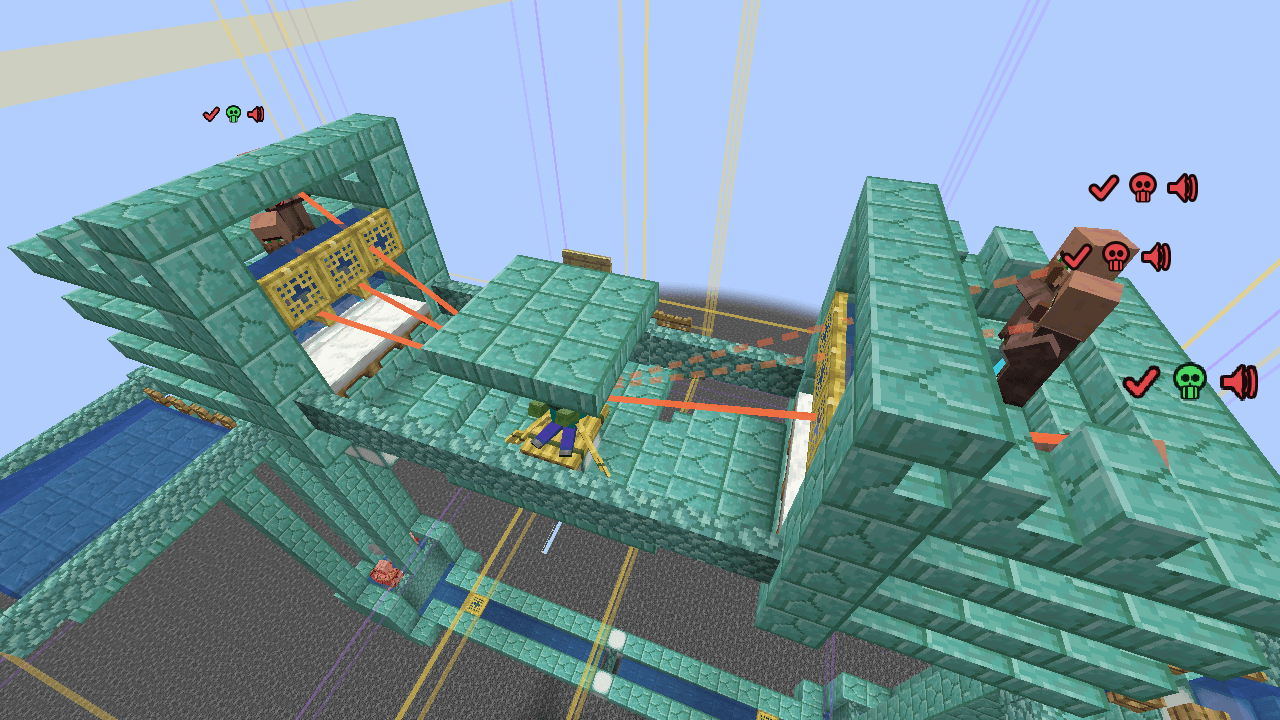
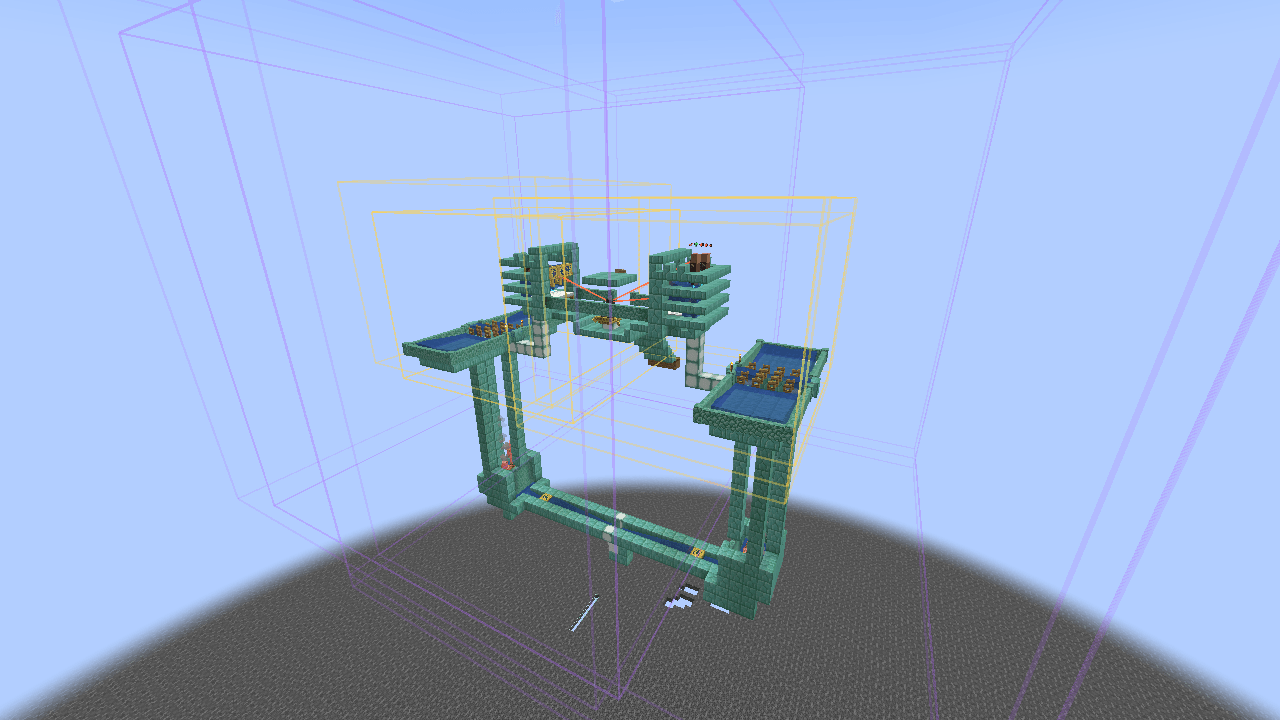
Brings iron farm logic into the game: three overhead icons tell you at a glance whether a villager can spawn a golem, right-click shows the full status, and the statistics tab tells you what is blocking it.
2026-10-27_22.31.44.png
2026-10-27_22.31.34.png
2026-10-27_22.31.56.png
2026-10-27_23.07.10.png
Description
ABOUT
Brings iron farm logic into the game: three overhead icons tell you at a
glance whether a villager can spawn a golem, right-click shows the full
status, and the statistics tab tells you what is blocking it.
Supports all 11 scaring mobs and every version from 1.21 onward.
The mod supports multiple languages and language configuration files.
1. INSTALLATION
----------------------------------------------------------------
1. Install Fabric Loader 0.20.1 or newer (Minecraft 1.21.1)
2. Install Fabric API
3. Put ironfarm-fabric-1.21.1-0.10.0.jar into .minecraft/mods
4. Launch the game
First launch writes two files:
config/ironfarm.properties settings
config/ironfarm-stats.txt statistics (maintained automatically)
2. WHAT THIS BUILD INCLUDES
----------------------------------------------------------------
DONE
- Three overhead icons per villager (check / skull / speaker)
- Right-click a villager to open the status screen
- An extra "Villager status" button at the bottom of the trade screen
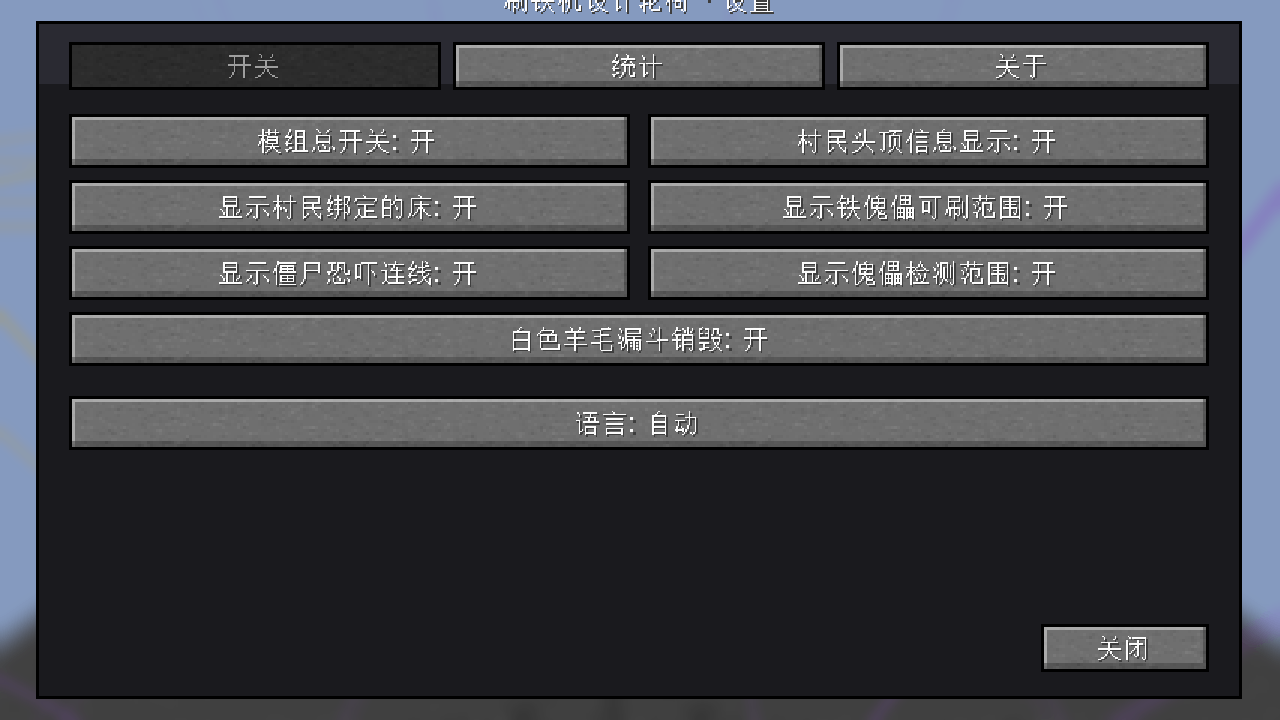
- Settings screen on hotkey I, with three tabs: Switches / Statistics / About
- All six switches work and save immediately
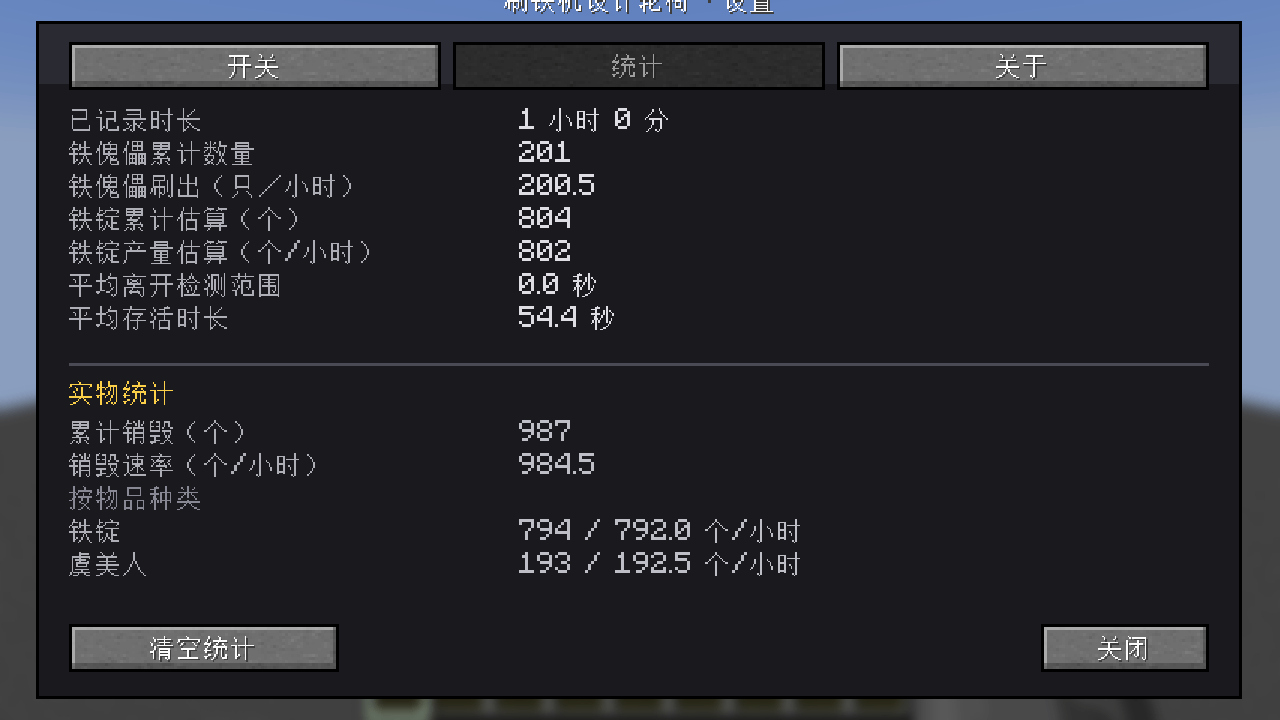
- Statistics tab: start time, golems spawned, evaluations, rate, failure ranking
- Bed lines (cyan)
- Panic lines (solid = effective, dashed = too far, dotted = sight blocked)
- Spawn area box (yellow, 17x13x17) plus a small cross on every valid spawn cell
- Golem detection box (purple, 33x33x33)
- Chinese and English, following the game language automatically
NOT YET
- A GUI for registering modded mob radii (editable in the config file)
- Integration with Jade / WTHIT
3. THE THREE OVERHEAD ICONS
----------------------------------------------------------------
Left to right: check, skull, speaker. They float 0.6 blocks above the
villager's head; each icon is 0.35 blocks square.
CHECK - are the spawn conditions met?
Green adult + slept within 20 min + no golem seen in 30 s
Red definitely not met (right-click to see which one)
Grey data unavailable - normal in multiplayer, see below
SKULL - is the villager being scared right now?
Green a scaring mob is close enough with a clear line of sight
Red not being scared
SPEAKER - is the gossip baseline present?
Green at least 5 qualified villagers within 10 blocks
Red not enough
Grey data unavailable
Icons are hidden beyond 32 blocks (adjustable, 8-64).
IMPORTANT: what grey means
------------------------------------------------------------------
In multiplayer the client cannot read a villager's "last slept" time or
its "golem detected recently" memory - both live on the server. The icons
then show a grey question mark instead of a red cross.
This is deliberate. A red cross would make players tear down a farm that
is actually working.
4. VILLAGER STATUS SCREEN
----------------------------------------------------------------
Right-click a villager:
No profession (or a baby) -> the status screen opens directly
Has a profession -> the trade screen opens, with an extra
"Villager status" button at the bottom
The screen has five groups:
- position and overall verdict
- individual conditions (adult, sleep, golem detection)
- trigger state (panicking, gossiping)
- group conditions (qualified counts, thresholds)
- spawn point (is there a valid position)
Values are colour-coded the same way as the overhead icons.
Hover any row to read the full explanation of that condition.
5. SETTINGS SCREEN (hotkey I)
----------------------------------------------------------------
Tab 1: Switches
Master switch turns everything off
Villager overhead info the three icons
Show bound beds cyan lines
Show golem spawn area yellow box
Show mob panic lines orange lines
Show golem detection box purple box (huge, very transparent)
Language Auto / Simplified Chinese / English
Tab 2: Statistics
Recording since: day N, HH:MM
Golems spawned: N
Evaluations: N
Average rate: N per hour
Spawn failures (sorted by count) - which villager, what reason, how often
By reason - the same data merged
A "Reset statistics" button (this discards the accumulated data)
Tab 3: About
Author and version information
【程序简介】
把刷铁机的判定逻辑搬进游戏:头顶三个图标一眼看出村民能不能刷,
右键看完整状态,统计页告诉你卡在哪一步。
支持全部 11 类恐吓生物与 1.21+ 所有版本。
一、安装
----------------------------------------------------------------
1. 装 Fabric Loader 0.20.1 或更高(Minecraft 1.21.1)
2. 装 Fabric API
3. 把 ironfarm-fabric-1.21.1-0.10.0.jar 放进 .minecraft/mods
4. 启动游戏
首次启动会生成两个文件:
config/ironfarm.properties 设置
config/ironfarm-stats.txt 统计数据(自动维护,一般不用手改)
二、头顶三个图标
----------------------------------------------------------------
从左到右:对钩、骷髅、喇叭。悬在村民头顶 0.6 格,每个 0.35 格见方。
对钩(条件是否具备)
绿 成年 + 20 分钟内睡过 + 30 秒内没看到铁傀儡,三项全过
红 确定不满足(右键看具体是哪一条)
灰 数据不可得(多人游戏里的正常现象,见第七节)
骷髅(是否正在被恐吓)
绿 旁边有能吓到它的怪物,且距离够、视线通
红 没有被恐吓
喇叭(是否具备闲聊基础)
绿 10 格内至少 5 名合格村民
红 不够
灰 数据不可得
距离超过 32 格不显示(设置里可调 8~64)。
三、村民状态页
----------------------------------------------------------------
右键村民:
没职业的村民(含婴儿)→ 直接弹出状态页
有职业的村民 → 先打开交易界面,底部多一个「村民状态」按钮
状态页分五组:
· 位置与总结论
· 个体条件(成年、睡眠、傀儡侦测)
· 触发状态(恐吓、闲聊)
· 群体条件(合格人数、是否达标)
· 生成点(有没有合法位置)
每行右侧的值有三种颜色,与头顶图标一致。
鼠标悬停任意一行,显示该条件的完整说明。
四、设置页(快捷键 I)
----------------------------------------------------------------
标签一:开关
模组总开关 关闭后一切停止
村民头顶信息显示 三个图标
显示村民绑定的床 青色连线
显示铁傀儡可刷范围 黄色框 + 台面上的合法点标记
显示怪物恐吓连线 橙红连线
显示傀儡检测范围 紫色框
语言 自动 / 简体中文 / English
标签二:统计
多人警告(仅多人时出现)
开始记录:第 N 天 HH:MM
刷出铁傀儡:N 只
判定次数:N 次
失败条目数:N
平均产量:N 只/小时
刷新失败(按次数排序)—— 哪只村民、什么原因、多少次
按原因统计 —— 合并同类项
「清空统计」按钮:点一次变「确定清空?」,3 秒内再点才真清空
标签三:关于
作者信息与版本
五、世界内绘制
----------------------------------------------------------------
床连线
青色实线。从村民脚部连到床方块中心。
恐吓连线(三种样式)
实线 橙红,透明度 0.9 —— 正在生效
虚线 橙红,透明度 0.45 —— 距离不够
点线 橙红,透明度 0.25 —— 视线被挡(够近但看不见)
铁傀儡可刷范围
黄色线框 17×13×17。
框内每个**真正合法的生成点**会画一个小黄十字 ——
这个很重要:光有外框,你不知道台面上哪一格能刷。
傀儡检测范围
紫色线框 33×33×33,透明度只有 0.18。
这个框非常大,全不透明会糊屏。
为了让视野不糊,范围框只给「硬条件已满足且正在被恐吓或闲聊」的村民画 ——
根本不可能触发召唤的村民画框没有意义。
Iron Farm Design Wheelchair Team