Structural Safety
- By
Seamlessly secure any structure with automatic Adventure Mode, interactive block-breaking rules, timed torches, and an interactive admin configuration.
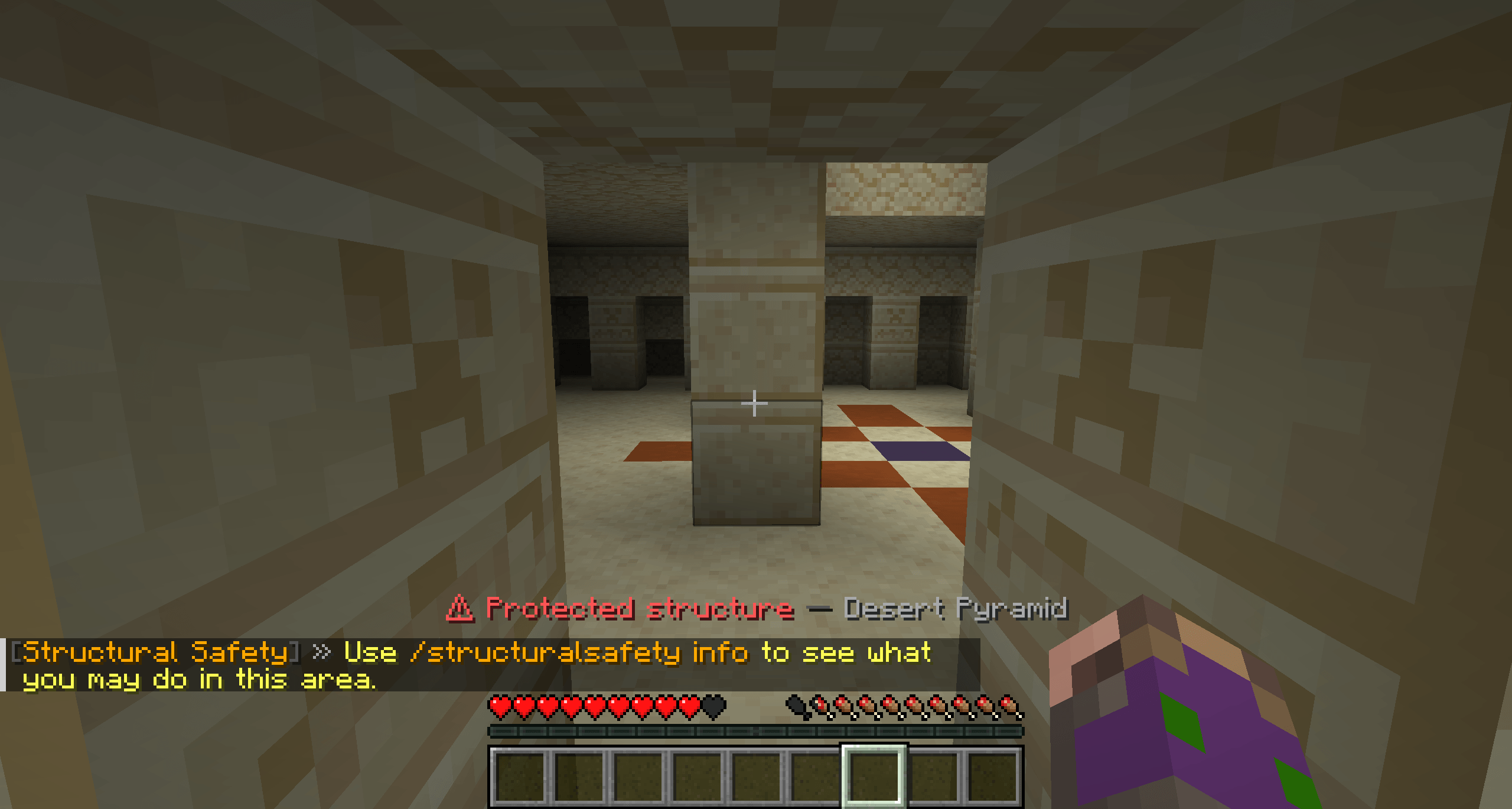
Structural Safety Structure.png
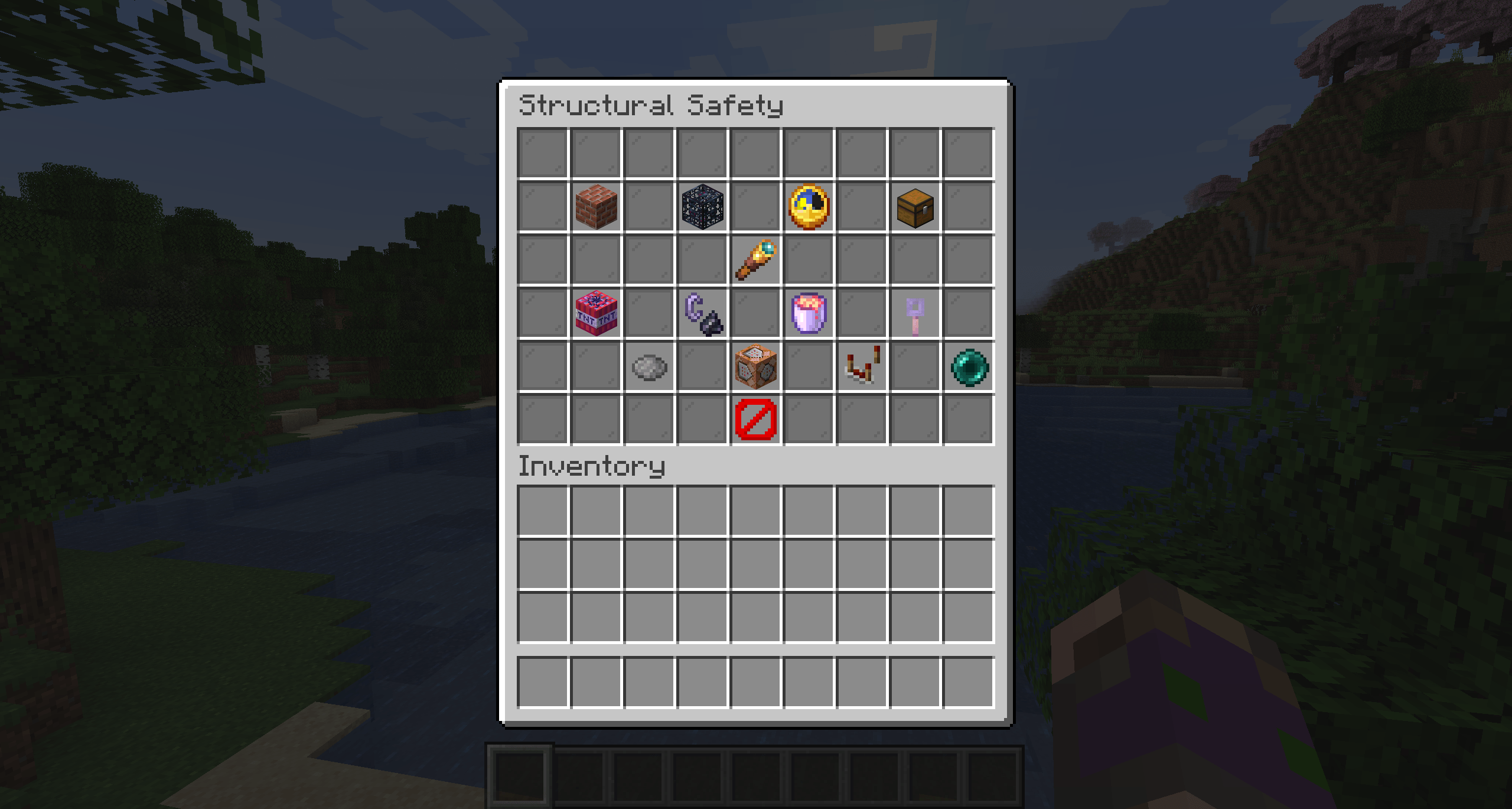
Structural Safety menu.png
Description
Structural Safety
Protect structures and world-generation features without changing how Minecraft feels.
Structural Safety is a fully server-side protection system for Minecraft structures and world-generation features. Players remain in Survival Mode, while protected areas automatically control what they may break, place and interact with.
Allowed blocks still use normal Vanilla mining mechanics — including mining speed, tools, durability, enchantments, drops and events.
No client mod is required.
✨ What Structural Safety Does
When players enter a protected structure or feature, Structural Safety automatically applies the rules configured for that area.
Players can still:
- Fight mobs normally
- Loot chests and containers
- Break specifically allowed blocks using normal Vanilla mining
- Use tools, enchantments and durability normally
- Interact with permitted blocks
- Place approved temporary or permanent items
- Explore structures without their game mode being changed
At the same time, Structural Safety can prevent players and environmental effects from damaging important generated areas.
Everything can be configured live in-game through a server-side graphical menu.
Structures & World Features
Structural Safety can protect both Minecraft structures and world-generation features.
This includes areas such as:
- Villages
- Strongholds
- Trial Chambers
- Ancient Cities
- Woodland Mansions
- Pillager Outposts
- Nether Fortresses
- Bastion Remnants
- Ocean Monuments
- End Cities
- Desert and Jungle Temples
- Mineshafts
- Monster Rooms
- Modded structures
- Supported world-generation features
Feature support also allows generated areas that are not technically Minecraft structures to receive the same protection system.
For example, Vanilla Monster Rooms / Dungeon Spawners can be detected and protected.
⛏️ Vanilla-Style Mining Protection
Structural Safety does not switch players into Adventure Mode.
Instead, the server decides whether a block is allowed to be mined.
If a block is allowed, Minecraft handles the rest normally:
- Mining progress
- Correct tool checks
- Mining speed
- Tool durability
- Enchantments
- Block drops
- Break events
- Mod compatibility
This keeps protected areas much closer to normal Survival gameplay.
Individual Rules for Every Area
Every protected structure and feature can have its own block-breaking rules.
There are four rule modes:
| Mode | Behavior |
|---|---|
inherit |
Uses the shared global breakable-block list |
extend |
Uses the shared list plus additional area-specific blocks |
replace |
Uses only the blocks configured specifically for that area |
none |
No block breaking is allowed |
This means different locations can behave completely differently.
For example:
- Villages can allow crops and decorative blocks
- Dungeons can allow cobwebs
- Adventure-map areas can completely disable breaking
- Modded structures can have their own custom rules
Rules can be managed through commands or directly through the graphical menu.
Interaction & Placement Rules
Breaking blocks is only one part of the protection system.
Structural Safety can also control which blocks players may interact with and which items they may place.
Interactions
Allowed interactions can include:
- Containers
- Redstone components
- Brushable blocks
- Doors and mechanisms
- Other configured blocks
Temporary Blocks
Specific items can be placed temporarily inside protected areas.
Examples include:
- Torches
- Ladders
- Blocks used to escape dangerous situations
Temporary blocks are automatically removed after a configurable amount of time.
Permanent Placement
Specific items can also be allowed as permanent placements when needed.
All placement and interaction rules are configurable.
Environmental Protection
Protected areas can also be protected from environmental destruction.
| Protection | Description |
|---|---|
| Explosions | Prevents TNT, Creepers and similar explosions from destroying protected blocks |
| Fire | Prevents fire and fire spread from damaging protected areas |
| Lava | Prevents flowing lava from entering protected regions |
Each protection can be configured independently.
Structure & Feature Detection
Structural Safety automatically works with generated structures and supported features.
Detected feature regions are stored per dimension, allowing the protection system to remember generated areas across server restarts.
The mod also includes controlled scans for already-loaded chunks.
These scans are throttled and do not force additional chunks to generate or load, making the system suitable for larger servers and existing worlds.
ℹ️ Player Information
Players can use:
/structuralsafety infoThe command automatically detects the protected structure or feature the player is currently standing inside.
It can display:
- Area name
- Area ID
- Whether it is a structure or feature
- Active break-rule mode
- Exactly which blocks may currently be broken
- Whether sneaking is required for specific actions
- Shared interaction rules
- Placement rules
An optional chat hint can also appear when entering a protected area.
The /structuralsafety info entry hint can be enabled or disabled separately.
Configurable Player Feedback
Server owners can customize how Structural Safety communicates with players.
Available feedback includes:
- Area entry messages
- Area exit messages
- Denied-action messages
- Protection sounds
- Escape hints
- Temporary-block timer feedback
This allows the system to remain subtle on Survival servers or provide more detailed guidance on adventure and RPG servers.
🖥️ Fully Server-Side Menu
Open the management interface with:
/structuralsafety menuStructural Safety uses a Vanilla chest-based GUI, meaning the entire interface runs server-side.
No client mod is required.
The menu can manage:
- Structures
- World-generation features
- Break rules
- Block allowances
- Interaction rules
- Placement rules
- Player feedback
- Protection settings
- Diagnostics
- Administration tools
For normal administration, there is no need to manually edit configuration files.
Singleplayer Support
Structural Safety fully supports Minecraft's integrated singleplayer server.
Singleplayer world owners can configure the mod through its menu even when cheats are disabled.
The same management system therefore works for:
- Dedicated servers
- LAN worlds
- Singleplayer worlds
- Modpacks
- Adventure maps
Inspection & Preview Tools
Structural Safety includes administration tools for understanding exactly why an action is allowed or denied.
Live Inspection
/structuralsafety inspectInspection mode provides live information about:
- Protection lookups
- Block-breaking decisions
- Interaction decisions
- Placement decisions
- Active area rules
This is especially useful when configuring modded structures or troubleshooting large modpacks.
Protection Boundary Preview
/structuralsafety previewDisplays detected protection boundaries using Vanilla particles.
This makes it easy to verify that a structure or feature uses the expected protected region.
No client-side rendering mod is required.
Diagnostics
Structural Safety includes live diagnostic information for server administrators.
Diagnostics can report information about:
- Protection lookups
- Allowed actions
- Denied actions
- Structure and feature scans
- Temporary blocks
- Audit status
- Configuration health
These tools make large configurations and modpack compatibility easier to troubleshoot.
Audit Logging
Optional asynchronous audit logging can record relevant protection activity without blocking normal server processing.
Audit logs use automatic rotation to prevent a single log file from growing indefinitely.
This can be useful for:
- Public servers
- Modpack development
- Troubleshooting
- Finding configuration mistakes
- Investigating unexpected protection behavior
⚙️ Safe Configuration System
Structural Safety includes safeguards designed to reduce the risk of configuration mistakes.
Configuration reloads support:
- Validation before activation
- Safe rollback when a configuration is invalid
- Backups of rejected configurations
- Conservative configuration repair tools
Existing custom settings are preserved when compatible new defaults are introduced.
Built-In Presets
Structural Safety includes several predefined configuration styles that can be used as starting points.
Vanilla-Friendly
Designed to protect generated areas while keeping gameplay close to normal Survival.
Anti-Grief
Stronger protection intended for multiplayer servers.
Strict
More restrictive protection for servers where generated structures should remain largely untouched.
Adventure Map
Designed for controlled environments where players should interact with structures without modifying them freely.
Presets can be customized after applying them.
Permissions
Administration access can be separated into different permission categories.
Permissions are available for actions such as:
- Viewing information
- Managing protection
- Inspection
- Testing
- Diagnostics
- Auditing
- Escape functionality
This allows server owners to give moderators or administrators access only to the tools they actually need.
🚪 Safe Escape System
Players who become trapped inside protected areas can use:
/structuralsafety escapeThe escape system searches for a safer location instead of simply disabling protection.
It is designed as a recovery tool rather than a fast-travel command.
Server owners can configure the related behavior and permissions.
Technical Test Mode
Structural Safety includes a dedicated technical test system for developers, modpack creators and advanced server administrators.
Technical test mode provides:
- Non-destructive startup self-tests
- Temporary in-memory structure test areas
- Temporary in-memory feature test areas
- Guided protection tests
- Breaking tests
- Placement tests
- Feedback tests
- Escape-system tests
Temporary test areas use the same protection engine as real structures and features.
Technical test mode is automatically enabled for development environments such as IntelliJ runs and disabled by default in packaged releases.
⚡ Performance
Structural Safety is designed around server-side operation.
Important systems include:
- Per-dimension feature-region storage
- Persistent temporary-block tracking
- Throttled scans
- No forced chunk generation during feature rescans
- No unnecessary loading of unloaded chunks
- Asynchronous rotating audit logs
- Server-side protection decisions
The client does not need to install Structural Safety.
Modded Content
Structural Safety is designed to work with modded Minecraft environments.
Modded structures can be detected and configured individually, allowing modpack creators to decide exactly which generated locations should receive protection.
Each protected area can use its own:
- Break-rule mode
- Additional allowed blocks
- Interaction rules
- Placement behavior
- Protection settings
This makes Structural Safety especially useful for modpacks, RPG servers, adventure servers and heavily modded Survival worlds.
Command Overview
Player & General
| Command | Description |
|---|---|
/structuralsafety |
Open Structural Safety |
/structuralsafety help |
Show available commands |
/structuralsafety menu |
Open the server-side management menu |
/structuralsafety info |
Show information about the current protected area |
/structuralsafety escape |
Escape from a protected area if trapped |
Administration & Debugging
| Command | Description |
|---|---|
/structuralsafety inspect |
Inspect live protection decisions |
/structuralsafety preview |
Preview protection boundaries with particles |
Additional structure, feature, rule, rescan, diagnostics, testing and administration functions are available through the command system and graphical menu.
✅ Designed For
Structural Safety is especially useful for:
- Survival servers
- Modpacks
- RPG servers
- Adventure maps
- Structure-focused modpacks
- Multiplayer servers
- Modpack development and testing
Whether you simply want to prevent players from destroying dungeons or need detailed rules for hundreds of generated structures, Structural Safety can be configured around the style of your world.
❤️ Credits & Links
Made with ❤️ by Mrstilu2k6
Found a bug or have a suggestion? Feel free to leave a comment or open an issue. Feedback helps improve Structural Safety and shape future features.
Enjoying the mod? If you'd like to support my work, a small tip is greatly appreciated. Every bit of support helps me dedicate more time to updates, compatibility and new features.
The Structural Safety Team

![Better Revive X Holy Ritual [Hardcore] project image](https://media.forgecdn.net/avatars/thumbnails/2057/189/256/256/639254273932951262.jpg)