Better Party
- By
Better Party brings a polished MMORPG-style party system to Minecraft with public and private groups, party chat, friendly-fire protection, nearby XP sharing, and a fully customizable live HUD.
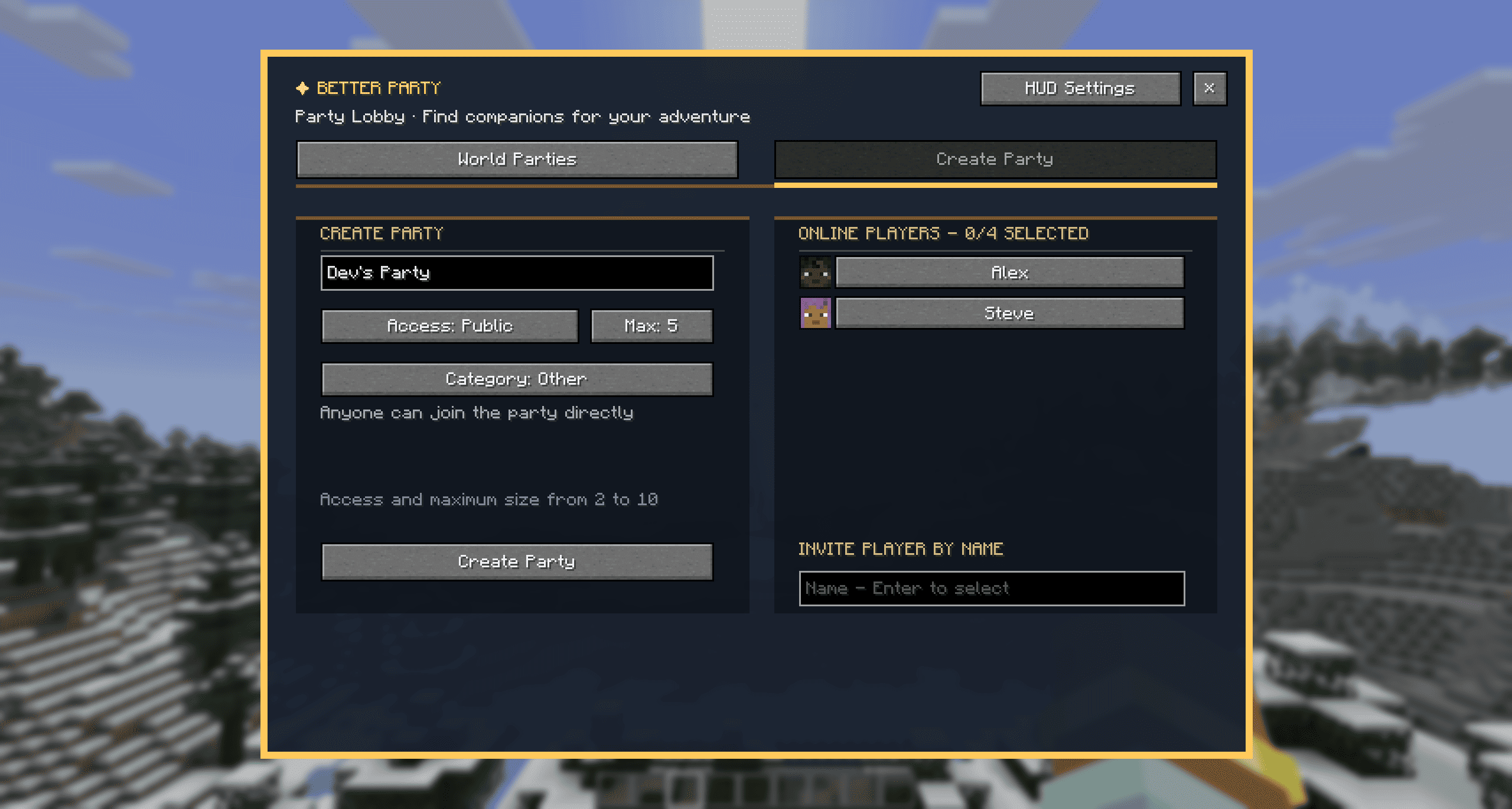
Better Party - Create Party
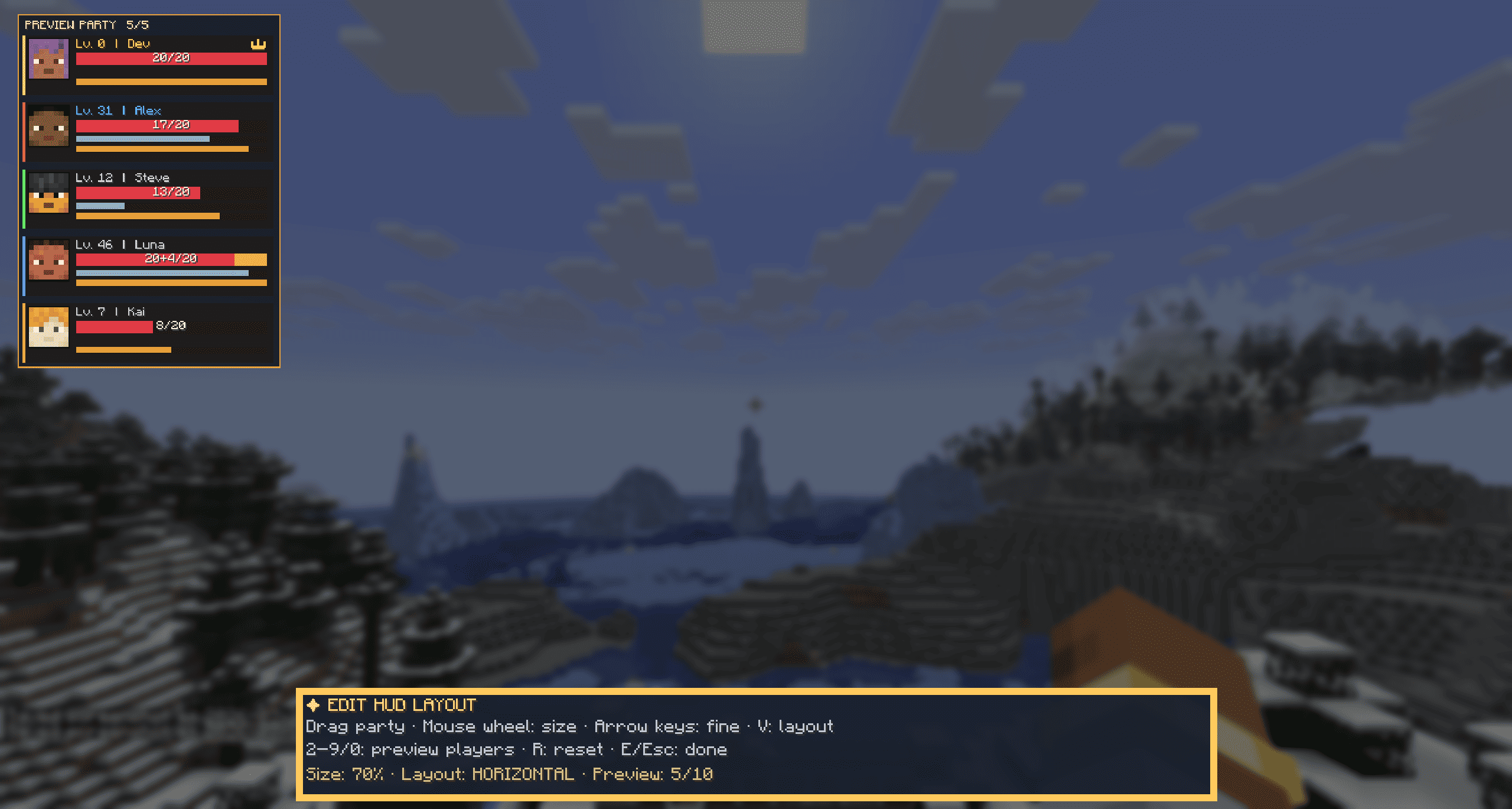
Better Party - HUD Layout Horizontal
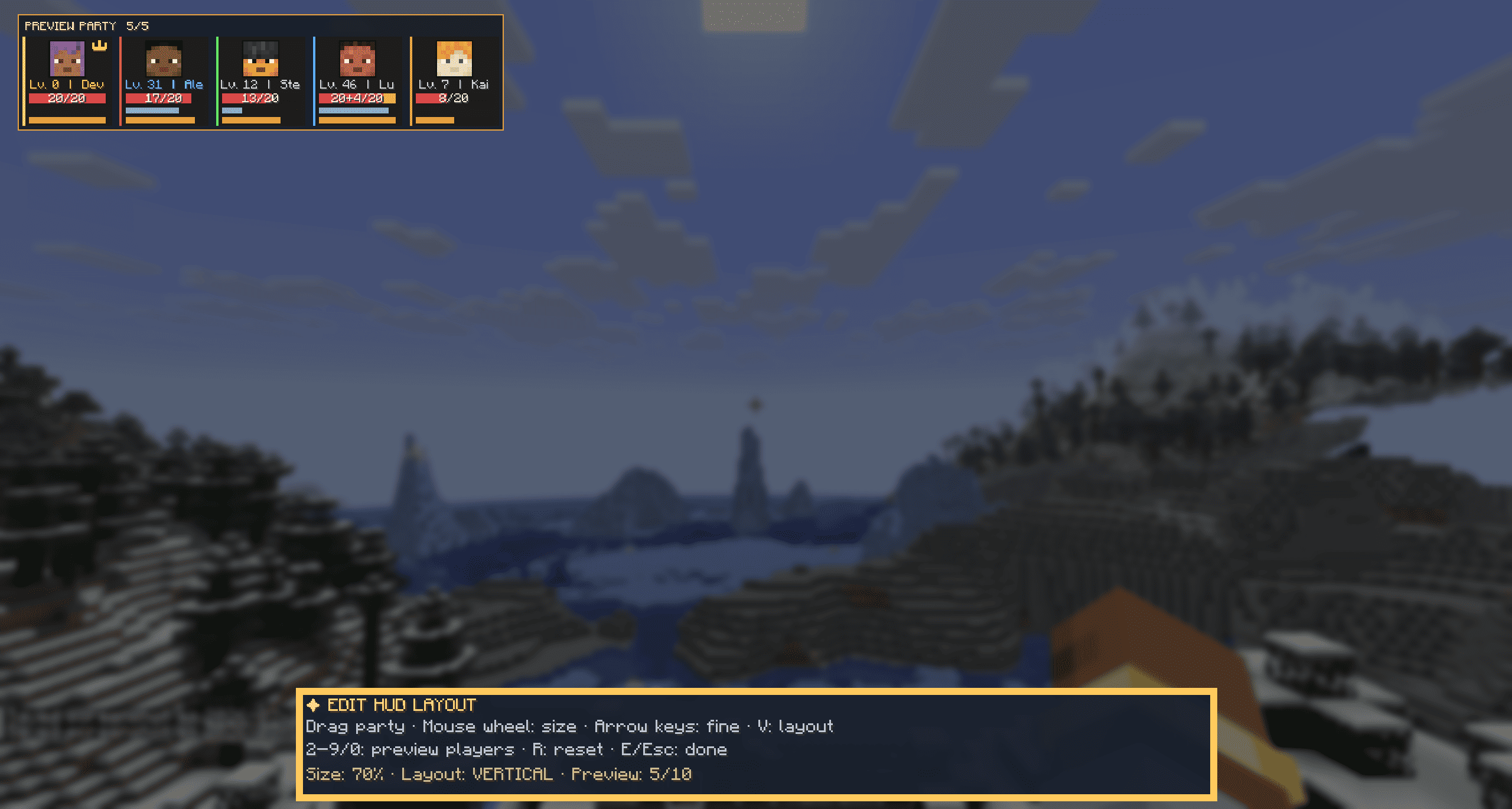
Better Party - HUD Layout Vertical
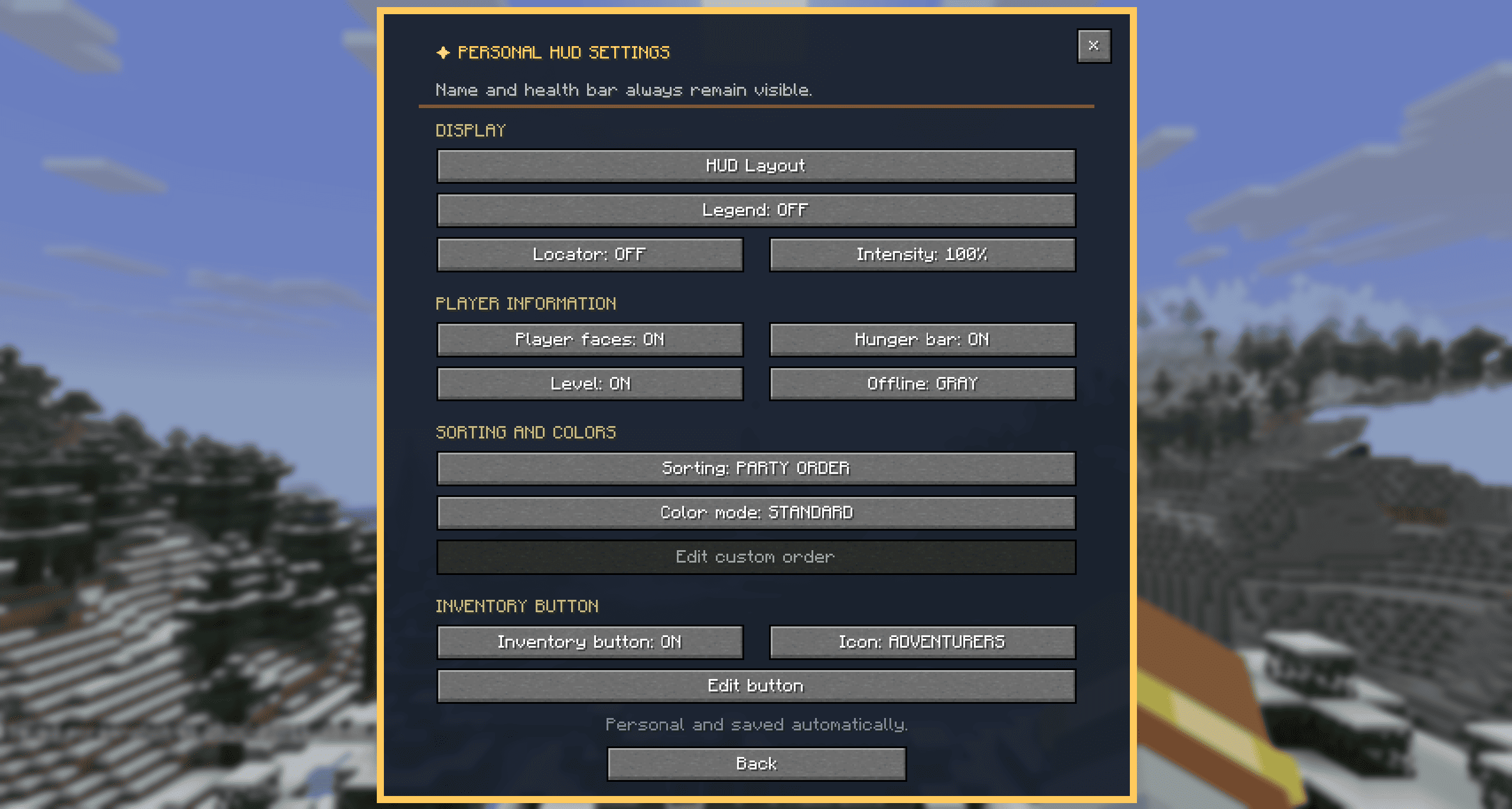
Better Party - HUD Settings
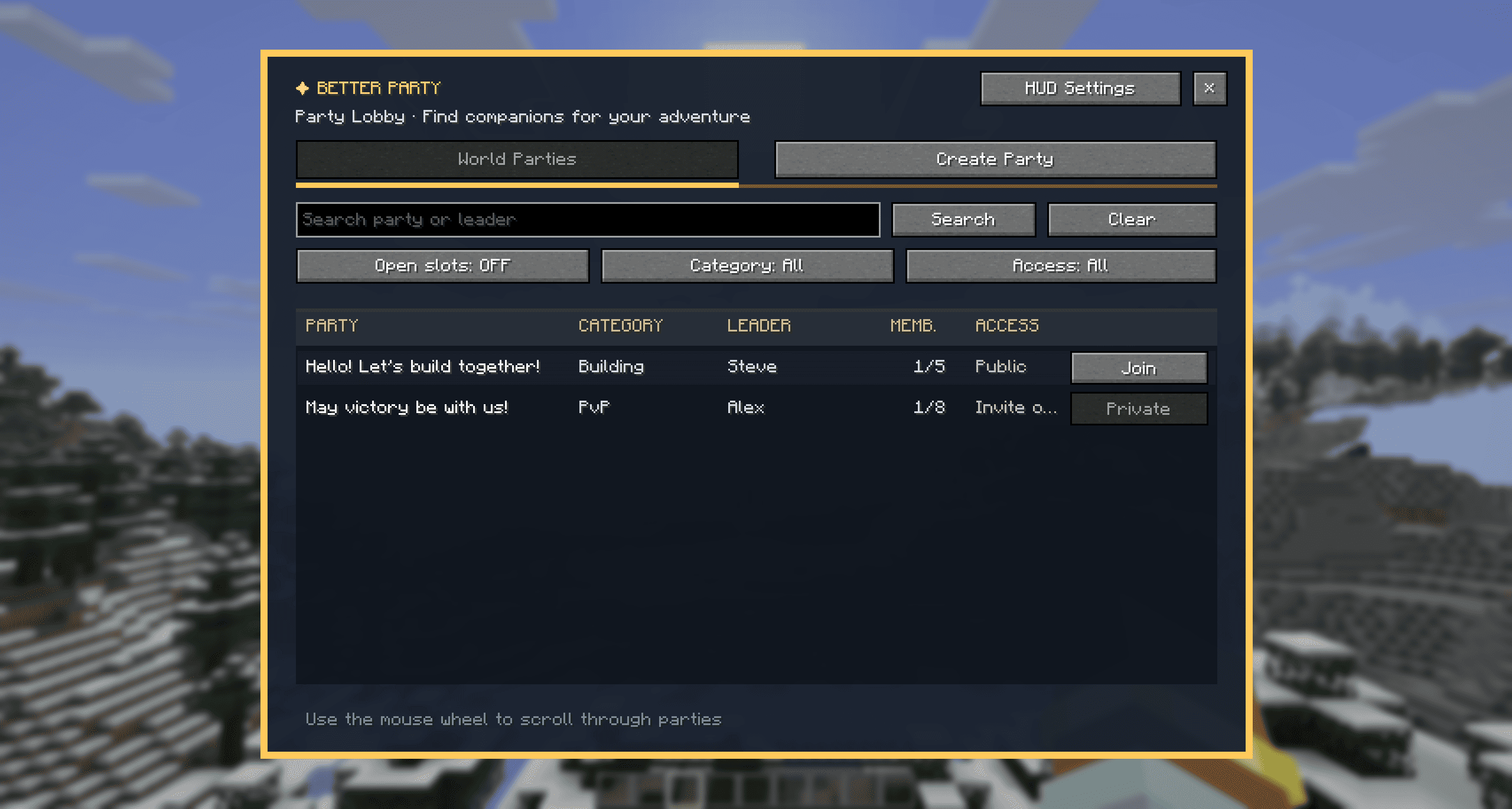
Better Party - Lobby.png
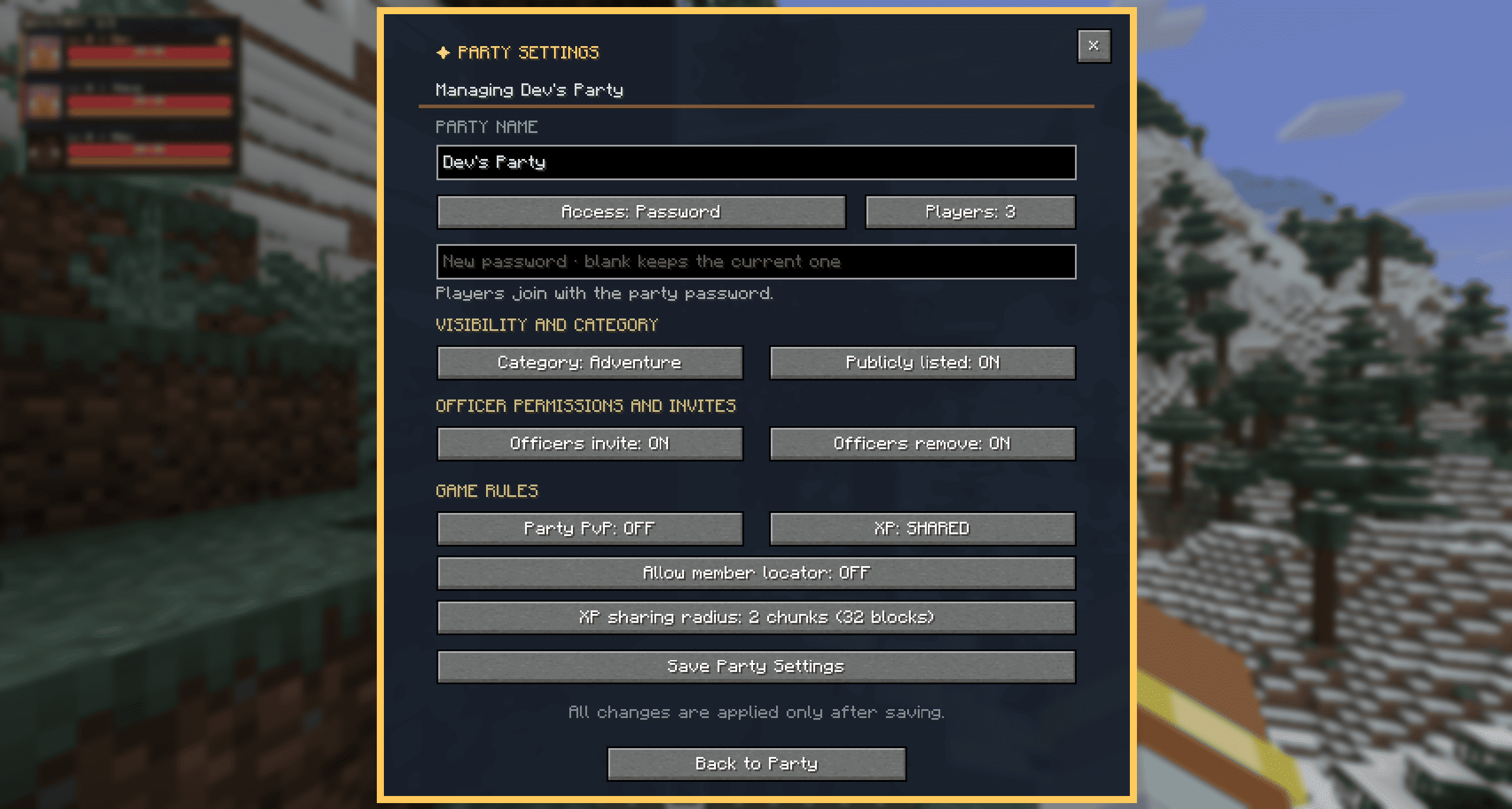
Better Party - Party Settings
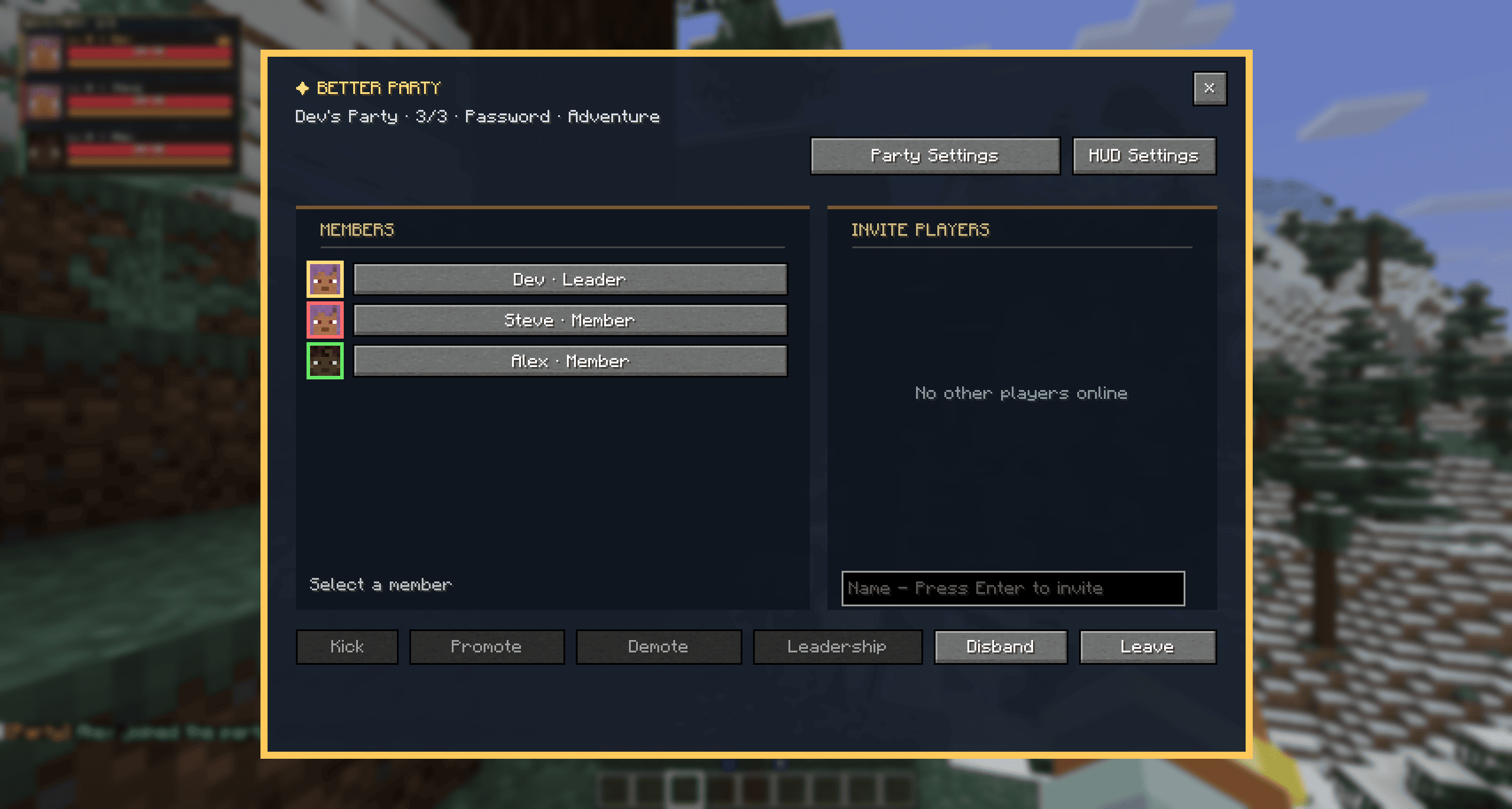
Better Party - Party
Description
Better Party
Turn Minecraft multiplayer into a true MMORPG-style party experience.
Better Party adds a complete and polished party system to Minecraft. Find other players, create public or private groups, assign roles, share experience, protect your teammates, communicate through party chat, locate party members, and keep track of your entire group with a fully customizable live HUD.
Whether you are exploring, building, trading, fighting bosses, completing dungeons, or playing PvP, Better Party makes playing together easier, more organized, and more enjoyable.
✦ Find the Right Party
Browse all currently active parties through a clean and scrollable party finder.
- Search by party name or leader
- Filter by available slots, category, and access type
- Choose between Public, Invite Only, or Password Protected
- Select a category: Adventure, Building, PvP, Trading, or Other
- Give your party a unique custom name
- Set a party size from 2 to 10 players, within the server owner's limit
- Show or hide your party from the public list
- Invite online players directly
- Invite players manually by entering their name
- Press Enter to send an invitation from the player name field
Access descriptions explain how each party type works before the settings are saved.
Password-protected parties only request the password when someone attempts to join.
✦ Powerful Party Management
Better Party provides the management tools expected from a real MMORPG group system.
- Three roles: Leader, Officer, and Member
- Separate officer permissions for inviting and removing players
- Promote and demote party members
- Transfer leadership through a dedicated action
- Confirmation screens for important actions
- Join and leave notifications
- Scrollable member lists for parties with up to ten players
- Player portraits in invitation and member lists
- Party-colored borders around member portraits
- Automatic handling of long player names
- Automatic leadership transfer
- Persistent parties across disconnects and server restarts
- Optional session-only party behavior controlled by the server owner
If the party leader remains offline or leaves the party, leadership is transferred to an eligible member. Online officers are prioritized before regular members.
With persistent parties enabled, party members, roles, and settings are saved and restored after a server restart. If persistence is disabled by the server owner, Better Party returns to its original session-only behavior and fully inactive parties are removed.
Long player names are automatically shortened or repositioned so that names, portraits, and the leader crown remain clearly visible.
Duplicate party names are not permitted, ensuring that every party can be identified correctly.
✦ Reliable Party Invitations
Invitations reserve an available party slot for their entire duration.
- Active invitations count toward the party capacity
- No more invitations can be sent than there are available slots
- Players joining through the public party browser cannot occupy reserved slots
- Players are marked as unavailable when every slot is occupied or reserved
- Invited players receive a green checkmark next to their name
- Invitation entries update when an invitation is accepted, declined, expires, or becomes invalid
- Removed party members can immediately be invited again
- Invitation windows close automatically when their timer expires
- A short cooldown prevents repeated invitation spam after a decline
- Clear messages explain when another invitation cannot yet be sent
Each invitation includes a visible 30-second countdown.
✦ Vanilla Team Integration
Better Party can connect its parties to Minecraft's vanilla scoreboard team system.
A corresponding vanilla team is automatically managed for every Better Party. Party members are added to this team, allowing other mods and systems that recognize vanilla teams to identify Better Party groups.
- Party names and visible vanilla team names remain synchronized
- Renaming a Better Party also updates its vanilla team
- Supported vanilla team changes are synchronized with Better Party
- Party friendly fire and vanilla team friendly fire remain synchronized
- Disbanding a party removes its corresponding vanilla team
/team leavealso removes the player from their Better Party- Moving into another Better Party-managed team also changes the player's party
- Team changes are rejected when the target party has no available slot
- The party HUD updates immediately after external team changes
- Leadership is transferred when a leader leaves their managed team
Better Party only manages vanilla teams that belong to Better Party.
Teams created by administrators, other mods, command blocks, or external systems are not overwritten. Players who are already assigned to an unrelated vanilla team remain in that team.
Vanilla team integration is enabled by default and can be disabled through the server configuration.
✦ Party Member Locator
The party member locator helps players find teammates who are completely hidden behind blocks.
The party leader can enable or disable the locator for the entire party. Each party member can then choose their preferred display mode independently:
- Off
- Dot
- Player Head
- Outline
The locator only appears when another party member is fully obstructed. Players who are directly visible continue to be rendered normally.
Locator Range
- Dots and player heads: up to 128 blocks or 8 chunks
- Outlines: up to 64 blocks or 4 chunks
Personal Locator Settings
- Adjust visibility from 10% to 100%
- Change intensity in steps of 10%
- Display player heads using the player's normal skin
- Display dots and outlines using the assigned party color
- Use consistent and clearly visible player contours
If the locator has been disabled by the party leader, a corresponding message is displayed inside the personal HUD settings.
Server owners can disable the locator globally. When they do, party leaders cannot enable it and exact party-member coordinates are no longer sent to clients.
✦ Individual Party Colors
Each of the ten available party slots has its own fixed and clearly distinguishable color.
- Every party member receives a unique color
- Colors are never assigned twice within the same party
- Players receive the first available party slot when joining
- Colors are assigned separately for every party
- Players do not carry their previous color into another party
- Colors are used consistently throughout the interface
The assigned color appears in:
- Party HUD entries
- Member lists
- Player portrait borders
- Locator dots
- Player outlines
The party leader is additionally marked with a crown.
This makes individual party members easy to identify across every Better Party interface.
✦ Share the Adventure
Playing together should feel rewarding.
Fair XP Sharing
The party leader can enable experience sharing and select a range permitted by the server owner. The normal maximum is 2 chunks / 32 blocks, but server owners can allow a selectable maximum from 1 to 32 chunks.
Collected experience is divided fairly between all eligible party members within the selected range.
Individual XP points that cannot be divided equally are distributed in rotation, ensuring that the same player is not permanently favored.
Server owners can also disable XP sharing completely. If disabled, party leaders cannot re-enable it and the corresponding controls are locked.
Friendly-Fire Protection
Party leaders can decide whether party members are allowed to damage each other, provided the server owner allows friendly-fire protection.
Server owners can disable the protection globally. In that case, party members can always damage one another and leaders cannot override the rule.
When vanilla team integration is active, the party setting and the corresponding vanilla team friendly-fire setting remain synchronized.
Private Party Chat
Use:
/p <message>
Party messages appear directly inside the normal Minecraft chat with a distinctive golden
[Party] prefix.
No additional chat window is required.
✦ Fully Customizable Party HUD
Keep an eye on your entire group without opening a menu.
The live HUD can display:
- Player heads
- Player names
- Experience levels
- Leader crown
- Health bars
- Exact health values
- Armor
- Optional hunger bars
- Online and offline status
- Individual party colors
- Additional information supplied by compatible add-ons
Player names and health remain visible so that the most important information is always available.
✦ Visual HUD Editor
The party HUD can be positioned and resized through a complete visual editor.
- Move the HUD directly with the mouse
- Resize the HUD using the mouse wheel
- Use the arrow keys for precise positioning
- Switch between horizontal and vertical layouts
- Preview the final HUD before leaving the editor
- Display between 2 and 10 preview players
- Preview different names, health values, levels, and party colors
- Reset the position, size, layout, and preview player count
- Save position and size automatically
The information panel automatically moves out of the way when the HUD overlaps it.
HUD settings can also be opened before joining a party.
Every player can configure their HUD independently:
- Scale from 10% to 150%
- Horizontal or vertical layout
- Free X and Y positioning
- Optional HUD legend
- Show offline players in gray or hide them completely
- Sort by party order, leader first, name, or lowest health
- Create a completely custom member order
- Choose between multiple colorblind-friendly display modes
- Enable high-contrast mode
All Better Party menus automatically adapt to Minecraft's selected GUI scale and screen resolution.
✦ Inventory Shortcut
Open Better Party directly from the player inventory using a dedicated party button.
Two selectable icon designs are available. The preferred design can be changed through the personal HUD settings.
The inventory button can be:
- Moved freely with the mouse
- Resized using the mouse wheel
- Previewed while editing
- Reset to its default position
- Hidden completely
The information panel automatically moves out of the way while the button is being repositioned.
You can also open the Better Party menu at any time using the default key:
Z
The key can be changed through Minecraft's normal control settings.
✦ Personal and Party Settings
Party leaders control the settings that affect the entire group:
- Party name
- Maximum party size, within the server owner's limit
- Access type
- Party category
- Public visibility
- Officer permissions
- Friendly-fire protection, when allowed by the server
- XP sharing, when allowed by the server
- XP sharing radius, within the server's maximum
- Party member locator, when allowed by the server
Changes to party settings are applied after saving, preventing accidental modifications.
Personal HUD settings allow every player to configure their own display without changing the experience of other party members.
✦ Server Admin and World-Owner Controls
Dedicated server administrators, singleplayer world owners, and LAN hosts have final control over the rules that affect all parties in their world.
Available Host Settings
- Persistent Parties — Enabled by default. Keeps parties, members, roles, and settings across disconnects and server restarts.
- Maximum Party Size — 10 players by default. Can be limited to any value from 2 to 10.
- XP Sharing — Enabled by default. Can be disabled for every party.
- Maximum XP-Sharing Radius — 2 chunks by default. Can be configured from 1 to 32 chunks.
- Friendly-Fire Protection — Allowed by default. Can be disabled globally so party members can always damage each other.
- Party Member Locator — Allowed by default. Can be disabled globally to stop sharing exact party-member coordinates with clients.
- Vanilla Team Integration — Enabled by default. Can be disabled when another mod or system needs exclusive control of scoreboard teams.
- XP-Sharing Diagnostics — Disabled by default. Can log detailed XP distributions for server troubleshooting.
These are hard server rules, not initial defaults that party leaders can change again. They apply to new, existing, and persistent parties and are checked for every relevant action.
Unavailable party sizes are removed from the interface. Disabled features remain visibly locked and cannot be re-enabled through the menu, commands, add-ons, or custom network packets.
If the maximum size is lowered below the size of an existing party, that party keeps its current members but cannot add anyone until it is below the new limit.
The LAN host's configuration applies to every connected player. A guest's local configuration cannot override the host's rules.
Forge and NeoForge use config/better_party-common.toml. Fabric uses
config/better_party.properties. Restart the game or server after changing these settings.
✦ Add-on Support
Better Party supports compatible standalone add-ons that expand the party system with additional integrations and settings.
Add-ons can register their own settings pages directly inside the Better Party settings menus and can add compatible information to party member HUD entries.
- Add-on settings only appear when a compatible add-on is installed
- Without an add-on, the regular settings menus remain unchanged
- Integrations can be installed separately
- Players and server owners only need to install the integrations they want to use
This system allows map, waypoint, team, voice chat, pet, RPG, and other multiplayer features to integrate with Better Party without being included directly in the main mod.
✦ Better Party Add-ons
- Better Party × Waystones
- Better Party × FTB Teams
- Better Party × Simple Voice Chat
- Better Party × Tamed Mobs
- Better Party × Mine and Slash
- Better Party × Xaero's Minimap
- Better Party × Xaero's World Map
✦ Designed for Multiplayer
Better Party is fully server-authoritative.
Party membership, permissions, invitations, reserved slots, party-size limits, PvP protection, XP sharing, locator privacy, team synchronization, and other important actions are validated by the server.
Better Party works in:
- Singleplayer worlds
- Worlds opened to LAN
- Dedicated servers
For multiplayer, Better Party must be installed on both the server and participating clients.
✦ Why Better Party?
Better Party is more than a collection of commands.
It provides a complete multiplayer group experience with an accessible interface, responsive menus, detailed customization, fair progression, party member tracking, vanilla team compatibility, and the familiar features players expect from MMORPG party systems.
Server owners remain in control of the important gameplay and privacy rules, while each player can customize how Better Party looks on their own screen.
Gather your friends, find new companions, and begin your next adventure together.
❤️ Credits & Links
Made with ❤️ by MrStilu2k6
🔗 CurseForge · ☕ PayPal
💬 Found a bug or have a suggestion? Leave a comment or open an issue. Every piece of feedback helps improve Better Party and shape its development!
☕ Enjoying Better Party? A small tip is always appreciated. Every contribution helps me spend more time creating updates, improvements, compatibility features, and additional add-ons.
Better Party Team