Status Effect Timers
- By
See exactly how long every potion effect lasts - a clean list with icons, levels and countdown timers that warns you before an effect runs out. - Client side
2026-11-06_20.45.48.png
Description
# How long is that Night Vision going to last?
You're deep underwater, mining by the light of Night Vision. Vanilla only shows a tiny icon in the corner - no timer, no warning - until suddenly everything goes dark. Same with Fire Resistance in the Nether, right above the lava lake.
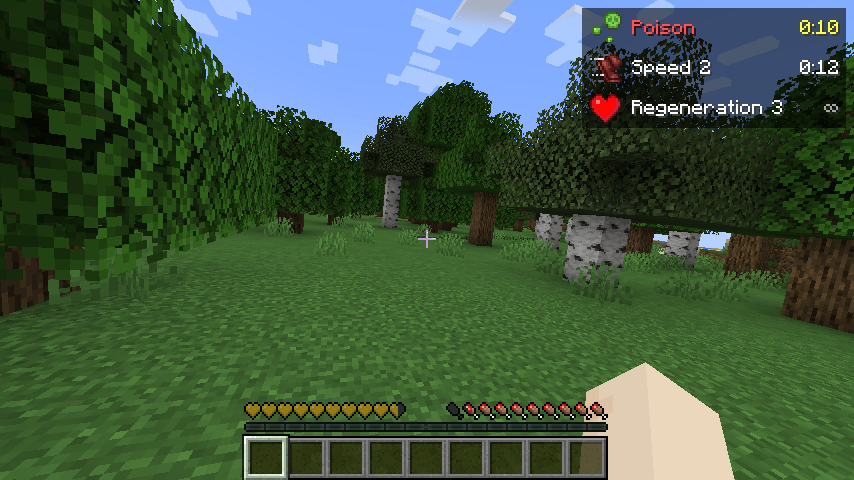
**Status Effect Timers** replaces the small vanilla icons with a clear list: every effect with its icon, name, level and a countdown.
## Features
- **Clear effect list** - icon, name and level ("Speed 2", "Regeneration 3") with the time left ("2:45").
- **Warnings before it ends** - the timer turns yellow in the last 10 seconds and red in the last 5, and the icon starts blinking.
- **Bad effects first** - harmful effects (Poison, Wither, Slowness...) are listed at the top in red, the rest sorted by time left.
- **Neat layout** - all timers line up on the right, with a subtle dark background.
- **Long and endless effects** - shows hours for very long effects ("1:02:30") and "∞" for infinite ones.
- **Beacon effects** - shown normally, or hidden with one setting.
- **Any corner, any size** - choose the screen corner, distance from the edge and scale.
- **Plain numbers** - levels as "Speed 2" by default; Roman numerals ("Speed II") optional.
- **No duplicates** - vanilla's own small icons are hidden while the list is shown (can be turned off).
- **Hides with F1 and F3** - like the rest of the HUD.
No key bindings - nothing to set up and no conflicts with other mods.
## Settings
The file `config/statuseffecttimers.properties` is created on first launch. Edit it with a text editor while the game is closed:
- `enabled` - list on or off (default: true)
- `replaceVanillaIcons` - hide vanilla's small effect icons (default: true)
- `corner` - top_left, top_right, bottom_left or bottom_right (default: top_right)
- `offsetX` / `offsetY` - distance from the screen edge (default: 4 / 4)
- `scale` - size of the list, 0.5 - 2.0 (default: 1.0)
- `background` - dark box behind the list (default: true)
- `showLevelOne` - show "Speed 1" instead of "Speed" (default: false)
- `romanLevels` - "Speed II" instead of "Speed 2" (default: false)
- `warnSeconds` - when the timer turns yellow and the icon blinks (default: 10)
- `hideAmbient` - hide beacon/conduit effects (default: false)
## Works on servers
This is a **client-side only** mod. The server already sends your active effects and their durations to you (vanilla shows the same timers inside your inventory), so this mod only displays that information more clearly. It works in singleplayer, on Realms and on any multiplayer server, with nothing installed on the server.
## Requirements
- Minecraft 1.21 / 1.21.1
- Fabric Loader 0.16 or newer
- Fabric API
- Java 21
## Installation
1. Install Fabric Loader for Minecraft 1.21.1.
2. Put **Fabric API** and **Status Effect Timers** in your `mods` folder.
3. Start the game and drink a potion.
## Modpacks
You are welcome to include this mod in any modpack. No need to ask.
## Also by this author
- **Death Location Helper** - an on-screen arrow back to where you died
- **Item Pickup Notifier** - see everything you pick up at the side of the screen
- **Smooth Zoom** - hold a key to zoom, scroll to change the zoom level
- **Item Container Preview** - see Shulker Box contents in the tooltip
- **Clean Tooltip Enchants** - color-coded enchantments with (MAX) tags
- **Smart Torch Placer** - place torches with one key, optional Auto-Light for mining
- **Smart Crop Harvest** - right-click ripe crops to harvest and replant
- **Floating Damage Indicators** - damage, heal and crit numbers above mobs
- **Smart Tool Safety** - durability warnings and tool break protection
- **Smart Chest Organizer** - sort buttons and quick deposit for chests
- **Dynamic Armor HUD** - armor, held item and arrow durability on screen
- **Smart Auto-Trash** - quickly trash or auto-throw junk items
- **Dynamic Item Glow** - rarity colors and glow for items
## Honest limitations
- Effects the game marks as hidden (no icon) are not shown, same as vanilla.
- In the top-right corner the list can sit next to other HUD mods that also use that corner; move it with `corner` / `offsetY` if they overlap.
- Some servers or plugins give "fake" effects with very long durations; those simply show a long timer.
- The settings are in a config file; there is no in-game settings screen yet.
## About the images
The project logo is an illustration created with AI assistance; it is not an in-game screenshot. The screenshots in the gallery are real, unedited in-game captures.
Status Effect Timers Team