Death Location Helper
- By
Never lose your items again: see where you died in chat and follow an on-screen arrow straight back to your death point. - client side
2026-11-06_20.43.01.png
2026-11-06_20.42.43.png
Description
## Get your stuff back
You fall into a ravine deep in a cave system, respawn in your bed, and... where was that? Somewhere north? Your diamonds have five minutes before they despawn, and you have no idea where to go.
**Death Location Helper** remembers the exact spot where you died and guides you back with a simple arrow on your screen.
## Features
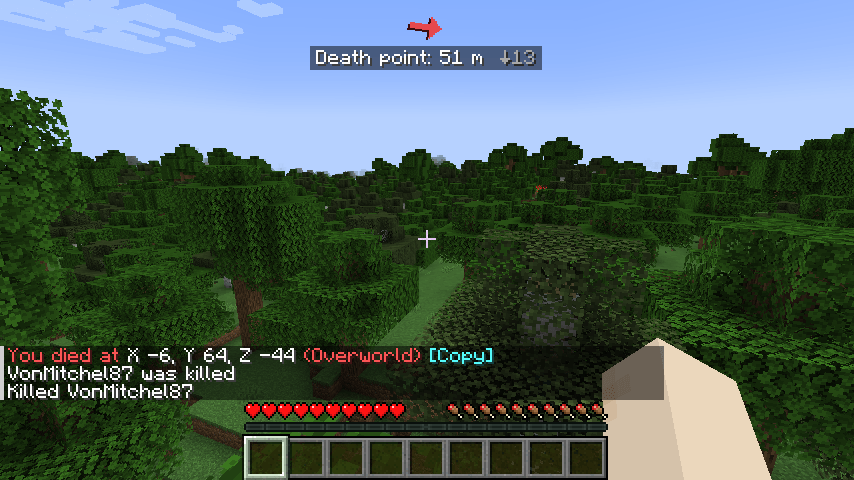
- **Death message in chat** - "You died at X 120, Y -42, Z 885 (Overworld)" with a **[Copy]** button that puts the coordinates on your clipboard. Only you see it.
- **Coordinates on the death screen** - see where it happened before you even press Respawn.
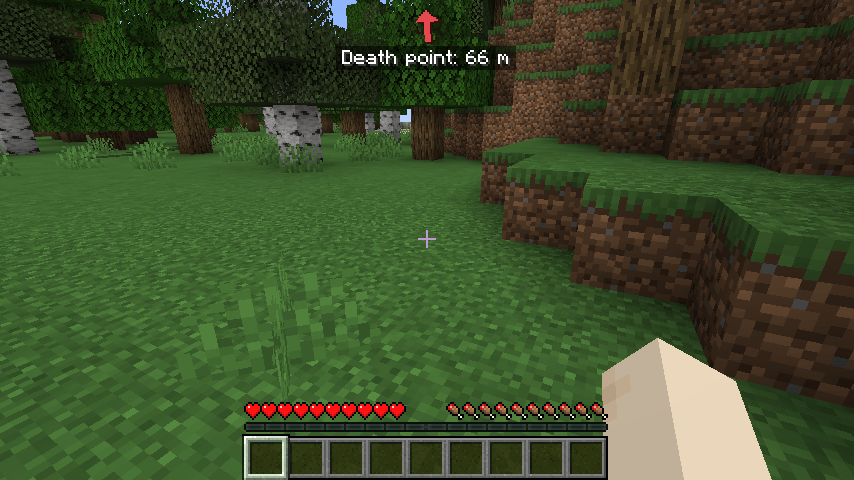
- **Arrow back to your items** - after respawning, a red arrow at the top of the screen points toward your death point, with the distance ("Death point: 312 m") and how far up or down it is.
- **Turns with you** - the arrow updates as you walk and look around, like a compass.
- **Clears itself** - when you reach the spot, the arrow disappears with a short "You reached your death point" message.
- **Other dimensions** - died in the Nether while you're in the Overworld? It tells you "Death point is in the Nether" instead of pointing the wrong way.
- **Remembers after quitting** - the death point is saved per world and per server, so it's still there if you log out.
- **Show/hide with O** - hide the arrow when you don't need it, bring it back later.
## Controls
| Key | Action |
|---|---|
| O | Show / hide the death arrow |
| Click [Copy] in chat | Copy the coordinates |
Change the key in Options > Controls > Key Binds. The key works even if another mod uses the same key.
## Settings
The file `config/deathlocationhelper.properties` is created on first launch. Edit it with a text editor while the game is closed:
- `enabled` - mod on or off (default: true)
- `chatMessage` - post coordinates in chat on death (default: true)
- `showArrow` - show the arrow after respawning (default: true)
- `showOnDeathScreen` - coordinates on the death screen (default: true)
- `clearDistance` - arrow disappears within this many blocks (default: 4)
- `hideAfterMinutes` - auto-hide after X minutes, 0 = never (default: 0)
- `offsetY` - distance of the arrow from the top of the screen (default: 4)
- `rememberAfterRestart` - keep the death point after quitting (default: true)
## Works on servers
This is a **client-side only** mod. It saves your own position at the moment you die - the same coordinates you could read on the F3 screen - so it works on any server, even when the server hides death coordinates. Nothing is installed on the server and nothing is sent to other players.
## Requirements
- Minecraft 1.21 / 1.21.1
- Fabric Loader 0.16 or newer
- Fabric API
- Java 21
## Installation
1. Install Fabric Loader for Minecraft 1.21.1.
2. Put **Fabric API** and **Death Location Helper** in your `mods` folder.
3. Start the game. (Hopefully you won't need it soon.)
## Modpacks
You are welcome to include this mod in any modpack. No need to ask.
## Also by this author
- **Status Effect Timers** - your potion effects as a clean list with countdowns
- **Item Pickup Notifier** - see everything you pick up at the side of the screen
- **Smooth Zoom** - hold a key to zoom, scroll to change the zoom level
- **Item Container Preview** - see Shulker Box contents in the tooltip
- **Clean Tooltip Enchants** - color-coded enchantments with (MAX) tags
- **Smart Torch Placer** - place torches with one key, optional Auto-Light for mining
- **Smart Crop Harvest** - right-click ripe crops to harvest and replant
- **Floating Damage Indicators** - damage, heal and crit numbers above mobs
- **Smart Tool Safety** - durability warnings and tool break protection
- **Smart Chest Organizer** - sort buttons and quick deposit for chests
- **Dynamic Armor HUD** - armor, held item and arrow durability on screen
- **Smart Auto-Trash** - quickly trash or auto-throw junk items
- **Dynamic Item Glow** - rarity colors and glow for items
## Honest limitations
- Only your **last** death is remembered. Dying again replaces it.
- The arrow points to where you died, not to the exact items - items can roll, fall into lava or be picked up by someone else.
- Items still despawn after the normal 5 minutes (while the area is loaded). The mod can't stop that.
- On servers whose name/address changes (e.g. a different IP for the same server), the saved point may not be found.
- The settings are in a config file; there is no in-game settings screen yet.
## About the images
The project logo is an illustration created with AI assistance; it is not an in-game screenshot. The screenshots in the gallery are real, unedited in-game captures.
Death Location Helper Team