Smooth Zoom Lens
- By
Hold Z to zoom in like a spyglass with a smooth animation, and scroll to zoom further - no spyglass needed. - Client-side
2026-11-05_16.30.24.png
Description
## A zoom that just feels right
Spotting a village across the valley, checking who's coming over the hill, lining up a long bow shot, or taking that perfect screenshot - a spyglass helps, but it takes a hotbar slot and covers half your screen.
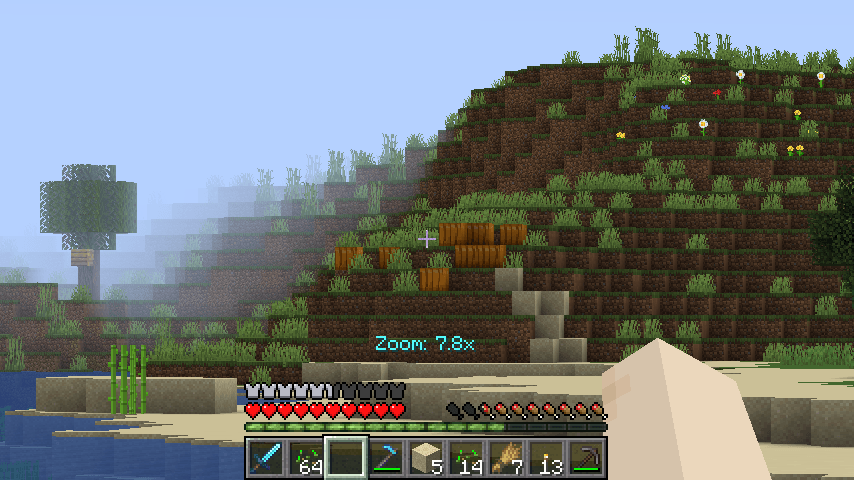
**Smooth Zoom** gives you a clean zoom on one key. Hold **Z**, the view glides in, let go and it glides back out. Scroll the mouse wheel while zooming to get closer or wider.
## Features
- **Hold Z to zoom** - 4x zoom by default, with a smooth animation in and out.
- **Scroll to change the zoom** - from 1.5x up to 50x. The hotbar doesn't scroll while you zoom, and a small "Zoom: 6.0x" message shows the level.
- **Steady aiming** - mouse sensitivity is lowered while zoomed, so the view doesn't fly around at 10x.
- **Clean view** - only the world is zoomed; your hand, crosshair and HUD stay the normal size. No overlay covering the screen.
- **Smooth at any FPS** - the animation is based on real time, so it looks the same at 30 or 240 FPS.
- **Toggle mode** - prefer press-once-to-zoom? One setting switches from hold to toggle.
- **Optional extras** - cinematic camera while zoomed, spyglass sounds, remember your last zoom level.
## Controls
| Key | Action |
|---|---|
| Z (hold) | Zoom in |
| Mouse wheel (while zooming) | Zoom further in / out |
Change the key in Options > Controls > Key Binds. Zoom keeps working even if you put it on a key that another mod or vanilla also uses.
## Settings
The file `config/smoothzoom.properties` is created on first launch. Edit it with a text editor while the game is closed:
- `holdToZoom` - true = hold the key, false = press to toggle (default: true)
- `defaultZoom` - zoom level when you press the key (default: 4.0)
- `minZoom` / `maxZoom` - scroll limits (default: 1.5 / 50.0)
- `scrollToZoom` - use the mouse wheel to change zoom (default: true)
- `smoothZoom` - animate the zoom (default: true)
- `zoomSpeed` - animation speed, 1-40 (default: 12)
- `reduceSensitivity` - slower mouse while zoomed (default: true)
- `cinematicCamera` - smooth cinematic camera while zoomed (default: false)
- `resetZoomOnRelease` - always start at defaultZoom; false = remember last level (default: true)
- `showZoomLevel` - show "Zoom: 6.0x" while scrolling (default: true)
- `playSound` - spyglass sound when zooming (default: false)
## Works on servers
This is a **client-side only** mod. It only changes how your own camera looks, like the vanilla spyglass or OptiFine's zoom. It works in singleplayer, on Realms and on any multiplayer server, with nothing installed on the server. It does not show anything you couldn't see with a spyglass.
## Requirements
- Minecraft 1.21 / 1.21.1
- Fabric Loader 0.16 or newer
- Fabric API
- Java 21
## Installation
1. Install Fabric Loader for Minecraft 1.21.1.
2. Put **Fabric API** and **Smooth Zoom** in your `mods` folder.
3. Start the game and hold Z.
## Modpacks
You are welcome to include this mod in any modpack. No need to ask.
## Also by this author
- **Item Container Preview** - see Shulker Box contents in the tooltip
- **Clean Tooltip Enchants** - color-coded enchantments with (MAX) tags
- **Smart Torch Placer** - place torches with one key, optional Auto-Light for mining
- **Smart Crop Harvest** - right-click ripe crops to harvest and replant
- **Floating Damage Indicators** - damage, heal and crit numbers above mobs
- **Smart Tool Safety** - durability warnings and tool break protection
- **Smart Chest Organizer** - sort buttons and quick deposit for chests
- **Dynamic Armor HUD** - armor, held item and arrow durability on screen
- **Smart Auto-Trash** - quickly trash or auto-throw junk items
- **Dynamic Item Glow** - rarity colors and glow for items
## Honest limitations
- Zooming doesn't load chunks further away - you can only see what your render distance already shows.
- Very high zoom levels (30x+) can look a bit blocky on far-away terrain, just like any zoom.
- Other zoom mods (Ok Zoomer, Zoomify, OptiFine/Sodium zoom add-ons) do the same job; use only one zoom mod at a time.
- The settings are in a config file; there is no in-game settings screen yet.
## About the images
The project logo is an illustration created with AI assistance; it is not an in-game screenshot. The screenshots in the gallery are real, unedited in-game captures.
Smooth Zoom Lens Team