A Minecraft mod that display HUDs in a more fancy way…
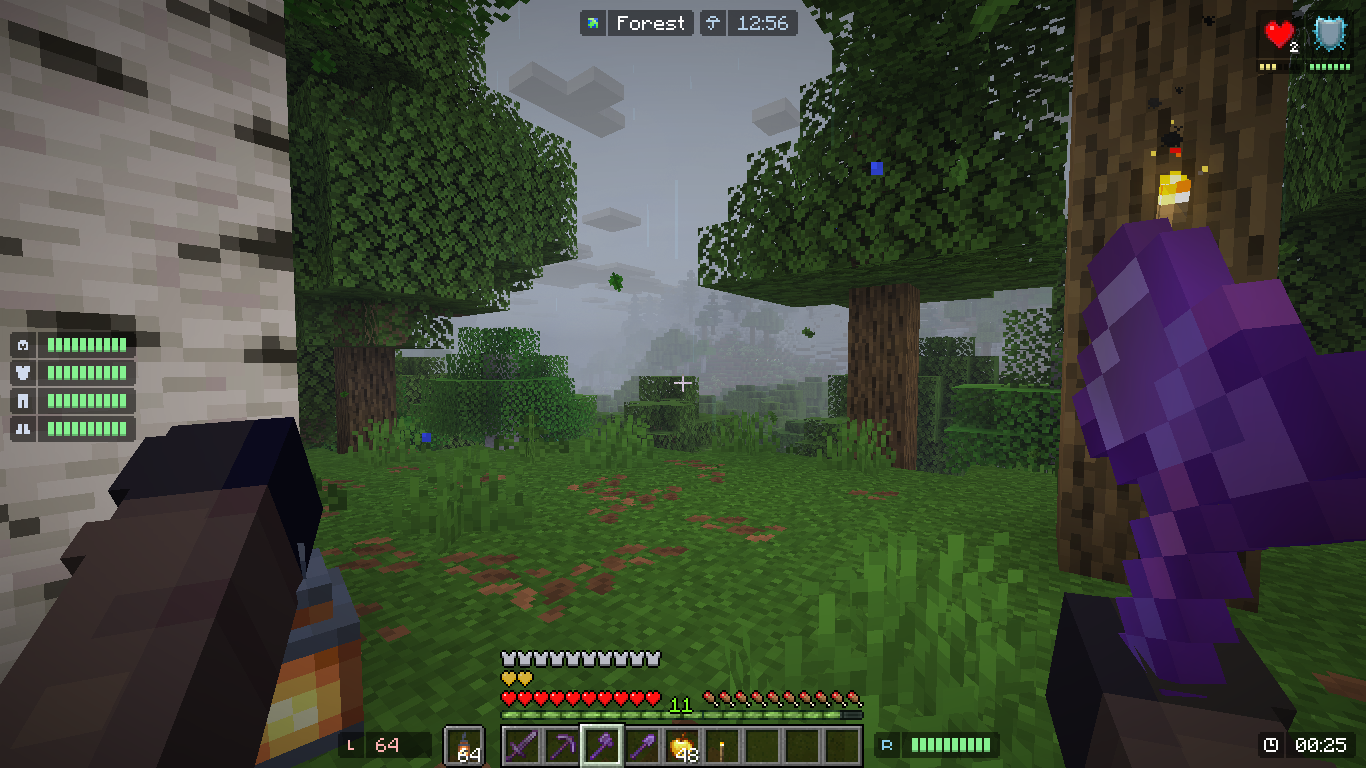
Mods used in this picture (Modrinth): Visual Effects+ recommended mods.
Requires Cloth Config
FEATURES
Armor Durability HUD
Coordinate & Nether Coordinate HUD
Cardinal Direction and Horizontal Yaw HUD
Ping HUD (Disabled in Singleplayer)
FPS HUD
System & InGame Clock (also shows world weather)
Biome Indicator HUD (and Dimension Indicator)
Inventory HUD (Disabled by default)
Hand Items Indicator HUD
Status Effect HUD
Day Counter HUD
Targeted Crosshair HUD
TPS HUD
Speed HUD
HUD Placement and Color Customization
Conditional HUD Placement and Toggle
Grouping System
And more to come... (hopefully)
Coordinate & Nether Coordinate HUD
Cardinal Direction and Horizontal Yaw HUD
Ping HUD (Disabled in Singleplayer)
FPS HUD
System & InGame Clock (also shows world weather)
Biome Indicator HUD (and Dimension Indicator)
Inventory HUD (Disabled by default)
Hand Items Indicator HUD
Status Effect HUD
Day Counter HUD
Targeted Crosshair HUD
TPS HUD
Speed HUD
HUD Placement and Color Customization
Conditional HUD Placement and Toggle
Grouping System
And more to come... (hopefully)
Configuring the HUD
Edit HUD Screen (2.0.0)
 Configuration Screen
In order to open this screen, by default you need to press RIGHT SHIFT in game.
The basic thing you can do, is just to CLICK on a HUD Box (displayed with border), and then drag the HUD around.
If you wanted to know more you can press the "Help" Button displayed with "?" on the button. This will display many keybind for your convenience.
If you wanted to see more information regarding your HUD, you can press the "More Options" Button displayed with "+" on the button. This will display the currently selected HUD information. And you can adjust them accordingly.
You need Mod Menu To access the configuration screen.
Set The HUD Location using X and Y Point.
(+X to move The HUD to the right, -X to the left)
(+Y to move the HUD to the bottom, -Y to the top)
Set the HUD Vertical / Horizontal Allignment so that the display will be consistent upon resizing.
Setting this will place your HUD DEFAULT location to the allignment specified.
Add a new Condition rule if your HUD is being overlapped by minecraft' HUD.
You can either: Disable the rendering, or move the HUD away.
If the HUD' texture length changes dynamically, you can set the Texture Growth Direction.
It's better to set the direction to be the OPPOSITE of your HUD allignment.
(Ex: Allignment: LEFT, so you put Growth Direction to the RIGHT and vice versa).
Bonus Tip: It is recommended to use Pastel Colors for the HUD.
Performance Concern
Yes, this mod DOES reduce your FPS. Worst case, IF EVERY HUD is rendered, you will have 40% FPS loss (60% if you are on 1.20.1 or 1.21.1 and didn't use ImmediatelyFast).
I highly recommend using ImmediatelyFast if you want even more performance from using this mod. based on my testing, the HUD is 1.5x faster when using ImmediatelyFast.
HUD Performance (Worst → Best)
I highly recommend using ImmediatelyFast if you want even more performance from using this mod. based on my testing, the HUD is 1.5x faster when using ImmediatelyFast.
HUD Performance (Worst → Best)
1. Inventory HUD (the more items the worse)
2. Status Effect HUD (The more Effects the worse)
3. Targeted Crosshair HUD
4. Durability HUD that uses Item as it's icon
5. The rest of the HUD
Performance Tips (2.2.0+)
Combine Background on Group HUD (enable background for group hud), this combines the child's background.


(16 draw calls -> 3 draw calls!) Set the "Icon to Info Gap" To 0 or lower, this will combine the background in icon and info.


(4 draw calls -> 3 draw calls!) Disable "Draw Background Rounded", this will change the background from a rounded rectangle, to a rectangle.

(3 draw calls -> 1 draw call!) Set a Condition for your HUD. Maybe only render them on a server? or only render them when a specific mod is loaded? The Condition feature allow you to dynamically toggle the hud based on conditions.
Disable any HUD you rarely / never used.
(16 draw calls -> 3 draw calls!) Set the "Icon to Info Gap" To 0 or lower, this will combine the background in icon and info.
(4 draw calls -> 3 draw calls!) Disable "Draw Background Rounded", this will change the background from a rounded rectangle, to a rectangle.
(3 draw calls -> 1 draw call!) Set a Condition for your HUD. Maybe only render them on a server? or only render them when a specific mod is loaded? The Condition feature allow you to dynamically toggle the hud based on conditions.
Disable any HUD you rarely / never used.
For Support or Suggestions: Discord | Github
CREDITS
Most colors: Color Hunt
HUD design: MCC Island, Origin Realms
HUD colors: Atom Material Icons
Status Effect HUD: Status Effect Bars, Simple HUD Enhanced
Targeted Crosshair HUD: Jade, WTHIT
TPS tracking: MiniHUD
The StarHUD Team