Sophisticated Terminal | Storage Network & Crafting Overhaul
- By
Expand Sophisticated Storage with a powerful storage and crafting terminal, reworked Storage Controllers and Storage Links, searchable inventories, JEI crafting support, and expandable storage networks.
Description
Sophisticated Terminal
A more sophisticated way to store, organize, and craft.
Ever wished your Sophisticated Storage setup felt a little more connected? Sophisticated Terminal expands the way you interact with your storage by reworking the Storage Controller and Storage Link, introducing a unified storage terminal, and making it easier to manage everything in one place.
rawr!
01 / A Terminal for Everything
Your Storage Controller now doubles as the entry point to a convenient storage terminal.
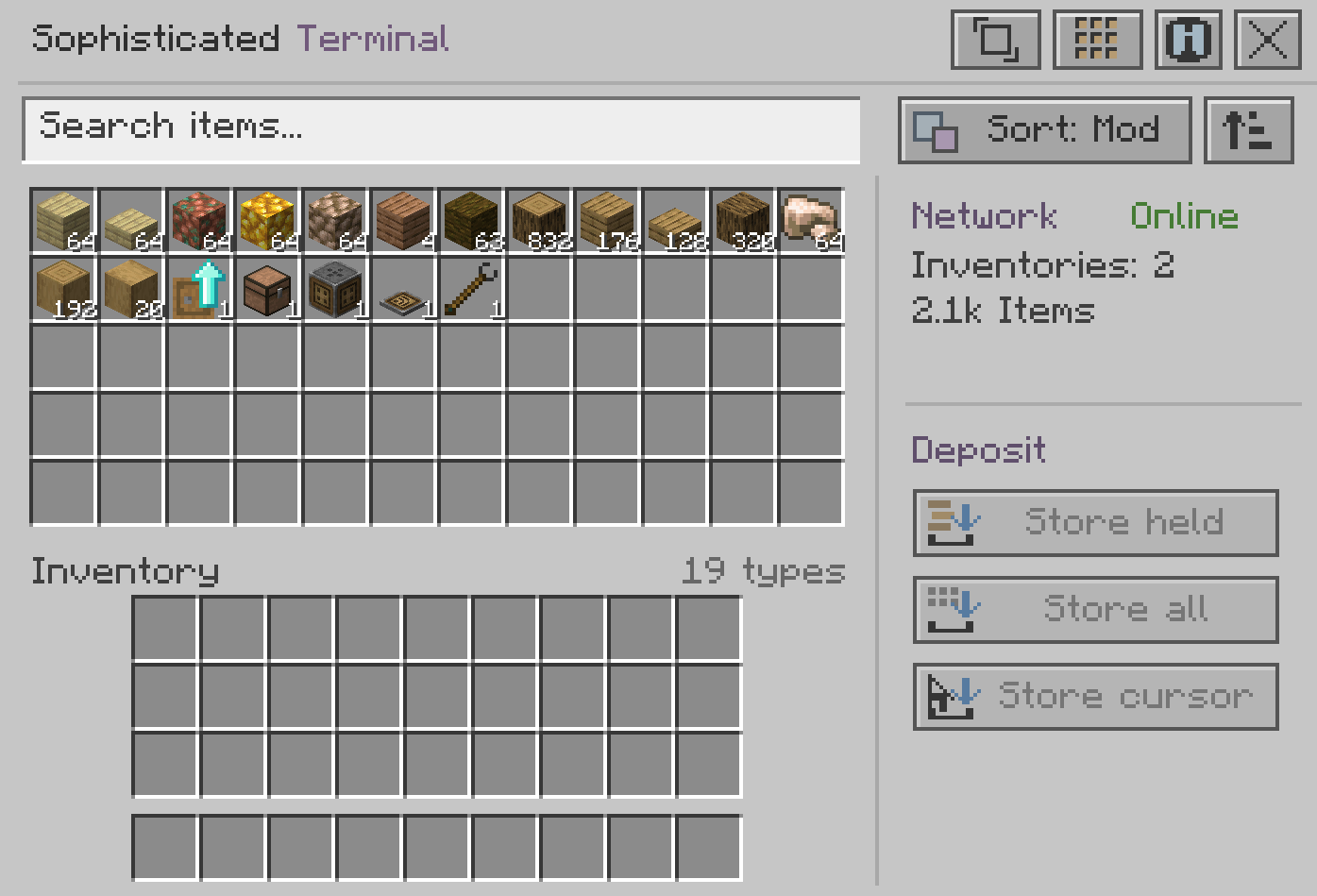
Simply right-click it with an empty main hand to open an interface displaying items from your connected storage network.
- Browse items from connected storage in one place.
- Search by item name, registry ID, mod ID, or item tag.
- Combine multiple search terms for more precise results.
- Sort items by name, quantity, or mod, with reversible sorting.
- Choose between compact, balanced, and expanded layouts.
Everything you need, without opening every chest individually.
02 / Item Management, Made Easier
Moving items around shouldn't feel like a chore. Sophisticated Terminal gives you several ways to interact with your storage.
- Left-click an item to withdraw a stack.
- Right-click repeatedly to withdraw matching items one at a time into your cursor stack.
- Shift-click to withdraw a stack directly into your inventory.
- Deposit items from your cursor or selected hotbar slot.
- Store your main inventory and hotbar contents in one action.
Armor and offhand slots are excluded from the Store All action, keeping those items untouched.
03 / Craft Without Leaving Your Storage
Sometimes finding your materials is only half the work. With the optional 3×3 crafting grid, you can craft directly inside your storage terminal.
- Craft items using normal Minecraft crafting behavior.
- Refill your last crafting pattern using ingredients from connected storage while the terminal remains open.
- Transfer recipes into the crafting grid using JEI.
- Unused ingredients are returned when closing the terminal whenever possible.
Your storage and your crafting table, finally working together.
04 / Reworked Storage Links & Controllers
Sophisticated Terminal doesn't just add another screen. It also expands how Storage Controllers and Storage Links work together.
Connect a Storage Link to your Controller using Sophisticated Storage's Storage Tool to extend your network beyond the Controller's immediate reach.
- 15-block link range - Each Storage Link extends the network within its range.
- Relay connections - Nearby Storage Links can extend the network another 15 blocks each.
- Automatic discovery - Supported containers within range can join the network automatically.
- Loaded chunks only - The system searches loaded chunks without automatically loading distant ones.
Build more flexible storage layouts while keeping your Storage Controller at the center of your setup.
05 / A Little More Personal
Not everyone likes their interfaces the same way, so the terminal gives you a few options to make it feel right for your setup.
- Compact - A smaller interface for players who prefer less clutter.
- Balanced - A comfortable middle ground.
- Expanded - More room for browsing larger inventories.
The interface adapts to the available screen space, while your preferred size, sorting options, and crafting settings are saved in the client configuration.
Its design stays close to Minecraft's familiar look, using Sophisticated Core's slot textures, a subtle wooden frame, and custom pixel-style icons.
Requirements & Compatibility
- Minecraft: 1.21.1
- Mod Loader: NeoForge
- Required: Sophisticated Storage
- Required: Sophisticated Core
- Optional Integration: JEI for recipe transfer
Tested with:
- NeoForge 21.1.259
- Sophisticated Storage 1.6.6.2181
- Sophisticated Core 1.5.12.2400
Important: Sophisticated Terminal must be installed on both the client and server. The versions above are the tested versions; compatibility with other versions has not been verified.
A Quick Note
This release focuses on connected storage management, terminal-based crafting, and Storage Link networking. Wireless terminal access, autocrafting, and other features not described above are not included in this release.
Make Your Storage a Little More Sophisticated.
A much nicer way to manage your stuffies.
Sophisticated Terminal by NullSc4pes
Sophisticated Terminal | Storage Network & Crafting Overhaul Team

Owner