Sophisticated Tab
- By
A simple mod which integrates Sophisticated Backpacks and Legendary Tabs for convenience; access your backpack from the inventory with the simple click of a tab, returning to your inventory the same way.
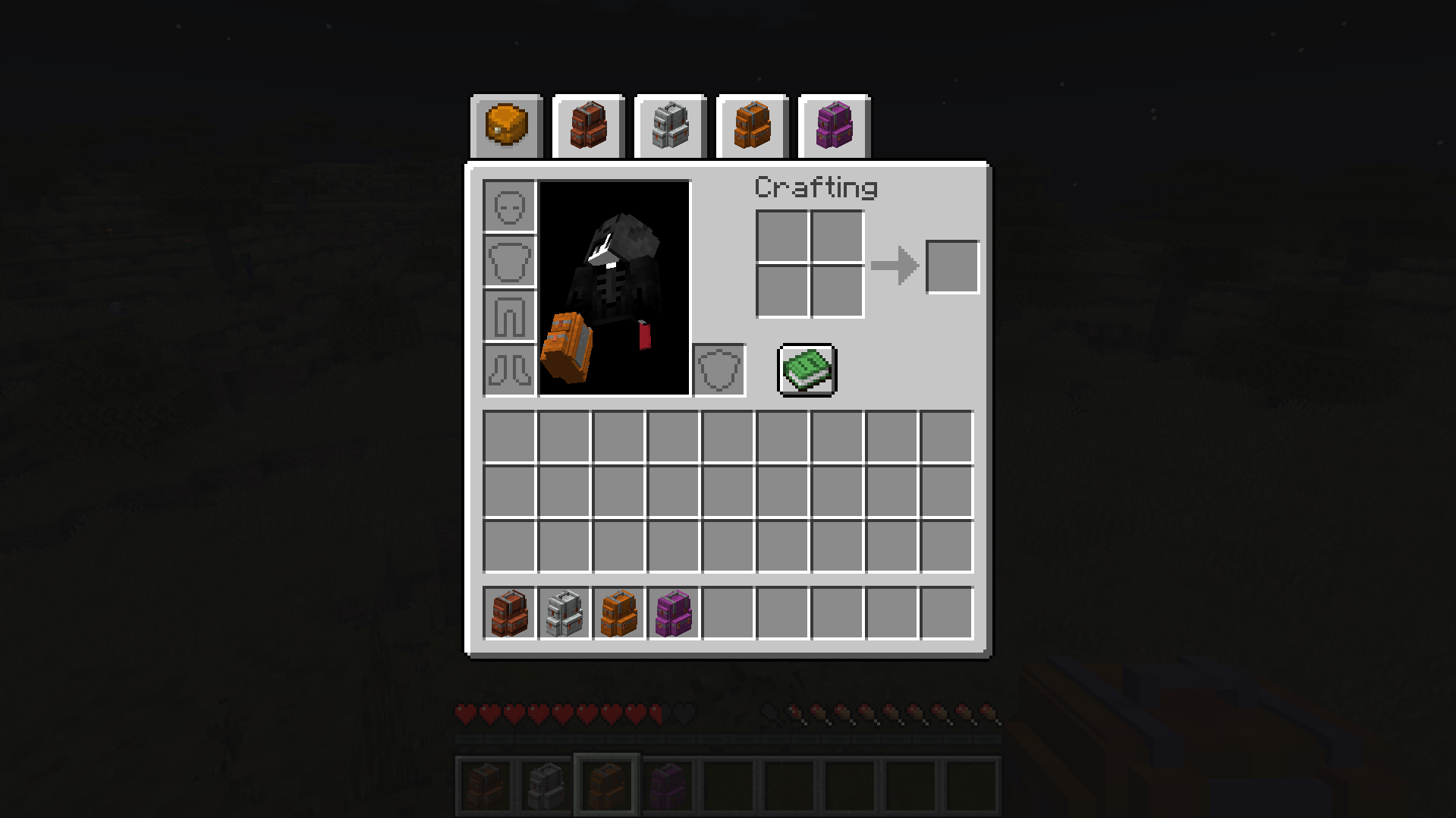
Sophisticated Tabs from Inventory
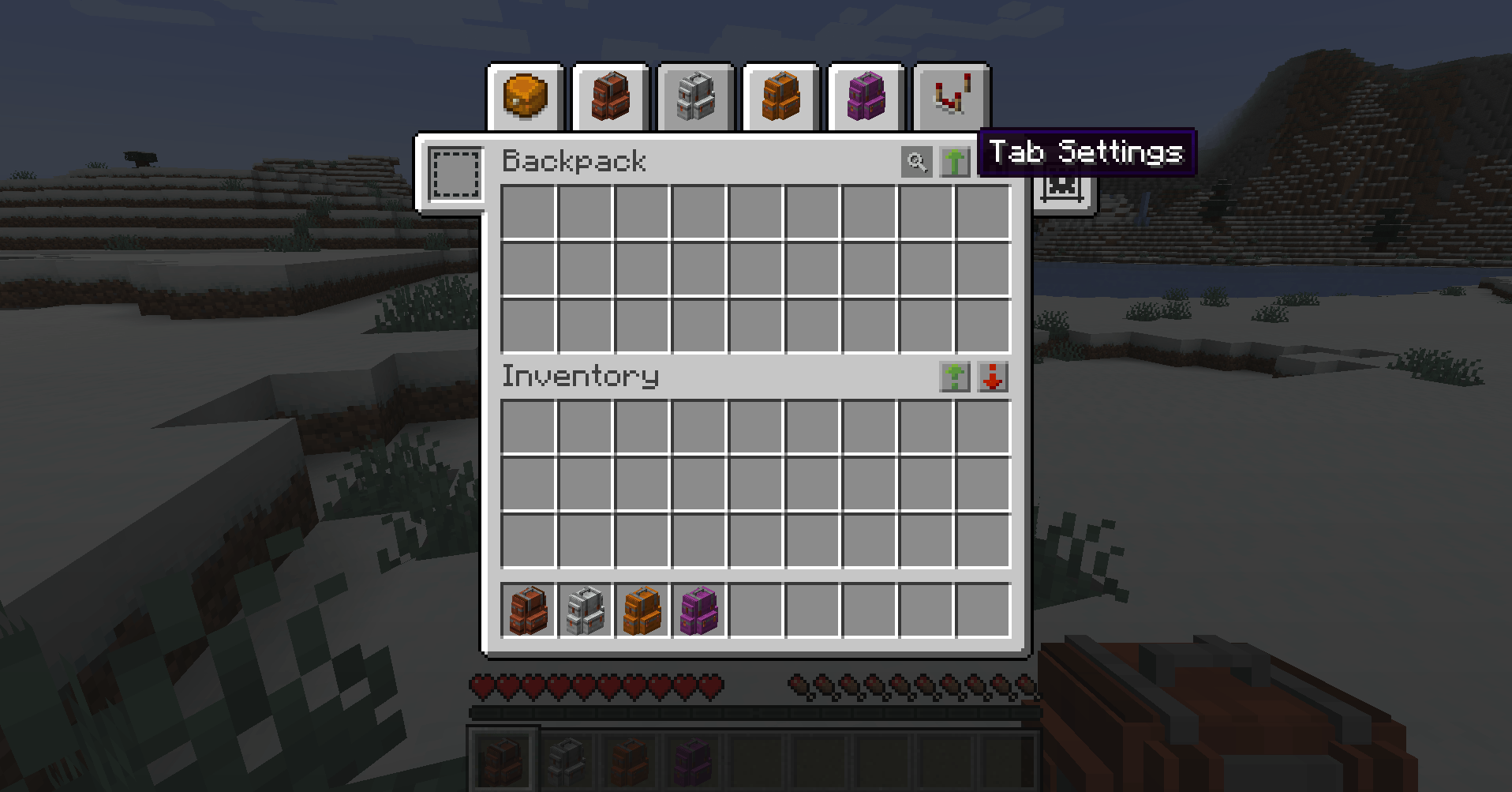
Tabs from the Backpack UI
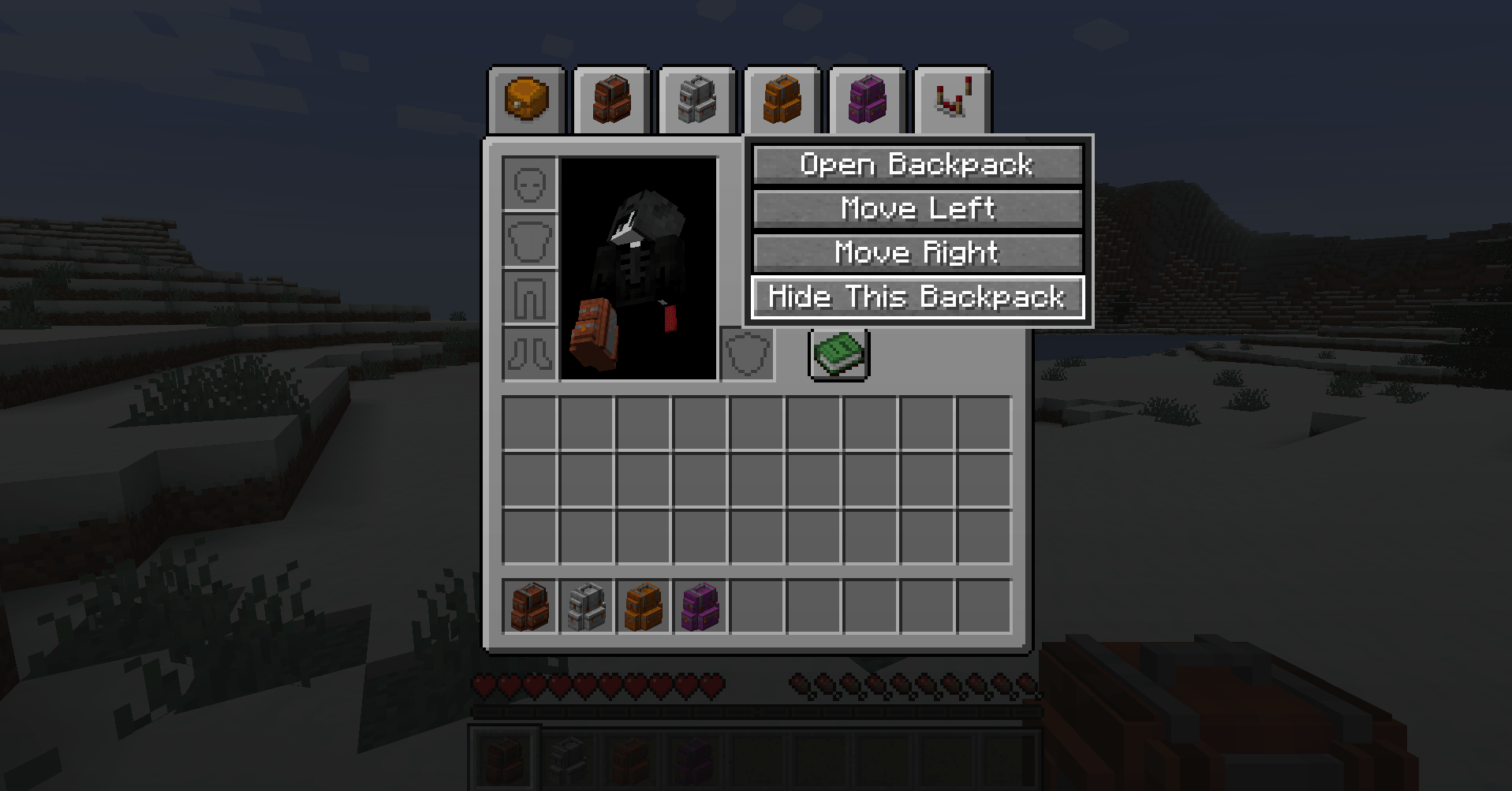
Right-Click Menu for Sophisticated Tabs
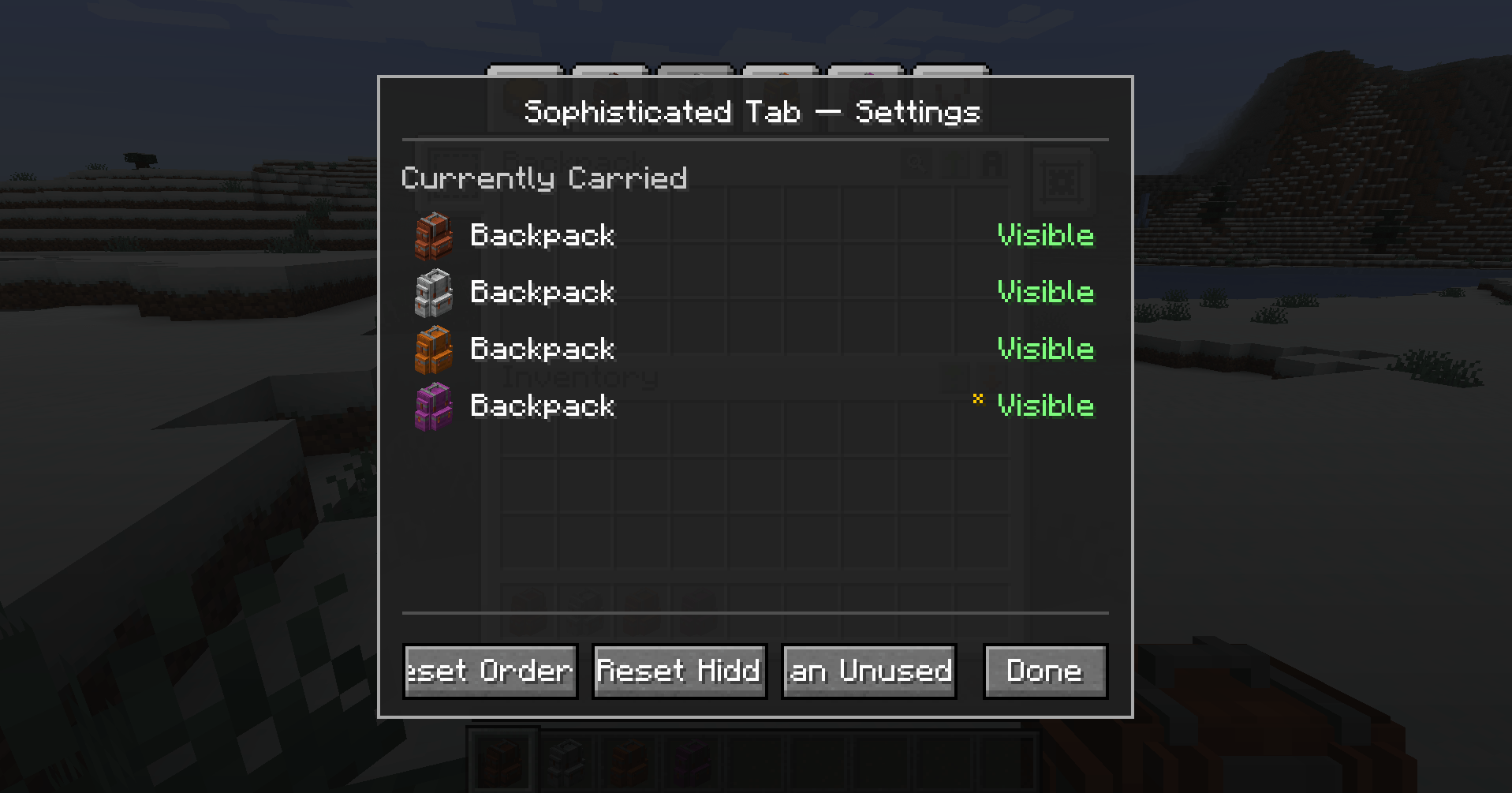
Sophisticated Tab Settings Menu
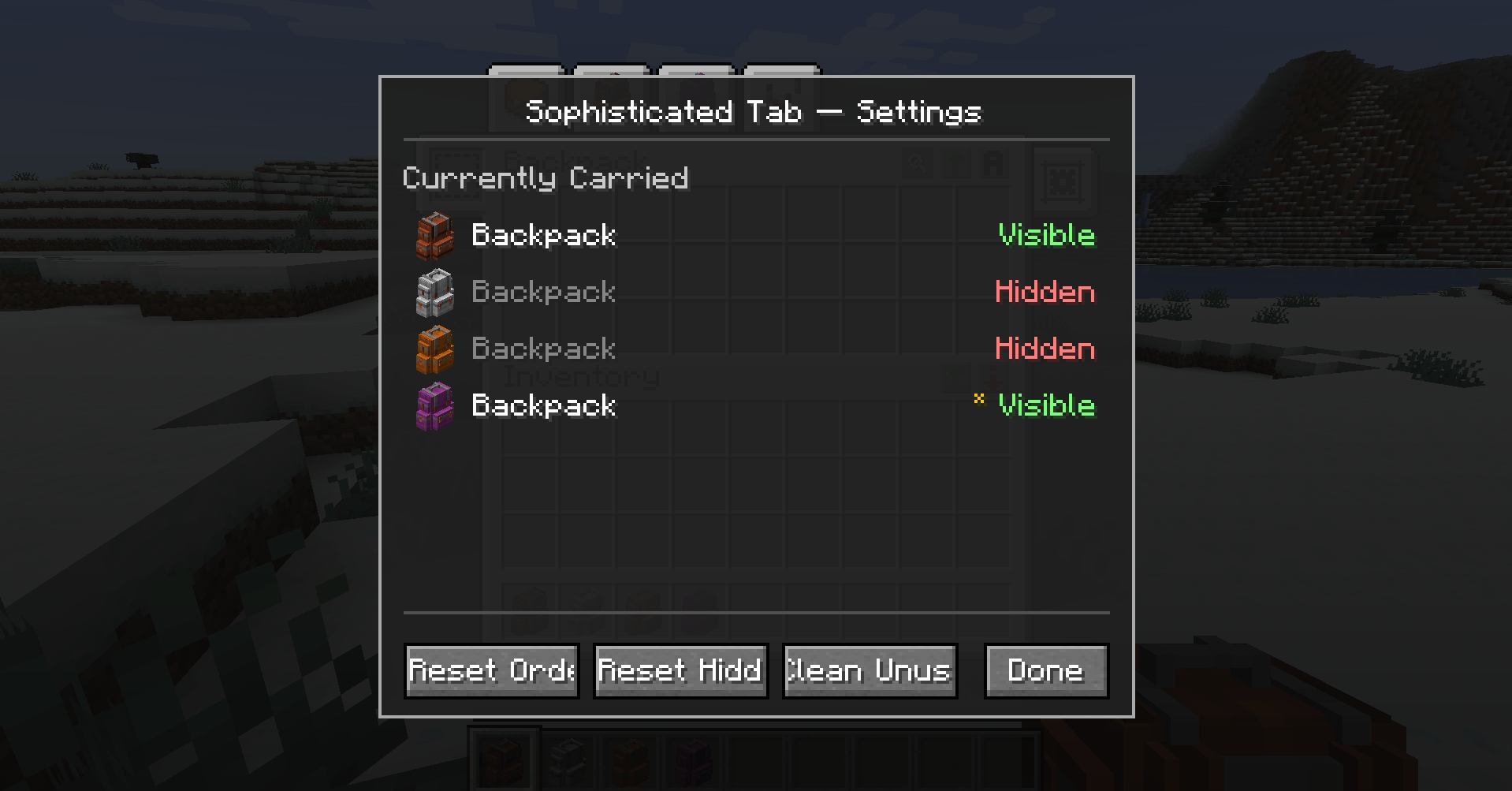
Hiding Backpacks in the Tab Settings
Otectus | Sophisticated Tab
Create a server, get 25% off your first month

Description

Sophisticated Tab
One-click access to every Sophisticated Backpack you're carrying — now with drag-to-reorder, right-click-to-hide, and a per-world settings screen. Sophisticated Tab is a small client-side compat addon that adds Legendary Tabs navigation tabs for Sophisticated Backpacks. Carry one backpack and get one tab. Carry several across your main inventory, offhand, and Curios back slot and get one tab each — every tab renders the actual backpack item so you can tell them apart at a glance, every tab opens its own backpack on click, and you decide which ones show up and in what order.
Minecraft 1.20.1 · Forge 47+ · Java 17 Free, open source, MIT licensed.
What it actually does
The mod adds tabs to the existing Legendary Tabs strip:
- One tab per backpack — up to eight tabs appear at the top of your player inventory, one for each backpack you're carrying. Each tab renders the real
ItemStackicon for that backpack (dyed, renamed, and upgraded backpacks look distinct) and clicking it opens that specific backpack, not whichever happens to be first. Tabs collapse out of the row when no backpack is in that pool slot. Backpacks are discovered through Sophisticated Backpacks' ownPlayerInventoryProvider, so Curios, Cosmetic Armor, main inventory, offhand, and chest armor are all honored automatically. - Active-tab highlight — the tab matching the backpack you're currently viewing stays in its hover/dark state so you can tell which one is open. Match uses each backpack's NBT-stored UUID, so it's stable across slot moves, dye changes, renames, and identical-tier backpacks.
- Return-to-inventory tab — appears at the top of the Sophisticated Backpack screen. One click, back to your player inventory. No more closing-and-reopening.
- Drag-to-reorder — left-click and hold any backpack tab, then drag it horizontally to a new slot. A faded ghost of the backpack icon follows your cursor and a small white indicator marks the drop position. Release to commit. Order persists across restarts.
- Right-click context menu — right-click any backpack tab for a small popup with Open Backpack, Move Left, Move Right, and Hide This Backpack. The hide action vanishes the tab from the row immediately.
- Settings tab (the gear) — the last tab on the row opens a settings screen listing every backpack you're carrying, each with a visibility toggle, plus any UUIDs the mod has previously seen that aren't in your inventory right now. Footer buttons: Reset Order, Reset Hidden, Clean Unused. There's also a key binding (Options → Controls → Sophisticated Tab → Open Tab Settings, default unbound) to open the screen from gameplay without going through the inventory first.
- Per-world, per-server preferences — tab order and hidden-backpack state are saved per single-player world (LAN-hosted included) and per multiplayer server in
config/sophisticatedtab/tab_preferences.json. Backpack identity is the contents UUID stored in NBT, so your choices survive renaming, dyeing, slot moves, even leaving the backpack in a chest and picking it up days later.
Tab chrome is a custom 52×22 PNG shipped with this addon, drawn in a Minecraft-style beveled-button look so it blends naturally with the rest of the Legendary Tabs strip. The real backpack item renders on top of the chrome via vanilla item rendering, so resource packs, custom item renderers, and tint handlers all work without any special handling. Resource-pack authors can restyle the tab chrome by overriding sophisticatedtab:textures/gui/backpack_tab.png. The gear settings tab reuses the same chrome with a vanilla comparator item overlaid as its glyph.
Why bother
If you have both Legendary Tabs and Sophisticated Backpacks installed without this addon, the backpack does not get a tab. Legendary Tabs has built-in support for Backpacked and Traveler's Backpack but not Sophisticated Backpacks. Sophisticated Tab fills exactly that gap.
And if you carry several backpacks — different tiers, different colors, one in Curios, one in your main inventory — a single generic tab can't tell you which is which. Sophisticated Tab gives you a tab for each, with the actual backpack item drawn on the button, so you can find and open the right one in a single click.
If you carry a lot of backpacks — mining, food, building, junk, admin-only spares — the tab strip can get noisy. The drag-to-reorder, right-click-to-hide, and per-world settings screen are there to keep the row reflecting your priorities, not whatever order Sophisticated Backpacks happens to iterate through. Hidden backpacks are never deleted: they stay in your inventory and remain openable via Sophisticated Backpacks' B keybind. Only the tab is suppressed.
If you only have Sophisticated Backpacks installed, this mod adds nothing — Sophisticated Backpacks already has a creative-mode tab and a configurable keybind. The point of this addon is to plug into Legendary Tabs' navigation strip the same way other backpack mods already do, and then give you the controls to curate it.
Screenshots
Placeholder — add screenshots before publishing:
- Inventory screen with several backpack tabs across the top, plus the gear settings tab on the right.
- Mid-drag — a tab being dragged, faded ghost icon following the cursor, drop indicator between two adjacent tabs.
- Right-click context menu open on a backpack tab.
- Settings screen showing carried backpacks with visible/hidden toggles.
Requirements
- Minecraft 1.20.1 with Forge 47.x (built against 47.4.20).
- Legendary Tabs — mandatory.
- Sophisticated Backpacks + Sophisticated Core — mandatory.
Both upstream mods are declared as hard mandatory=true dependencies. The mod will refuse to load with a clear error message if either is missing, rather than crash on startup.
Installation
- Install Minecraft Forge for 1.20.1.
- Drop the following jars into your
.minecraft/mods/folder:legendarytabs-…jarsophisticatedcore-…jarsophisticatedbackpacks-…jarsophisticatedtab-…jar(this mod)
- Launch the game. Open your inventory — the backpack tab is at the top.
Works on single-player, LAN, and dedicated servers. The mod itself is client-only: the dedicated server accepts the jar but it has no server-side payload. The actual "open my backpack" packet is Sophisticated Backpacks'.
Mod compatibility
- Curios and Cosmetic Armor Reworked — fully supported because backpack lookup uses Sophisticated Backpacks' own
PlayerInventoryProvider, which already integrates with both. - Other Legendary Tabs tabs — coexists peacefully. Backpack tabs use priorities
20–27(one per pool slot), matching the convention of other backpack-style tabs (Backpacked, Traveler's Backpack). The return-to-inventory tab uses priority10. The gear settings tab uses priority100so it always sits to the right of other tabs without colliding. - Right-click capture — the right-click context menu intercepts
ScreenEvent.MouseButtonPressed.Preat high priority and cancels it only when the click lands on one of our backpack tabs. Other Legendary Tabs tabs (from other addons) keep their default click behavior — your right-click on a Backpacked or Traveler's Backpack tab is not affected. - Other backpack mods — Sophisticated Tab is scoped exclusively to Sophisticated Backpacks. It does not touch Backpacked, Traveler's Backpack, or Quark backpacks; Legendary Tabs has separate built-in tabs for those.
- Resource packs — backpack item icons inherit from whatever model + texture Sophisticated Backpacks (or your pack) defines for each backpack, because the tab uses vanilla item rendering. The tab chrome itself is
sophisticatedtab:textures/gui/backpack_tab.pngand can be overridden by any resource pack. The return-to-inventory tab still reuses Legendary Tabs' atlas, so it follows LT's resource pack overrides. - Key binding category — adds one entry under Options → Controls: Sophisticated Tab → Open Tab Settings (default unbound). Won't collide with anything out of the box.
For modpack makers
- No modpack-side config. There is no Forge TOML config to ship or tune. The mod auto-creates
config/sophisticatedtab/tab_preferences.jsonon first launch to persist each player's own tab order and hidden-backpack state per world or server. If you delete the file (or if it ever ends up corrupt), the mod renames the bad file totab_preferences.json.broken.<timestamp>and starts fresh — players won't lose access to their backpacks, only the local preference state. - No mixins, no access transformers, no reflection. Pure public-API integration on top of Legendary Tabs and Sophisticated Backpacks. Survives upstream patch updates that don't break the public hooks. The one piece of cross-mod field access (LT's public
TabButton.tabBase) is wrapped in a try/catch — if a future LT release ever flips that field private, drag-and-drop and the right-click menu degrade to a logged warning while the settings screen still works. - Small jar. ~64 KB. A small set of focused classes, one lang file, one PNG. Trivial to audit, trivial to ship.
- Same jar on client and server. Server-side it loads cleanly and does nothing — no network code, no registration, no state. The
@Modentrypoint short-circuits on anything butDist.CLIENT, so client-only classes never link on a dedicated server. - No new server packets. Opening a backpack still uses Sophisticated Backpacks' own
BackpackOpenMessage. Tab order and hidden state never leave the client.
Known caveats
- Eight-tab cap. The mod pre-registers a pool of eight backpack tab slots. If you carry more than eight visible backpacks at once, the 9th and onward won't get a tab — they're still openable via Sophisticated Backpacks' default
Bkeybind. The hide-via-right-click and the settings screen are there for exactly this case: tuck away the backpacks you rarely open so the eight tabs that do show represent the eight you actually use. - Tab list only refreshes when the screen opens. If you pick up a new backpack while your inventory screen is already open, you won't see its tab until you close and reopen the inventory. (Legendary Tabs caches its enabled-tab list per screen init.) Drag-reorder updates immediately within the same open screen; hide and unhide apply on the next inventory open.
- UUID-less backpacks. Backpacks that have never been opened may briefly lack their NBT contents UUID. Those still get a tab and a real icon, but they can't be persistently hidden or reordered until the UUID is assigned (the settings screen marks them with a small
*). Open the backpack once and they'll join the configurable pool. - Sophisticated Backpacks already provides a hotkey (default
B) that opens the first reachable backpack. This mod is the discoverable, mouse-driven counterpart for players who don't memorize hotkeys — plus it lets you choose which backpack you open, in which order, with which ones hidden.
License & links
- MIT licensed.
- Source on GitHub
- Issue tracker
The Sophisticated Tab Team


Owner