SLM: Shader
- By
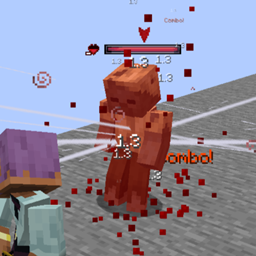
A small library with ShadersFx, featuring Impact Frames, Noise Overlays, Color Overlays, Radial Blur [In & Out]
🎨 SLM: Shader
This mod introduces a dynamic shader system for screen effects, with full support for multiplayer synchronization.
⚙️ Features
Includes a variety of real-time shader effects:
- 🌈 Color overlays
- 💥 Impact frames
- 🌫️ Noise overlays
- 🔄 Radial blur (in / out transitions)
These effects can be combined and executed in sequences using a flexible shader pipeline.
🔗 Networking Support
The system is fully network-aware and supports multiple execution flows:
- Client → Server → Client (CTS → STC → CTS)
- Server → Client (STC → CTS)
- Static (Instance Only)
More details
Using client-side execution for a "CTS -> STC -> CTS" sequence is useful when you want to launch the shader from the client but also use server-side data such as nearby entities, which entities are facing the player, load additional effects, etc.
Using "STC -> CTS" is useful when you want the above but are not on the client side.
Using "Static" is useful if the shader doesn't require server-side data or you only want to launch it on the client.
This allows shaders to be triggered:
- Locally (client-side effects)
- Remotely (server-driven events)
- Synchronized across players
More details
Noise Overlay, Color Overlay, and Impact Frame can be sent from one entity to another; however, blur effects can only be executed statically within the instance.
🎬 Smooth Transitions
- Built-in support for graceful shader cancellation
- Prevents abrupt visual cuts
- Ensures smooth transitions
🧠 Shader Pipeline
- Chain-based execution system
- Supports different shader types and phases
- Modular design for combining multiple visual effects
More details
However, multiple executions of the same shader fx are not possible, as they will overwrite each other. If you execute two impact frames at the same time, you will not get 2 impact frames, but the last one added will overwrite the other, the same logic for the rest of the shaders.
Although, as previously mentioned, you can run multiple shaders simultaneously, you can also combine Noise Overlays, Color Overlays, and Radial Blur In for example.
🛠️ Utilities
Includes additional tools for:
- 📡 Raycast system
- 🎮 Command support for triggering shaders
- 🔧 Helper utilities for screen-based rendering
SLM: Shader Team

Owner