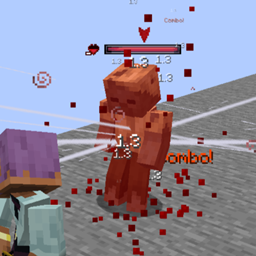
In this case, let's look at an example of how the Skills Datakeys can be used to work together with the previous feature (Passive Skills)
In this case, we use the passive of the Uchigatana that allows a "Sheath" of the Katana, once this applies and the value of the passive is True, we change to the "Sheath" style
This supports the following list in predicates:
passive_skill_boolean_data_key
passive_skill_float_data_key
passive_skill_integer_data_key
innate_skill_boolean_data_key
innate_skill_float_data_key
innate_skill_integer_data_key.
For Booleans, you need to add the Skill Datakey and the desired value: "skill_data_key": "namespace:path", "expected_value": true
For integers, you need to add the Skill Datakey and the desired value: "skill_data_key": "namespace:path", "expected_value": 5
For floats, you want to add the Skill Datakey, the desired value, and a tolerance: "skill_data_key": "namespace:path", "expected_value": 2.5, "tolerance": 0.01
β Make sure you use the correct values ββfor each Key β
Here is a weapon that, when its Innate ability reaches more than "5" charges, will then change from Two Hand to Ochs, until the "Charges" are less than or equal to 5.
Just remember to add ""tolerance": 0.X" when working with floats....
π‘ Good habits!
One thing to add is that, to better understand things, it's helpful to order the operations like this:
"skill_data_key": "modid:charge",
"comparison_type": ">",
"expected_value": 5
Because the comparison actually works like this: SkillKey | Comparison Type | ExpectedValue.
X | Comparison Type | Constant.
8 > 5.
πΉ Charged Attacks (v1.3 & v1.8.4+)
Hold a key to enter Charged Mode.
Effects
+20% Damage
-15% Attack Speed
Optional stamina cost
Behavior
Does NOT reset combo
Can mix normal and charged attacks
Example combo
1AA → 2CAA → 3AA → CDA
π½ More Details (Advanced)
When the player activates a charged attack, the system does not reset the combo sequence. This means the internal combo count continues naturally, allowing you to switch between normal and charged attacks without breaking the flow of combat.
For example, if your weapon has a sequence like this:
Normal Attacks: 1AA → 2AA → 3AA → DA → AS
Charged Attacks: 1CAA → 2CAA → 3CAA → CDA → CAS
You can chain both sets of animations depending on the combo's position. This allows for combinations like:
1AA → 2CAA → 3AA → 1CAA → CDA → AS
To remain in Charged Attack Mode, you must hold down the button. When you release it, after half a second, the system returns to normal mode.
The "allow_two_hand_compatibility" entry means if you want it to go to the charged attack considering or not considering the Offhand item
β The energy between Innate Skills is not conserved, in the example the Innate Skills are different to visually show the change from mode to charged mode.
πΉ Zoom & Use Method (v1.4+)
Fixes camera issues when using items with no proper animation.
"zoom_in_type": "custom"
Values
none
always
use_tick
aiming
custom
π‘ You can also force right-click behavior using item tags.
π½ More Details (Advanced)
In this case, we are building an "Antitheus" item in a datapack. We have assigned the passive and the Innate Skill; however, when using the right click, the camera "bugs." We fix this by adding the line: "zoom_in_type": "custom"
But what if my item won't let me right-click? We can always force it!
Enforce the "Use Method" on any item that contains the required tag. This resolves several client/server use-item issues in EF when creating datapack items.
To do this, create the file in the following path: data/epicfight_edp/tags/items/force_use_method.json.
And add the items in the tag list.
Now our weapon can use right-click, it can cast the Antitheus right-click ability and the camera won't glitch!
πΉ Advanced Swing Trails (v1.5+)
Add custom swing trail textures per weapon style.
π Path:
assets/<namespace>/item_skins_parameters/*.json
βοΈ Supports:
Per-style trails
Texture override (ignores animation conflicts)
More details
In this case, I will give the example of a diamond sword, which, depending on whether it is One Hand or Two Hand, will have varying swing trails!
This is useful if you want to change your Item's model when you change Style, and by extension, also change its Swing Trail.
This function also applies an "Overwrite" to the original texture, even if it's attached to an animation. This ensures your Swing Trail won't be modified by animations and will instead use the texture you want.
This is only for configuring the texture; you also need to create the "item_skins" (assets/item_namespace/item_name.json) file for the item in question.
In the case of the previous example, the diamond sword, its Item Skin is this (assets/minecraft/item_skins/diamond_sword.json)
The Item Skin is where the color, begin pos, end pos, lifetime, interpolations, and particle type parameters were added. The "texture_path" will only be used if the Advanced Swing Trail textures fail along with their Callback Trail.
πΉ Models per Style (v1.6+)
Assign different models depending on player style.
π Path:
assets/<namespace>/item_model_parameters/*.json
Supports:
Style-based model switching
Multiple texture/model channels
π½ More Details (Advanced)
Parameters Explained
item: The target item that will receive the model overrides.
item_socket: The socket item containing all models and textures, separated by channels.
per_style: Boolean flag indicating whether textures/models should change depending on the player’s style.
style_config: A configuration object that defines which socket channel each style should use.
style: The style identifier.
socket_channel: The channel inside the item socket that will be used for this style.
Once we have this, we need to build our "Item Model Socket" which will simply store all our model overrides inside; it is useful for loading models and assigning the desired texture to the channel, the number of addable channels is as many as you want; you don't need to put one in each socket.
Here's an example of what it would look like in-game, using the Swing Trails per Style system and the Model per Style system
In some cases, a weapon category does not have a clear or defined icon in Epic Fight’s Skill system. When this happens, opening the related Skill Book may cause an exception due to a missing icon.
(This issue occurred in older versions; it may or may not still happen, but this system exists as a preventive solution.)
How it works
Adding an icon is simple. You only need to define:
The item to be used as the icon
The weapon category it belongs to
β Override Behavior β
This system allows overrides. If multiple configurations define an icon for the same category, only one will be used.
skill_builder: The array name where all entries are stored.
skill_id: The Epic Fight Skill ID. The target skill must contain a field for storing a weapon category. If the skill does not support Weapon Available Category, this system will do nothing.
category: The weapon category to be added to the skill.
β Override Behavior β
This system does NOT allow overrides. A single category declaration can be used by multiple Passive Skills, but cannot be redefined.
This system is more complex than the previous ones, as it requires defining:
The guard skill
The weapon category
The animation type
Whether animations change per style
Whether animations are single or arrays
The required animation sets:
2 sets: base and break
3 sets: base, break, and advanced (depending on the skill)
Despite this, the configuration remains straightforward.
Core Parameters
skill_guard_builder: The array name where all guard skill entries are stored.
skill_guard_id: The Epic Fight Guard Skill ID. The skill must inherit from Guard Skill and support animations. Any Guard Skill that meets these requirements is compatible.
category: The weapon category to be added to the Guard Skill.
Animation Parameters
Depending on the guard skill type:
Guard / Impact Guard - Like Skills
guard_motion
guard_break_motion
Parrying-like Skills
guard_motion
guard_break_motion
guard_advanced_motion
Animation Definitions
guard_motion: Animation played when the player successfully guards an incoming attack.
guard_break_motion: Animation played when the player’s posture/stamina is exceeded and the guard breaks, stunning the player.
guard_advanced_motion: Special guard interaction animation.
For Parrying exmple: a deflection animation
For Weapons of Miracle – Counter Attack: an attack animation
Animation Sub-Configuration
Animation entries support additional parameters:
type: Defines whether a single animation or an animation array is used (multi). Only guard_advanced_motion supports arrays (multi). Any value set for guard_motion or guard_break_motion other than single will be considered invalid.
per_style: Defines the style in which the animation is used.
Use "return" to ignore the player’s current style. If you have assigned "return", the system will understand that you do not want to use styles, so DO NOT assign styles if you use return.
To define animations per style, specify values such as: one_hand, two_hand, etc.
β Override Behavior β
This system does NOT allow overrides. A single category declaration may be reused by multiple Guard Skills.
There you can create a file like this; in this example it's for both one-handed and two-handed modes.
As you can see, if we want to use a simple overlay, that is, a single image, we simply pass it: "overlay_path": "epicfight_edp:overlays/flame/fireflay_50.png"
In turn, you must always declare the item you want to write to. In the example, it was: "item": "minecraft:diamond_sword",
on the other hand: "per_style": true, is just bureaucracy; it doesn't do anything currently. If in the future I want the overlay to be launched with different parameters, this will be useful.
The path assigned to the texture is not automatically located in "textures." The image shows: "epicfight_edp:overlays/flame/fireflay_50.png"
This means it is located in: assets/epicfight_edp/overlays/flame/fireflay_50.png
NOT IN: assets/epicfight_edp/textures/overlays/flame/fireflay_50.png
Important: The size MUST match the number of images available for animation. The FPS CANNOT EXCEED the level's evaluation threshold of 20 ticks (20 FPS).
The system counts from 1 -> Size, not from 0, and the asterisk (*) must correspond to the number in your image set. Additionally, the notation is straightforward: 0 -> 1 -> 10 -> 11 -> 100, etc.
IT IS NOT COMPATIBLE WITH 000 -> 001 -> 010 -> 11 -> 100...
Extends innate abilities and category, using animations from the "Epic Fight - Animations by asanginxst" resource pack, making it compatible for 1.20.1.