More Bookmarks | JEI/EMI/REI addon
- By
Save any search (iron, diamond sword, #logs, $tooltip, @mekanism, …) as a bookmark
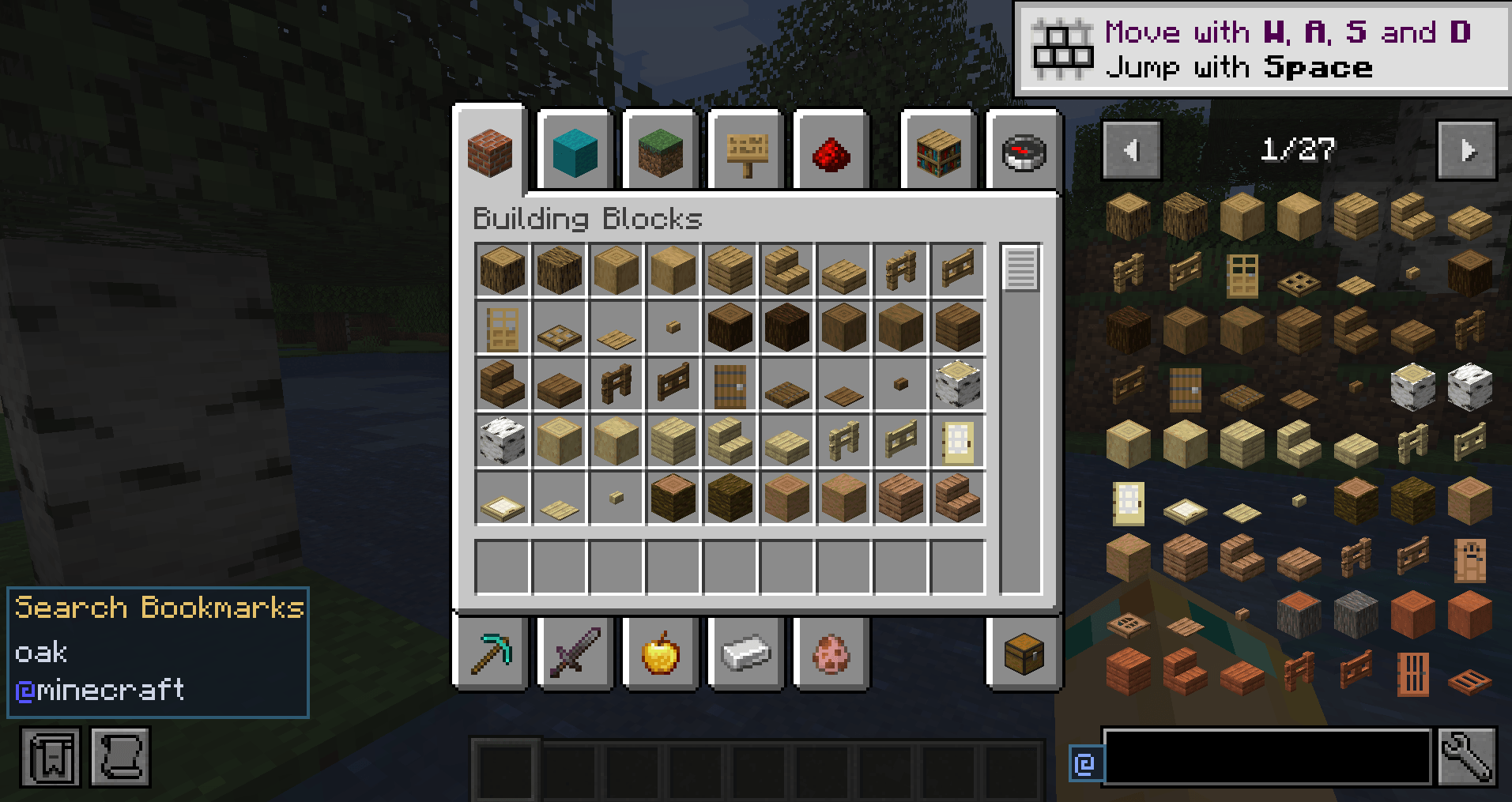
click on the bookmark to instantly swap to it!
Description
Client-side Minecraft 1.21.1 addon for Fabric and NeoForge. Save any EMI, JEI, or REI search — iron, #logs, $tooltip, @mekanism, or a compound query — then click the bookmark to put that text back in the search bar and show the filtered item index.
EMI, JEI, and REI are optional. Install any combination. If none is present, the mod loads and does nothing.
Features
- Search-bar button — a small @ icon to the left of the recipe viewer’s search field.
- Popup — add the current search, apply a saved one, remove a single entry, or clear all.
- Search Bookmarks list — left of the item browser. Left-click applies the search and shows results; right-click removes it.
- Any search — not only @mod. Tag, tooltip, item-name, and compound queries all save. A config option can restrict bookmarks to @mod queries if you want the old behavior.
- Shared list — one file, config/morebookmarks-searches.json, used by EMI, JEI, and REI. An existing config/emi-mod-bookmarks.json is migrated once.
- Options — toggle the button, left panel, any-search vs @-only, panel rows, and Clear all. Fabric: Mod Menu. NeoForge: Mods list. Needs Cloth Config.
- REI favorites — saved searches can also appear as a REI favorite-entry type; click applies the query.
- Extra EMI screens — EMI overlay and bookmarks also attach to container/terminal screens EMI would otherwise skip (empty-slot containers and well-known AE2 / Ars Nouveau / Create-style packages). JEI and REI already overlay those screens.
How to use
- Open inventory, a chest, a crafting table, or a terminal.
- Type a search in EMI, JEI, or REI (iron, #logs, $tooltip, @mekanism, …).
- Click the @ button → Add current search as bookmark.
- Click a row under Search Bookmarks (or in the popup) to restore that query and filter the index.
- Remove an entry with the popup x, or by right-clicking it on the left list.
If a bookmarked mod is not installed, the bookmark stays; the viewer just returns no hits.
Install
Client-only. No server install. Java 21. Pick the jar that matches your loader:
- more-bookmarks-1.0.1.jar — Fabric (Quilt works if Fabric API is present). Requires Minecraft 1.21.1 and Fabric API.
- more-bookmarks-neoforge-1.0.1.jar — NeoForge. Requires Minecraft 1.21.1 and NeoForge.
Recipe viewer (optional, pick any combination): EMI, JEI, and/or REI. You need at least one of these for bookmarks to appear. None is required to launch the game.
Options screen (optional): Cloth Config. On Fabric, also install Mod Menu to open it from the mods list. Without Cloth Config, defaults apply and you can still edit the JSON files in config/.
Links
More Bookmarks | JEI/EMI/REI addon Team