deathdamagerecap.png
Description
Death Damage Recap
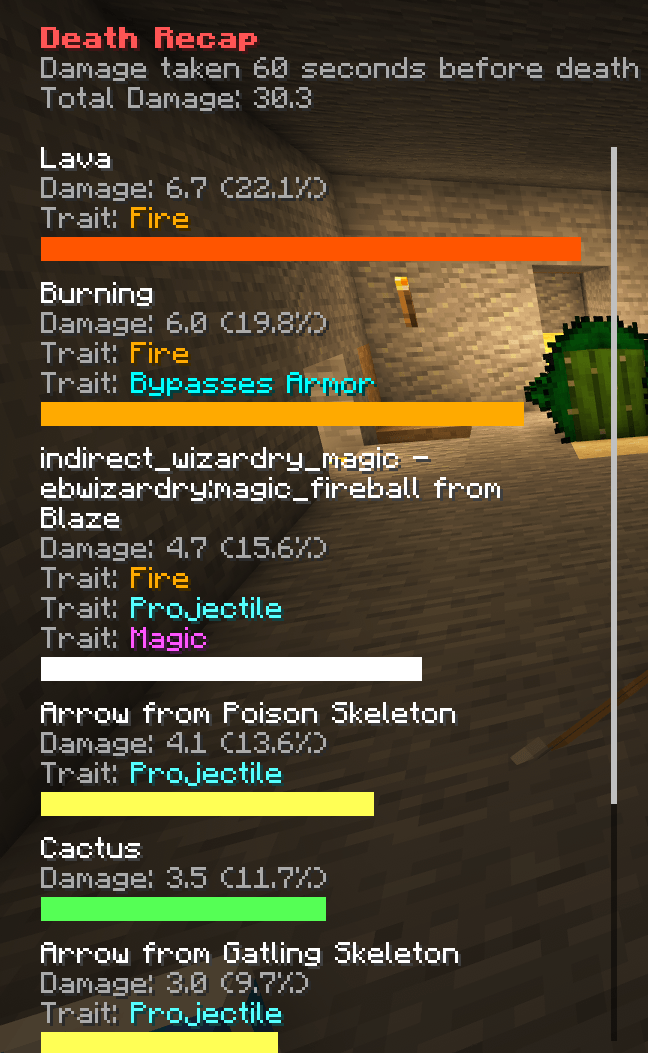
Helps players understand what damaged them and which damage properties were involved. When you die, a private [RECAP] link opens a breakdown of recent damage, showing each cause, its damage amount, and its share of the total. This can also help understand what types of damage the players are taking, which is not always clear in the game. This can help players choose specialized protection instead of relying only on Protection.
AI usage disclaimer: This mod was developed with AI-agent assistance using this agent workflow. The project owner reviewed the work during development.
- Distinguishes environmental, entity, projectile, player, and modded causes when reliable information is available.
- Shows observed Damage Traits such as Fire, Projectile, Magic, Explosion, Bypasses Armor, and Absolute.
- Supports configurable cause and trait labels, colors.
A Primary Cause is the main source under which damage is counted. A Damage Trait is an additional property that helps explain that cause. For example, a Blaze fireball can appear once as Small Fireball from Blaze while also showing the Fire and Projectile traits. Traits can overlap, but they do not add another copy of the damage.
Configuration
Server owners can set the Tracking Window from 5 to 300 seconds and temporarily enable diagnostic logging:
I:"Tracking Window (Seconds)"=60
B:"Enable Diagnostic Logging"=false
Fresh configurations include readable names and distinct colors for common Minecraft 1.12.2 causes and Damage Traits. Raw modded damage identifiers are not always friendly or easy to distinguish, so the same configuration lets you add clearer names and recognizable colors. For example, if another mod adds a damage identifier such as radiation, you can display it as Radiation with a green bar without requiring a special integration:
S:"Damage Type Mappings" <
    inFire=Standing in Fire=#FFAA00
    lava=Lava=#FF5500
    radiation=Radiation=#55FF55
 >

S:"Damage Trait Mappings" <
    fire=Fire=#FFAA00
    bypasses_armor=Bypasses Armor=#00FFFF
 >
The same format customizes the six supported Damage Trait labels and text colors. The mapping format is key=Display Name=#RRGGBB.
Server settings are guaranteed to apply after a server restart; presentation changes require a client restart.
Death Damage Recap must be installed on both the server and client.
Source: GitHub
Issues: GitHub Issues
The Death Damage Recap Team